429 rate limit handling: queue, backoff, and clear user states
429 rate limit handling for LLM and API apps: queue requests, back off safely, and show clear user states so the product stays predictable.
What a 429 really means (and why users notice)
A 429 is the provider saying: slow down. You're sending too many requests too quickly. It usually doesn't mean your code is "wrong." It means you hit a limit set to protect their systems (and sometimes your own budget).
Users feel bad 429 handling even when the app mostly works. The experience turns messy: a spinner that never ends, an error after a long wait, or replies that sometimes appear and sometimes fail. The worst part is the inconsistency. People can't predict what will happen next.
Retries can help, but careless retries often make things worse. If every failed request retries immediately, you create a traffic spike at the exact moment the provider is asking you to reduce traffic. That can turn a small hiccup into a longer outage, and it can burn through quotas fast.
The goal isn't perfect speed. It's predictable behavior under load. The app should behave the same way every time, even if the answer arrives later.
A simple mental model is three pieces working together:
- A queue to smooth bursts instead of firing everything at once
- Backoff (often exponential backoff with jitter) so retries spread out
- Clear user-facing states so people know whether the request is waiting, retrying, or needs action
Example: a chat app gets a morning spike. Without control, half the messages fail randomly. With a queue and backoff, messages may take longer, but users see "Queued" and then "Retrying in 4s." The app feels calm and reliable instead of broken.
Where rate limits usually come from in real apps
Most 429s aren't random outages. They're a sign that too many requests hit a limit at the same time, and your app didn't spread the load.
The most common trigger is a burst: a traffic spike after a launch, a social post, or a single large customer inviting a team. Batch jobs also do it, like re-indexing content, importing CSVs, or backfilling embeddings overnight.
It also matters whose limit you hit. Providers often enforce caps per API key, per account, or per region. Your own app can create limits too, intentionally or by accident, such as per user, per workspace, or per IP address (especially if many users sit behind one corporate NAT).
LLM apps have a few patterns that hit limits faster than you expect:
- Streaming responses keep connections open longer, so concurrency rises even when QPS looks normal.
- Tool calls multiply work, because one "answer" may trigger extra calls to fetch data, run functions, and then ask the model again.
- Bulk embeddings are a classic: a single "import documents" action can fire hundreds of requests in a tight loop.
Hidden multipliers are the usual culprit. One button click can create many downstream calls:
- A chat send triggers moderation, the main completion, and a logging call
- A single user message triggers 3-10 tool calls before the final answer
- A "retry" button fires immediately and adds more pressure
- A page load triggers multiple parallel requests across tabs
- A background worker repeats the same failing job across many accounts
Staging often looks fine because it has one user, clean data, and no cron jobs. Production has concurrency, real usage peaks, long-lived streaming sessions, and accidental storms like multiple workers starting the same backfill.
Pick a clear policy: retry, delay, or stop
When you hit a 429, the worst move is "try again immediately" with no rules. It makes the provider push back harder, and your app feels random. Good 429 rate limit handling starts with a simple policy that everyone on the team can follow.
Split requests into two buckets:
- Interactive actions (a user clicked a button)
- Background work (syncs, webhooks, batch jobs)
Interactive actions need a short patience window and clear feedback. Background work can wait longer, as long as it doesn't pile up forever.
A practical policy you can adopt and tune later:
- Retry only when the request is safe to repeat (read-only calls, or writes with idempotency).
- Set a maximum retry window (for example, 10-20 seconds for interactive, 5-30 minutes for background).
- Stop and fail fast when the user can fix it by changing behavior (like spamming "Regenerate") or when required input is missing.
- Use separate priorities: interactive requests go first, background requests yield when limits tighten.
- Log context on every 429 so you can debug patterns, not guesses.
Idempotency is what makes retries safe. If an operation creates something (charge a card, create a record, send an email), attach an idempotency key so a retry doesn't duplicate the side effect. If you can't make it idempotent, prefer "stop and ask" over blind retries.
Define "done" for every request. A request should either succeed, return a clear error, or time out after your max retry window. Hanging forever is the most frustrating outcome.
Log enough to answer the basics: what endpoint was hit, which user triggered it, what type of request it was (interactive vs background), when it started, and how long it waited.
Step-by-step: add a request queue that smooths bursts
The fastest way to improve 429 rate limit handling is to stop firing requests the moment the UI triggers them. Instead, put each API call into a queue. That turns a burst of 50 clicks into a controlled flow the provider can actually accept.
1) Start with a tiny queue between your UI and the provider
Keep the first version boring. When the app wants to call the LLM or an API, it creates a job with the payload and a few labels (who asked for it, what screen it's for, when it was created). The UI sends jobs to the queue, not directly to the provider.
A practical job shape includes: endpoint/model, prompt or parameters hash, user ID, priority, and a retry counter.
2) Add a worker with a concurrency limit
A worker pulls jobs off the queue and runs them. The key setting is concurrency: how many jobs can run at the same time. Start low (like 1 to 3), then increase only if you see stable results.
A simple approach that works in most apps:
- Process only N jobs in parallel (your concurrency limit)
- When a job finishes, immediately start the next
- If a job gets a 429, put it back in the queue with a delay (backoff is covered later)
- Track active jobs so you never exceed N
3) Priorities: keep the app feeling responsive
Not all requests are equal. A button the user just clicked should jump ahead of background work like "summarize everything" or "generate weekly report." Use two priorities (high and low) at first. If your queue supports it, treat high priority as a separate lane.
4) Dedupe repeated requests
Users double-click. Frontends re-render. If you send identical prompts within a short window (say 2 to 10 seconds), merge them. Return the same in-flight result to every caller. This alone can cut request volume sharply.
5) Persist queue state so restarts don't drop work
If the server restarts, you don't want pending jobs to vanish or repeat unpredictably. Store queued jobs and their status in durable storage (a database or a proper queue system). This is also where many prototypes fail: requests are fire-and-forget, and users see missing responses, duplicates, or endless spinners when rate limits hit.
Step-by-step: backoff that reduces pressure instead of adding it
Good 429 rate limit handling is mostly about doing less, not trying harder. If you retry too fast, you turn a small slowdown into a traffic spike and keep users stuck in a loop.
Start with exponential backoff: after the first 429, wait a bit, then wait longer after each next 429. A simple rule is doubling the delay each time. This gives the provider time to recover and keeps your app from hammering the API.
Add jitter (a small random offset) to every wait. Without jitter, thousands of clients that hit the limit at the same time will retry at the same time and hit the limit again. Jitter spreads retries out so your app has a chance to succeed.
If the provider gives you a hint like a Retry-After value, treat it as the source of truth. Use it as the base delay, then apply a little jitter around it.
Set clear ceilings so retries don't go on forever:
- Maximum attempts (for example 3-6 tries)
- Maximum delay (for example cap waits at 30-60 seconds)
- Total time budget (stop after, say, 2 minutes)
- A fallback path (save the task, ask the user to try later)
Stop retrying on errors that won't fix themselves. A 400 will fail every time. A 401/403 means auth is broken. Retry only when it's likely to succeed (429, many 5xx errors, and some network timeouts).
Example: a chat feature hits 429 during a launch. Attempt 1 waits 1-2 seconds, attempt 2 waits 2-4 seconds, attempt 3 waits 4-8 seconds, then you stop and show a clear message that the system is busy and the message will send when available.
User-facing states that keep the app feeling predictable
When you hit a rate limit, the worst outcome isn't the delay. It's the confusion. If the UI looks frozen or keeps flipping between errors and spinners, users will click again, refresh, or open a second tab. That creates more requests and makes the problem last longer.
Good 429 rate limit handling starts with naming what's happening in plain language and giving one clear next step.
Use a small set of clear states
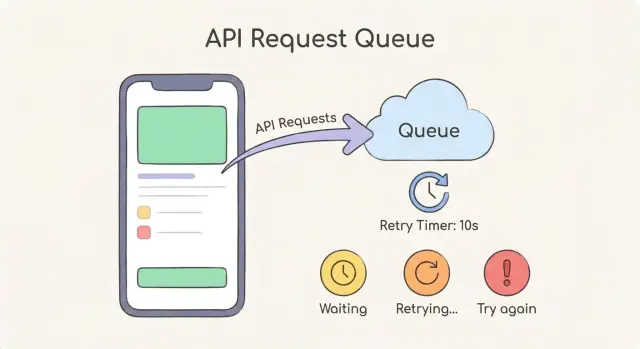
Keep the states consistent across the app. Most teams only need three:
- Waiting in queue: "We're in line to send your request."
- Retrying: "The provider is busy. Trying again in 10-20 seconds."
- Try again: "We couldn't send this yet. Please try again now."
Add a rough time expectation whenever you can, even if it's only a range. You can base it on queue position (for example, 3 requests ahead) or on your backoff timer. A small countdown helps people wait without clicking.
Offer a safe Cancel button for long waits. Explain what cancel means in one sentence: "Canceling stops retries. Your draft stays here, and nothing is sent." If cancel would lose work, say that clearly and offer "Save draft" instead.
Avoid raw errors like "429" or "Too Many Requests." Translate it into what the user cares about: "The AI provider is asking us to slow down." Then offer one action: keep waiting (default) or try again.
For waits longer than a few seconds, show a lightweight notification when it's ready, like an in-app banner that says "Your answer is ready" or a status change on the message. This is especially important in chat.
Protect the rest of your app while the provider slows you down
When a provider starts returning 429s, the biggest risk isn't the failed call. It's the ripple effect: threads get stuck, queues grow without limits, and unrelated parts of your app feel slow. Good 429 rate limit handling is mostly about containment.
Start with timeouts everywhere a provider call can hang. A retry that waits forever isn't patient, it's a blocker. Keep a clear max time per attempt and a clear max total time across retries, so one request can't hold the rest of the system hostage.
A circuit breaker helps when 429s spike. Instead of letting every request keep hitting the provider, pause calls for a short window, then try again with a small test request. This makes the slowdown predictable and stops you from adding more pressure.
Separate UI responsiveness from provider speed. The UI should react instantly: accept the user action, show a clear state, and process the work in the background. If you tie button clicks directly to provider response time, the whole app feels broken even when only one dependency is slow.
Per-user budgets prevent one heavy user (or one bug) from starving everyone else. Keep it simple: how many queued jobs and how much retry time one user can consume before you start delaying or rejecting.
Useful signals to watch:
- 429 rate over time (spikes vs steady)
- Queue depth (how many jobs are waiting)
- Average wait time before a job starts
- Timeout rate (too strict vs too loose)
- Circuit breaker open time (how often you pause calls)
Common mistakes that make 429 problems worse
Most 429 pain comes from a few predictable mistakes. Avoid them and 429 rate limit handling becomes boring (in a good way).
Retrying in a way that creates a retry storm
Instant retries, or retries with the same fixed delay every time, can turn a small slowdown into an outage. If 200 users hit "Try again" and every client retries on the same second, you get a synchronized wave of traffic that keeps triggering more 429s.
Use a delay that grows over time, plus jitter, so retries spread out.
Endless retries and hidden costs
Without a max retry count and a max total wait time, a single user action can trigger an unbounded loop. That can burn tokens or API credits, keep server workers busy doing nothing useful, and create confusing "loading forever" screens.
Cap retries, and stop with a clear message when you hit the limit.
One global limit with no priorities
If you treat all calls the same, background work (like embeddings) can starve critical flows like login, checkout, or "Send message." Use separate queues or priorities so core actions always win.
Ignoring partial success
A common case: one request succeeds (you created a message), but the next request gets a 429 (you failed to fetch updated history). If you treat the whole operation as failed, you risk duplicates, missing UI updates, or broken state.
Treat each call as its own step. Save what succeeded, retry only what failed.
Generic errors that teach users to click more
"Something went wrong" makes people hammer the button, which creates more load. Show a specific state like: "We're waiting for the provider. Retrying in 8 seconds."
Quick checklist before you ship
Before release, treat 429 rate limit handling like a product feature, not just a retry loop. A good setup keeps costs controlled, avoids surprise outages, and makes the app feel calm even when the provider says "slow down."
A practical pre-ship check:
- Concurrency is capped in two places: per feature (for example, chat) and per user (so one busy person can't starve everyone else).
- Retries have clear limits: a max attempt count and a max total time spent retrying (so requests don't hang forever).
- Backoff reduces pressure: you add jitter, you respect server hints like
Retry-After, and you avoid synchronized retries across many users. - The UI stays predictable: users see what's happening ("Waiting to retry"), how long it might take, and a safe next action (Cancel, Try again, or Continue without this result).
- Logs are enough to debug fast: include provider name, endpoint/model, request ID, user ID (or anonymous token), attempt number, wait time chosen, and the exact error payload.
Do a quick storm test before you ship. Open the app in two browsers, trigger 10-20 actions quickly, and confirm you see orderly queuing, increasing delays, and a clean stop when limits are reached.
Example: a chat feature that gets hit by a sudden spike
Picture a team demo: someone shares a link, and within a minute 50 people open the chat and hit the same prompt. Your app sends 50 near-identical calls to an LLM provider. A few seconds later, you start getting 429s.
Without controls, everything feels random. Some requests time out, some retry immediately and get blocked again, and users start clicking Send over and over. Now you have duplicate requests, higher cost, and mismatched outputs (one person sees an answer, another sees an error, a third sees two answers).
A request queue changes the shape of the traffic. Instead of spiking the provider, you line requests up and release them at a steady pace. Add priority so the app stays responsive: UI-critical actions like canceling a message, loading chat history, or fetching the user profile go first, while generation requests wait their turn.
Backoff keeps you from making things worse when the provider is already pushing back. When you get a 429, you retry after a delay that grows (exponential backoff), plus a little randomness (jitter). That stops all 50 clients from retrying at the exact same moment and colliding again.
What users see matters as much as the code. During the spike, a predictable UI might show:
- "Queued" with an estimated wait like 20-40 seconds
- A clear Cancel button that actually stops the queued job
- A Retry option only after a failure, not during normal waiting
- A single message per prompt (no duplicates), updating from Queued to Sending to Done
Next steps: implement the basics, then make it reliable
Start with one page that describes your rules: when you retry, how long you wait, when you stop, and what the user sees at each step. This prevents the common mess where the backend retries forever while the UI looks frozen.
If you only do two engineering tasks this week, do them in the smallest place that stops the pain first: the single shared client that talks to your provider. Centralizing 429 rate limit handling means every feature benefits, and you don't end up with five different retry behaviors across the app.
A practical order that usually works:
- Define a retry policy (max attempts, max wait, and which errors are retryable)
- Add a request queue to smooth bursts from user clicks and background jobs
- Add exponential backoff with jitter so retries reduce pressure instead of piling on
- Add clear user states: waiting, retrying, and a safe fallback when you give up
- Log each 429 with the chosen delay so you can see patterns later
Then run a simple load test. Simulate 20-50 rapid actions (send message, regenerate, refresh data) and force a few 429 responses. The goal isn't perfect speed. It's that the UI stays understandable: users should see that the app is waiting, not broken, and they should know what happens next.
If you're inheriting an AI-generated codebase, be careful about piling on patches. That's how you get retry storms and ghost requests that keep running after the user navigates away.
If you want a second set of eyes, FixMyMess (fixmymess.ai) focuses on diagnosing and repairing AI-generated apps that fall apart under real traffic, including runaway retries, missing caps, and messy request fan-out. A quick audit can help you get to predictable behavior fast.
FAQ
What does a 429 error actually mean?
A 429 means the provider is rate limiting you because too many requests arrived in a short time. Your code might be fine, but your traffic pattern (bursts, high concurrency, or hidden extra calls) is exceeding a quota or throughput cap.
What should my app do when it gets a 429?
Default to waiting and retrying with a delay, not retrying instantly. Use a short time budget for user-triggered actions and a longer one for background jobs, and stop retrying once you hit your budget so the app never spins forever.
Why are exponential backoff and jitter recommended?
Exponential backoff means each retry waits longer than the last, which reduces pressure when the provider is already overloaded. Jitter adds small randomness so many clients don’t retry at the same moment and cause another wave of 429s.
Should I follow the Retry-After header?
Treat Retry-After as the primary instruction for how long to wait. If you add jitter, keep it small around that value so you still respect the provider’s timing while avoiding synchronized retries.
Do I really need a request queue, or can I just retry?
A queue smooths bursts by turning “50 requests now” into a controlled flow the provider can accept. It also gives you a place to add priorities, delays, and persistence so requests don’t vanish or duplicate on restarts.
How do I pick a safe concurrency limit?
Start with a low concurrency limit (often 1–3 per worker or per feature) and increase only after you see stable results in production-like traffic. The right number is the highest value that doesn’t trigger frequent 429s during normal peaks.
When are retries dangerous, and how do I make them safe?
Retry only requests that are safe to repeat, like read-only calls or writes protected by idempotency keys. If a retry could create duplicates (charges, emails, records), make it idempotent first or fail fast and ask the user to confirm.
Should I dedupe identical prompts or API calls?
Yes, if you see repeated identical requests close together, return the same in-flight result instead of starting new calls. This reduces accidental double-click traffic and frontend re-render spam, which often causes 429s during spikes.
What should users see while a request is waiting or retrying?
Use plain, consistent states like “Queued,” “Retrying in X seconds,” and a clear “Try again” when you stop. The key is that the UI acknowledges the action immediately and explains what’s happening so users don’t keep clicking and adding load.
What should I log and measure to fix 429s for good?
Log enough context to see patterns: which endpoint/model, which user or workspace, interactive vs background, attempt count, chosen delay, and total time spent. If you’re inheriting an AI-generated codebase with runaway retries, fan-out tool calls, or missing caps, FixMyMess can audit it and fix the failure modes quickly so behavior stays predictable under real traffic.