AI-built apps fail with real users: 3 demo traps to spot
AI-built apps fail with real users when demos skip edge cases. See login, email, and payment scenarios, plus checks to harden your app before launch.
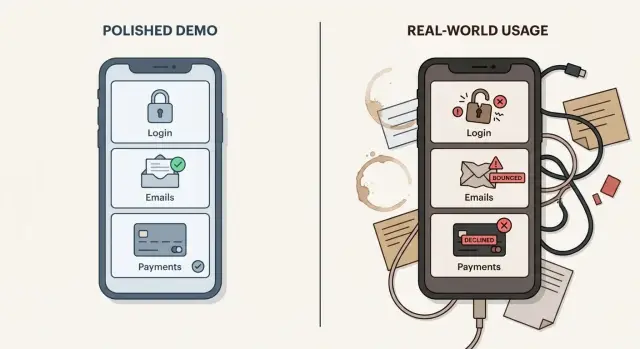
What looks fine in a demo and what breaks in production
A demo is a controlled moment. You use one device, one account, clean sample data, and a path you already know will work. Real users do the opposite. They click out of order, reuse old links, mistype passwords, refresh at the wrong time, and try it on phones you never tested.
That’s why AI-built apps fail with real users even when the demo feels perfect. A prototype often proves an idea is possible, not that it’s dependable.
Early users also behave differently than the builder expects. They don’t read instructions. They sign up with work emails, personal emails, and sometimes temporary ones. They open the app behind corporate firewalls. They try to pay with cards from different countries. And they ask support questions the same day, because anything “live” should just work.
In a demo, “works” often means “I can complete the happy path once.” In production, “works” includes reliability, security, supportability, and recovery. Key actions should succeed repeatedly (even on a bad connection). Private data must stay private. When something fails, you need enough visibility to understand what happened and help quickly. And you need safe ways to retry, roll back, or fix problems without breaking everything else.
You don’t need to lose the speed that got you to a prototype. Keep the same flow, but add the unglamorous checks: solid error handling, logging, rate limits, safe credential storage, and testing with messy data.
Why AI-generated prototypes cut corners
AI-generated code is often optimized to “show something working” as fast as possible. Demos reward the happy path: one account, one device, one clean network, and predictable inputs. Production rewards the opposite: resilience.
Prototypes often skip the uncomfortable parts. What happens when a request times out, an API returns a partial response, or two actions happen at the same time? In a demo you click once and move on. In production, people refresh, double-submit, switch tabs, lose signal, and try again.
Another common issue is hidden assumptions. AI-generated code may hard-code values that seem harmless on day one: a fixed user role, a single environment setting, a temporary API key, one currency, or one timezone. It works locally and then breaks after deployment, team access, or the first real customer.
Most missing pieces are boring, but they prevent support tickets from piling up: handling timeouts and retries, validating inputs with helpful messages, dealing with partial failures, removing demo-only settings and secrets, and adding logs that point to the real cause.
Picture a simple flow: a user signs up, receives a confirmation email, then pays. A demo proves the buttons work. Production has to prove the whole chain holds under stress, and fails gracefully when something upstream breaks.
Scenario 1 - Login works once, then users get locked out
A demo login usually follows the happiest path: one test account, your laptop, one browser, stable connection. You sign in, land on a dashboard, and everyone nods.
Real users don’t behave like that. They log in from a phone and a work laptop. They forget passwords. They click “Sign in with Google” in an in-app browser. They close the tab, come back tomorrow, and expect to still be signed in.
Many “works once” login bugs come from a few breakpoints:
- OAuth callbacks are picky. The callback URL must match exactly, and small redirect differences can break the final step after the provider says “Success.”
- Cookies and sessions can be set in a way that only works on localhost, only in one browser, or fails under stricter privacy settings.
- Sessions expire, but the app doesn’t recover cleanly, so users get stuck in loops.
What users report is almost always vague: “I can log in once, then it stops working.” That single sentence can hide anything from a mis-set cookie to a blocked cross-site request to a redirect that drops a token.
Before inviting people in, run a few simple checks (no deep tech required). Log in on your phone and a second device and confirm both stay signed in. Close the tab and come back in 10 minutes, then 24 hours. Try password reset and confirm the new password works right away. Test an incognito window and a different browser. And ask someone outside your network to sign up from their connection.
If any of those fail, pause and diagnose. Authentication is often the one blocker that turns a “working” prototype into something users immediately bounce off.
Scenario 2 - Emails send in testing, but never reach customers
In a demo, email looks “done” because you try it once and it shows up in your inbox. That can be true even when the system isn’t ready for real users.
The gap shows up the moment you send to people outside your team. Real inboxes filter aggressively, and your domain has a reputation (or none yet). If SPF, DKIM, and DMARC are missing or misconfigured, many providers treat messages as suspicious. From your app’s point of view the email “sent,” but the user never sees it.
Other breakpoints are simpler and just as painful. The sender address is wrong. The “from” name triggers spam rules. A template renders fine in one client but breaks in another. Links point to localhost or a staging domain. If you send a burst (like importing a waitlist), rate limits kick in and you drop messages unless you queue and retry.
The user impact is immediate: no verification email means no account. No password reset means support tickets. No receipt email means people think they were charged and got nothing, even if the payment was fine.
Before you blame “email being flaky,” check the basics: provider logs (accepted, deferred, rejected), bounce and complaint events, SPF/DKIM/DMARC alignment, and a small batch test across Gmail, Outlook, and Apple Mail. Also scan templates for broken links and anything that looks like staging.
A common failure looks like this: your sign-up works for your own address, but a customer on Outlook never gets the verification email. They click “resend” five times, and your app throttles or locks them out. Often the real issue is deliverability plus a template problem, so even delivered emails lead to dead ends.
Scenario 3 - Payments succeed in sandbox, fail with real cards
Sandbox payments are friendly by design. Test cards often approve, and the “happy path” looks perfect. Real banks don’t behave like a sandbox, and the app has to handle messy outcomes.
With real cards, extra checks appear. A user might hit 3D Secure and abandon the flow. AVS/CVC checks can fail if the billing address is slightly different. Banks decline for reasons you can’t predict. Add currency conversion, taxes, and regional rules, and your “one button pay” becomes a set of branches.
The most common production break isn’t the payment form. It’s everything around it, especially webhooks. In a demo, it’s tempting to assume “payment succeeded” and unlock access right away. In production, the webhook event is the source of truth, and it can arrive late, arrive twice, or never arrive if the endpoint is misconfigured.
Watch for these day-one patterns:
- Access granted before confirmation, then the charge fails or gets reversed.
- Webhooks ignored, so users pay but their account never updates.
- No idempotency, so retries create duplicate charges.
- Race conditions between the “success” page and webhook processing.
Support tickets follow the same script: a customer sees “payment failed,” tries again, then finds two charges. Or they get access even though the payment never completed, which turns into refund chaos.
What to validate before real users pay is simple, but non-negotiable: webhook flow end-to-end, idempotency keys on create/confirm actions, and clean cancellation and refund paths. Test failures on purpose (wrong CVC, failed 3D Secure, declined card) and confirm your database stays consistent.
Step-by-step - Turn a prototype into a user-ready release
When AI-built apps fail with real users, it’s rarely one big bug. It’s lots of small gaps the demo never hits. The fastest path forward is to pick a few real journeys and make them boringly reliable.
Start by writing down the five most important user journeys in plain language: sign up, log in, verify email, reset password, and pay. For each one, define what “success” means for the user and what should be true in your database.
Next, add basic logging so you can answer three questions fast: what failed, for which user, and why. You don’t need fancy dashboards at this stage, just enough breadcrumbs to stop guessing.
A practical sequence that works for most teams:
- Define the five journeys and a short success checklist for each.
- Add logs around risky points (auth callbacks, email sends, payment confirmation).
- Test edge cases on purpose: wrong password, expired reset link, slow network, double-clicking “Pay.”
- Add guardrails: timeouts, safe retries, and error messages that tell users what to do next.
- Run a small pilot (5-20 users), then fix what they hit first before inviting more.
One small change that pays off immediately: if password reset fails, don’t show “Something went wrong.” Tell the user if the link expired, offer to resend, and log the exact reason (token invalid, user not found, provider rejection).
The hidden risks - security, secrets, and data integrity
A prototype can feel “done” because the happy path works. In production, many failures are really security and data consistency problems showing up as “random bugs.”
Security problems that look like ordinary glitches
Non-technical teams often experience these as flaky behavior: someone gets logged out, a feature works for one person but not another, or data “disappears.” Under the hood, it can be a security gap.
Common issues in AI-generated code include exposed secrets (API keys in repos, browser bundles, or logs), broken authorization (users can access someone else’s records by changing an ID), and injection risks (inputs stitched into database queries without safe handling). A realistic example: an admin screen looks fine in testing, but in production any logged-in user can load it because the app checks “is logged in” and forgets “is admin.”
Data integrity: the app works until it doesn’t
Data problems are harder to spot than UI bugs. You often see them only after real usage creates edge cases.
Watch for duplicate actions (double-clicks or retries creating duplicate orders), missing transactions (step 1 succeeds, step 2 fails, leaving half-updated data), and partial updates (the UI says “saved,” but only some fields changed).
Common traps teams miss when they just ship it
A demo rewards the happy path. Real users bring forgotten passwords, slow connections, expired sessions, and weird timing.
One mistake is trusting the first success. If you tested login once on your own laptop, you still haven’t tested what happens after a logout, a refresh, a second device, or a session that expires overnight. The app can look stable while it’s one edge case away from locking people out.
Another trap is postponing recovery features. Password reset, email change, and account recovery feel like extras until the first customer can’t get back in. Then support becomes your product, and you’re patching flows that touch security-sensitive code under pressure.
Background work is where many prototypes cut corners. Emails, payment updates, and data sync often depend on webhooks, queues, and scheduled jobs. If those pieces are missing or brittle, everything looks fine while you click buttons, but the real system state drifts over hours and days.
A few traps show up repeatedly:
- A feature “works once” but fails on the second try because state is stored in the browser instead of the server.
- Account recovery is missing, so one bad login attempt turns into a lost user.
- Webhook events aren’t handled fully, so refunds, failed payments, and bounces never update your database.
- There’s no monitoring plan, so you learn about outages from angry messages, not alerts.
- The code structure turns into spaghetti fast, making every fix risky.
Example: you launch a paid beta on Monday. On Tuesday a user’s card is declined, but your app still marks the order as paid because it only checked the initial checkout response. By Thursday, your support inbox is full and you can’t reproduce the issue because it depends on webhook timing.
Quick checklist before inviting real users
Before you send invites, do a short “real user rehearsal.” Demos hide the everyday stuff: switching devices, forgetting passwords, double-clicking buttons, and using messy data.
Run these checks in a staging environment with two accounts (one brand-new, one existing). Write down what happens and how long each step takes.
- Account loop: create an account, confirm it (if required), log out, then log back in on a different device or browser profile.
- Password reset loop: trigger a reset, confirm the email arrives quickly (aim for under 2 minutes), and verify the reset link works only once.
- Payments loop: test a successful charge, a declined card, a refund, and a double-click on Pay.
- Secrets check: inspect the frontend build and network calls and confirm no API keys, database URLs, or service tokens are exposed to the browser.
- Visibility check: force an error (wrong webhook secret, invalid email address, failed payment) and confirm you can see it clearly in logs with enough detail to act.
A practical way to run this: ask a friend to do the steps without help. If they get confused, or you can’t diagnose failures quickly, pause the launch and close those gaps first.
A realistic launch week example (and how to recover)
A founder builds an AI-made app, nails the demo, and invites 50 beta users on Monday. The first hour feels great. By lunch, support messages start piling up.
On Day 1, three small cracks turn into real problems. Some users hit a login loop after resetting a password because sessions and redirects were handled loosely. Others never get verification emails because the app used a test sender setup that worked locally but not in real inboxes. A few people pay, see a success screen, and still can’t access the paid area because the app treats “payment succeeded” and “subscription active” as the same thing.
By Day 2, the founder is doing manual fixes: deleting accounts, toggling flags in the database, and asking users to try again. Confused users sign up twice, email providers start throttling, and some customers request refunds after being charged but blocked. The app isn’t “down,” but trust is.
A focused repair sprint looks different from random patching. The goal is to make the top flows reliable before adding anything new:
- Reproduce failures end-to-end for the core flows (login, verify email, pay, unlock access).
- Fix root causes, not symptoms (tokens, redirects, webhooks, state checks).
- Add guardrails like rate limits, safe retries, and clear error messages.
- Retest with real conditions (fresh accounts, real inboxes, real cards).
- Re-run a small beta (5-10 users) before opening the gates again.
Then make a clear call on scope. Patch when the architecture is mostly sound and the failures are isolated. Refactor when the same bug pattern appears everywhere. Rebuild when the codebase is too tangled to reason about safely, which is common with AI-generated prototypes.
Next steps - get clarity, then fix the right things first
If your app was built with tools like Lovable, Bolt, v0, Cursor, or Replit, assume it was optimized for a demo. That doesn’t mean it’s bad. It means you should expect shortcuts around login, emails, payments, and security.
Before you rewrite anything, get clear on what’s actually failing. Teams lose weeks rebuilding the wrong parts when they start from opinions instead of evidence.
Collect proof from real use and reduce it to the few flows that matter. One user can’t reset a password, another never gets a welcome email, and a third sees a payment error with a real card. That’s enough to plan the next sprint.
What to gather in one short pass:
- 3-5 user reports with exact steps (what they clicked and what they expected)
- Screenshots of errors and the full text of messages
- The top 3 broken flows that block signups or revenue
- Notes on where it happens (device, browser, time)
- Access to logs or whatever your host provides
From there, ask for diagnosis before a rebuild. A solid audit maps symptoms to root causes (session handling, email domain setup, missing validation, webhooks not handled) and ranks fixes by impact.
If you inherited an AI-generated prototype that’s breaking under real usage, FixMyMess (fixmymess.ai) focuses on diagnosing and repairing those exact gaps: authentication, deliverability, webhook logic, security hardening, and cleanup that makes the code safe to ship. A quick audit can turn “it works in the demo” into a short, prioritized fix list you can execute with confidence.
FAQ
Why does my app look perfect in a demo but fall apart with real users?
A demo proves the happy path once, under your conditions. Production has to handle repeated use, messy inputs, slow networks, expired sessions, multiple devices, and people clicking in the “wrong” order.
What should I fix first before inviting real users?
Focus on the core journeys that create trust and revenue: sign up, log in, verify email, reset password, and pay. Make each one succeed repeatedly, and make failures understandable so users can recover without contacting you.
Why do users say “I can log in once, then it stops working”?
This is usually a session or redirect problem, not a “login button” problem. Cookies may be set in a way that works on localhost but fails on real domains, privacy settings, or different browsers, causing loops after the first successful sign-in.
What’s the most common OAuth mistake in AI-generated apps?
OAuth providers are strict about exact callback URLs and redirect behavior. A tiny mismatch between environments can result in the provider showing “Success” while your app never finishes the session properly, so users bounce back to the login screen.
Why do emails work for me but customers never receive them?
Sending is not the same as being delivered. If your domain isn’t set up with SPF, DKIM, and DMARC, many inboxes will filter or reject messages, so verification and reset emails never show up for customers even though your app thinks they were sent.
What should I check in email templates before launch?
It’s often a staging artifact: links still point to localhost or a test domain, or the sender identity triggers spam filters. Even when the email arrives, a broken link or wrong environment turns it into a dead end.
Why do payments succeed in sandbox but fail with real cards?
Sandbox flows are forgiving, but real banks add declines, 3D Secure, address checks, and timing issues. Your app must handle those branches without corrupting state, and it must not assume “checkout page success” equals “paid.”
What are the biggest webhook mistakes that cause billing chaos?
Webhooks are the source of truth in production, and they can arrive late, arrive twice, or fail if misconfigured. If you don’t use idempotency and consistent webhook handling, you’ll see duplicate charges, paid users without access, or access granted without a successful payment.
What security issues hide inside “random” production glitches?
AI-generated prototypes often expose secrets in the frontend or logs, and they commonly get authorization wrong so users can access data they shouldn’t. These issues can feel like random bugs, but they’re security failures that can become serious quickly.
When should I patch vs refactor vs rebuild, and who can help?
Start by capturing enough detail to answer what failed, for which user, and why, then reproduce the failure end-to-end. If you’re stuck in repeated patches or the code is too tangled to change safely, a focused audit can quickly map symptoms to root causes and rank fixes by impact; FixMyMess specializes in repairing AI-generated apps and can usually turn that into a clear plan fast, often within 48–72 hours after diagnosis.