AI coaching platform: scheduling, session notes, and privacy
Plan and build an AI coaching platform with clear scheduling, session notes, and strong privacy boundaries between coach and client from day one.
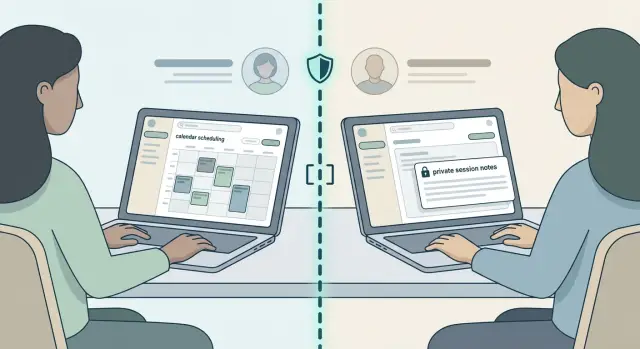
What you are really building (and why it gets messy fast)
An AI coaching platform sounds like three simple screens: a calendar, a notes page, and a client list. In reality, those three touch almost every real product problem: identity, permissions, time zones, notifications, and data you can’t afford to leak.
Early coaching apps usually break in predictable ways. A client books the same slot twice because the system didn’t lock the time fast enough. A coach edits notes and overwrites a previous session. A contractor account sees the wrong client because “admin” became a shortcut for every role. These aren’t rare edge cases. They show up as soon as real people start using the product.
Scheduling, notes, and privacy aren’t side features. They are the workflow. If booking is unreliable, you lose trust. If notes are messy, coaching quality drops. If access is blurry, you risk exposing sensitive personal details.
This matters most for solo coaches, small coaching teams, and early-stage founders building an MVP with AI tools. You want something that works every day, not a feature parade.
“Good enough” for an MVP means the basics work without surprises: booking, rescheduling, and cancellations don’t create double bookings; private coach notes stay private; roles are clear (coach, client, and maybe admin); there’s an audit trail of who changed what; and time zones plus reminders behave consistently.
If you already built a prototype with tools like Cursor, Replit, or Bolt and it feels unreliable, that’s normal. The messy parts are usually in the logic and permissions, not the UI.
Start with a simple data model and clear user roles
If your AI coaching platform feels confusing early, roles and data are usually fuzzy. Get those two things right first and everything else becomes easier.
Start with roles. Most products only need coach and client. Add admin only if someone truly needs to manage billing, disputes, or support across many coaches. Be strict about what each role can see and do. Permission mistakes are hard to unwind once real data exists.
Then define a small set of objects to build around:
- User: profile, timezone, role, contact settings
- Session: date/time, status (booked/canceled/completed), coach, client
- Availability: coach working hours, buffers, blackout dates
- Note: attached to a session, with privacy level (private/shared)
- Message (optional): a short thread tied to a session (avoid building a full chat app)
Decide what’s private by default versus shared by choice. A solid rule: coach notes are private by default, and a separate shared recap is created intentionally. That one decision prevents a lot of accidental leaks later, especially once you add AI summaries.
Write user stories in plain language before you code. A few that cover most MVPs:
- A client can book from a coach’s available times in the client’s timezone.
- A client can reschedule or cancel, and both sides see a clear status change.
- A coach can block time off and add buffers so sessions don’t overlap.
- A coach can write private notes during or after a session.
- A coach can share a recap and action items with the client.
Decide one more thing early: how edits work. If clients can request changes to shared recaps, make that explicit. If admins can access anything for support, log it.
Scheduling: the minimum set of features that works
Scheduling is where a promising coaching app often starts to crack, not because calendars are mysterious, but because people are picky. Time zones, late changes, and no-shows turn into support tickets fast.
Pick one scheduling style and commit to it:
- Fixed slots: you publish times.
- Request-based: clients request, you confirm.
- Hybrid: clients pick from options and can request outside them.
Hybrid can be useful, but it also doubles your edge cases. Only choose it if you truly need it.
Availability rules should be simple and visible. At minimum, support coach time zone, show times in the client’s time zone, add buffer time between sessions, and include a daily cap so a coach doesn’t accidentally get booked into back-to-back calls all day.
Reschedule and cancellation rules should fit in one paragraph, and the app should enforce them. If you can’t explain it clearly, clients will argue about it.
Notifications should be boring and reliable. Send the minimum that prevents missed sessions: a booking confirmation, one earlier reminder (like 24 hours), one short reminder (like 1 hour), and clear change notices for reschedules or cancellations. Keep spam off by default and add opt-ins later.
If you’re building with AI tools, don’t rely on “looks right” demos for time zone handling. Test real bookings across time zones and around daylight saving changes.
Calendar integration and conflict handling (without surprises)
Calendar sync sounds straightforward until real life shows up: clients have multiple calendars, coaches move events from their phone, and invites get forwarded.
Decide early whether you want one-way sync (read busy times, don’t write events) or two-way sync (create and update events in the user’s calendar). One-way is safer for an MVP. Two-way feels nicer, but it creates hard questions: what if the event title changes, the event is moved, or the user deletes it?
If a coach has multiple calendars (work and personal), double booking is the biggest risk. A practical rule is to treat the coach as unavailable if any connected calendar shows busy.
When sync fails, don’t silently proceed. Use a clear fallback: show a warning that the connection is stale, lock selected times for a short window while the client checks out, and allow a manual override for the coach with a reason field.
Keep an audit trail for every schedule change. Store who changed what, when, and whether it was the coach, the client, or the system. When something goes wrong, that log turns a messy argument into a quick fix.
Session notes: private, shared, and structured enough to use
Session notes are where a coaching platform can feel genuinely helpful, or uncomfortably intrusive. The fix is simple: be clear about what’s private by default, what’s shareable, and how notes are organized so you can find them later.
Separate two note types:
- Private coach notes: working thoughts, patterns you notice, sensitive context, reminders.
- Shared client recaps: what the client can see, like what you covered, decisions, and next steps.
Treat shared as a clean summary, not a raw transcript.
Keep structure light with small templates
A blank page sounds flexible, but it often creates messy notes you never reuse. A few small templates usually cover real sessions:
- Intake: goals, constraints, history, what “success” looks like
- Goal review: wins, blockers, what changed since last time
- Action plan: 1 to 3 actions, owner, deadline, next check-in date
- Reflection: what worked, what didn’t, what to try next
Keep templates mostly short fields plus one free-text area. That gives consistency without feeling like paperwork.
For search, keep it basic: session date, client name, and a few tags you actually use (like “career,” “confidence,” or “habits”). Avoid complex tag trees. If coaches can’t remember what to tag, they won’t tag.
Clients may ask for exports, especially when switching coaches. Offer clear options: summary only (shared recap), shared recaps for a date range, and coach-only notes as an off-by-default option with an explicit warning.
Using AI for summaries and action items without crossing lines
AI is great at turning messy notes into a clean recap. In a coaching platform, that usually means a draft summary, a short list of action items, and maybe a suggested follow-up message.
The boundary that keeps you out of trouble is simple: AI suggests, the coach decides. Treat every AI output like a junior assistant’s first draft.
A practical workflow:
- The coach clicks “Generate recap” after a session.
- The draft opens in a dedicated screen with a clear “Not shared yet” status.
- The coach edits and approves.
- Only then does the client see it.
Avoid auto-sending anything by email or message. Review first, share second.
To reduce confusion and accidental leaks, make sources visible. A small “Used to generate this” panel helps coaches spot mistakes (for example: “session notes from Jan 21” and “intake form answers”). If something should never be used, like internal coach notes, make it a separate field that the AI never reads.
Plan for clients who don’t want AI involved. Make AI optional per client and per workspace so a coach can turn it off where it isn’t appropriate.
A real-world example: a client shares a workplace conflict and names coworkers. An AI draft recap might repeat names and details. A review step lets the coach rewrite it as “team conflict” and keep sensitive parts private while still capturing useful action items.
Privacy boundaries: how to prevent the most common leaks
Privacy problems usually come from “helpful defaults.” A new teammate gets admin access, a note is shared to the whole workspace, or an export includes more than it should. In a coaching platform, assume every extra permission will be used by accident.
Start with least privilege by default. A coach sees only their own clients. A client sees only their own sessions. An admin can manage billing and users, but doesn’t automatically see private notes.
If you support agencies or teams, workspace separation matters. Each coach needs a clean boundary between Client A and Client B, including files, session history, and messages. If you allow “team members,” make membership explicit and time-bound (for example, a contractor added for one month).
Decide, for each object, what is private versus shared: notes, attachments, recordings, goals, and past summaries. If you use AI summaries, treat prompts and transcripts as sensitive data, not just the final recap.
A few guardrails worth implementing early:
- Keep private notes and shared recaps as separate fields.
- Require an explicit share action (never auto-share).
- Scope every server query by workspace and client relationship.
- Audit-log viewing, exporting, and downloading sensitive items.
- Show clients exactly what will be shared before sending.
Safety and compliance basics (without pretending to be a lawyer)
You don’t need a law degree to make safer choices, but you do need clear defaults. Collect as little as you can, keep it for as short a time as you can, and protect it like it matters.
Start with data retention. Decide how long you keep session notes, recordings (if you allow them), and system logs. Whatever you choose, make it visible and make deletion straightforward.
Consent and transparency should be plain language. Before the first session, tell clients what you store, who can see it, and whether AI will summarize anything.
A simple checklist most clients understand:
- What gets saved after a session (notes, action items, messages)
- Who can access it (coach only, client, admins)
- How long it stays in the system
- How to export or delete it
- Whether AI touches the content, and how to turn it off
Watch for regulated contexts. If a coach is handling mental health treatment, legal advice, or anything close to diagnosis, extra rules may apply. That’s the moment to pause and get real advice, not guess.
Security basics are boring and non-negotiable: strong passwords, an MFA option, and no secrets in your code. One of the most common failures is shipping with test API keys exposed in a repo.
Step by step: a practical build plan for your MVP
Write your MVP plan on one page before you touch any builder or code editor. The goal isn’t to be clever. It’s to avoid building “everything” and ending up with a half-working product.
A simple build order works well for most teams:
- Freeze scope and write a “not yet” list. Make a small promise: book a session, meet, leave notes. Skip payments, marketing pages, multi-coach teams, and analytics for now.
- Choose tools you can maintain. If you’re solo and non-technical, pick a stack you can live with. If you have a developer, favor well-known components over experimental ones.
- Build scheduling first. Availability, time zones, reminders, and rescheduling must work end to end.
- Add session notes next. Two note types (private and shared) plus easy access to past sessions.
- Add AI helpers last. Summaries and action items should be a button the coach chooses to run, not an automatic background process.
Then test with 3 to 5 real users (a mix of coaches and clients). Ask specific questions like “What confused you when rescheduling?” or “Which note did you expect the client to see?”
Example: a life coach tests with three clients and discovers one reminder fires in the wrong time zone. Fix time zone handling before inviting anyone else.
Before you scale, lock down permissions. The earlier you catch access bugs, the cheaper they are.
Common mistakes when building with AI tools
The fastest way to break trust is to ship something that feels “almost right” but leaks details or changes records without anyone noticing. AI tools help you move fast, but they also make it easy to skip the boring parts that keep a real product safe.
A common trap is letting AI write straight into client-visible notes. Auto-summaries are useful, but they can be wrong, overly personal, or include details that were meant to stay private. Make “coach reviews before share” the default.
Another mistake is a rushed database setup that mixes data across clients. This often happens when an MVP starts with one generic notes table and workspaces get bolted on later. A simple rule helps: every session, note, message, and file should be tied to both a coach and a specific client relationship, and queries should always filter by both.
Other issues that show up often in AI-generated codebases: secrets committed to a repo, debug logs left on in production, calendar sync without clear conflict rules, and building add-ons (payments, chat, referrals, analytics) before the core flow is stable.
Example: a coach runs recurring weekly sessions. Calendar integration creates a second event instead of updating the first when a client changes the time. Two reminders go out, notes attach to the wrong session, and nobody knows which one is real.
Quick checklist before you onboard real clients
Before you invite paying clients, test your platform like a skeptical user. Create two fake clients, book sessions, write notes, reschedule, cancel, and export recaps. Most early problems aren’t missing features. They’re small leaks and unclear defaults.
- Private coach notes stay private by default. Clients shouldn’t see internal notes in exports, notifications, or shared summaries.
- Overlapping sessions are blocked for the same coach. Try booking two sessions for the same time (including buffer time). The system should prevent it.
- Every schedule change leaves an audit trail. When a session moves or cancels, you can see who did it and when.
- Client recaps export cleanly. Exports should include what clients need without pulling in drafts, internal tags, or other clients’ data.
- AI is optional per client. You can disable AI summaries for one client without breaking everything else.
A quick test that catches a lot: write a blunt private note like “client seems burned out” and confirm it cannot appear in a client recap no matter what.
Example scenario: one coach, recurring sessions, and clean recaps
A career coach has 20 clients and runs weekly 45-minute sessions. Each client has a shared action plan (what the client sees) and a private coach notebook (what only the coach sees). This is the kind of simple setup that feels useful without getting risky.
On Monday, a client reschedules their Thursday session to Wednesday. Later that day, they reschedule again to Friday. The system should do three quiet things: update a single source-of-truth session record, keep the history of changes, and notify only the coach and that client.
After the Friday session, the coach writes two types of notes: private notes (concerns, hypotheses, sensitive context) and a shared recap (goals, decisions, next actions, due dates). AI can draft the shared recap from a structured outline, but the coach approves it before it’s shared.
Privacy boundaries are enforced by design: every note, file, and message is scoped to a single client and checked on every read and write. That prevents the worst leak: a recap accidentally appearing in another client’s portal.
Next steps: make it stable, then grow
Once your MVP works end to end, the next goal is boring but important: make it reliable for real clients. A coaching platform lives or dies on trust. If a note leaks, a session disappears, or someone gets access they shouldn’t have, people stop using it.
Pick one growth feature at a time. Good next bets are payments, packages, intake forms, basic messaging with clear boundaries, or coach-only admin tools like no-show tracking. Build one, test it with a handful of clients, then move on.
Set a production-ready bar and verify it: permission tests for each role, secret handling (no API keys in the browser, no tokens in logs), backups plus a restore drill, a basic security review for common issues (like broken auth or unsafe uploads), and error monitoring so you know when something breaks.
If you built your first version with tools like Lovable, Bolt, v0, Cursor, or Replit and the code feels tangled or unsafe, a focused audit is often faster than random fixes. FixMyMess (fixmymess.ai) specializes in diagnosing and repairing AI-generated app code - including auth, permissions, security hardening, refactoring, and deployment prep - and they offer a free code audit to surface the highest-risk issues before you onboard real client data.
FAQ
Do I really need an admin role in my coaching MVP?
Default to two roles: coach and client. Add admin only if someone truly needs to manage billing, disputes, or support across many coaches. The simplest rule is least privilege: every role can only see what they must to do their job.
What’s the simplest data model that won’t bite me later?
Start with a small set of objects you can reason about: users, sessions, availability, and notes. Make every session explicitly point to one coach and one client, and make every note explicitly attach to a session. Clear ownership early prevents cross-client data leaks later.
How do I prevent double bookings when two clients click the same slot?
Treat booking like a transaction: when a client selects a time, you temporarily lock that slot and only confirm once the session record is saved. Also enforce buffers and overlap checks on the server, not just in the UI. If it can be double-booked through two browsers, it will be.
What’s the safest way to handle time zones and daylight saving time?
Store session times in UTC and store each user’s timezone separately, then always render times in the viewer’s timezone. Test bookings around daylight saving changes with real dates, not just “today plus two weeks.” Most “timezone bugs” are actually DST edge cases.
Should my app do one-way or two-way calendar sync?
For an MVP, one-way sync is the safer default because it reduces surprises and “who changed what” conflicts. If you do two-way sync, you need clear rules for deletes, moves, and duplicates, or you’ll end up with mismatched sessions and confusing reminders.
What should I include in an audit trail for sessions and notes?
Record every create, edit, reschedule, cancel, and share event with who did it and when, including system actions. Keep it readable so you can answer support questions quickly. A good audit trail turns a dispute into a straightforward timeline instead of guesswork.
How should I set up private notes vs shared client recaps?
Make private coach notes private by default and require an explicit action to share anything with a client. Keep shared recaps in a separate field so you never “accidentally” expose internal thoughts. This one separation prevents a huge percentage of early privacy failures.
How do I use AI summaries without leaking sensitive details?
Use AI to draft, not to publish. The safest workflow is: generate a draft, show it as “not shared,” let the coach edit, and only then share it to the client. This reduces wrong details, oversharing, and awkward wording that can damage trust.
How should exports and data retention work in a coaching platform?
Offer exports that match what clients expect to receive, usually shared recaps over a date range, and keep coach-only notes excluded unless the coach explicitly opts in. Pair that with a clear retention policy and a simple delete flow so you’re not keeping sensitive data forever by accident.
I built this with an AI tool and it feels messy—what should I do next?
If your prototype looks fine but feels unreliable, the issues are usually in permissions, booking logic, and data scoping rather than the UI. The fastest path is often a focused codebase audit that lists concrete breakpoints and security risks before you keep adding features. FixMyMess can diagnose AI-generated code, repair auth and permissions, harden security, and prep for deployment, starting with a free code audit so you know what’s risky before onboarding real client data.