AI-generated login breaks in production: a troubleshooting flow
AI-generated login breaks in production? Follow a simple flow to debug sessions, JWTs, OAuth redirects, cookies, and 'works locally' auth bugs.
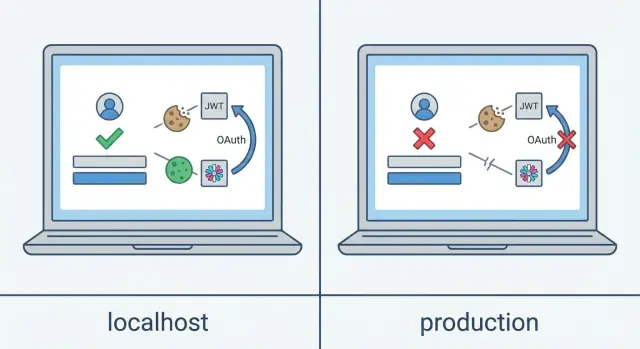
What “works locally” login bugs look like
A login can look fine in production and still be broken. The form submits, you see a “success” response, and then you land right back on the login screen.
Common symptoms include:
- A redirect loop between the login page and the app
- You look “logged in” for one page, then you’re suddenly logged out
- You get a 401 or 403 after a refresh even though it worked a moment ago
- OAuth completes, but the app still acts like you’re signed out
- It works on one browser or device, then fails on another
The reason is usually boring: authentication depends on small environment details that change between local and production. Local dev tends to be one host, no proxy, simple cookies, and plain HTTP. Production adds HTTPS, real domains, reverse proxies, and sometimes a separate API domain. Those differences affect how cookies are stored, which headers the server receives, and where redirects end up.
A typical example: locally, you log in and a session cookie is set and stored. In production, the server still sends the cookie, but the browser refuses to store it because the cookie flags don’t match the real setup (often SameSite and Secure). The backend thinks you’re logged in, but the browser never sends that cookie back. From the outside, it looks like random logouts or an endless redirect.
Don’t guess or rewrite your whole auth system. Find the exact step where the flow stops being true:
- Did the server send a cookie or token?
- Did the browser store it?
- Did the next request include it?
- Did the redirect land on the correct domain?
- Did the API accept the session or token?
Most production auth failures are configuration and cookie behavior, not the login form.
Teams like FixMyMess see this a lot in AI-built prototypes: the UI looks finished, but production rules for domains, HTTPS, and sessions were never handled carefully.
Before you touch code: collect a clean repro
The fastest wins usually come from a clean, repeatable repro, not from guessing. If you can make the bug happen on demand, you can prove the fix quickly.
Write down the exact scenario so someone else can follow it without back-and-forth. Include device (desktop or phone), browser name and version, the exact page you started on, and which user account you used. If it only fails in incognito, on mobile data, or after a tab has been open for a while, capture that too.
Also clarify where it fails. Many “login bugs” don’t fail on the login screen. They fail right after login:
- You submit the form and bounce back to the login page
- OAuth looks successful, but the callback never completes
- You land in the app, but the first API call returns 401 and you get kicked out
- It works once, then fails after a refresh or after 10 to 30 minutes
Define success in concrete terms. Pick one or two checks you’ll use every time, such as: a session cookie exists, a token is stored, or your “current user” endpoint returns 200. Without that, teams “fix” the UI state while the server still considers the user anonymous.
Add timing and identity clues. Capture one or two timestamps when you reproduce it (down to the minute). If your backend logs expose a request ID, session ID, or trace ID, record that too. Those breadcrumbs often connect a browser symptom to the exact server error.
A quick repro template
Write it like a mini test case:
- Environment: production, browser + version, device
- Steps: click-by-click path from a logged-out state
- Expected: your chosen success signal (cookie set, token stored, “current user” returns 200)
- Actual: what you saw (redirect loop, error page, sudden logout)
A realistic example
A common pattern is “works locally, fails only on the deployed domain.” You sign in, see a brief redirect, then end up back on the login page.
Your success definition could be: “After login, the current-user request returns 200 and the session cookie is present.” If you reproduce the issue in production and that request returns 401, you’ve already narrowed it down. It’s not the password check. It’s session persistence, cookie settings, callback handling, or a proxy/domain mismatch.
If you’re inheriting a messy AI-built codebase, this clean repro also helps services like FixMyMess diagnose faster because it pinpoints whether the break is at login, callback, refresh, or the first authenticated API call.
Step 1: Trace the login flow in the browser
The fastest way to stop guessing is to watch what the browser actually sends and receives. Most auth bugs show up clearly in the Network tab.
Open an incognito window so you start with zero cookies and cached state. Then open DevTools and keep the Network panel visible while you sign in.
What to look for in Network
Find the request that submits credentials (often a login or session endpoint). Check the status code, but don’t stop at “200.” A response can be successful and still fail to set a session or return a usable token.
Then follow the next requests. If your flow uses redirects (common with OAuth), click each redirect response and inspect the Location header. A surprising number of production failures come down to a redirect to the wrong domain, the wrong path, or HTTP instead of HTTPS.
A quick way to walk the flow:
- Identify the first auth request and note the status code.
- For any redirect response, confirm the Location points where you expect.
- Inspect response headers for Set-Cookie.
- Watch for DevTools warnings about blocked cookies.
- Confirm the next API call includes a Cookie header or an Authorization header.
Confirm the browser accepted the session
If you see Set-Cookie in the response, the browser can still refuse it. Chrome often surfaces the reason in cookie details or the Issues tab (SameSite, Secure, domain, or path mismatches are common).
Finally, check the first authenticated API call after “successful” login, such as the current-user or profile request. Look at request headers. If there’s no Cookie and no Authorization token, the browser isn’t carrying your session forward. That’s a useful narrowing: it’s not “the backend forgot who I am,” it’s “the client didn’t send proof of login.”
A pattern FixMyMess sees often: everything works in local dev, but in production the OAuth callback completes and the UI still shows “logged out.” In the Network tab, you can usually spot the moment the cookie was set for a local-only host or blocked because it was missing Secure on an HTTPS site.
Step 2: Fix cookie flags that break sessions
Cookies are a frequent cause of “works locally” auth failures. Local dev is forgiving. Production is not.
Start by checking cookies immediately after a successful login response. You’re looking for the session cookie (or refresh token cookie) and whether it’s actually stored and then sent back on the next request.
The flags that decide if your cookie survives
Domain and Path decide where the cookie is sent. If your frontend and API live on different hosts, a cookie scoped too narrowly might never be included where you expect. Path can also bite: a cookie set for an auth-only path won’t be sent to other API routes.
SameSite is the big one for OAuth and cross-site redirects. If the flow involves leaving your site and coming back, SameSite settings can make the cookie disappear between hops. In many OAuth cases you need SameSite=None, and that comes with a hard rule: it must also be Secure.
Secure tells the browser to only send the cookie over HTTPS. That’s correct for production, but it can break on staging or other environments that still use HTTP.
HttpOnly prevents JavaScript from reading the cookie. That’s usually what you want. A common AI-code mistake is frontend code that tries to read the session cookie from the browser and assumes login failed when it can’t.
Before changing code, check these common gotchas:
- Cookie domain matches the real production host (no leftover local-only values)
- Cookie path is wide enough (often the root)
- SameSite matches your flow (especially OAuth redirects)
- Secure is enabled for HTTPS environments
- You don’t have duplicate cookies with the same name but different domain/path scopes
A quick example: a founder deploys behind a reverse proxy, OAuth “succeeds,” but the app returns to a logged-out state. DevTools shows two cookies with the same session name, each scoped differently. The browser sends the wrong one, so the server rejects it. This often looks like “random auth” until you inspect cookie scope.
Step 3: Check HTTPS, domains, and reverse proxies
If it works locally but fails in production, the culprit is often outside your auth logic: HTTPS, the public domain, and how your app sits behind a proxy.
Make sure the app knows the real protocol and host
Many production setups put your app behind a load balancer or reverse proxy. The browser talks to the proxy over HTTPS, but your app might see the incoming request as plain HTTP unless it correctly trusts forwarded headers.
When that happens, common symptoms include cookies being set without Secure, redirects going to HTTP, and OAuth flows failing because the app builds the wrong callback URL.
Quick checks:
- In server logs, print the protocol and host your app thinks it received.
- Verify the proxy sends forwarded headers (protocol and host are the usual ones).
- Ensure your app is configured to trust the proxy so it uses those headers safely.
Kill redirect loops and “wrong place” redirects
A classic production failure: you log in, land on the app for a moment, then get bounced back to the login page again and again. Often the login succeeded, but the redirect chain flips between HTTP and HTTPS or between two hosts.
Check the Network tab for the exact redirect targets. Look for patterns like:
- HTTP to HTTPS to HTTP loops
- Redirects to a staging or old domain
- Redirects to a local-only port that doesn’t exist in production
Also confirm every auth-related URL uses the public domain. OAuth providers are strict. If your registered callback is one URL but your app sends users somewhere else, it will fail.
Subdomains, cookie scope, and browser blocks
If you use multiple subdomains (for example, one for the app and one for the API), decide whether cookies should be shared or isolated. Shared cookies often need a parent-domain scope; isolated cookies should avoid it.
Browser privacy features matter too. If your login relies on cookies in a third-party context (embedded flows, cross-site redirects), some browsers will block them unless SameSite and Secure are correct.
If you want a second set of eyes on proxy and domain mismatches, FixMyMess often finds the exact redirect or header causing the break during a free code audit.
Step 4: Debug OAuth callbacks and redirects
OAuth failures look confusing because the browser jumps across sites, and the error can appear on the provider page, on your callback route, or nowhere at all.
Pinpoint where it fails
Reproduce the login and pay attention to where you land:
- If you land on a provider error page, the provider is rejecting your request (often redirect URI mismatch).
- If you bounce back to your site and get an app error, your callback handler or token exchange is failing.
- If you return “successfully” but still look logged out, the callback may complete but the session isn’t being saved.
High-impact checks:
- Compare the configured redirect URI with the actual callback URL character for character (scheme, domain, path, trailing slash).
- Confirm the correct environment variables are used for this deployment (client ID, client secret, issuer, and app base URL).
- Make sure state (and nonce for OIDC) is generated, stored, and validated after the redirect.
- Verify the callback hits your backend route and that the authorization code is present.
- Check that the code exchange returns tokens and that you handle errors instead of swallowing them.
Common mismatch patterns
Redirect URI mismatches are rarely obvious. Typical mistakes include HTTP vs HTTPS, using a different subdomain, mixing callback paths, or adding a trailing slash in one place.
State and nonce bugs are also common in AI-generated code. If the app stores state in memory, serverless deployments or multiple instances can lose it between redirects. If it stores state in a cookie, that cookie might not survive the cross-site bounce.
A realistic example: Google login works locally, but production returns “Invalid state.” The root cause is often that the app’s base URL configuration still points to local dev, so the state cookie is written for the wrong host and never comes back on callback.
If you need a second set of eyes, FixMyMess typically starts by mapping the exact redirect URI, state storage, and token exchange response so the failure point is clear quickly.
Step 5: Validate JWTs and token refresh
If login “works” but users get kicked out after a refresh, a new tab, or 10 to 30 minutes, treat it like a token problem until proven otherwise. Small differences in time, keys, and validation rules can turn a token that looks fine locally into one that fails every request in production.
Start with what the server thinks the token is
Decode the token and check its expiration. Then compare it to the server’s current time. A few minutes of clock skew can make a brand-new token look expired, which shows up as random 401s.
Next, confirm the signing and validation setup matches production:
- Algorithm: the server and client must agree on the signing algorithm.
- Secret or keys: verify the deployed signing secret or public key is the one the server is actually using.
- Validation rules: check issuer and audience. These often differ between local and production, especially if you copied example values from an AI-generated snippet.
A common “works locally” case: local code skips issuer/audience checks for convenience, but production middleware enforces them. The token is valid, but the server rejects it as the wrong audience.
Prove refresh works after real user behavior
Token refresh has to work after a reload or a new tab. Test a realistic sequence: log in, close the tab, reopen the site, and make an API call. If the app stores the access token only in memory, it vanishes on reload and the user looks logged out.
Be careful where tokens live. Storage that survives reloads is convenient, but it can increase risk if the page ever has an XSS bug. Cookies can be safer when set correctly, but token cookies can also be dropped if their flags or domain settings are wrong.
If you inherited AI-generated auth code, it’s common to find a half-finished refresh flow (a refresh token is issued but never used, or the client never saves the refreshed token). The login endpoint looks fine, but the “after refresh” path was never tested.
One fast sanity check: log the reason for token rejection on the server (expired vs signature vs issuer/audience). Without that, you’re guessing.
Server-side checks: CORS, CSRF, and session storage
Browser clues are only half the story. The server can be rejecting requests quietly, or storing sessions in a place your app can’t reliably read back.
CORS: allow the real origin (and credentials)
CORS problems often look like “it logged in, but the next request is anonymous.” In production you usually have different frontend and API origins.
Make sure your API explicitly allows the production origin (not a wildcard), and that it’s configured to accept credentials if you use cookies. If the frontend sends requests with credentials enabled but the API doesn’t return the right CORS headers, the browser may ignore the response or drop cookies.
A quick server-side checklist:
- Allow the exact production origin (scheme + domain)
- Return the credentials header when using cookies
- Handle preflight requests (OPTIONS) and return expected headers
- Avoid multiple conflicting CORS middlewares
- Confirm allowed headers include what you actually send (like Authorization)
CSRF: POST works locally, fails in prod
If login uses POST (or you have logout, refresh, or profile updates), CSRF rules can break only in production. Two common causes are missing CSRF tokens and stricter cookie rules.
For cookie-based sessions, a strict SameSite value can prevent the browser from sending the session cookie on cross-site POSTs. The server then rejects the request because it looks like the CSRF token is missing or invalid.
To debug quickly, log these fields for the failing request: request origin, cookies received, CSRF token/header, and the framework’s rejection reason.
Session storage, load balancing, and secrets
A classic production-only failure: you log in, get a session, then every other request looks like a new user. This often means sessions aren’t shared across instances.
If you run more than one server process (or your host auto-scales), you need either sticky sessions or a shared session store. Also confirm the session cookie name and any key prefixes are consistent across instances.
Double-check environment variables too. A missing auth secret, signing key, or session encryption key can cause “random” logouts after deploy because the app falls back to a default. If that default changes across restarts, existing sessions become unreadable.
If you inherited an AI-built app and server-side auth behavior is inconsistent across environments, FixMyMess can use a free code audit to pinpoint the specific CORS, CSRF, session store, and secret issues before you commit to a rebuild.
Common traps in AI-generated auth code
AI-generated auth often works on local dev because everything is simple: one domain, one port, no proxy, and usually plain HTTP. Production adds HTTPS, real domains, and often a reverse proxy. Small assumptions become big failures, and the browser gives you a vague redirect loop.
One pattern that causes a lot of pain is mixing auth styles without clear rules. For example, the app sets a session cookie after login, but the API also expects a bearer token. Locally you might accidentally send both and it “just works.” In production, one path checks the cookie, another checks the token, and you end up half logged in.
Traps that show up again and again
Watch for these signs when you review code and config:
- Environment mismatch: local assumptions about HTTP, domains, and ports leak into production.
- Two sources of truth: both session cookies and JWTs exist, with no clear rule for which endpoints use which.
- Hardcoded URLs: OAuth redirect or callback values are baked into code, or base URLs are assembled inconsistently.
- Secret rotation surprises: redeploying changes signing keys or session secrets, logging users out or breaking refresh.
- Errors get swallowed: a catch block returns “ok” or redirects back to the login page, hiding the real 401/403 or token error.
A realistic example: an AI-generated app logs in fine locally. In production, users submit the login form but bounce back to the login page. The root cause is three small issues together: the cookie is missing Secure, the OAuth callback still uses local settings, and token errors are caught and turned into redirects. The browser shows only redirects, so it looks like “auth is broken,” not “the cookie was dropped.”
If you inherited an AI-generated project (Lovable, Bolt, v0, Cursor, Replit) and you see these patterns, FixMyMess usually starts by identifying a single source of truth for auth, then tightening secrets and environment config so logins survive real traffic and redeploys.
A short checklist, one real example, and next steps
You can save hours by checking the basics in the right order. Most “works locally” auth bugs aren’t mysterious. They’re usually cookies not being stored, redirects going to the wrong place, or the app not sending credentials on the first API call.
A quick checklist you can run in 5 to 10 minutes:
- After login, do you see a Set-Cookie header (or a token response) in the Network panel?
- Does the browser actually store the cookie with the expected domain, path, and expiry, or is it rejected?
- On the next request, is the cookie sent back (or is an Authorization header present) on your first authenticated API call?
- If you use OAuth, does the callback URL in your provider settings exactly match what your production app uses?
- During the code exchange, does the server return 200, or do you see a silent 400/401 due to a bad secret, wrong redirect, or proxy issue?
A real pattern: OAuth works locally, fails on the production domain. Locally everything completes. In production, the provider redirects back, but the app never becomes “logged in.” In the Network panel you can often spot it: the callback hits your server, the server attempts to set a session cookie, but the cookie is blocked because it’s missing Secure on HTTPS or because SameSite is too strict for a cross-site OAuth redirect. The UI loads, immediately calls the current-user endpoint, that request has no cookie, the server returns 401, and the app bounces back to the login screen.
If the flow still feels unclear, assume the code is tangled, not you. AI-generated auth code often mixes client and server responsibilities, duplicates session logic, or hides critical config in multiple places. A focused audit is usually faster than guessing.
FixMyMess (fixmymess.ai) can diagnose and repair AI-generated auth flows, including cookies, JWT sessions, OAuth callbacks, and deployment readiness. If you want a clear list of what’s broken before committing to changes, we offer a free code audit, and many fixes land in 48 to 72 hours.
FAQ
Why does my login look successful but I end up back on the login page?
Most of the time the login did succeed, but the browser didn’t keep or resend the session proof. In production, cookie rules change with real domains, HTTPS, and proxies, so a cookie that works locally may be rejected or never sent back, which looks like a redirect loop or instant logout.
What’s the fastest way to pinpoint where the auth flow breaks?
Use an incognito window, open DevTools, and watch the Network tab from the moment you submit login. Verify the server response sets a cookie or returns a token, confirm the browser stored it, and then confirm the very next request includes a Cookie or Authorization header.
Which cookie settings usually cause “works locally” session failures?
Common causes are missing Secure on an HTTPS site, SameSite blocking cross-site OAuth redirects, a cookie domain/path that doesn’t match the real host, or duplicate cookies with the same name but different scopes. Any of these can make the backend think you’re logged in while the browser behaves like you’re not.
Why does OAuth complete but the app still says I’m logged out?
OAuth often needs the session or state cookie to survive a cross-site redirect back to your app. If SameSite is too strict or Secure isn’t set correctly for HTTPS, the cookie can be dropped during the redirect, leading to “OAuth succeeded” but the app still acting signed out.
How can a reverse proxy break authentication without changing my code?
A reverse proxy may terminate HTTPS, but your app might think requests are HTTP unless it trusts forwarded headers. That can lead to wrong redirect URLs, cookies missing Secure, or callback URLs being built with the wrong scheme or host.
What should I check first when an OAuth provider says redirect URI mismatch or invalid state?
Start by comparing the redirect URI your provider has registered with the exact callback URL used in production, character for character. Next, check whether state (and nonce for OIDC) is stored somewhere that survives the redirect and multiple instances; losing state is a common reason for “Invalid state” in production.
Why do users get logged out after a refresh or a few minutes?
If users get kicked out after a refresh or after 10–30 minutes, treat it like a token lifecycle issue. Check token expiration versus server time, confirm signing keys/secrets are correct in production, and make sure your refresh logic works after a reload rather than only in a single-page session.
How do CORS settings cause auth to work locally but fail in production?
If you use cookies, the API must explicitly allow the real production origin and allow credentials, otherwise the browser may ignore responses or never accept cookies. If you use Authorization headers, the server must allow the headers you send and handle preflight requests correctly.
Why does POST login or logout fail in production with CSRF errors?
In production, stricter cookie rules and cross-site behavior can prevent cookies from being sent on POST requests, which makes CSRF checks fail even if your login UI looks fine. Logging the request origin, received cookies, CSRF token/header, and the framework’s rejection reason usually reveals the mismatch quickly.
What are the most common traps in AI-generated auth code, and when should I ask FixMyMess for help?
Many AI-built apps mix session cookies and JWTs without a clear rule, hardcode local URLs, swallow auth errors into redirects, or rely on in-memory state that disappears across instances. FixMyMess can run a free code audit and typically identifies the exact cookie, redirect, proxy, or token issue quickly, with many auth fixes completed in 48–72 hours.