AI lead capture funnel: spam-proof routing and reliable storage
Build an AI lead capture funnel that blocks spam, routes inquiries to the right inbox, and stores submissions safely using simple, reliable steps.
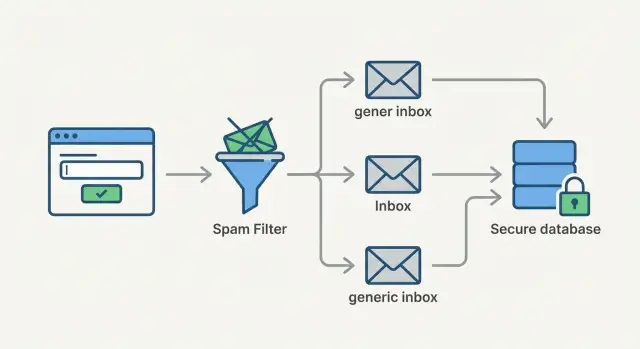
Why AI-built lead capture funnels break in real use
An AI-built prototype can look finished: a form, a thank you page, and an email notification. Then real traffic shows up and the funnel starts leaking leads. The usual pattern is simple. The happy path works in a demo, but the messy path (spam, retries, outages, weird inputs) was never built.
In an AI lead capture funnel, the most common failures aren't really "AI problems." They're basic reliability and security gaps that get skipped when code is generated fast.
What usually breaks first when a form meets the real world:
- Spam floods the inbox until real leads get buried or your email provider throttles you.
- Notifications fail quietly (misconfigured SMTP, rate limits, blocked domains), so you think you have "no leads."
- Submissions aren't stored anywhere reliable, or they're only stored on the client, so a refresh loses the record.
- The form accepts anything, including junk payloads that crash the handler or open security holes.
- Everything goes to one mailbox, so sales, support, and partnerships get mixed together and responses slow down.
A reliable funnel has one non-negotiable rule: every submission should be stored server-side, timestamped, and traceable. Even if email fails, you can still see what was submitted, whether it was routed, and what happened next.
When a funnel is leaking, it tends to show up in a few recognizable ways. People complain they "submitted twice" because they never saw a confirmation. Leads arrive in batches instead of in real time. You can't answer "how many submissions did we get last week?" without guessing. Or you notice odd test entries you didn't create, including sudden spikes from one IP.
The fix is rarely flashy. Make storage dependable, tighten validation, and add clear routing and audit logs so nothing disappears.
Map the funnel from form to follow-up
Most form problems happen after the click. Before you touch tools or prompts, write down what the lead is trying to do and what should happen next. An AI lead capture funnel is only useful if the handoff is clear.
Start with the goal. Are you collecting contact requests, demo bookings, quote requests, or support tickets? Each one needs a different follow-up. A quote request might need project details fast. Support needs context and urgency.
Then assign ownership. Decide who is responsible for each type of submission (sales, support, partnerships). Don't rely on "we'll sort it out in the inbox." That's how leads get missed when someone is out, or when two people assume the other replied.
You can capture the whole routing plan in 10 minutes:
- Lead type (sales, support, partnership, other)
- Owner (a specific person or a shared inbox)
- First response (what goes out, and by when)
- Escalation (what happens if there's no reply in X hours)
- Source of truth (where the submission is stored for recovery)
Pick one single source of truth for submissions. Email alone isn't enough because messages can be filtered, deleted, or misrouted. You want a place you can search later, export from, and audit when something goes wrong.
Finally, define success in a way you can measure: reply time, booked calls, qualified leads, or resolved support requests. "Sales replies within 2 business hours" is clearer than "respond quickly."
Choose form fields that help routing without scaring people off
A form should do two jobs: make it easy to contact you, and give you enough context to respond well. The more fields you add, the more people abandon. Start small and earn the right to ask for more later.
Keep the must-have fields to the basics: name (or first name), email, and a message. Then add one qualifier that helps you route the lead without turning the form into an interrogation. A single dropdown usually works better than extra text boxes.
Qualifier options only help if you actually use them. Common ones include:
- "What do you need?" (Sales, Support, Billing, Partnership)
- Timeline (ASAP, This month, Just researching)
- Project stage (Idea, Prototype, In production)
Set expectations right on the form so people know what happens next. A simple line like "We reply within 1 business day" reduces follow-up emails and makes the request feel safer. If you have different paths (sales vs support), say so in plain language.
Consent is easy to get wrong. Separate "contact request" from "marketing." If someone is asking for help, you can respond without a marketing opt-in. If you want to email newsletters or promos, add a clear unchecked checkbox for that.
Avoid sensitive fields unless you truly need them. Don't ask for passwords, full addresses, payment info, or private IDs in a contact form. If you need technical details, ask for them after the first reply, or provide a safer follow-up step.
Step-by-step: a simple, reliable submission flow
A lead form only works if every submission lands somewhere safe, even when email fails or spam floods in. The most dependable pattern is: validate, save, then notify. That order is what keeps you from losing real leads.
The flow to implement
-
Collect and validate input. Enforce required fields, check email format, and trim whitespace. Block obviously broken inputs (like an email without an @). Keep the rules strict enough to prevent junk, but not so strict that normal users get stuck.
-
Save first, before you notify. Create a submission record in your database (or another durable store) as soon as validation passes. Give it a unique ID and store the raw payload plus metadata like timestamp, source page, and IP address (if you collect it).
Only show "Thanks, we got it" after the save succeeds. If the save fails, show a generic error and a retry option.
-
Send notifications after the record exists. Trigger email, Slack, inbox rules, or ticket creation. If sending fails, mark the record as something like
notify_failedso you can retry automatically. -
Show a safe confirmation screen. Keep it boring on purpose. Don't reveal which inbox it went to, what rules you used, or any internal IDs. A simple confirmation message and expected response time is enough.
-
Write an event trail you can audit. Log key moments like "created," "routed," and "notified." When someone says, "I submitted yesterday and nobody replied," you can trace exactly what happened.
A practical example: a founder tests the funnel with five submissions. Two go through, one hits an email outage, and two are spam. With this flow, all five are saved, the outage is visible as notify_failed, and spam can be flagged without deleting data you might need for investigation.
Handle spam without blocking real leads
Spam isn't just annoying. It buries real people in your inbox, triggers email provider limits, and wastes time. The goal isn't "zero spam at any cost." It's low spam with low friction, so real leads still submit in one try.
Start with quiet filters users never notice. A honeypot field (a hidden input that should stay empty) catches basic bots. If that field has any value, block the submission.
Next, slow floods instead of trying to outsmart every bot. Rate limit by IP and by email. For example: 3 submissions per IP per 10 minutes, and 2 submissions per email per hour. When the limit is hit, show a friendly message like "Please try again in a few minutes."
CAPTCHA is a last resort, not a default. If spam is low, skip it. If spam jumps, turn it on only for suspicious traffic (new IPs, lots of attempts, unusual user agents), or only after the second failed try. Most real people should never see it.
Before accepting a lead, reject obvious junk with basic quality rules that legitimate users already meet:
- Require a real message (minimum length, not just a single word).
- Detect repeated text or copy-paste noise.
- Flag mismatched inputs (for example, a phone number full of letters).
Avoid deleting anything suspicious that could still be real. Put it in a review queue with the reason it was flagged (rate limit hit, disposable domain, repeated text). If your rules were too strict, you can recover leads instead of losing them.
Route leads to the right inbox every time
Routing is where many AI-built funnels quietly fail. The form works, but messages land in the wrong place, get missed, or hit a single person who's out sick. A good rule is simple: route by what the sender needs, then add a safety net.
Start with a clear Topic field that matches how your team actually works. A short dropdown like Sales, Support, Billing, Other is usually enough. Avoid free-text categories because they create messy routing rules.
If location or language changes who should respond, route on that too. For example, send Spanish messages to a Spanish-speaking inbox, or route EMEA leads to the team that can take calls in that time zone. Keep the rule set small so it stays readable.
Standardize the email subject so people can filter and search consistently. A predictable subject also helps you spot spikes in spam or delivery issues. Templates like these keep things tidy:
- New Lead [Sales] - {Company or Name} - {Country or Language}
- Support Request [Support] - {App Name} - {Urgency}
- Billing Question [Billing] - {Account Email}
Also store internal metadata that helps the team act fast: source page, campaign tags, referrer, and the submission ID. These details should go to your internal storage and notifications, not back in the confirmation message.
Always include a fallback inbox. If a rule fails (unknown topic, missing language, parsing error), send it to a triage address so nothing is dropped.
Store submissions reliably (and make them easy to recover)
Email is a notification, not storage. Treat every submission like money: record it first in a database or CRM, then send emails or Slack messages after. That way, a spam filter, inbox outage, or typo in a routing rule can't erase the lead.
A simple pattern works well: when the form is submitted, your server creates a new record and returns a confirmation. Only after the record exists do you trigger notifications. Give every submission a unique ID (a short code is fine). Put that ID in the email subject and inside the message so you can search and recover the full submission even if the email content is cut off.
To avoid silent losses, design for failure on purpose:
- Save first, notify second
- Retry notifications (for example, 3 attempts over 10 minutes)
- Keep a dead-letter queue for notifications that still fail
- Log every step (received, saved, routed, notified, failed)
Duplicates are another quiet lead killer. People double-click, refresh, or resubmit when a page feels slow. Use idempotency: generate a one-time token for the form session, and if the same token is sent again, return the same result instead of creating a second record. If you do want to allow repeats, store them as separate events tied to the same contact.
Plan for exports and backups before you need them. A weekly CSV export plus database backups means you can rebuild your pipeline after a mistake.
Common mistakes that cause lost leads
Most lost leads happen for boring reasons, not technical ones. A funnel can look finished in a demo and still drop real submissions once people start using it.
A common trap is "we send an email, so we're done." Email delivery isn't storage. Messages get spam-filtered, delayed, or routed to Promotions, and you have no record to recover when someone says, "I submitted yesterday."
Another mistake is hard-coding a single inbox. It works until you add a second product, a support queue, or a teammate goes on vacation. Then edge cases pile up, and important leads land in the wrong place or nowhere at all.
No logs is the bigger problem. If you can't answer "Did we receive it?" "Did we validate it?" "Did the email provider accept it?" you can't fix issues fast. You also won't notice a broken integration after a deploy.
Spam controls can backfire too. Overusing CAPTCHA or adding multiple challenge steps can crush conversions, especially on mobile. A simpler approach often works better: light friction plus good validation and rate limits.
Before you ship, pressure-test the weak spots:
- Submit the form on mobile using slow data and confirm the success message is clear.
- Turn off email temporarily and confirm submissions are still saved and recoverable.
- Send a few test leads that should route differently (sales, support, partnerships) and verify each destination.
- Try obvious spam (gibberish, repeated submissions) and confirm it's blocked without blocking normal users.
- Verify you can trace one submission end-to-end in logs without copying sensitive data.
Security and privacy basics for lead forms
A lead form feels simple, but AI-generated funnels often break on security basics. The goal isn't perfect security. It's avoiding common mistakes that leak data, invite abuse, or create compliance problems.
First rule: never put secrets in the browser. If your form code contains an API key, SMTP password, database URL, or private token, assume it will be copied. Keep all credentials on the server side, and have the client call a single backend endpoint that validates and stores the submission.
Treat every field as untrusted input. Even a name can contain malicious text. Validate types and length, escape output when you display it later, and use parameterized queries so user input never becomes part of your SQL. This is where many prototypes get burned by SQL injection or unsafe string building.
Access is the next weak spot. Submissions shouldn't be visible to everyone "just in case." Give the least access needed. Sales can see contact details, support can see tickets, and only admins can export or delete data.
Email is convenient, but it isn't a secure database. Avoid emailing sensitive details (passwords, access tokens, personal IDs). Send a short notification and keep the full record in your storage system.
A simple privacy checklist:
- Define a retention rule (for example: delete raw submissions after 30-90 days).
- Log who viewed or exported submissions.
- Add rate limiting and bot checks on the server.
- Mask or redact sensitive fields in notifications.
- Back up storage so you can recover data after mistakes.
Example: a funnel that routes sales vs support and stops spam
A small agency has one contact form on its site. People use it for two very different things: new project inquiries and "your login is broken" support requests. They built an AI lead capture funnel with an AI coding tool, but in practice everything lands in one inbox, spam pours in at night, and the team misses real leads.
They fix this with one small change: add a simple "What do you need?" choice, like Sales, Support, Partnerships, Other. Then they add one optional detail field ("Website or app link") that helps the team act fast without forcing people to write a long message.
Their submission flow stays predictable:
- Validate required fields (name, email, topic, message).
- Create a submission record and generate a unique ID (example: FM-48219).
- Route notifications by topic (Sales inbox for Sales, Support inbox for Support).
- Send an auto-reply to the sender with the ID and response-time expectation.
Then a spam wave hits: the form gets 300 junk posts in an hour. Instead of adding a puzzle that blocks real people, they use quiet defenses:
- Honeypot field
- Rate limits per IP and per email
- Basic content checks (too many links, repeated text)
- Soft-block mode (store it, but don't notify)
Because every request is stored with an ID, nothing is truly lost. A week later, a real lead says, "I submitted the form but nobody replied." The agency searches stored records for their email, finds FM-48219 sitting in soft-block, and replies in minutes.
Quick launch checks and practical next steps
Before you call your funnel done, test it the way real users will hit it: flaky mobile networks, different browsers, and people who don't follow the happy path. A lead capture flow can look fine in a demo and still drop submissions quietly.
Use a small, structured test plan and write down what happened for each attempt (time, device, what you submitted, what you expected). If anything feels hard to verify, that's usually a sign you need better logging or a clearer data trail.
A quick pre-launch checklist:
- Send realistic test submissions from different devices and networks (phone on cellular, laptop on home Wi-Fi, and a different browser).
- Confirm each submission is saved first, and that it stays saved even if the email step fails or times out.
- Try at least three lead types that should route differently (sales, support, partnerships) and confirm each one lands in the right inbox.
- Check logs and confirm you can trace one submission end-to-end using a unique ID (form received -> saved -> routed -> notifications sent).
- Review errors: validation failures, rate limit hits, and any 500s during your tests.
After launch, add a simple weekly routine: 10 minutes to check error counts, scan spam trends, and confirm storage is still growing normally.
If you inherited an AI-generated app where forms are brittle, credentials are exposed, or submissions vanish, FixMyMess (fixmymess.ai) focuses on turning those prototypes into production-ready software. A free code audit can quickly show where your funnel is leaking and what needs to be hardened first.
FAQ
Why does my AI-built lead form work in tests but lose leads in real traffic?
Start by checking whether submissions are being saved server-side. If the only “record” is an email notification, you can lose leads to spam filters, SMTP misconfigurations, or provider rate limits and never know it happened.
What’s the safest submission flow for a lead capture funnel?
The safest order is validate → save → notify. Save the submission in a durable store first, then send email/Slack/tickets, so outages don’t erase leads.
Why isn’t sending an email notification enough?
Email gets delayed, filtered, deleted, or routed incorrectly. Treat email as a notification, and keep the real submission record in a database or CRM so you can search, export, and recover when something fails.
How do I reduce spam without hurting conversions?
Use a hidden honeypot field and server-side rate limits first. Only add CAPTCHA when spam actually spikes, and ideally show it only to suspicious traffic so normal users don’t get blocked.
What’s the simplest way to route leads to the right inbox?
Add one simple dropdown like Sales, Support, Billing, Partnership, Other, and route based on that. Always include a fallback “triage” destination so unknown or malformed submissions still go somewhere.
What should I log so I can trace a missing submission later?
A unique submission ID plus an audit trail of events like created, routed, notified, and notify_failed. When someone says they submitted, you can look up exactly what happened without guessing.
How do I stop duplicate submissions from creating duplicate leads?
Give the form an idempotency token so double-clicks and refreshes don’t create duplicates. If you want to allow repeats, still tie them to the same contact so your team doesn’t reply twice by accident.
What are the biggest security mistakes in AI-generated lead funnels?
Keep all secrets on the server, not in browser code. Validate and sanitize inputs, use parameterized queries, and avoid emailing sensitive details; store the full record securely and send minimal notifications.
What fields should my form include to stay short but still useful?
Keep must-haves to name, email, and message, then add one qualifier that helps routing. Set clear expectations like a response-time line, and separate “contact request” from marketing consent with an unchecked opt-in.
What’s the quickest way to pressure-test an AI funnel before launch?
Start with real-world tests: mobile on slow data, different browsers, and a simulated email outage. If the code is AI-generated and brittle, FixMyMess can run a free audit to find where submissions leak, where secrets are exposed, and what to harden first so the funnel is production-ready in days, not weeks.