API-aligned form validation to stop bad data at the source
API-aligned form validation keeps client and server rules consistent, so users see clear errors before submit and requests stop failing for avoidable reasons.
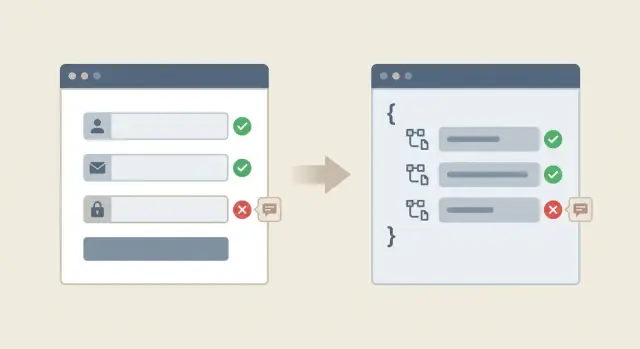
Why mismatched validation causes avoidable failures
Bad data usually isn’t dramatic. It’s everyday stuff: a required field left blank, a date typed as “12/13/24” when the API expects “2024-12-13”, a phone number with letters, or a dropdown option that changed on the backend but not in the form.
When the form accepts those inputs and only the API rejects them after submit, users feel tricked. They did the work, clicked the button, and then hit a vague “Something went wrong.” Sometimes the error shows up far from the field that caused it, so they’re forced to guess.
Mismatched rules let a few predictable problems slip through: empty or whitespace-only required fields, wrong formats (email, date, postcode), values outside limits (too long, too small, too many items), outdated enum values (an old plan name or removed role), and cross-field conflicts like an end date before a start date.
The cost adds up quickly. Each failed request can mean an abandoned signup, a lost checkout, or a half-created record that needs cleanup. Support tickets follow: “I can’t create an account,” even though the real issue is a simple formatting rule. Over time, inconsistent records creep into your database and make reporting and automations less reliable.
API-aligned form validation is a simple idea: the same rules run in both places. The form prevents obvious bad inputs and shows clear, field-level feedback before the request goes out. The API still validates everything (never trust the browser), but it mostly confirms what the user already fixed.
Client vs server validation in plain language
Client-side validation happens in the browser while someone fills out a form. It’s the quick feedback that catches obvious mistakes early: missing required fields, an email that doesn’t resemble an email, or a password that’s too short.
Server-side validation happens after the form is submitted and your API receives the data. It’s the final gatekeeper that protects your database and your users.
Why you need both
Client-side rules are about speed and clarity. They reduce frustration because people can fix problems right away.
Server-side rules are about safety and truth. The server must validate because anyone can bypass the browser (custom scripts, modified requests, old app versions), the server sees the real state (existing accounts, permissions, rate limits), and some checks require trusted data (ownership, security, integrity constraints).
A common misunderstanding is thinking client-side validation “prevents bad data.” It helps, but it can’t guarantee it. Only the API can make that promise.
The real goal: one shared rulebook
What you want is one shared rulebook: the client and server enforce the same requirements, so users get the same answers in both places.
In practice, that means choosing one source of truth for rules (often an API schema or a server validation layer), then making the client reflect it. If the server requires a password of 12+ characters and blocks common passwords, the form should say “12+ characters” up front. The “common password” check can be a softer hint, but the hard requirement should be consistent.
What should be validated and where
Some checks belong in the browser because they help people finish the form. Other checks must happen on the server because only the server knows what’s true right now. The goal is consistency: users should learn about problems before a request fails, and when the server rejects something, the reason should match what the UI already teaches.
Start with field shape rules. These basics should match everywhere:
- Whether a field is required
- The expected type (text, number, date)
- The format the API expects
If your API expects a number and the form sends text, the request fails even if the UI looked fine.
Constraints should also be shared: minimum and maximum length, allowed values (like a country code list), and simple patterns (for example, “must include an @”). Client-side validation gives fast feedback; server-side validation confirms it.
Cross-field rules need extra care because they involve more than one input. If users can fix the issue by comparing two fields on the same screen, validate it in the form and recheck it on the server. Two common examples are “password and confirm password must match” and “start date must be before end date.”
Some rules are backend-only because the client can’t reliably verify them. These include uniqueness checks (is this email already registered?), permissions (is this user allowed to set this value?), rate limits, anything that depends on current database state, and security rules (reject unexpected fields or values).
A signup form can validate email format locally, but only the API can confirm whether the email is already taken.
How validation rules drift out of sync
Validation drift often starts with good intentions: someone fixes a bug quickly, ships it, and moves on. A week later, another person adds a “temporary” rule in a different file. After a few iterations, the UI and API disagree, and users get confusing failures.
Copy-paste validation is a common cause. A team builds three forms that collect the same field (email, phone, company name), but each form ends up with slightly different rules. The API might enforce a stricter format while one form only checks “not empty.”
Version changes are another source. The backend updates a rule (password length goes from 8 to 12, or a field becomes required), but the UI stays on the older assumption. Users pass client-side validation and still hit server errors.
Environment differences can hide drift until it hurts. Staging may have relaxed settings, different feature flags, or a different auth provider configuration. Everything looks fine in testing, then production rejects real inputs because the rules are stricter.
AI-generated code can make this worse by duplicating validation across components, mixing libraries, or inventing regex rules that don’t match the API. It’s common to see the same field validated three different ways in one app.
You likely have drift if you see patterns like these:
- Users report “it says OK, then fails” after pressing Submit
- The same field behaves differently on different pages
- Errors show up as a generic “Something went wrong”
- Fixes are made in the UI without updating the API contract (or the other way around)
Step-by-step: make the API the source of truth
If users can fill out a form that your API will reject, you end up with wasted requests and confusing failures. The fix is straightforward: treat the API contract as the source of truth, then make the UI mirror it.
Start by writing down the contract for the endpoint you’re calling. For every field, capture:
- Type
- Required vs optional
- Allowed ranges and limits
- Formats (email, UUID, date)
- Constraints like max length or allowed values
Then split rules into two buckets. First, rules the browser can check instantly (required, format, length). Second, rules only the server can know (uniqueness, permissions, rate limits, “current password matches”). This keeps feedback fast without pretending the client can guarantee server reality.
A practical path that holds up over time:
- Choose a schema format you can reuse (OpenAPI, JSON Schema, or a shared validation library).
- Put the endpoint request and response rules in that schema, including constraints.
- Generate or reuse client validators from the schema so UI rules aren’t hand-copied.
- Validate on the server using the same schema (or equivalent rules) before business logic runs.
- Standardize error codes and message templates so the same issue looks the same everywhere.
Also make errors predictable. Use stable error codes (like email_taken or password_too_short) and let both client and server map them to clear text.
Designing error messages users can act on
People fix problems faster when the message tells them exactly what to change. The goal is consistency: the same rule should produce the same message, whether it was caught in the browser or rejected by the API.
Write one clear sentence per rule, and keep it stable. If the rule changes, update the message at the same time. “Password must be at least 12 characters” is actionable. “Invalid input” is not.
Where you show errors matters as much as what you say. Put the message next to the field that needs attention. Add a short summary at the top only when it helps people find missed fields, especially on long forms.
A reliable pattern for most forms is:
- An inline message under the field (short and specific)
- Styling that highlights the exact input
- A top summary listing 1-3 issues (no duplicates)
- Focus moving to the first error after submit
Server errors need special care. Even with good client checks, requests will fail for reasons the client can’t fully control: expired sessions, race conditions, or rules the UI didn’t know yet. When the API responds with errors, map them back to fields using consistent keys and reuse the same wording. If an error isn’t tied to a single field, show it as a page-level message.
Avoid technical phrasing in user-facing text. People shouldn’t see “400 Bad Request” or raw validation codes. Translate them into plain language like “That email address is already in use” or “Please enter a valid date.”
Cross-field and async checks without confusing users
Some validation isn’t about a single field. It’s about how fields work together. If you only validate each input in isolation, users can still submit data that fails on the server and then get an error that feels random.
Cross-field validation covers the checks users expect: “end date must be after start date” or “password and confirm password must match.” A good rule of thumb: if the user can fix it by comparing fields on the same screen, validate it in the form and explain it right next to the fields.
Keep the message tied to the fix. “Dates are invalid” is vague. “End date must be after start date” tells them what to change.
Async checks: when you must ask the server
Some checks depend on real data or permissions, so they require the server. Common examples are “email already used,” “invite code is valid,” or “username available.” These checks still belong in an aligned validation system, but the UI needs to handle them gently so they don’t interrupt typing.
A simple approach:
- Show a small “Checking…” state after the user pauses or leaves the field.
- Let the user keep filling the form while the check runs.
- If the check fails, explain what to do next (use a different email, request a new invite).
- If the check can’t run (offline or timeout), don’t pretend it passed. Ask them to retry on submit.
When to validate: blur, submit, or progressive
Timing matters. Validating on every keystroke can feel like the form is arguing with the user.
A simple default that works for many teams:
- Validate basic format and minimum length as they type.
- Validate cross-field rules when the second field is touched (confirm password) or on blur.
- Run async checks on blur or after a short pause, not on every keypress.
- Re-check everything on submit and map server errors back to the right fields.
Common mistakes that create noisy failures
Noisy validation failures feel random to users, but they usually come from a few predictable mistakes. The biggest theme is drift: the UI and the API slowly start enforcing different rules.
Trusting client-only checks is a classic trap. Users can bypass the browser, or your API can be called from a different client. When the server becomes the first place validation happens, people see failures only after they’ve spent time filling out a form.
Patterns that cause the most “why did this fail?” moments include:
- The same field has different rules on different screens (signup vs settings).
- Regex rules that block real input, like names with apostrophes, non-English characters, or apartment numbers in addresses.
- The API returns a generic 400/500 error, so the UI can’t highlight the field that needs fixing.
- API validation rules change but UI tests and QA scripts still expect the old behavior.
- Errors are written for developers (“constraint violation”) instead of users (“Password must be at least 12 characters.”)
A simple example: the UI accepts “Sam O’Neil” in a profile form, but the API rejects it because the server regex only allows A-Z. The user sees “Request failed” with no field highlight, tries again, and gives up.
Reducing noise often comes down to a few focused fixes: standardize rules per field across screens, loosen patterns to match real-world input, and return field-specific error codes the UI can place exactly where users need them.
Quick checklist to verify alignment before release
Before shipping, do a quick pass that checks the full path: what the user types, what the UI blocks, what the API rejects, and what message the user sees.
Start by comparing API requirements to the form. If the API says a field is required, the UI should clearly mark it required and prevent an empty submit. If the UI requires something the API doesn’t, users can get stuck for no reason.
Use a small, repeatable set of tests for each field:
- Match required rules: every required API field is required in the UI, and optional fields are truly optional.
- Try three bad values per field: too short, too long, wrong format.
- Run one cross-field rule end to end: the client message and server message should say the same thing.
- Confirm the API returns field-level errors, not only a single generic string.
- Confirm the UI treats network errors differently from validation errors (a timeout should not look like “your email is invalid”).
One practical tip: do at least one real submit test with browser dev tools open. If the server rejects something the UI allowed, you have drift.
A realistic example: a signup form that keeps failing
A team ships a signup page with four fields: email, password, company name, and an invite code. It looks fine in the browser. But support tickets pile up: “It keeps saying something went wrong.”
The root cause is a mismatch. The UI checks that the password is at least 8 characters. The API requires at least 12. A user types Sunshine1 (9 characters), the form shows a green check, the request goes out, and the API rejects it with a 400 response. The app turns that into a generic banner at the top, and the user has no idea what to fix.
The symptoms are easy to spot:
- Many failed requests right after submit
- Generic error banners instead of field-level hints
- Users retrying with the same data and getting stuck
The fix isn’t “add more checks.” It’s to make the API contract the source of truth and keep client rules generated from it.
A simple repair flow:
- Decide the real rule (8 or 12) with the team that owns the API.
- Update the API contract (for example, an OpenAPI schema) to reflect that rule.
- Regenerate or update the client validation from the contract.
- Map the API error to the password field with a clear message like “Password must be at least 12 characters.”
- Retest the flow, including a short password and an invalid invite code.
After this, bad requests drop because users get feedback before submit. If the invite code must be checked on the server, the UI can still help: validate the format locally (length, allowed characters), then show “Invite code not found” only after the server confirms.
Next steps to keep validation aligned over time
Pick one high-traffic form and make it your alignment pilot. Choose something that breaks often or matters most to revenue, like signup, checkout, or password reset. Bring the API rules (types, required fields, min/max lengths, allowed values) next to the form rules and close the gaps until the same inputs pass or fail in both places.
Once one form works cleanly, repeat the approach on the next form instead of trying to fix everything at once. Small wins are easier to verify, and they reduce support tickets quickly.
Add a light contract review when the API changes
Validation drifts when the API evolves and the UI doesn’t. Add one step to your normal change process: whenever an API request or response shape changes, someone checks whether the form rules and error messages still match.
Keep the routine short:
- Note what inputs became stricter or looser.
- Update server rules and client rules in the same pull request.
- Confirm error messages match the field names users see in the form.
- Run one bad-input test on purpose (empty required field, too-long string, invalid format).
If the codebase is messy, start with an audit
If your app was generated by an AI tool or inherited from a prototype, mismatched validation is often a symptom of bigger problems: duplicated rules in multiple files, half-finished auth flows, or unsafe patterns like trusting client-only checks.
If you need an outside review, FixMyMess (fixmymess.ai) focuses on diagnosing and repairing AI-generated apps, including reconnecting client-side and server-side validation, fixing broken authentication, and hardening security issues that show up when prototypes meet real traffic.
FAQ
Why does my form look valid but still fail after I click Submit?
When your form lets something through that the API rejects, users waste time and feel tricked. The fix is to make the API’s rules the source of truth and make the UI reflect those same rules before submit.
Do I really need both client-side and server-side validation?
Client-side validation is for fast, clear feedback while someone is typing. Server-side validation is the final authority that protects your data, because anyone can bypass the browser and the server knows the real state (like existing accounts and permissions).
What validation rules should always match between the UI and the API?
Start with “shape” rules: required vs optional, type, format, and basic limits like min/max length. These are easy to keep consistent and they prevent most avoidable submit failures.
Which validation checks should only happen on the server?
If the check needs live server state, keep it server-first. Examples include “email already taken,” permission checks, rate limits, and anything that depends on what’s currently in the database.
How do I write validation errors that users can actually fix?
Put the message next to the field that needs fixing and say exactly what to change. Use the same wording whether the error was caught in the browser or returned by the API, so the user doesn’t get mixed signals.
How can my UI highlight the correct field when the API rejects input?
Have the API return stable error codes and field identifiers, not a single generic error string. Then the UI can map each error back to the right input and show the same message it would have shown client-side.
What’s the best way to handle cross-field rules like start/end dates?
Validate cross-field rules in the form as soon as the second field is available, and re-check them on the server. The message should name the relationship, like “End date must be after start date,” so the fix is obvious.
How should I handle async checks like “email already in use” without annoying users?
Run async checks after a short pause or on blur, and don’t block typing. If the check times out or can’t run, be honest and re-try on submit instead of pretending the value is OK.
Why do validation rules drift out of sync over time?
Copy-pasting rules into multiple forms, changing backend rules without updating the UI, and having different settings between staging and production are the usual causes. AI-generated code often makes this worse by duplicating validators or mixing validation libraries for the same field.
What’s the quickest way to fix validation mismatches in a messy or AI-generated app?
Pick one high-traffic form and compare what the API requires to what the UI enforces, then test a few bad inputs on purpose. If the codebase is messy or AI-generated, a focused audit can quickly find duplicated rules, mismatched constraints, and missing field-level errors; teams like FixMyMess specialize in turning those prototypes into production-ready flows.