API keys in frontend builds: how to find and fix leaks
API keys in frontend builds can expose your data. Learn how to find bundled secrets, move them server-side, and rotate safely.
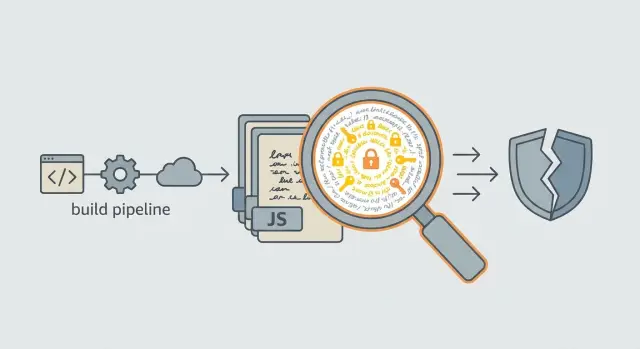
What it means to leak secrets through a frontend build
A frontend build is the set of files your users download to run your app in a browser. It usually includes bundled JavaScript (often one big file), CSS, images, and other static assets. Build tools take your source code and package it so the browser can load it quickly.
A leak happens when something you meant to keep private gets baked into those downloadable files. If it ships to the browser, anyone can see it by viewing page source, opening DevTools, or downloading the bundle and searching through it.
Secrets are anything that lets someone act as your app or access protected systems. Common examples include API keys and service tokens (Stripe, OpenAI, map providers, email services), database connection strings, JWT signing secrets, private encryption keys, private webhook URLs, admin endpoints, and internal URLs that bypass normal auth.
This is why API keys in frontend builds should be treated as public information. Minification and obfuscation don’t help. If the browser must receive the value to use it, an attacker can receive it too.
The impact is usually straightforward: someone copies your key and runs up your bill, drains rate limits so real users get errors, or uses your account to spam a provider. If the secret unlocks data access, it can become a real breach (customer records, files, or admin actions). Costs and damage often start small and then escalate fast, especially when the leaked key has broad permissions.
Common ways secrets end up in client code
Most leaks aren’t “hacks”. They come from normal build and configuration choices that accidentally treat secrets like public settings.
Build-time injection turns .env into shipped code
Tools like Vite, Next.js, and Create React App can replace environment variables at build time. If a secret is referenced in client code, the bundler often swaps it in as a plain string. A value that lived safely in a local .env file can end up baked into production JavaScript.
A common trap is thinking, “it’s in an env var, so it’s safe.” It’s only safe if it’s used on the server and never included in client bundles.
“Public” env prefixes are for public values
Frameworks use prefixes to mark variables that may be exposed to the browser (for example: VITE_, NEXT_PUBLIC, REACT_APP). These are fine for non-sensitive settings like a feature flag or a public analytics ID.
They are not a place for anything that can spend money, access private data, or grant elevated permissions: third-party API keys that create charges, admin tokens, signing keys, database URLs, service credentials, and webhook secrets.
If you put a secret behind a public prefix, you’re explicitly asking the build system to publish it.
Hardcoded strings and “helpful” config files
Secrets also sneak in through constants, config objects, and JSON files (for example, config.ts, firebaseConfig, or settings.json). They can look like harmless app configuration during review.
This is especially common in AI-generated prototypes: tools often paste a working example with a key inline so the demo “just works.” If that code ships, the key becomes public.
Source maps make discovery easier
Source maps don’t create the leak, but they can make it much easier to find. If source maps are public, an attacker can search readable source for tokens, endpoints, and secret-looking strings instead of scanning minified bundles.
If you suspect a secret has been exposed, assume it’s already compromised. Plan to move it server-side and rotate it.
Fast ways to spot exposed env vars and API keys
You can often confirm a leak in minutes without changing any code. Start with what the browser already has.
-
Watch network requests in DevTools. Open the Network tab and click through flows that call third-party services (login, checkout, search, file upload). Open a request and check Headers and Preview/Response. Leaks often show up as query params (like
?api_key=), anAuthorization: Bearer ...header, or a JSON body that includes a token. -
Search what you actually ship. In your built output folder (often
dist/orbuild/), run a text search across.jsfiles for patterns likesk-,api_key,apikey,secret,token,Bearer,BEGIN PRIVATE KEY, plus your vendor names and base URLs (Stripe, OpenAI, Twilio, Supabase, etc.). -
Open the compiled bundle and scan for suspicious strings. Look for hardcoded credentials, full endpoints, or config blobs that include keys. A common red flag is runtime config exposed on
window(for examplewindow.__CONFIG__orwindow.env) that includes anything more sensitive than public IDs. -
Check whether source maps are accessible in production. Public
*.mapfiles can reveal original variable names and config structures, which makes reuse faster.
A practical test: if you can copy a token from DevTools and replay the same request from another browser profile or a script, it’s not a safe client-side value.
Plan the cleanup before you change code
Once you’ve confirmed a leak, don’t start ripping out variables or rotating everything at once. A small amount of planning prevents outages, broken logins, and confusing 401 errors.
Start by listing every external system your app talks to and where credentials live today: payments, email, file storage, analytics, AI APIs, and anything else. Include staging, preview, and local dev. Leaks often happen in preview builds because they feel disposable.
Next, separate what can be called from the browser from what must be server-only. Anything that can spend money, read private data, write to your database, or bypass rate limits should not be callable directly from the client. If a service offers a publishable key meant for browsers, treat it differently from a secret key.
Create a simple inventory the team can share:
- Key name as used in code (for example,
STRIPE_SECRET_KEY) - Service and account/project it belongs to
- Environments (dev, staging, prod)
- Where it appears (repo, CI, hosting settings, built files)
- Risk level (low for public IDs, high for secrets)
Then decide what to rotate immediately versus after code changes. Rotate now if the leaked key grants write access, has broad scopes, or can drain credits. Delay rotation if it will break production before you have a server-side replacement ready.
Set a short freeze window (even 30 to 60 minutes) where nobody merges, deploys, or changes hosting env vars while you coordinate. Assign an owner for each service and agree on the order: ship server-side changes first, rotate next, then redeploy and verify.
Step-by-step: audit, remove, and retest your build
Treat this like an incident: find what leaked, stop the leak, then prove it’s gone.
1) Audit what exists (repo and build output)
Search your source code and your built assets (the final files your users download). Don’t stop at the repo. Build files can hide secrets in minified bundles.
A simple workflow:
- Scan for secret-like patterns: long tokens, provider prefixes (for example,
sk_,xoxb-), andBearerstrings. - Check env usage:
process.env,import.meta.env, and any framework public env variables. - Search built JS for obvious strings: your API domain, key prefixes, or JSON blobs with credentials.
- Confirm where it appears: in source, in config, or only after the build step.
- Write down every match and where it was found before you change anything.
2) Confirm what is actually sensitive
Not every key-looking value is dangerous. Some services use publishable keys meant for browsers, while others grant full account access.
Ask two questions:
- What can this credential do?
- Can an attacker use it from their own machine?
If the answer is yes and yes, treat it as sensitive.
3) Remove it from the client, replace with a server call
Delete the secret from client code and from any build-time env that ends up in the browser. Replace the client-to-vendor call with a server endpoint that uses the secret on the server. The frontend should call your endpoint, not the vendor directly.
4) Retest with a fresh key (non-production first)
Create a new key, test end-to-end in staging or preview, and only then switch production. Rebuild and re-scan the output to confirm the secret is truly gone.
Move secrets server-side without breaking your app
The safest fix isn’t “hide it better in JavaScript.” It’s to stop sending the secret to the browser at all.
The basic pattern: a server-side proxy
Have the client call your backend endpoint (or a serverless function). That endpoint talks to the third-party API and adds the secret on the server. The browser never sees the key.
A simple approach that keeps your UI behavior the same:
- Replace the direct third-party API call in the frontend with a call to your own endpoint.
- On the server, read the secret from server-only environment variables.
- Return only the data the UI needs, not the full upstream response.
Avoid building an open proxy. Validate inputs on the server: allow only the routes you need, check required fields, and block unexpected URLs or headers. If your endpoint accepts a “target URL” from the client, you’ve recreated the leak in a new shape.
Prefer short-lived tokens when possible
If a third-party supports it, generate short-lived tokens server-side and send only the token to the client. Tokens that expire in minutes are safer than long-lived keys baked into a bundle.
Pair this with basic server controls like rate limiting and request logging so abuse shows up quickly (sudden spikes, repeated failures, unusual payloads).
Keep client code limited to public identifiers (like a public project ID) and non-sensitive flags (like useSandbox: true). Anything that grants access or can create charges belongs on the server.
Rotate keys safely with minimal downtime
Rotating a leaked key isn’t just “generate a new one and paste it in.” If you revoke the old key too early, real users get errors. If you leave it active too long, the leak can still be abused. Aim for a short, controlled overlap.
The safest approach is two-phase rotation: introduce the new key first, confirm traffic is using it, then revoke the old one.
A low-risk rotation sequence
Do this when you can watch your logs.
- Create a new key in your provider dashboard. Name it clearly (for example:
prod-2026-01-rotation). - Add the new key to a server-side secret store (not the frontend build). Keep the old key active for now.
- Deploy a version that uses the new key.
- Verify usage in provider logs and your app logs.
- Revoke the old key after a short overlap window (often 15 to 60 minutes, longer if deploys are slow or you have long-running jobs).
Set a reminder to revoke the old key. Teams often forget, especially during an incident.
Don’t forget the “hidden” callers
Before revoking anything, make sure you’ve updated:
- Background jobs and scheduled tasks
- Webhooks and third-party integrations that call your API
- Mobile apps (they can lag if users don’t update)
- Staging environments that accidentally share production keys
- Local testing setups that still use the old key
After the deploy, watch error rates and authentication failures closely. If something breaks, roll back quickly or extend the overlap while you find the missed caller.
Common mistakes that keep the leak alive
If you can see a value in the browser (View Source, DevTools, network requests, bundled JS), an attacker can too.
- Minification and obfuscation don’t protect secrets. A key embedded in a bundle is still a key, even if it’s split across variables or renamed.
- Long-lived tokens in
localStorageorsessionStorageare easy to steal with XSS. Prefer short-lived, server-issued sessions (often via HTTP-only cookies) and keep real credentials on the server. - Debug endpoints and admin routes get left open. Anything that bypasses auth or dumps data during testing can become a path to production data.
- Client-side error logging can leak secrets. Avoid logging full request headers, tokens, or config dumps in the browser.
- CORS isn’t a security boundary. It only limits which browsers can read responses. It doesn’t stop direct calls from scripts, servers, or tools like curl.
Quick pre-deploy checklist
Use this right before you ship.
5 checks that prevent most leaks
- Confirm the client bundle is clean: Search the built output (not just source) for key patterns (for example,
sk_,AIza,Bearer,-----BEGIN, or your vendor name). Also confirm you aren’t using public env prefixes (likeNEXT_PUBLIC_orVITE_) for anything that should stay private. - Treat source maps as sensitive: If you keep source maps in production, restrict access. If you don’t need them, disable them for production builds.
- Move secrets behind a server boundary: Any call that needs a secret should go through your server (or serverless function). The browser should only send user intent and receive safe results.
- Lock down server endpoints: Validate inputs, check auth where needed, and enforce rate limits.
- Rotate keys and watch for abuse: Create new keys first, deploy the change, then revoke old keys. Monitor for sudden traffic or cost spikes.
A simple example: if your frontend calls a map or AI provider directly, that key will be copied and reused by strangers. Instead, the browser calls your backend endpoint, and the backend calls the provider with the secret.
Example: an AI-generated prototype that shipped a real API key
A founder builds a quick MVP in Lovable. It looks great, so they deploy it the same day. The app calls a paid third-party API (like an LLM, maps, email, or analytics), and the key is set as an environment variable. The catch is that the build tool copies that value into the browser bundle, so the key ends up inside the shipped JavaScript.
A curious user opens DevTools, searches the Sources tab for “key” or the vendor name, and finds it in a minified file. They copy it and run requests from their own script. Within hours, usage spikes, costs jump, and the vendor dashboard shows a flood of traffic that doesn’t match real users.
The fix is simple, but order matters:
- Move the API call behind a server route (or serverless function) so the browser never sees the secret.
- Add basic protection on that route: auth checks, rate limits, and input validation.
- Rotate the exposed key and revoke the old one after a short overlap.
- Review vendor logs for suspicious IPs, unusual endpoints, and traffic outside your normal hours.
- Add alerts and spending limits so you get warned before costs run away.
After the change, the UI still triggers the same feature. It just calls your backend endpoint instead of the vendor directly. The backend reads the key from server-side environment variables and talks to the third-party API on the user’s behalf. In the browser, there’s nothing valuable to steal.
Next steps if your codebase is messy or AI-generated
If your app was generated with tools like v0, Cursor, Replit, Bolt, or Lovable, assume the same secret may be copied into more than one place: a .env file, a config helper, a “temporary” debug log, and the client bundle itself. That’s why quick fixes fail. You remove one copy, but another copy still ships.
Focus on every path the value can take, not just the obvious one. That includes build-time env injection, bundled config objects, serverless functions, and auth flows that pass tokens through the browser.
A practical approach when the repo is hard to trust:
- Identify the secrets that matter most (payment, email, database, admin APIs).
- Search the repo for key patterns and env var names, then check the built output too.
- Trace how requests are made: browser direct to a vendor API, or via your server.
- Decide the new server-side home for each secret (API route, backend service, proxy).
- Plan key rotation after the code change to avoid surprise outages.
If you inherited a broken AI-generated prototype and need a fast, security-focused pass, FixMyMess (fixmymess.ai) does codebase diagnosis and remediation for issues like bundled secrets, broken auth, and unsafe request patterns, and they offer a free code audit to map what’s exposed before you start rotating keys.
FAQ
What counts as a “secret” in a frontend build?
If the browser needs the value to run, it’s effectively public. Anything that can spend money, read private data, write to your database, or sign/verify tokens should be treated as a secret and kept server-side.
Does minification or obfuscation protect API keys in JavaScript bundles?
No. Minification only changes how the code looks, not what it contains. Anyone can download your bundle and search for strings, so a key embedded in JavaScript is still exposed.
Are NEXT_PUBLIC_, VITE_, and REACT_APP_ environment variables safe to use for secrets?
Those prefixes are explicitly meant for values that can be exposed to the browser. Use them only for non-sensitive settings like public IDs or UI flags, and never for secret keys, service tokens, or database URLs.
How can I quickly tell if a key is leaking without changing code?
Open your site, use DevTools, and check network requests for query params, headers, or request bodies that contain tokens. Then search the built output files for obvious patterns like “Bearer”, “api_key”, provider names, or recognizable key prefixes.
Why do public source maps make secret leaks worse?
Source maps don’t create the leak, but they make it much easier to find and reuse because they reveal readable source and variable names. If you keep them in production, restrict access, or disable them for production builds if you don’t need them.
What should I do first after I find an exposed key?
Assume it’s compromised and stop the leak before you spend time debating it. Capture where you found it, identify what it can do, and plan the change so you can move the secret server-side and rotate it without breaking production.
What’s the safest way to move a secret out of the frontend without breaking features?
Replace the direct browser-to-vendor call with a backend endpoint (or serverless function) that calls the vendor using server-only environment variables. The frontend should send user intent and receive safe results, not carry the vendor credential.
Is it okay to store tokens in localStorage or sessionStorage?
It’s risky because any XSS bug can steal those tokens and replay them. Prefer server-managed sessions and short-lived credentials where possible, and avoid storing long-lived secrets in browser storage entirely.
How do I rotate a leaked key without downtime?
Use a two-step approach: deploy code that supports the new key first, confirm traffic is using it, then revoke the old key after a short overlap. If you revoke too early, real users get errors; if you wait too long, attackers can keep abusing the leaked key.
Do AI-generated prototypes leak secrets more often, and can FixMyMess help?
Yes. AI-generated code often inlines working keys, copies them into “temporary” config, or references env vars from client code so they get baked into the build. If the repo feels hard to trust, FixMyMess can run a free code audit, trace every leak path, and ship a security-focused remediation fast—often within 48–72 hours, and in urgent cases a rebuild plan can start within about a day.