API timeouts and retries: sane limits for third-party calls
API timeouts and retries keep third-party slowdowns from freezing your app. Set sane timeouts, exponential backoff, retry limits, and safe defaults.
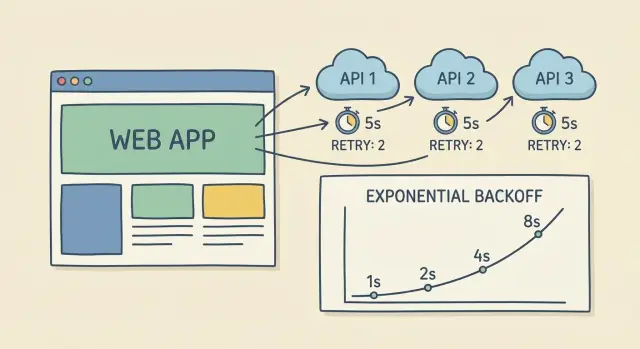
Why slow third-party APIs can freeze your app
A third-party API call feels small until every request depends on it. When that provider slows down, your app starts waiting, and waiting. Users see endless spinners. Background jobs stop finishing. Nothing “crashes”, but everything feels stuck.
Most apps run with limited capacity: a fixed number of web threads, serverless concurrency slots, or queue workers. When a request blocks on a slow provider, it holds that capacity hostage. A handful of slow calls can turn into a pileup where new work can’t even start.
Stuck requests usually show up as a pattern:
- Web requests hang until the browser times out, even though your servers look “up.”
- Workers stay busy but don’t complete jobs, so the queue keeps growing.
- One endpoint starts consuming most of your threads (or database connections) because it’s waiting on an external call.
- Retries fire blindly, repeating the same slow call and growing the backlog faster.
Timeouts and retries are meant to do one thing: fail fast, retry safely, and recover gracefully. A clear timeout stops one slow provider from freezing the whole system. Conservative retries help you recover from brief glitches without creating a self-inflicted outage.
This surprises people because HTTP client defaults are often too lenient. Some are set to very high timeouts, and some effectively wait forever unless you set both connect and read timeouts. Many AI-generated prototypes ship with those defaults, so the system is doing exactly what it was told: keep waiting.
Once you treat every third-party call as a potential bottleneck, you can design the app to degrade cleanly: show a helpful message, queue the task for later, or switch to a fallback instead of letting everything jam up.
Key terms: timeouts, retries, backoff, and limits
If you want reliable third-party integrations, be clear about four basics: how long you wait, whether you try again, how you space attempts, and when you stop.
Timeouts (the different “clocks”)
A timeout is a hard rule: “If we haven’t made progress by X seconds, stop and return control to the app.” Common types include:
- Connect timeout: how long you wait to open a connection (DNS, handshake, network path). This catches dead networks quickly.
- Read timeout: how long you wait for data after the connection is open. This is where slow providers often hurt you.
- Total/request timeout: the maximum time for the whole call, start to finish. This is your final safety net.
Without timeouts, a single slow provider can tie up server threads or queue workers until everything backs up.
Retries (trying again) vs. timeouts (stopping)
A retry is another attempt after a failure. Retries are not a substitute for timeouts. Retries without timeouts can be worse than no retries at all, because you can pile up multiple stuck requests instead of one.
Retries help with temporary problems: brief timeouts, 502/503 errors, and network hiccups. They’re risky for “real” failures like bad credentials or invalid requests, where repeating the same call won’t help.
Backoff and jitter (waiting smarter)
Backoff means you wait longer between each retry (for example: 1s, then 2s, then 4s). Jitter means you add a small random delay so many clients don’t retry at the exact same moment and overload the provider again.
Retry limits (when you give up)
A retry limit caps attempts. “Giving up” should be a clean outcome: show a message like “That service is slow right now, please try again,” keep user state safe (cart, draft, form data), and log the failure for follow-up instead of spinning forever.
Choosing sane timeout values
Timeouts aren’t one number you copy everywhere. Pick them per provider and per call type, based on what feels acceptable to users and what your system can tolerate when a provider is slow.
A practical starting point is to separate “can I connect?” from “can I get a response?” Many HTTP clients let you set both.
Typical starting ranges:
- Connect timeout: 0.2 to 1s for most public APIs, up to 2s if you expect occasional network slowness.
- Read/response timeout: 2 to 10s for typical requests; 15 to 30s only for known long-running endpoints (reports, exports).
- Write calls (create charge, create order): keep timeouts modest (often 5 to 10s) and rely on safe retry rules rather than waiting forever.
- Polling/status checks: short timeouts (2 to 5s) and fewer retries.
User-facing requests should be stricter than background jobs. If a checkout page is waiting, cap the third-party call at 3 to 5 seconds and show a clear fallback message. If a nightly sync runs in the background, it can wait longer, but it still needs limits so it doesn’t pile up stuck workers.
Also set an overall deadline for the whole operation, including retries. For example: “Try for up to 20 seconds total, then fail.” Without this, retries can quietly extend a 5-second call into a 2-minute problem.
Write down your assumptions so the next person doesn’t guess:
- Typical provider latency you observe (p50 and p95)
- Your UX tolerance (how long a user will wait before abandoning)
- The maximum total time you’ll spend including retries
- Which endpoints are allowed to be slower, and why
When to retry (and when not to)
Retries are for problems that are likely to fix themselves in a moment. If the request is wrong, retrying just wastes time and can make an outage worse.
Retries usually make sense for transient failures: a dropped connection, a DNS hiccup, or a timeout. They can also make sense for rate limiting (HTTP 429) and some server errors (5xx), because the provider may be overloaded.
A simple rule of thumb:
- Retry on network errors, timeouts, 429, and selected 5xx (like 502/503/504).
- Don’t retry most 4xx (like 400, 401/403, 404) until something changes.
- Honor
Retry-Afterwhen the API sends it. - Stop early if you get a clear permanent error message.
Be careful with “unknown outcome” requests. If you time out after sending a card charge, retrying can create duplicates unless you use idempotency keys or an order token.
A practical approach is to separate two patterns:
- A quick retry for tiny blips (one fast retry after ~100 to 200 ms).
- A short backoff sequence for throttling or partial outages (a few attempts with increasing delays).
That keeps the app responsive while still recovering when the provider needs a moment.
Exponential backoff with jitter, explained simply
When an API call fails or times out, retrying immediately often makes things worse. Exponential backoff means you wait a little, then a bit longer each time. It reduces pressure on the provider and gives the service time to recover.
A simple progression (with a cap so it doesn’t drag on):
- Try 1: wait 0.25s
- Try 2: wait 0.5s
- Try 3: wait 1s
- Try 4: wait 2s (cap here)
Jitter adds a small random offset. Without it, thousands of clients can retry at the same moments (exactly one second later), creating another spike and another wave of failures. With jitter, one client might wait 0.8s while another waits 1.3s, so retries spread out.
Two guardrails matter most:
- Cap the maximum delay (often 2 to 5 seconds).
- Keep attempts small and predictable, usually 2 to 4 retries.
That makes worst-case waiting time easy to reason about and prevents hidden queues of stuck work.
Make retries safe: idempotency and duplicate prevention
Retries can save you during network hiccups, but they can also create a mess. If you retry a non-idempotent action (like “charge card” or “create order”), the same click can run twice. That’s how you get double charges, duplicate accounts, or two shipments.
A simple rule: only retry calls that are safe to repeat. Reads (GET) are usually safe. Writes (POST that creates or charges) need protection before you enable retries.
Use idempotency keys when the provider supports them
Many payment, messaging, and order APIs let you send an idempotency key. Generate a unique key for the user action (like one checkout attempt) and reuse it on every retry. The provider then returns the same result instead of running the action again.
Store that key with the response, and keep it stable even if the user refreshes.
Add your own dedupe when the provider does not
If there’s no idempotency feature, you can still prevent duplicates on your side. Keep it simple:
- Create a “request record” with a unique
request_idbefore calling the provider. - Enforce a unique constraint (for example:
user_id + cart_id + action_type). - Store the provider response (success or failure) and reuse it on retries.
- Add a short TTL window so you don’t block legitimate future purchases.
- Log a stable request ID so support can trace what happened end-to-end.
Example: during checkout, the first charge request times out, but the provider later processes it. If you retry without idempotency or dedupe, you might charge twice. With a stable request_id, you can retry safely and still show a single final outcome.
Stop runaway failures: caps, circuit breakers, and fallbacks
Retries help when a provider has a brief hiccup. If the provider is down or very slow, retries can turn one small issue into a flood of stuck requests. The goal isn’t “never fail.” It’s “fail in a controlled way” so your app stays usable.
Put hard caps on every call
Every outbound call needs limits that end the pain quickly. Keep the list of caps short and enforce them consistently:
- Max attempts (for example, 3 tries total)
- Max elapsed time (for example, stop after 10 seconds overall)
- Max concurrent calls (avoid 500 requests piling up at once)
- A strict definition of what’s retryable (only errors you expect to recover)
These caps keep one slow provider from freezing your web server, backing up jobs, or burning through rate limits.
Use a circuit breaker when a provider is failing
A circuit breaker is a simple rule: if too many calls fail in a short window, pause calls for a bit. During the pause, you return a controlled response immediately instead of waiting on timeouts. After a cool-down, allow a small number of test calls to see if the provider recovered.
This helps isolate a provider outage from your core app. Users can still log in, browse, and save progress even if one integration is unhealthy.
Add fallbacks that keep users moving
Fallbacks can be as simple as cached data, a “try again in a minute” message, or a degraded mode that skips a non-critical feature.
Example: if shipping rates time out during checkout, show a default rate or let the user place the order and confirm shipping later.
Step-by-step: add timeouts and retries to an existing app
Start by making behavior consistent. If every engineer sets timeouts differently (or forgets them), one slow provider can still tie up the whole app.
1) Centralize your HTTP defaults
Create one shared HTTP client (or wrapper) and force all outbound calls through it. Give it safe defaults: a connect timeout, a response timeout, and a hard cap on total time spent (including retries). Log every request with a provider name so you can spot patterns.
Then add a small per-provider policy layer. Payments, email, maps, and AI models behave differently, so the same retry rules rarely fit all.
2) Add per-provider overrides that match reality
For each provider, define:
- Timeouts (short for fast endpoints, longer only where needed)
- Retry rules (which status codes and network errors qualify)
- Retry limits (max attempts and max total time)
- Rate-limit handling (honor 429 and
Retry-Afterwith a limited number of retries)
Keep retries conservative. A broken provider should fail fast and free your app to keep working.
3) Measure what your users feel
Track a few metrics and review them regularly: timeout rate, retries per request, success-after-retry, and total latency (including waits). If retries “work” but add 8 seconds to checkout, users still feel it.
4) Prove it works with forced slowness
Test in staging by simulating slow responses and flaky connections. Make a provider call “sleep” for 10 seconds and confirm your app times out at 2 seconds, retries with backoff, then stops at the limit. Also test partial outages where every third request fails.
Common mistakes that cause stuck requests
Stuck requests usually come from one root problem: there’s no clear limit on how long the app will keep trying. When a provider gets slow, workers sit around waiting, and the backlog grows until the whole app feels frozen.
Here are the patterns that quietly create pileups:
- Retry counts so high they’re effectively infinite.
- Immediate retries with no pause, especially under load.
- No overall deadline, so the user waits longer while your servers stay tied up.
- Retrying permanent errors (bad API key, missing permissions, invalid payload) instead of fixing the request.
- Ignoring rate limits (429), which often leads to harder throttling.
A useful mental model: retries are for temporary problems, not permanent ones. When a provider is down or slow, you want fewer, smarter attempts, not more.
What “safe” often looks like: 2 to 3 extra tries, exponential backoff with jitter, and a hard cap for the whole operation (for example, “stop after 10 seconds total, no matter what”). For 429 responses, treat the provider’s wait time as part of the contract.
A realistic example: one provider slows down during checkout
Picture a checkout flow with three third-party calls: a payments API to charge the card, a shipping API to fetch live rates, and an email provider to send the receipt.
One afternoon, the shipping provider gets slow. Your app asks for rates, but the request hangs for 25 to 30 seconds. The customer is staring at a spinner. If your server keeps that request open, you tie up worker threads and queue more checkouts behind it. One slow provider can make the whole site feel broken.
A safer flow:
- Payments: short timeout; don’t automatically retry after a charge attempt unless you can prove it’s safe.
- Shipping rates: timeout quickly (for example 2 to 3 seconds), retry a small number of times with backoff, then stop.
- Fallback: if shipping is still slow, show standard shipping with an estimated range, or let the user continue and confirm shipping later.
- User message: “We couldn’t load live rates. You can still place the order, and we’ll confirm shipping by email.”
Where retries happen matters. In the checkout page, keep timeouts tight so the customer gets an answer quickly. After the order is created, you can do longer background retries (still with strict limits) to fetch a final rate and update the order without holding the user hostage.
Quick checklist before you ship
Before you roll out, do a pass over every third-party call (payments, email, maps, auth, shipping, AI providers). The goal is simple: one slow provider shouldn’t freeze your app, and a brief outage shouldn’t create a pile of stuck requests.
Make sure every call has:
- A short connect timeout
- A reasonable read timeout
- A total deadline for the entire operation (including retries)
For retries:
- Retry only transient failures (timeouts, temporary network errors, clear 429/5xx)
- Use exponential backoff plus jitter
- Enforce max attempts and max elapsed time everywhere (HTTP client, job queue, background workers)
Finally, make retries safe. If an operation can create duplicates (charges, orders, account creation), add idempotency keys or deduping before you enable retries.
Monitoring should tell you what’s happening per provider: timeout rate, retry rate, and average latency. That’s how you catch problems early, before they turn into a user-facing freeze.
Next steps: stabilize your integrations without overbuilding
Start by finding the calls that can hang forever. Look for requests with no explicit timeout, background jobs that retry “until success,” and workers that never give up. Those are the ones that quietly pile up and turn a small provider slowdown into an outage.
Pick one or two critical third-party APIs and finish the pattern end-to-end before touching everything else. Critical usually means money flows, sign-in, messaging, or anything that blocks a user action. Implement a clear timeout, a retry policy with backoff, and a hard retry limit. Add basic logging so you can answer: how often did we retry, how long did we wait, and did we eventually succeed?
When things go wrong, speed matters more than perfect tooling. Write a small incident playbook: how to temporarily disable a provider (feature flag or config toggle), what to show users, what to check first (provider status, error rates, queue depth), and when to re-enable.
If you inherited an AI-generated codebase with unsafe defaults, FixMyMess (fixmymess.ai) can run a free code audit to pinpoint missing timeouts, runaway retries, and fragile integrations, then help turn the prototype into production-ready software with human-verified fixes.
FAQ
Why can a single slow third-party API make my whole app feel frozen?
Your app has a fixed amount of capacity (web threads, serverless slots, or workers). If a request is waiting on a slow third-party API with no strict timeout, it keeps that capacity busy and new work can’t start, so everything feels stuck even though nothing “crashes.”
What timeouts should I set for most third-party API calls?
Set a short connect timeout and a separate read/response timeout, plus an overall request deadline. A common starting point is about 0.2–1s to connect and 2–10s to get a response, then adjust per provider based on what users can tolerate.
What’s the difference between a timeout and a retry?
A timeout stops waiting and returns control to your app. A retry is a new attempt after a failure. You usually need both: timeouts to prevent stuck work, and a small number of retries to recover from brief glitches.
Which errors should I retry, and which should I avoid retrying?
Retry only errors that are likely temporary, like timeouts, network hiccups, 429 rate limits, and certain 5xx errors. Don’t retry most 4xx errors like bad requests or bad credentials, because repeating the same call won’t fix anything.
How do I do backoff and jitter without making things worse?
Use exponential backoff to wait longer between attempts, and add jitter so many clients don’t retry at the same instant. Keep it small and predictable, like 2–4 retries with a capped delay, so you don’t accidentally create long waits or big backlogs.
Why can retries cause double charges or duplicate orders?
Retries can repeat a “write” action when the first attempt actually succeeded but your app didn’t see the response. That can create duplicate orders, double charges, or repeated messages unless you use idempotency keys or your own deduplication record.
Should timeouts be different for web requests vs. background jobs?
For user-facing requests like checkout, keep third-party timeouts tight and show a clear fallback when the provider is slow. For background jobs, you can wait longer, but you still need strict limits so one provider can’t tie up workers and grow the queue.
When should I add a circuit breaker?
A circuit breaker stops calling a provider for a short period after repeated failures, so you fail fast instead of waiting on timeouts every time. It’s useful when a provider is degraded or down and you want the rest of your app to stay usable.
Why do AI-generated prototypes often ship with unsafe HTTP defaults?
Most HTTP clients ship with defaults that are too lenient, and some effectively wait forever unless you set both connect and read timeouts. Many AI-generated prototypes keep those defaults, so the app keeps waiting exactly as configured.
What’s the fastest way to add sane timeouts and retries to an existing app?
Start by centralizing outbound HTTP calls behind one shared client so every request gets the same safe defaults. If you inherited an AI-built codebase and you’re not sure where timeouts and retries are missing, FixMyMess can run a free code audit and then fix the integration behavior quickly with human-verified changes.