Audit logs for admin actions that settle disputes fast
Audit logs for admin actions help you see who changed what, when, and why. Learn what to capture, how to add diffs, and how to search logs for disputes.
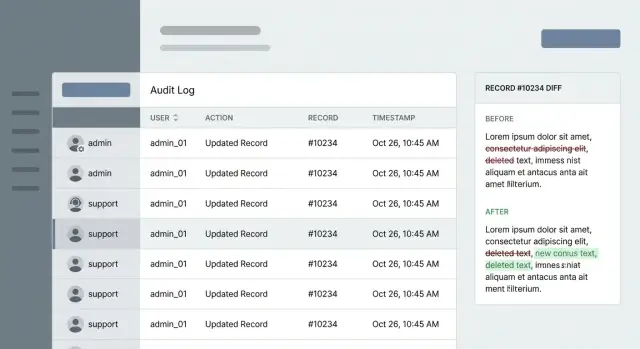
Why admin and support audit logs matter
When something changes in an app and nobody can explain why, support turns into guesswork. Customers feel blamed, teammates feel accused, and small issues become long threads and slow incident response.
Admin and support actions are the behind-the-scenes moves that can change a user’s experience without them doing anything. A support agent resets a password. An admin changes a plan. Someone removes content. These actions are often necessary, but they cause the most arguments because they happen out of view.
Disputes usually sound like this:
- “I never requested that refund, why was it issued?”
- “My account was disabled, who did it and what rule was triggered?”
- “Our subscription was downgraded and features disappeared overnight.”
- “A post was removed, but we need to prove the reason and timing.”
- “Support changed my email, and now I cannot log in.”
In those moments, the point of an audit log isn’t “more data.” It’s a clean answer. A good entry shows who did what, to which record, and when. A great entry also shows what changed (a diff) and enough context to explain why it happened (ticket ID, reason code, internal note).
This matters even more for teams shipping quickly or inheriting AI-generated code. When logic is messy, the app can behave differently than you expect, and you still need a reliable paper trail. At FixMyMess, we often see prototypes built with tools like Cursor or Replit where admin panels are half-working and critical actions aren’t logged at all - that’s exactly when disputes get painful.
Good logs settle arguments fast, shorten investigations, and protect both customers and your team with facts instead of opinions.
What an audit log entry should contain
An audit log is only useful in a dispute if each entry answers five questions clearly: who did it, what happened, what was affected, when it happened, and where it came from. If any of those are missing, you’re back to guessing.
Start with the actor. Store a stable identifier (user ID, admin ID, or service account ID) and the permissions they had at the time (role). If support can impersonate users, record that explicitly: performed by admin X while impersonating user Y. Without this, you can’t tell whether a change was made by the customer or by staff on their behalf.
Capture the action and target together. “Updated customer email” is better than “update,” but don’t rely on free-text alone. Keep a structured action name (create, update, delete, export, password reset, login override) and the exact record that was touched. Include the tenant/workspace so you can separate accounts.
For time, store a precise timestamp in UTC and only format it into local time for display. Disputes often hinge on minutes, and UTC avoids daylight savings confusion.
Add enough context to trace the event end-to-end. A solid baseline is: entry point (UI screen name or API endpoint), request ID (and session ID if you have it), source IP and user agent (when appropriate), outcome (success/failure with an error code), and a support reason or ticket reference.
Example: a customer says, “Support changed my plan without asking.” A strong entry shows the admin ID, whether impersonation was used, an action like plan_update, the target workspace, a UTC timestamp, and a request ID you can follow back to the exact screen or API call. That’s the difference between a vague story and a log that settles the issue in minutes.
Tracking diffs without leaking sensitive data
A diff is the simplest way to end arguments because it shows the before and after values for each field that changed. The goal is clarity without turning your logs into a second database full of private data.
Log only what changed. If an admin edits a customer record, record a small payload like role: user -> admin and status: trial -> active, not the full profile. This keeps entries readable, makes searches faster, and reduces accidental exposure.
Sensitive fields need special handling. You usually don’t want raw values in logs for passwords, access tokens, full card numbers, or private notes. A useful rule: if you wouldn’t paste it into a support chat, don’t put it in an audit log.
Common approaches include masking (for example, ****@gmail.com), hashing (a one-way fingerprint), a simple “changed” flag (like password: changed), full redaction, or splitting sensitive details into a separate store with tighter access and shorter retention.
Diffs are even more useful with intent. Add a reason code (like customer_request, fraud_review, bug_fix, policy_exception) and a short note. When a dispute happens later, “why” matters as much as “what.”
Also capture related IDs so you can reconstruct the story: ticket ID, conversation ID, order ID, refund ID, and the record’s primary key.
Example: a customer claims support upgraded their plan without permission. Your entry should show plan: basic -> pro, the agent identity, the timestamp, reason code customer_request, and a ticket ID that matches the conversation where they asked for the change. If you inherited messy AI-generated code that logs too much (or nothing), FixMyMess often starts by adding safe diffs and strict redaction rules so logs resolve disputes instead of creating new risks.
How to design logs that you can trust later
Trustworthy logs are less about fancy dashboards and more about boring rules that never change. If you want admin and support logs to settle disputes, you need entries that are hard to fake, easy to read, and consistent across every code path.
Treat each entry as append-only. Don’t edit old events when something changes or when an agent made a mistake. Write a new event that corrects the previous one, so the history stays complete.
Use one event shape everywhere, even across different teams and services. When support, admins, background jobs, and API calls all produce different fields, the log stops answering basic questions under pressure.
A practical baseline schema:
- who: user ID, role, and any acting-as info
- what: action name (for example,
user.password_reset) - where: record type and record ID
- when: server timestamp (UTC)
- context: request correlation ID, source (UI/admin panel/API key/background job), and IP/device when appropriate
Correlation IDs are what turn “we think it happened around 3pm” into proof. Generate one per request, pass it through internal calls, and attach it to the audit event. If an action touches three tables, the same correlation ID lets you tie those events back to a single support ticket or click.
Record the source every time. “Admin changed plan” isn’t enough when the real question is whether it came from the admin UI, an API key used by an agency, or a nightly job.
Plan retention early. Decide how long you need events for disputes, how big the logs can get, and where they live. Teams that come to FixMyMess often discover their AI-generated app never logged critical actions or deleted history too soon, which makes verification impossible when a customer challenges a charge.
Making logs searchable for real support work
Search is the difference between “we think this happened” and “here’s the exact moment it changed.” Design search the way support works: find a customer, narrow to the record, then confirm the exact change.
Keep action names small and consistent. A tight taxonomy (think tens, not hundreds) makes filters usable and avoids the “everything is custom” mess that fast-built apps often end up with. If you need more detail, put it in structured fields, not in a new action name.
Normalize the basics so every event can be filtered the same way across the app.
The fields that make search actually work
At minimum, make sure every event includes:
- action (for example,
user.password_reset,billing.refund_issued) - actor_id and actor_role (admin, support, system)
- record_type and record_id (always present, always formatted the same)
- created_at (server time)
- request_id (to group related events)
Then add a small set of safe “support context” fields that help you search: customer email (or a hashed/normalized version), order number, workspace/org name, and ticket or conversation ID. Keep these as separate fields, not buried inside a sentence.
Avoid noisy events. Page views, screen opens, and “list loaded” logs bury the signal. Audit logs should focus on actions that change state, grant access, or expose sensitive data.
Make each entry readable without losing structure: a clear sentence for humans plus structured fields for filters. “Support agent updated billing email” is helpful, but it should still include record_type=workspace, record_id=..., and a diff summary that proves what changed.
Step by step: add admin action logging to an app
A practical workflow
List what admins and support can actually do today, not what you hope they do. Turn each capability into a clear event name so the log reads like a timeline instead of a junk drawer.
A simple workflow:
- Inventory admin/support actions (refund, password reset, plan change, profile edit, role grant) and map each to one event.
- Mark high-risk records that must always log (auth, billing, permissions, account ownership).
- Define required context: actor, target record, timestamp, reason, and a safe diff.
- Implement logging in the service layer (where business rules run), not scattered across UI buttons.
- Run a “dispute test” that reconstructs who changed what and why using only the logs.
After you map events, decide what “target” means in your app. A good pattern is target_type (Subscription), target_id (sub_123), and optional related IDs (like user_id). This makes later searches much easier.
Where teams usually get stuck
High risk doesn’t mean rare. It means a change here can cost money, lock someone out, or create a support argument. If you’re unsure, start with a short set: authentication settings, billing/invoices, roles/permissions, email/phone changes, and anything that affects access.
Require a human reason for sensitive actions, even if it’s short. “Customer confirmed new email over phone” is far more useful than “updated.”
Run a fake dispute before you ship. Pretend a customer says, “Support downgraded my plan without asking.” Can you pull one event that shows: which admin, which record, the before/after diff (Plan: Pro -> Basic), the reason note, and the timestamp? If not, fix the fields now.
If you’re repairing an AI-generated app, logging in the service layer also reduces “missing events” when UI code changes. It’s often one of the first fixes teams like FixMyMess add when prototypes become real products.
High-risk actions to log every time
If you only log a few things, log the actions that can change money, access, or trust. These are the moments that turn into disputes: “I never changed that,” “Support accessed my data,” or “Someone escalated their own permissions.”
The actions that deserve always-on logging
Focus on events that are powerful, hard to reverse, or touch sensitive data. A simple test: if a user would be upset seeing it on a statement, a screenshot, or a compliance report, it belongs in the log.
Prioritize:
- Sensitive data reads (exports, downloads, “view full card,” opening full profiles with private details).
- Roles and permissions changes (role updates, group membership, API keys, SSO settings, admin flags).
- Impersonation (start, end, and every action taken while impersonating, recording both the staff member and the customer account).
- Bulk actions (mass refunds, bulk deletes, migrations, batch edits), including counts and references to affected IDs.
- Failed restricted attempts (denied permission checks, invalid admin tokens, blocked exports), with rate limits to avoid noise.
A quick example of how this settles disputes
A customer says, “Support downloaded my invoice list and changed my plan.” If your logs capture both “Export invoices” (read) and “Plan changed” (write), you can quickly show who did it, when, from which session, and whether it happened during impersonation.
This is where many AI-generated prototypes break in production: they log only successful writes and skip sensitive reads. Platforms like FixMyMess often start by adding these high-risk events first because they deliver the biggest trust and support payoff with a small code change.
Keep each event easy to understand: a clear action name, the record(s) touched, and enough context to explain why it happened without exposing secrets.
Common mistakes that make audit logs unreliable
Most disputes don’t happen because you have no logs. They happen because the logs are vague, incomplete, or impossible to trust later. A good audit trail should read like evidence: clear, specific, and hard to tamper with.
A frequent failure is logging a generic event like “updated user” with no field-level detail. When a customer says “Support changed my plan,” you need to see exactly what changed (old value, new value), not just that “something” happened. Without diffs, you also miss patterns like repeated toggling or accidental overwrites.
Another mistake is dumping secrets and personal data into the trail. Full tokens, passwords, session cookies, API keys, or raw payment details should never land in logs. Store redacted values or references instead, and record that a sensitive field changed without recording the value.
Actor attribution breaks more often than teams expect. Background jobs, webhooks, and scripts often run as “system,” even when triggered by a human. That makes the trail much less useful in real support work.
Reliability killers to watch for:
- Events can be edited or deleted after the fact.
- The actor is missing (or always “system”) for automated flows.
- Record identifiers aren’t stable, so searches return noise.
- Action names aren’t consistent, so filters miss half the story.
- Diffs are partial or ambiguous (missing before/after).
Example: a founder disputes a refund change. Your log should show the refund status diff, the admin account that clicked it, the ticket/reason, and the record ID. When FixMyMess audits broken AI-generated apps, this is one of the first gaps we see: “it was updated” without the proof you need.
Quick checklist for resolving a dispute using logs
When a customer says, “I never changed that” or “Your team broke my account,” the goal is simple: build one clear timeline that both sides can understand. Good logs let you answer three questions fast: who did it, what changed, and when.
Start broad, then narrow down until you’re looking at one specific event and its exact diff.
A fast way to get to the truth
- Find the customer using a stable identifier (customer ID, account ID, ticket ID) and confirm you’re looking at the right record.
- Filter by action type (password reset, refund, plan change) and actor (specific admin, support agent, automated job).
- Open the change details and read the diff, not just the summary.
- Use the correlation/request ID to see what else happened in the same flow. Disputes often come from side effects, not the original click.
- Write the outcome in plain words and, if needed, add a follow-up event that records the resolution.
Small example
A customer reports they were downgraded without consent. The log shows an agent changed the plan, but the same correlation ID also includes a failed payment retry seconds earlier. The diff shows a downgrade rule ran automatically after the retry failed. That usually settles the dispute and points to what to fix: clarify the UI, tighten permissions, or improve the rule.
If you’ve inherited an AI-generated app, this is one of the first things to add during cleanup. Teams like FixMyMess often see powerful “admin actions” happening with no trace, which turns every complaint into guesswork.
Example: tracing a support change from complaint to proof
A customer writes in: “My subscription was canceled and I did not do it.” This is where admin and support logs stop guesswork. You want a clean trail that shows who touched the account, what changed, and why.
Start with the customer record and filter events around the time they noticed the problem. In a good trail, you quickly find an impersonation (or “login as user”) event followed by a subscription update.
Here’s what that trail might look like when it is working well:
2026-01-16 09:41:03Z  actor=support:maya  action=impersonate_user  target=user:1842
context: ticket=SUP-10488  reason="Asked to check billing page error"

2026-01-16 09:43:19Z  actor=support:maya  action=subscription_update  target=sub:7711
source=ui  request_id=8f3c...  ip=203.0.113.24
diff:
  status: active -> canceled
  cancel_at_period_end: false -> true
context: ticket=SUP-10488  note="Customer requested cancel at renewal"
Two details settle disputes fast: the diff (what changed) and the context (ticket ID, reason, and a short note). The timestamp and actor clarify whether it was a support action or the customer.
Confirm the source so you don’t blame the wrong system:
- UI action: there’s an internal user actor plus a session/request ID.
- API key: the actor is a key or integration, often with a key ID.
- Automated job: the actor is a job name, with a schedule/run ID.
If the change was wrong, revert it right away (for example, set the subscription back to active), then log the corrective action as its own event with a reason note like “Reverted cancel, customer did not consent.” That final entry prevents the same argument from coming back later.
Next steps: start small, then tighten the trail
Start with a minimum scope you can ship next sprint. Pick the admin and support actions that most often cause arguments and chargebacks, and log those first. If you only do one thing, make sure you can answer: who did it, what changed, which record, and when.
A practical way to find gaps is a short dispute drill. Grab a real past ticket (or make a fake one) and try to prove what happened using only your logs. For example: “A customer says their plan was downgraded without permission.” Can you see the exact user affected, the actor (admin or system), the before/after values, and the ticket context? If you can’t, write down what’s missing and add it.
Once the basics work, add guardrails so the trail stays safe and useful: mask or omit sensitive fields (passwords, tokens, full card data) while still logging the fact of the change, set retention that matches support needs and legal requirements, restrict access to logs (and log access to the logs themselves), and add alerts for high-risk actions like role changes, refunds, and auth resets.
If your codebase was generated by AI tools, inconsistent logging is common: actions happen in multiple places, auth checks differ by route, and “system” changes are hard to separate from human ones. A focused audit can be the fastest fix.
FixMyMess (fixmymess.ai) offers a free code audit to flag missing audit logging, broken auth trails, and security gaps, especially for AI-generated prototypes that need production-ready behavior.
FAQ
What problem do admin and support audit logs actually solve?
An audit log turns a dispute into a checkable timeline. Instead of debating what “must have happened,” you can point to one entry that shows who acted, what they did, which record they touched, and when it happened.
Which admin/support actions should I log first?
Log any action that changes money, access, or trust. Start with password resets, email changes, role/permission changes, plan upgrades/downgrades, refunds, cancellations, impersonation, and exports of sensitive data.
What fields should every audit log entry include?
A useful entry answers five things: actor, action, target record, timestamp, and source context. In practice that means a stable actor ID and role, a structured action name, record type and record ID, UTC time, plus request/session details and a support reason or ticket reference.
How do I name actions so logs stay searchable?
Use a small, consistent action taxonomy like billing.refund_issued or user.password_reset. Keep the detailed explanation in structured fields (diff, reason code, ticket ID) so filters stay reliable and you don’t end up with dozens of near-duplicate action names.
Should I store diffs (before/after values) in audit logs?
Record a field-level before/after for only the fields that changed. Diffs should be small and specific (for example, plan: basic -> pro) so you can prove what changed without dumping entire records into your logs.
How do I log changes without leaking sensitive data?
Don’t store raw values for secrets or highly sensitive data like passwords, tokens, full payment details, or private notes. Prefer redaction, masking, hashing, or a simple marker like “changed,” and keep the entry focused on the fact of the change plus who/when/where it happened.
Why should audit log timestamps be stored in UTC?
UTC prevents daylight savings and timezone confusion, which is common in disputes where minutes matter. Store the timestamp in UTC and only convert to local time in the UI when someone is reading the log.
How should I log support impersonation (“log in as user”)?
Impersonation should be explicit and traceable. Log the start and end of impersonation, and for every action taken while impersonating, record both identities: the staff member who performed it and the user/account they acted as.
How do I make audit logs trustworthy and hard to tamper with?
Make audit logs append-only and treat them as evidence. If something was wrong, write a new corrective event that references the original, and restrict who can access or delete logs; you should also log access to the logs themselves.
My app was built with AI tools and logging is a mess—can this be fixed quickly?
Yes, it’s common for AI-generated prototypes to miss critical logging or to log inconsistently across routes. A practical fix is to implement logging in the service layer (where business rules run), standardize event shape and action names, and add safe diffs with redaction; FixMyMess can do a quick audit to identify what’s missing and patch it fast.