B2B request-a-quote form app: fields, uploads, workflow
Build a B2B request-a-quote form app that captures required fields, accepts file uploads safely, and runs a simple workflow so every request is tracked.
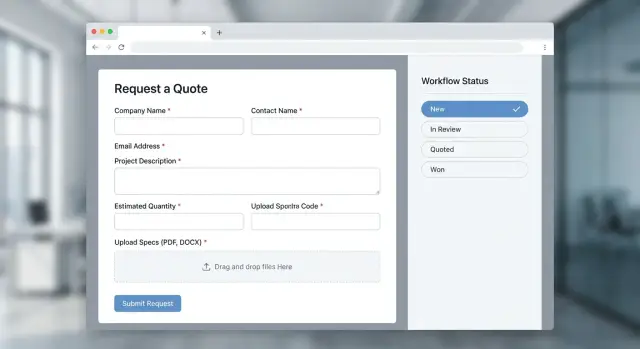
Why quote requests disappear (and how to stop it)
Most quote requests don’t vanish because of one big mistake. They fade out through small gaps: missing details, uploads that never arrive, and no clear person responsible for the next step.
A request-a-quote form often fails when it behaves like a fancy email. Someone submits a form, it lands in an inbox, and then everything depends on manual habits. If the right person is out, the thread gets buried, or nobody forwards it, the request is effectively gone.
File uploads make this worse. Large files bounce, links expire, or attachments get separated from the original request. Follow-up questions then happen across email, chat, and phone, so the real requirements end up scattered.
The patterns are predictable: vague submissions that force basic follow-up, no owner assigned, uploads that fail silently, and no clear status so “waiting on customer” looks the same as “ready to quote.” If updates live only in messages and not in the system, nobody can tell what’s true.
“Never vanish” means every request gets a unique ID, an owner, a clear status, and a simple audit trail (who changed what, and when). Sales should see the next step in seconds, ops should trust the details, and nothing should get stuck because it lacks a file, a decision, or a responsible person.
Decide the scope before you start building
These apps fail most often when nobody agrees on what “done” looks like. Before you add fields or build uploads, write down the outcomes you need the system to support, end to end.
Start with status outcomes you can report on later. For many teams, that’s not just “submitted,” but “quote sent,” “timeline agreed,” “declined (with reason),” and “closed as duplicate.” If you can’t name the final states, requests will sit in a gray area and quietly disappear.
Next, decide who the app is for. Customers may only need a simple form, while sales and ops need triage, notes, and a clean handoff. If all three groups use it, define what each can see and do on day one.
Lock down your intake channels early. You might accept website form submissions only, add manual entry for phone calls, or turn inbound RFQ emails into tracked requests. Whatever you choose, pick a small set of inputs you can support reliably.
Also be honest about response time. If you promise “we reply in 1 business day,” define what happens at hour 20: who gets pinged, who can reassign, and what counts as a first response.
A simple example: a customer uploads a spec sheet on Friday. If ops is off, the request should still land in a queue with an owner, a due time, and a next action so Monday doesn’t start with a hunt through inboxes.
Required fields that actually help you quote
A quote form should collect enough detail to price the work without turning the form into a quiz. Ask for too little and you spend days emailing. Ask for too much and people abandon the form.
Start with contact details that let you follow up fast: who the person is, what company they represent, and the best way to reach them. Add location only if it changes pricing (shipping, onsite work, taxes, time zones).
Next, capture the project basics that drive cost: what they want, how many, and when they need it. Budget can be a range rather than a single number. That keeps it realistic while still helping you route the request.
A few qualification questions can save hours. Keep them simple and optional when you can: industry, urgency, and whether they’re switching vendors.
On the internal side, add fields your team needs but customers shouldn’t see:
- Owner (who is responsible)
- Priority (low/normal/high)
- Source (website, referral, partner)
- Internal notes
Only include consent if you truly need it, like agreeing to terms or acknowledging a privacy notice. And if you built an early prototype with an AI tool, double-check that required fields actually save and validate correctly. Silent failures are a common reason requests vanish.
A simple data model that supports tracking
If you want this to be reliable, the data model matters more than fancy screens. The goal is simple: every request has a stable identity, a clear owner, and a history you can audit later.
Start with an RFQ record that gets a unique request ID the moment the form is created (not after it’s submitted). That ID becomes the anchor for emails, internal notes, and file uploads. A human-friendly format (for example, RFQ-2026-00127) makes it easier to reference on a call.
Keep “contact” separate from “request.” A contact is the buyer (person and company). A request is one quoting event. This makes repeat buyers easy: new RFQs can reuse the same contact record, and you can see past quotes without mixing data.
A clean starter model looks like this:
- Contact: name, email, company, phone, billing and shipping basics
- RFQ: request_id, contact_id, product or service summary, quantity, target date, priority
- Attachment: rfq_id, filename, type, size, storage_key, uploaded_at
- Assignment: rfq_id, owner, status, status_changed_at, due_at
- ChangeLog: rfq_id, field, from, to, changed_by, changed_at
Optional fields should stay optional, but don’t ignore them. Store a “missing info” flag (or a short checklist) on the RFQ so sales can see why a quote is blocked without rereading the whole form.
One practical example: if a buyer uploads three drawings across two days, each file is its own Attachment row tied to the same request_id, and every status change (New -> In Review -> Quoted) is recorded in ChangeLog. That’s how requests stop vanishing.
Form UX and validation that reduces back-and-forth
A good quote form isn’t “short.” It’s clear. People should know what to enter, what to upload, and what happens next without guessing.
Use labels that match how customers talk. Add one short example under tricky fields (part numbers, target delivery date, shipping location). For uploads, say exactly what you need (for example: “PDF drawing or STEP file”) and what isn’t accepted. A few words of clear copy can remove a lot of follow-up.
Validation has to happen in two places: in the browser for fast feedback, and on the server so bad data can’t slip through. Client-side checks are about convenience. Server-side checks are about truth.
Validations that usually pay off immediately:
- Required basics: company name, contact name, email, and a clear request description
- Email confirmation (type it twice) to prevent typos
- File checks: allowed formats, max size, and empty upload detection
- Simple duplicate detection: same email and same key fields within a short window
- Rate limits to block accidental double-click storms and spam
After submission, show a confirmation screen the buyer can screenshot: a request ID, what you received (including filenames), and the next steps based on your real SLA. Send the same details by email.
Drafts can help, but only if they’ll be used. If buyers fill forms on mobile, drafts can be useful. If not, drafts become a privacy risk. Store them securely, expire them, and don’t save sensitive notes in plain text.
File uploads: safety, limits, and storage choices
File uploads are where these apps often break in real life. Big PDFs fail, odd file types sneak in, and someone ends up emailing attachments instead, which ruins tracking.
Start by being strict and clear. Tell people what you accept and why. For most RFQs, you can usually limit it to PDF plus common images, and optionally spreadsheets. Set a max size that matches your buyers (for example: 25 MB per file, up to 5 files), and reject everything else with an error message that says what to do next.
Store uploads in a dedicated file storage service, not in your database. Keep the database for metadata only (filename, size, type, who uploaded, and which request it belongs to). This keeps queries fast and backups simpler.
For safety, treat every upload as untrusted:
- Allowlist file types and verify by content, not just the extension
- Keep uploads private by default
- Disable execution (don’t serve files from a path that can run code)
- Virus scan if you can, or at least quarantine and review suspicious files
- Use time-limited download access for your team so files don’t get forwarded forever
Design for failure too. Uploads should show progress, support retry, and never erase the form if one file fails.
A workflow that makes requests hard to lose
The fastest way to lose a quote request is to treat it like an email thread: nobody owns it, nobody knows the latest state, and it quietly ages out. A simple workflow turns your app into a shared system of record.
Start with a small set of statuses that people will actually use:
- New (submitted, not yet triaged)
- In Review (someone is working on it)
- Needs Info (waiting on the requester)
- Quoted (a quote was sent)
- Closed (won, lost, or no longer active)
Then add ownership rules. Every request must have one assigned person, even if it sits in an “unassigned” queue briefly. If ownership is missing, the request shouldn’t be allowed to sit.
Make status changes accountable. Each change should log the old status, new status, who changed it, and when. Add a short note for context like “called customer, waiting on CAD file.” That history is what saves you when someone follows up weeks later.
Prevent stale requests with time pressure. A due date or SLA makes “Needs Info” and “In Review” measurable. “Respond within 1 business day” or “quote due by Friday 3pm” is concrete. “ASAP” isn’t.
Finally, create an inbox view that feels like a to-do list. Keep filters simple: status, owner, and age (for example, “New older than 24 hours”).
Notifications and routing without creating noise
This only works if both sides know what happens next. Send one confirmation to the requester right away, and one clear alert to the internal owner. Everything else should be quiet by default.
The confirmation should include a request ID and a short promise you can keep, like: “We received your request. We’ll reply within 1 business day.” That ID matters when someone calls later and says, “Did you get my RFQ?”
For internal routing, assign an owner based on what the request is about (service type) and where it’s needed (region). If you do this at submission time, you avoid the shared-inbox problem where everyone assumes someone else is handling it.
Keep notifications predictable:
- Requester email: confirmation with request ID, summary, and expected next step
- Internal alert: only to the owner (and a backup), with a one-line summary and deadline
- Reminders: only when a request is stuck too long in one status
- Escalation: if reminders are ignored, notify the backup or team lead
Replies are where requests often vanish. Give the requester a secure way to add details or upload missing files that updates the same record, instead of starting a new email thread.
Example: a buyer submits “CNC machining, EU delivery.” The system assigns it to the EU queue, sends request ID RFQ-1048, and notifies the owner. If it stays “New” the next day, the owner gets one reminder, not ten.
Step-by-step: building it with AI tools and a clear spec
AI tools can produce a good first version quickly, but they need a tight spec. For a quote app, clarity beats cleverness: what data you collect, how it moves, and who is responsible at each step.
1) Start with a one-page spec the AI can’t misread
Write one page that names the required fields, allowed file types, and workflow statuses. Add roles (requester, sales, admin) and a simple rule like “every request must have an owner within 1 business day.”
Build in this order:
- Form page first, then an admin inbox listing requests with status, owner, and last updated
- Server-side validation (not just form checks) with clear error messages
- File uploads with size limits, type checks, and permission rules
- Notifications with a light touch: new-request, assigned-to-you, and a reminder only if it’s still unassigned
- End-to-end testing with real messy files (large PDFs, weird filenames, multiple attachments)
Before you deploy, do a basic security pass: require login for the inbox, block exposed secrets, and treat every input as untrusted (especially filenames and free-text notes).
Example: a quote request from submission to quote sent
A buyer at a small manufacturing company needs pricing for 200 custom brackets. They open your quote form, fill in company details, ship-to location, quantity, material, and target date, then upload two PDF drawings and a STEP file.
When they click Submit, the request gets a unique ID and lands in a shared queue. Based on rules like territory and product line, the system assigns it to Jordan, the right sales rep. Jordan gets one notification, not five.
Jordan reviews the files and spots a gap: the finish type is missing. Jordan clicks “Ask a question,” writes “Do you need anodized or powder coat?” and sends it. The buyer replies through the same tracked path, and the answer is saved on the request.
Now the request moves through a clear trail:
- New -> Assigned
- Needs Info
- In Review
- Quoted
Jordan generates the quote, uploads the final quote PDF, and sets the status to Quoted. The system records who changed the status and when, plus any notes.
Later, a manager checks a “Stuck” view and sees one request sitting in “Assigned” for 3 days. They reassign it and add a note. Nothing disappears, and every handoff is visible.
Common traps that make RFQs vanish again
RFQs rarely disappear because of one dramatic failure. They vanish because small shortcuts pile up: loose validation, unclear ownership, and missing records when something goes wrong.
Relying on client-side validation only is a classic mistake. The form looks strict in the browser, but integrations and edge cases can still send incomplete data to your server. Then a request gets saved without the details your team needs and quietly gets ignored. Treat the browser as a helper, not a gatekeeper.
File handling causes a different kind of loss. Public uploads, storage keys exposed in frontend code, and unstable links lead to missing files or security incidents that force you to shut uploads off. Keep uploads private by default and issue controlled, time-limited access when someone needs to view them.
Tracking breaks when identifiers and history are weak. Without a unique request ID and status history, you can’t answer basic questions like “who changed it?” or “when did it move to pricing?” That makes it hard to audit and easy for requests to slip through.
Also avoid the single mega status like “Open.” It hides the next step. Action-based statuses work better: “New,” “Needs Info,” “In Pricing,” “Quote Sent,” “Closed.”
Finally, skipping role-based access causes both privacy issues and process confusion. If anyone can view anyone’s requests, people stop trusting the system and drift back to email and spreadsheets. That’s when RFQs vanish for real.
Quick checklist before you ship
Before you call it done, check the parts most likely to fail in real life. A request-a-quote app is only useful if every request is captured, readable, and easy to move forward.
- Each submission gets a unique request ID, and the requester sees a confirmation message (and receives a confirmation email if you send emails).
- Required fields are validated on the server (not just in the browser), with clear errors that point to the exact field.
- Uploads are private by default, restricted by file type and size, scanned if possible, and only downloadable through permission-checked access.
- Every request has an owner, a status, and timestamps (created, last updated). You can answer “Who has it?” and “What’s the next step?” quickly.
- There’s an inbox view that highlights new requests and overdue ones, so nothing sits unnoticed.
Finish with a simple test run: submit one request, attach a file, confirm notifications land where you expect, then change status a few times and verify the inbox updates.
Next steps: pilot, harden, and get help if the prototype breaks
After you build the first version, run a short pilot before you announce it. Aim for 5 to 10 real quote requests from real customers. That’s enough to reveal what’s missing without drowning you in edge cases. Watch where people hesitate, what they type into the wrong field, and which uploads fail.
During the pilot, make small, intentional edits. Tighten required fields, add one clarifying question that prevents bad quotes, and improve the confirmation message so customers know what happens next.
When it feels stable, add reporting you’ll actually use. Keep it simple: weekly request volume, time from submission to first response, requests stuck in a stage for more than X days, top reasons quotes get blocked, and source of requests.
If your app was built with an AI tool and it starts breaking in production, stop trying to patch it by prompting. Diagnose first: confirm where requests are dropped (validation, uploads, routing, notifications), then fix the underlying cause so it doesn’t return.
If you inherited an AI-generated quote app that’s dropping records, breaking authentication, or handling uploads unsafely, FixMyMess (fixmymess.ai) focuses on diagnosing and repairing AI-built codebases so they behave reliably in production, including workflow fixes, security hardening, refactoring, and deployment preparation.
FAQ
What’s the fastest way to stop quote requests from disappearing?
Start by giving every request a unique ID at creation time and showing it on the confirmation screen and in the confirmation email. Then require three things internally: a single owner, a clear status, and a timestamped change history so you can always answer “who has it” and “what happened.”
Which fields should be required on a B2B request-a-quote form?
Collect only what you need to price the work: who to contact, what they want, how many, and when they need it. Add location and budget only if it changes pricing or routing, and keep anything “nice to know” optional so people don’t abandon the form.
What statuses should an RFQ workflow include to prevent limbo?
Use a small set of action-based statuses that make the next step obvious, like New, In Review, Needs Info, Quoted, and Closed. Avoid a single “Open” status because it hides whether you’re waiting on your team or the customer.
How do I make file uploads reliable for RFQs?
Be strict and explicit: state accepted formats and max sizes, and fail with a clear message instead of silently dropping files. Store the files in a proper storage service and keep only metadata in your database so uploads stay attached to the right request ID.
Do I really need server-side validation if the form already validates in the browser?
Do both, but trust server-side validation as the real gatekeeper. Browser checks improve the experience, while server-side checks prevent incomplete submissions, integration edge cases, and spam from creating broken requests.
How should I route new quote requests without spamming everyone?
Assign an owner automatically at submission time using simple rules like service type and region, and notify only that owner (plus a backup). If a request sits too long without movement, send one reminder and then escalate, instead of blasting the whole team.
What should the customer see right after they submit an RFQ?
Show a confirmation page that includes the request ID, a summary of what you received (including filenames), and the next step you’ll take with a realistic response time. Send the same details by email so the buyer can reference them later.
How can I prevent duplicate RFQs from double-clicks or repeat submissions?
Use lightweight duplicate detection, like matching the same email and key fields within a short time window, and then prompt the user to confirm they want to submit again. Internally, mark suspected duplicates so a rep can merge or close them instead of quoting twice.
What security basics matter most for an RFQ form app?
Keep the inbox behind login, apply role-based access, and treat every upload and text field as untrusted input. Private-by-default file access and an audit trail of changes reduce both security risk and “who edited this?” confusion.
My AI-built prototype is breaking in production—what should I do next?
Stop patching by prompting and first find where data is getting dropped: validation, uploads, routing, or notifications. If the codebase is messy or unsafe, FixMyMess can run a free audit and then repair the workflow, harden security, and refactor the AI-generated prototype into something that works reliably in production.