Background jobs not running? Fix queues, cron, workers fast
Background jobs not running can break emails, billing, and sync. Learn how to tell if it is cron, queues, workers, retries, or idempotency and fix it.
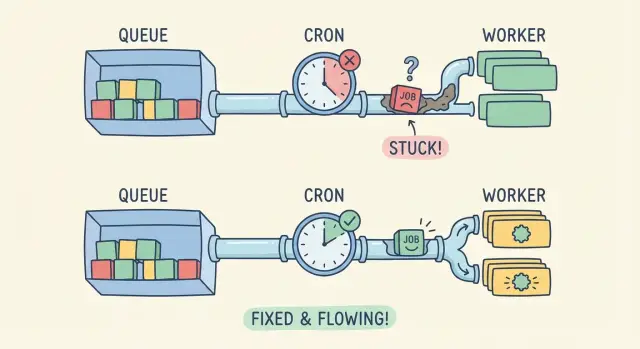
What it looks like when background jobs stop working
When background jobs aren’t running, the app can look fine at first. Pages load, users click around, and forms submit. But the “afterward” work never happens.
People notice missing side effects: the welcome email never arrives, a CSV import sits on “processing” forever, a payment webhook is received but the order never updates, or a nightly sync stops changing numbers. Support tickets sound vague (“it’s stuck”) because nothing obviously crashes.
This is especially common in AI-generated prototypes. They often work locally because one machine is doing everything: serving the web app, triggering schedules, and running workers. In production those pieces are split across services, containers, or machines. One missing piece breaks the chain.
Most failures fall into four buckets:
- Scheduling: cron/timers never trigger, time zones drift, or the schedule runs in the wrong environment.
- Worker deployment: the worker isn’t running, can’t reach the queue, or is pointed at the wrong queue.
- Retries: jobs fail and retry forever, or fail once and vanish without alerts.
- Idempotency: a job runs twice and corrupts state, so it’s disabled or constantly errors.
Before touching code, collect a few facts. It saves hours of guessing and makes it clearer where the pipeline breaks:
- The timestamp when the user action happened (or when the schedule should have fired)
- The job name/type and any job ID your system logs
- Worker logs around that time (not just web logs)
- Queue metrics: pending, in-progress, failed
- The last successful run time of the same job
If you inherited a prototype from tools like Replit, Cursor, or Bolt, this “evidence pack” is also what teams like FixMyMess use to spot whether you have a missing scheduler, a dead worker, or a job that’s failing quietly.
Cron, queues, and workers: the simple mental model
Think of background work as a delivery system. Something decides when work should happen, something stores the work, and something actually does it.
Cron (or a scheduler) is the clock. It triggers a task on a schedule like “every 5 minutes” or “every Monday at 9am.” A queue is the mailbox. It holds jobs until a worker is ready. A worker is the mail carrier. It pulls jobs from the queue and runs the code.
One-time jobs and recurring jobs start differently. A one-time job is usually created by your app (for example, “resize this image after upload”). A recurring job is usually created by cron (for example, “send weekly reports”). If you use a queue, both end up in the same place: a job record waiting to be processed.
In production, state needs to live somewhere shared and durable: a database table for scheduled runs, Redis for queue messages, or a managed queue service. If a prototype relies on in-memory state, it can work locally and then fail the moment you have more than one server, or after a restart.
Local dev hides problems because everything runs in one process. In production they’re separate. If cron isn’t installed, if the worker isn’t deployed, or if the worker can’t reach Redis or the database, you get the classic symptom: background jobs don’t run even though the app looks “healthy” on the surface.
Fast triage: where is the pipeline breaking?
Don’t guess. Figure out which part of the pipeline is failing: are jobs not being created, not being picked up, or running and failing?
1) Are jobs being created at all?
Start with the simplest split: “no job exists” vs “job exists but nothing happens.” Look for a job record in your queue store/table, or for any log line that confirms a job was enqueued.
If you see nothing, it’s usually scheduling. Cron/timers might not be running in production, might be running in the wrong environment, or might not have the right permissions. A common prototype mistake is relying on a local scheduler (your laptop) without deploying an actual scheduler process.
2) Are jobs created but never processed?
If jobs exist but stay stuck as “queued,” you likely have a worker that isn’t processing jobs. Confirm a worker is actually running in the production environment (not just during deploy) and listening to the same queue name your app publishes to.
Also check connectivity and credentials. Workers need access to the queue backend (Redis/SQS/database) and the same env vars as the app. One mismatched variable can make the worker look “healthy” while it never sees the jobs.
3) Do jobs run but fail and retry forever?
If you see attempts increasing, scheduling is probably fine. Now it’s execution. Open the latest error and look for the repeating cause (auth errors, missing secrets, timeouts). Retries should have backoff and a max attempt count.
If a job touches money, email, or user data, assume it can run twice. Missing idempotency is how “it’s failing” turns into “it’s failing loudly,” with duplicate charges or repeated emails.
Fixing scheduling issues (cron and timers)
First verify the basics: is anything triggering the job, and is it triggering when you think it is?
Confirm the schedule is what you think
Cron expressions can look right and still be wrong. Time zones are the most common trap. Your laptop might be on local time while production runs in UTC. That turns “every day at 9am” into “every day at 1am” or “not during your testing window.”
Also check how your platform interprets the schedule. Some systems use 5-field cron, others use 6 fields (with seconds). One extra field shifts everything.
Quick checks that catch most mistakes:
- Print the next 5 run times from your scheduler (in logs) and confirm they match your expectation.
- Confirm the timezone setting in both your app config and hosting environment.
- Validate the cron string against the scheduler library you’re actually using.
- Make sure the job is enabled in production (feature flags and env vars often differ).
- Confirm only one scheduler instance is active (or you may get duplicates).
Make the scheduler safe in production
A scheduler that runs on your laptop doesn’t automatically run after deployment. In prototypes, it’s common to put the scheduler inside the web server process. Then it stops whenever the web dyno restarts, scales to zero, or sleeps.
Missed runs are another quiet failure. If the app restarts at 9:01, the 9:00 job never fires unless you design for it. For important tasks, consider a catch-up approach: on startup, check what should have run and queue it.
Finally, handle overlaps. If a job can take longer than its interval, you need a lock or a “do not overlap” rule. Otherwise you’ll see double sends, duplicate billing, or competing updates.
Fixing worker deployment and connectivity
If the schedule looks correct but jobs still aren’t being processed, look at the worker. A queue only moves when a worker process is actually online, connected, and able to keep running.
Confirm there’s a worker process in the same environment where the app is deployed (not just on your laptop). You want evidence that it starts, stays up, and points at the same queue your app is sending jobs to. Check your process list or service dashboard, then check logs for a startup line like "listening" or "connected".
Deployment gaps that show up often in AI-generated prototypes:
- The worker was never deployed (only the web app was).
- The worker command is wrong (it runs a dev script, or exits immediately).
- Environment variables are missing in the worker (queue URL, credentials, NODE_ENV).
- The worker points at a different queue name/region than the web app.
- The worker crashes and restarts in a loop (often due to memory limits or missing dependencies).
Connectivity issues look similar: jobs pile up and nothing consumes them. Common causes are a wrong host, blocked ports, expired credentials, or a queue service that’s only accessible from a private network your worker isn’t in.
Concurrency matters too. Too few workers means slow processing; too many can cause timeouts, rate limits, or out-of-memory crashes. A simple starting point is 1-2 workers with small concurrency, then increase only when you can see stable memory and predictable job time.
Example: a startup deploys a “send invoice emails” job. The web app enqueues fine, but the worker runs without the queue credentials in production, so it starts and then exits. Fixing the worker environment (and adding a clear “connected to queue” log line) makes the issue obvious next time.
Retries, backoff, and failure handling that doesn’t spiral
Sometimes the complaint “background jobs aren’t running” is really: the job is running, failing instantly, and retrying so fast it never makes progress. Good retry rules keep your system calm and your logs readable.
Sort failures into two buckets:
- Transient errors usually go away: timeouts, rate limits, temporary database locks, brief network hiccups. These should retry.
- Permanent errors won’t improve with time: missing data, a bad API key, “user not found,” validation errors, or a code bug that always throws on the same line. These should fail fast and land in a “dead” state for review.
Backoff prevents a small issue from turning into a storm. A sane default is a small number of attempts (for example 3-10), with delays that grow each time. Add a little random jitter so a thousand jobs don’t retry at the same second.
Capture the same basics every time a job fails so you can reproduce it later:
- Job name, unique job ID, and attempt number
- The exact input payload (or a safe summary) and relevant record IDs
- The error message and stack trace, plus the upstream response code if it was an API call
- Timing info: how long the job ran, and how long until the next retry
Alerts can be simple. If queue length grows for 10 minutes, or the oldest job age crosses a threshold, page someone or at least message a shared channel. This catches “quiet” failures where the worker is alive but every job is stuck.
Example: a weekly email job hits an email provider rate limit on Monday morning. Without backoff, it retries immediately, burns through all attempts, and drops emails. With backoff and a clear “rate limited” log, it waits, recovers, and you can confirm the fix.
Idempotency: making jobs safe to run twice
Once jobs start running again (or retries begin working), a new problem often appears: the same job runs twice. If the job isn’t idempotent, “twice” can mean double charging a customer, sending duplicate emails, or creating duplicate records.
Idempotency means you can safely run the same job more than once and still get one correct outcome. Picture a “charge card and email receipt” task. A network glitch can happen after the payment succeeds but before your app saves the result. The queue retries, and the customer gets charged again.
Where idempotency keys help most
For anything that talks to the outside world (payments, email providers, SMS, webhooks), add an idempotency key that stays the same for the logical action, not the attempt. A good key is tied to a stable business ID, like invoice_1234 or order_987.
Also protect your database from duplicates. The simplest guardrail is a unique constraint, like “only one receipt per invoice.” Then your job can “try to insert” and treat “already exists” as success.
Practical patterns that work well as prototypes move toward production:
- Record a job state first (for example:
payment_pending), then do the external call, then mark itpayment_completed. - Store a “processed key” (job ID or business ID) and check it before doing side effects.
- Use unique constraints for one-time things (receipts, emails, subscriptions).
- Return success if the result already exists.
If you inherited an AI-generated prototype, this is often missing: jobs do the side effect first, then try to save. Fixing that order alone can eliminate most duplicate charges and emails.
Step-by-step: a repeatable debugging workflow
Stop guessing and test one point of the pipeline at a time. The goal is to turn a vague symptom (emails not sent, reports not generated) into a clear failure point you can fix.
Use one small test job with a known payload, and keep everything else the same as production:
- Prove the schedule triggers: run the scheduler once on demand (or temporarily set the cron to every minute) and confirm it attempts to enqueue the job.
- Prove the job is created: check the queue, job table, or broker for a new entry with your known payload and timestamp.
- Prove a worker can see it: start a single worker in the foreground and watch it pick up the job.
- Read the real error: find the first failure (missing env var, wrong database URL, blocked outbound email, permissions).
- Re-run the same job: confirm it completes, then confirm it doesn’t double-apply changes if run twice.
Once you do this, you’ll know which layer is broken: scheduling, enqueueing, worker deployment/connectivity, or job logic.
After it works once, add guardrails
A job that runs only when you’re watching isn’t fixed yet. Add a few protections so failures don’t pile up silently:
- Timeouts and limits (so jobs don’t hang forever)
- Clear retry rules with backoff (so failures don’t loop)
- Dead-letter or failure queue (so bad jobs don’t block good ones)
- Idempotency checks (so a retry doesn’t charge a card twice)
- Logs that include a job ID and key inputs
Common traps that keep jobs from ever completing
Often the cause isn’t the queue system itself. It’s a small mismatch between where the scheduler runs, where the worker runs, and what the job needs to succeed.
One common failure is splitting the pipeline by accident. For example, cron runs on a web server, but the worker is deployed on a different machine or container that isn’t running in production. The scheduler happily enqueues work, but nobody is there to pick it up.
Other traps show up again and again:
- Using an in-memory queue (or dev-only adapter) so jobs vanish on restart or scale-out.
- Catching errors and returning “success” anyway, so the job looks done but did nothing.
- No failure visibility, so broken jobs pile up silently for days.
- Secrets and endpoints are hardcoded and differ between local, staging, and prod.
- Jobs depend on local files or a temp folder that doesn’t exist on the worker.
A small example: a job sends invoices and calls an external API. Locally it works because the API key is in your .env file. In production, the worker container doesn’t have that variable, the code catches the exception, and the job completes with no invoice sent. You only notice when customers complain.
If you suspect one of these, answer two questions: where does the job run (which service), and where do you see its logs? If you can’t find both, failures can hide for a long time.
Quick checklist before you ship again
Before pushing another build, do a quick pass across the whole pipeline. Most “background jobs not running” reports aren’t a single bug. They’re small mismatches between scheduling, enqueuing, and worker setup.
Start with the scheduler. In many prototypes, the cron process never runs in production, or it runs in a container that gets scaled down. Confirm it’s running right now (not just “configured”), and that it has the same environment variables as the app.
Next, confirm jobs are actually being created. Check that the job timestamp (run at / scheduled for) matches your production time zone, and that the payload has real IDs (not empty strings, placeholder emails, or null user IDs). If jobs are created but scheduled far in the future, they’ll look “stuck” even though nothing is broken.
Then verify the worker. Make sure at least one worker process runs continuously and listens to the exact queue name your app uses. A single typo or default queue mismatch can create silent pileups.
Finally, make failures visible and safe to retry:
- Log errors with enough context to act (job name, ID, key fields)
- Cap retries and use backoff, so failures don’t loop forever
- Make jobs idempotent, so a retry doesn’t double-send emails, double-charge cards, or re-create records
Example: the weekly email job that works locally but not in production
A common “it worked on my laptop” story: a prototype sends a weekly report email every Monday at 9:00. After deployment, nothing arrives. The dashboard looks fine, users can log in, and there are no obvious errors.
First check: is the schedule real in production? Locally, your dev server might auto-run a scheduler (or you started it once and forgot). In production, the cron entry exists in config, but there’s no scheduler process actually running. The code is correct, but nothing triggers the queue.
After deploying a scheduler (or enabling the platform cron), jobs finally start appearing. That reveals the second issue: the worker keeps retrying the same job because an env var for the email provider API key is missing. Each run fails, requeues, and builds a backlog. New jobs are delayed, and the queue looks “stuck,” even though the worker is busy failing.
What fixes it for good:
- Add a simple health log when the scheduler enqueues jobs (so you can prove triggers are happening).
- Fail fast on missing env vars at startup (so the worker crashes loudly instead of retrying forever).
- Cap retries with backoff (for example, 5 attempts over 30 minutes), then move the job to a dead-letter state for review.
- Make the email job idempotent by saving a unique key like
report:teamId:weekStartDatebefore sending, and skipping if it already exists.
With those changes, you can rerun workers, redeploy, or recover from crashes without sending duplicates or creating endless retry loops.
Next steps: harden the pipeline and keep it stable
Once jobs are running again, the goal is to stop the same break from returning next week. Treat background jobs as a production risk, not a one-off bug.
Turn what you learned into a short runbook so anyone can follow it:
- Where schedules are defined (cron config, platform scheduler, app timers)
- How workers are started (process name, command, required env vars)
- What “healthy” looks like (queue depth, last successful run time)
- The top failure modes you saw (timeouts, auth, bad payloads)
- The safe way to replay jobs (and how to avoid double-sends)
Add minimal monitoring that answers two questions: are jobs piling up, and are they failing? Even basic alerts on queue depth growth and a daily count of failed jobs catches most issues early.
If your prototype mixes web request code and job logic, plan a small refactor. Move the job’s core work into a single function that can run from a worker, and make the web request only enqueue and validate input. This makes retries safer and removes hidden dependencies on request state.
If you inherited an AI-generated app and need a fast second set of eyes, FixMyMess (fixmymess.ai) focuses on diagnosing and repairing broken prototypes so queues, workers, retries, and deployment behavior match what you see locally - with human verification before you ship.
FAQ
How do I know it’s a background job problem and not a normal app bug?
If pages load but “afterward” actions never happen (no emails, imports stuck, webhooks received but no updates), assume background jobs are failing. Confirm by checking whether a job was ever enqueued and whether a worker attempted it around the time the user action happened.
Why do background jobs work locally but not in production?
Because local dev often runs everything in one place: the web server, the scheduler, and the worker. Production splits those into separate processes or services, so one missing piece (no scheduler running, no worker deployed, wrong queue connection) breaks the chain even though the web app still looks fine.
What’s the fastest way to triage where the pipeline is breaking?
Start by deciding which stage is broken: job creation, job pickup, or job execution. First, look for an enqueue log or a job record; if none exists it’s usually scheduling. If jobs exist but remain queued, it’s usually a worker or connectivity issue. If attempts increase, it’s running and failing, so focus on the error and retry rules.
What are the most common scheduling (cron) mistakes?
Scheduling is broken when no job is created at the expected time. Common causes are the scheduler not running in production, time zone differences (local vs UTC), the schedule defined for the wrong environment, or a cron format mismatch (5-field vs 6-field). A quick check is to log the next few run times and confirm they match your expectation.
What’s the difference between the queue and the worker, and what breaks most often?
A queue is the place jobs wait, and a worker is the process that pulls jobs and runs them. If jobs pile up as “queued,” it usually means the worker isn’t running, is pointing at a different queue name, or can’t reach the queue backend due to wrong credentials or network access.
Why does my worker look “healthy” but still never processes jobs?
Because the web app and the worker frequently have different environment variable sets. The app might enqueue correctly, while the worker is missing a queue URL, database URL, or API key, so it starts but can’t process jobs. The simplest fix is to verify the worker has the same critical env vars as the web process and logs a clear “connected to queue” message on startup.
If retries keep happening, does that mean scheduling is fine?
Not necessarily; it can mean the job is failing instantly and retrying. Check whether the attempt count is increasing and whether the same error repeats. If it is, add a max attempt count and backoff so failures don’t loop forever, and make sure permanent errors move to a failed state you can review instead of retrying endlessly.
How do I prevent duplicate emails or double charges when jobs retry?
Idempotency means the job can run twice and still produce one correct result. Use stable idempotency keys for external side effects (payments, emails, SMS) and protect your database with unique constraints so “already done” is treated as success. This prevents double charges and duplicate emails when retries happen after partial success.
What information should I collect before changing code?
Capture the timestamp of the user action (or expected schedule time), the job name/type and any job ID, worker logs for that window, queue depth and failure counts, and the last successful run time for the same job. This “evidence pack” quickly tells you whether jobs aren’t being created, aren’t being consumed, or are failing during execution.
When should I bring in FixMyMess instead of debugging longer?
If you inherited an AI-generated prototype and jobs are stuck, failing silently, or duplicating side effects, it’s usually a deployment and pipeline mismatch rather than one small bug. FixMyMess can do a free code audit to pinpoint whether you’re missing a scheduler, running a dead worker, or failing on secrets and retries, then repair and harden the setup quickly with human verification.