Concurrency limits for background workers that protect your DB
Concurrency limits for background workers keep DB load steady by capping parallel jobs and queue depth. Learn simple rules, quick checks, and an example.
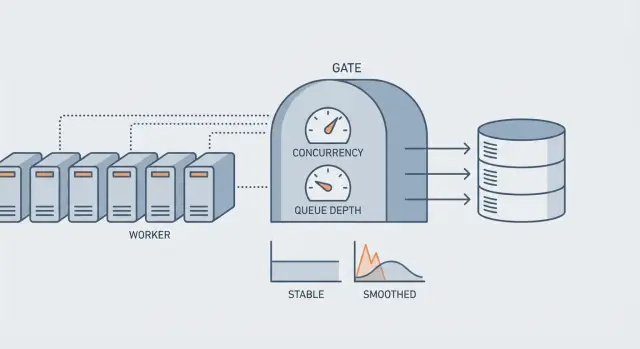
Why background workers can overwhelm your DB
A "DB spike" usually shows up as a chain reaction. Pages that were fast start hanging. Logins fail. You see timeouts in your API and a growing pile of failed or retried jobs. Even if only one feature runs in the background, it can make the whole app feel broken because the database is the shared bottleneck.
Background workers overload databases faster than web traffic because they’re built to be persistent and parallel. A web request is limited by people clicking around and by request timeouts. Workers will happily pull job after job and run as fast as your CPUs allow. If each job does a few queries, that turns into hundreds or thousands of queries per minute with no natural pause.
The tricky part is that it can look like "slow queries" when the real issue is parallelism. When too many jobs hit the DB at once, the database runs out of connections, starts queueing work internally, and everything slows down together.
Symptoms that often point to concurrency as the root cause:
- Many different queries get slower at the same time (not just one endpoint)
- Connection pool errors or "too many connections" messages
- Job retries spike right after a deploy or a scheduled task starts
- DB CPU climbs while throughput stops improving
The goal of a concurrency limit isn’t to make jobs slower. It’s to keep throughput steady instead of bursty: stable DB load, fewer incidents, and consistent latency for real users.
Example: a nightly "rebuild search index" job launches 20 workers. Each worker reads rows, updates status, and writes progress. The site is quiet at night, but the DB still saturates and morning traffic hits a tired, backed-up system.
Concurrency, rate, and queue depth in plain terms
When people say "we need more workers," they usually mean one of three knobs. Each solves a different problem, and turning the wrong one can overload your database.
Concurrency is how many jobs run at the same time. If concurrency is 20, you can have 20 jobs hitting your DB in parallel.
Rate is how fast you start jobs over time, like "5 jobs per second," even if you could run more.
Queue depth is how many jobs are waiting in line. Backlog age is how long the oldest job has been waiting.
Queue depth tells you volume. Backlog age tells you pain. A queue can be deep but fine if it drains steadily. A small queue can be a crisis if jobs are stuck and the oldest one is hours old.
Why "more workers" often makes things worse first: workers mostly compete in the same few places. The hidden bottleneck is usually the database, whether it’s connection pool limits, row or table locks, or long transactions. When you increase concurrency, you don’t just do more work. You increase contention. Requests queue up for DB connections, transactions stay open longer, locks last longer, and everything slows down.
A quick example: 10 workers each run a job that holds a transaction for 300 ms. That sounds small. But if those jobs touch the same tables, doubling to 20 workers can double lock waits and push transaction time to seconds. Your web requests then fight the workers for connections, and the whole app feels down even though it’s just overloaded.
What usually breaks first in the database
When background workers spike, the first failure often isn’t "the database is slow." It’s "the database can’t accept more work right now." That shows up as timeouts, a pile of waiting queries, and error rates that jump even though CPU may look fine.
1) Connection pool exhaustion
Most apps have a fixed connection pool per process. Each worker thread or process needs a connection for every query it runs. If you spin up more workers than the pool can handle, they start waiting for connections. Waiting workers still hold memory and keep retrying, which adds pressure everywhere.
A common pattern: your web app needs 20 connections to stay healthy, but workers grab the remaining pool and the website starts failing login or checkout.
2) Locks from long transactions
Locking is the next common failure. Even if queries are fast, long transactions keep rows locked. If many jobs touch the same hot rows or tables (for example updating the same user, account balance, or a "last_processed_at" field), the work becomes serial: only one job can move at a time, and the rest wait.
Lock waits can look like random slowness, but the root cause is too much parallelism hitting the same data.
3) Expensive job query patterns
Jobs often do small work in a tight loop, which creates a lot of queries. Common culprits include N+1 patterns, per-item updates instead of bulk updates, recomputing the same aggregates repeatedly, missing indexes on job filters, and fetching far more data than the job actually needs.
4) External calls inside a transaction
If a job starts a transaction and then calls an external API (email, payments, AI, storage) before committing, the database connection and locks are held while the worker waits on the network. Multiply that by parallel workers and you get fast connection saturation.
Concurrency limits help, but they work best alongside short transactions and predictable query costs.
How to choose sane limits (without guessing)
A good limit isn’t a number you feel is right. It’s a number your database can handle on a bad day, when traffic is high and cache misses spike. The goal is simple: keep your DB within safe connection and query-time ranges while still making steady progress.
Start with a conservative baseline tied to the database, not the app server. Look at your DB connection pool (or max connections) and reserve headroom for web requests, admin tasks, and migrations. Then factor in how long your typical job holds a connection.
A practical baseline:
- Reserve 50-70% of DB connections for online traffic and unknown work.
- Use the remaining 30-50% as the total budget for all workers combined.
- Start with low parallelism (often 1-3 workers per queue) and increase only after DB latency stays flat.
- Re-check after adding features. Limits that worked last month can fail after a query change or a missing index.
Don’t use one global number for every job. Separate limits per queue based on business impact. A critical queue (password resets, onboarding) should stay responsive even if a bulk queue (backfills, imports) is huge.
Some job types are known DB bullies: exports, billing runs, large imports, anything that scans big tables. Put per-job caps on these even if the overall worker pool is larger. For example, you might allow 10 workers overall but only 1 export at a time.
Also decide what happens when the queue grows. If you ignore it, you often get surprise spikes later when workers catch up.
- Backpressure: slow producers (reduce schedule frequency, add delays, cap enqueues per minute).
- Shed work: drop or coalesce low-value jobs (merge duplicates, keep latest only).
- Defer: move bulky tasks to off-peak windows with strict caps.
- Split: break one giant job into smaller chunks with a hard per-chunk limit.
Step by step: set concurrency and queue depth limits
Start by naming your job types. Write down what triggers each job, how often it runs, and whether it reads or writes lots of rows. Mark the DB-heavy ones (imports, analytics backfills, "sync everything," email sends that also update user state). Those are the first to control.
Next, set a ceiling on how many jobs can run at once, then split that ceiling across queues. A common setup is a default queue for normal work and a heavy queue for DB-intensive jobs. This keeps one noisy job type from stealing all DB connections.
A practical starting setup:
- Global cap: keep total concurrent jobs below your safe DB connection budget.
- Per-queue cap: give heavy jobs a smaller slice than fast jobs.
- Per-job cap (if supported): only 1-2 of the same expensive job at a time.
- Priority: keep user-facing work ahead of maintenance work.
- Time windows: run heavy queues during low-traffic hours.
Then cap queue depth. Decide what happens when the queue is full: pause new enqueues, delay them (with a scheduled run time), or reject with a clear error. If your heavy queue reaches 1,000 jobs, you might stop accepting new bulk imports and tell users to try again later.
Retries can create spikes too. Add jitter (small random delays) so failures don’t retry in lockstep, and use backoff that grows quickly for DB errors like timeouts.
Roll out changes gradually. Lower concurrency first, watch the DB, then raise limits in small steps. If query time climbs or connections pin at the max, back off before users feel it.
Monitoring that tells you if limits are working
Limits are working when your database stays stable even as job volume changes. You should see controlled peaks, not sudden cliffs where everything slows down at once.
Database signals that matter
Watch a small set of metrics together:
- Active connections (and connection pool wait time)
- Slow query count and p95 query time
- Lock waits and deadlocks
- CPU usage and memory pressure
- Disk IOPS and read/write latency
If connections are pegged while CPU is low, you likely have too many concurrent queries waiting on locks or I/O. If CPU is pegged and slow queries rise, the DB is doing too much work per query.
Worker signals that show whether throttling is helping
Track running jobs, queued jobs, job duration (p50 and p95), retry rate, and dead letters. A healthy system has a queue that grows and shrinks, but backlog age stays roughly flat.
Actionable alerts:
- Backlog age rising for 10-15 minutes
- Retry rate rising alongside DB timeouts
- DB connections stuck near the max for several minutes
- Job duration drifting up (especially p95)
How to decide what to change: if reducing worker concurrency calms DB metrics and job duration improves, you needed tighter limits. If lowering concurrency barely helps but slow queries and lock waits stay high, you need faster queries or better indexing, not more throttling.
Example: if a nightly email job causes retries to spike and lock waits to jump, the limit might be fine, but the query that selects recipients may need a smaller batch size or a better index.
Common mistakes that cause spikes anyway
Many teams add limits and still get surprise database spikes. Usually the limit was set based on worker capacity, not on what the database can safely handle. Setting worker concurrency equal to CPU cores can look sensible, but it ignores connection pool size, lock contention, and slow queries. A database can fall over long before the worker host is "busy."
Retry behavior is another quiet spike generator. Unlimited retries, or retries that all fire at the same time (like "retry in 30 seconds" for every failure), can create a retry storm. One brief outage becomes a second outage when thousands of jobs wake up together and hammer the same tables.
Queue design can amplify the problem. If you use one queue for everything, bulk work can starve critical work. A huge backfill or export delays user-facing jobs, and then someone cranks up concurrency to catch up, which hits the DB even harder.
During incidents, a common mistake is raising limits to "clear the backlog." That often turns a manageable queue into database connection saturation. You might clear the queue faster, but you also increase timeouts, lock waits, and deadlocks, so the backlog returns.
Guardrails that prevent the usual failures:
- Base concurrency on DB connections and query cost, not CPU cores.
- Add jitter and exponential backoff to retries, with a hard max.
- Separate queues for critical vs bulk work.
- Treat "raise limits" as a last resort, and do it in small steps.
- Define a clear delay, shed, or reject policy when the queue is full.
Quick checklist before you ship
Before you turn background workers loose in production, assume the worst case: a deploy, a restart, or an outage recovery where every worker wakes up at once. Your database doesn’t care that jobs are "in the background" - it only sees a sudden wave of connections and queries.
Checklist:
- Peak connections math is written down. Add up web servers + worker processes x worker threads + admin scripts. Compare the total to your DB connection limit (and leave headroom).
- Heavy jobs are separated and capped. Put the most expensive job types (imports, backfills, large email blasts, data syncs) in their own queue with lower concurrency than normal jobs.
- Queue depth has a hard ceiling, and backlog age is watched. A max queue length prevents infinite pileups, and an alert on oldest job age catches slowdowns early.
- Retries don’t create a retry storm. Spread retries out, stop after a reasonable window, and avoid immediate retries on DB errors that are likely load-related.
- You have a safe emergency knob. Know how to cut worker concurrency fast (and how to pause only the heavy queue) without redeploying.
One practical example: if a nightly report job touches lots of rows, give it its own queue with concurrency 1-2, cap that queue’s depth, and alert if the oldest report job is more than 15 minutes old.
Example: preventing a nightly job from taking your app down
Picture a SaaS app where users are active until late, then a nightly import kicks off at 1:00 AM. The import reads a large CSV, enriches each row, and writes updates to the same tables your app uses for sign-ins, dashboards, and billing.
With no limits, the worker system tries to finish faster by running as many jobs as it can. Within minutes, database connections hit the ceiling. Queries that used to take 50 ms start taking seconds. Web requests time out. Then retries start, and now you have a second wave of re-queued work fighting for the same database.
A simple plan changes the story:
- Put the import jobs on their own queue, separate from user-critical jobs (emails, webhooks, payments).
- Cap import concurrency to a small number based on DB capacity (for example, 3-5 workers).
- Add a queue depth limit so you stop enqueuing new work when the backlog is already too big.
- Add rate limiting around the heaviest DB operations (like upserts) to smooth bursts.
Now the import runs longer, but it stays predictable. User requests keep a steady share of DB connections. If the import generates more work than the system can safely handle, it waits in line instead of creating a traffic jam.
The trade-off is simple: a slightly slower batch job in exchange for a stable app. Most teams prefer the import finishing later if it avoids support tickets and emergency rollbacks.
When limits are not enough (and what to change next)
Concurrency limits are a safety rail, not a cure. If you hit the limits every day and the queue never catches up, the issue is usually the job itself, not the worker count.
Scale workers when the job is already efficient and you just have more volume. Fix the job logic when each job is heavier than it should be (too many queries, repeated work, or locking rows for too long).
Reduce DB load before you add more workers
Most spike incidents come from jobs doing lots of small database trips in parallel. Changes that usually pay off:
- Batch work: update or insert in chunks instead of row-by-row.
- Make jobs idempotent: safe to retry without duplicating side effects.
- Cut round trips: fetch what you need once, then operate in memory.
- Add the right indexes: slow scans multiply quickly under parallelism.
- Shorten transactions: do less work while holding locks.
Example: a nightly "recalculate stats" job that loads 10,000 users and runs 10 queries per user will melt your DB even with low concurrency. Reworking it to compute in batches (or with one aggregated query) can turn a query storm into a small number of predictable queries.
Read/write separation: helpful, but not magic
Sending read-only work to replicas can help if the job truly does reads and your replicas can keep up. It won’t help when the pain is writes, row locks, or a hot table that every job touches. Watch replica lag too: a job that reads from a replica and writes to the primary can make decisions on stale data.
If you’re relying on throttling forever, set a concrete goal (like halving queries per job or keeping job runtime under 30 seconds) and revisit your limits after you fix the workload.
Next steps for AI-generated codebases
AI-generated apps often ship with unsafe defaults because the goal is usually "make it work" instead of "make it survive production." That’s how you end up with unbounded queues, workers that spawn as many tasks as the machine allows, and no backpressure when the database starts slowing down.
A common pattern: a background job reads 50,000 rows and then does a per-record write with no batching. Even if each write is fast, the combined load can saturate connections, create lock pileups, and turn normal user requests into timeouts. In that situation, setting sensible limits helps, but it’s only part of the fix.
If you inherited an AI-generated prototype from tools like Lovable, Bolt, v0, Cursor, or Replit and it’s already showing spike behavior, FixMyMess (fixmymess.ai) can start with a free code audit to pinpoint the exact source of DB pressure and recommend safe worker and queue settings before you ship.
FAQ
Why do background workers overload the database faster than normal web traffic?
Background workers can run continuously and in parallel, so they generate steady database pressure with no natural pause. If each job does even a few queries, high concurrency quickly turns into connection pool waits, lock contention, and timeouts that affect the whole app.
How can I tell if the problem is concurrency rather than one slow query?
If many unrelated queries get slower at the same time, that usually points to contention, not one bad query. Connection pool errors, rising retries right after a scheduled task, and DB CPU going up without higher throughput are also strong signs of too much parallelism.
What’s the difference between concurrency, rate limiting, and queue depth?
Concurrency is how many jobs run at once. Rate is how quickly you start jobs over time, and queue depth is how many jobs are waiting (while backlog age tells you how long the oldest has waited). If you turn up concurrency when the DB is the bottleneck, things often get worse before they get better.
What usually breaks first in the database during a worker spike?
Connection pool exhaustion is usually the first thing to break: workers and web requests fight for a limited number of DB connections. After that, long transactions and row/table locks can make work effectively single-file, so more workers just means more waiting.
Why is it dangerous to call external APIs inside a DB transaction?
Keep transactions short and avoid doing network calls while a transaction is open. If a job calls an external API inside a transaction, it holds a DB connection and locks while waiting, so a small amount of latency becomes a big outage when multiplied by parallel workers.
How do I choose a safe worker concurrency limit without guessing?
Start by budgeting DB connections: reserve most for web traffic and unknown work, and allocate the remainder to all workers combined. Begin with low per-queue concurrency and only increase if DB latency and lock waits stay flat under load.
Should I use one queue for everything or separate queues?
Split jobs into separate queues by impact and DB cost, so bulk work can’t starve user-critical tasks. Give heavy queues lower concurrency and consider per-job caps for known “DB bullies” like exports, backfills, and large imports.
How should I cap queue depth, and what should happen when it’s full?
Set a hard ceiling and decide the behavior when it’s full: delay, pause producers, or reject new bulk work with a clear message. A depth limit prevents infinite pileups and forces you to handle overload intentionally instead of letting it crash the DB.
How do I prevent retries from creating a second spike?
Use jitter plus exponential backoff with a hard maximum retry window, especially for DB timeouts. Without jitter, many jobs retry at the same moment and create a retry storm that turns a brief slowdown into a second outage.
What metrics tell me if my limits are working, and what do I change next?
Watch DB connections and pool wait time, p95 query time, lock waits/deadlocks, and worker backlog age alongside retry rates. If lowering concurrency quickly stabilizes DB metrics and improves job duration, your limits were too high; if not, the job’s query patterns or indexes likely need fixing.