Blue-green deployment for small apps: safer cutovers and rollbacks
Learn blue-green deployment for small apps with two environments, safe cutovers, fast rollbacks, and practical guidance for databases and sessions.
Why small apps still get hurt by risky deploys
Small apps usually go down for boring reasons. A deploy ships one tiny change, and suddenly login fails for everyone. Or a background job starts twice and writes duplicate rows. Or a config value points to the wrong database and users get errors for an hour.
Those outages feel unfair because the app isn't "big." But risk is often higher in small teams: fewer eyes on changes, less time for testing, and nobody on call who can drop everything to fix production.
The worst deploys break things that are hard to spot locally. Authentication and sessions can fail because cookies get invalidated, callbacks are misconfigured, or tokens are rejected. Data can get unsafe when migrations lock tables, or when code writes new fields before they exist. Runtime settings bite when secrets are missing, environment variables are wrong, or network rules differ from dev. And even when everything works in a quiet test, real traffic can knock over an endpoint that looked fine in development.
Blue-green deployment lowers that risk without turning releases into a big ceremony.
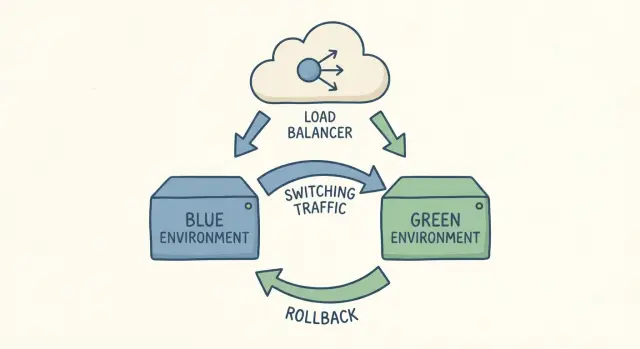
When people say "two environments," they mean two full copies of your app setup running at the same time: one is live (blue), the other is the new version you're about to release (green). Both should use the same kind of server, the same dependencies, and the same production-like settings. The key is that only one of them receives real user traffic.
A cutover is simply switching traffic from blue to green. If something goes wrong, you switch it back. That's the whole idea.
This isn't about heavy process. It's about buying yourself a safe place to answer practical questions before users pay the price: does login still work, do key pages load, are background jobs behaving, and can you roll back quickly if you missed something?
A common small-app scenario is a "quick" change made in a hurry. It works for you, then breaks for users because production has different cookies, domains, or secrets. With green waiting in the wings, you can test those production-only details first, then flip traffic when you're confident.
If your codebase is AI-generated and already shaky, the risk goes up. Teams often inherit broken authentication, exposed secrets, and tangled logic that behaves differently under real traffic. Blue-green won't fix bad code by itself, but it can keep a bad deploy from becoming a long outage.
Blue-green in plain English
Blue-green deployment is the simple idea of keeping two ready-to-run copies of your app.
Blue is what users are on right now. It's the current live version, handling real traffic. Green is the new version you want to release. You build it, configure it, and test it while blue keeps serving users.
When you're happy with green, you do a controlled traffic switch so users start hitting green instead of blue. That switch usually happens in one place: a load balancer or reverse proxy rule, a platform toggle if your host supports a swap, a router setting in your container gateway, or (less ideally) DNS. DNS works, but caching makes timing less predictable.
The big win is speed and confidence. If something goes wrong after the cutover, rollback is often just switching traffic back to blue. You're not rebuilding the old version under pressure. It's already there and already working.
Picture a simple SaaS with login, billing, and a dashboard. You deploy green with a new dashboard layout, smoke test it on real infrastructure, then flip the switch. If customers report broken charts, you can flip back to blue in minutes while you fix green.
Blue-green doesn't magically solve everything. Two areas trip teams up most:
Database changes: if green needs a new table or changed columns, you have to plan so both blue and green can run safely during the transition.
Sessions and logins: if sessions are stored in memory on each instance, users may get logged out when traffic moves. Shared session storage (or stateless auth) prevents that.
When blue-green is a good fit (and when it's not)
Blue-green works best when you want safer releases, but you don't want complicated release tooling. You keep two production-like environments, test the new one with real settings, then switch traffic.
It's a strong fit when your app is mostly stateless and your changes are easy to test end-to-end. That often includes simple web apps, APIs with short independent requests, internal tools with a known user set, and early SaaS products shipping small changes often. It also helps when you can afford to run two copies during a release window.
A simple example: a small SaaS has a Next.js app and an API. You deploy the new version to green, run a quick smoke test (login, create an item, export), then switch traffic. If something feels off, you switch back in minutes.
It's not a great fit when the hardest part of your release is the database, or when work can't be duplicated safely across environments. Warning signs include frequent schema rewrites that lock tables, long-running jobs that can't be paused or duplicated, heavy in-memory state like WebSockets or custom session storage, and third-party side effects (payments, emails) that you can't replay without care. It also goes poorly when the team doesn't have a written cutover and rollback checklist.
There's a cost: you pay for two copies during releases. For small apps this can still be cheap, but plan for doubled compute plus any duplicated services (queues, caches) if you need them.
Tooling matters less than team habits. A short checklist (who switches traffic, what to verify, what triggers rollback) prevents panic.
What you need before you try it
Blue-green works best when you treat blue and green as two separate, complete copies of production. If the basics aren't solid, you can still switch traffic, but you won't know which side is healthy, and rollback can get messy.
Start with configuration. Blue and green should run the same code, but they must not share the wrong secrets by accident. Keep environment variables clearly separated, and make it easy to confirm which environment a service is using. A common failure is pointing green at the wrong database, the wrong OAuth callback, or a test payment key.
Minimal setup checklist
Before your first cutover, you want to be able to say "yes" to these:
- Separate configs for blue and green (env vars, secrets, third-party keys), with clear naming and an easy way to verify what's loaded.
- One reproducible build artifact that gets promoted (build once, deploy many). Don't rebuild for green.
- A health check that proves more than "the server is up" (include critical dependencies like database and cache).
- Basic monitoring for what users feel (error rate and latency) plus one or two key actions (signup, checkout, file upload).
- Logs you can read under stress (request IDs, useful errors, and a way to compare blue vs green).
Health checks deserve extra attention. A "200 OK" endpoint is fine for a load balancer, but you also want a deeper signal before you cut over. For example, can the app reach the database, read a row, and write a lightweight record? If you can't safely test writes, at least verify the app can connect and run a simple query.
Keep releases boring. The biggest advantage of blue-green is confidence that you're switching to the same thing you already tested. If your build changes between environments, you're testing one thing and shipping another.
Step-by-step: a simple blue-green release runbook
Blue-green works best as a short, repeatable checklist. You're not trying to be fancy. You're trying to be boring and safe.
1) Choose how you will switch traffic
Pick one cutover method and stick to it:
- Load balancer or reverse proxy switch
- Platform swap (if your host supports it)
- DNS change (works, but caching makes timing unpredictable)
Decide ahead of time who has access, how long it takes, and how to undo it.
2) Deploy green to match blue
Deploy the new version to green with the same "shape" as blue: the same services (queue, cache, storage), the same secrets management approach, the same background worker setup, and equivalent runtime settings. Values can differ, but the structure should be consistent.
Most blue-green failures happen because green isn't really production-like. Green points to a different database, a missing secret causes auth to fail only after the switch, or a job runner isn't wired the same way.
3) Verify green before users touch it
Run quick smoke tests against green using a real account (or a staging-safe one). Keep it simple and focus on what breaks revenue and trust:
- Log in and log out
- Load a few key pages
- Create and update one real record
- Trigger one background job (email, webhook, report)
- Scan logs for new error spikes
If your app uses caches or workers, start them early and let them warm up. A common pattern is "it worked in testing" but falls over once caches are cold and workers start processing real queues.
4) Cut over, then watch closely
Switch traffic in a controlled way. If your setup allows gradual traffic (even 10% first), do that. If it's all-or-nothing, do it during a quiet window.
For the next 10 to 30 minutes, watch a short set of signals: error rate, latency, login success, checkout or your key action, and database load. Decide in advance what numbers mean "stop and switch back."
Database changes without losing writes
The hardest part of blue-green is usually not the switch. It's the database.
The core risk is simple: for a while, two versions of your app can be live. If both versions talk to the same database but expect different tables or columns, one version can start throwing errors. Worse, it can write data the other version can't read, or overwrite fields in ways you didn't expect.
A safer pattern is to make database changes backward-compatible first. Add things before you remove things. Keep old code working while the new code rolls out.
Use the "expand then contract" approach
Most small apps avoid downtime by splitting schema work into smaller moves:
- Expand: add new columns or tables, keep the old ones.
- Write with overlap: update the new version to write to the new place, while keeping reads compatible.
- Contract: after the cutover and a safe window, remove old columns, tables, or code paths.
Example: you want to rename users.fullname to users.display_name. Don't drop fullname during the switch. Add display_name, ship code that writes both fields (or writes one and backfills the other), then clean up later.
Separate the deploy from destructive migrations
Try not to bundle "drop column," "rewrite table," or "backfill 50 million rows" into the same moment you flip traffic. Do slow or risky work ahead of time, while the current version is still serving users. If a migration will take minutes or lock rows, treat it as a pre-migration and make it safe to run while the old app is live.
During the cutover window, check compatibility in both directions: old app reading rows written by the new app, and new app reading rows written by the old app. That's where hidden assumptions show up, like hard-coded column lists, missing null handling, or unsafe defaults.
Sessions and auth: keep users logged in during the switch
The fastest way to turn a safe cutover into a support nightmare is to accidentally log everyone out. Sessions usually break because something changed between blue and green: a cookie name, a session signing key, a token format, or even the domain/subdomain.
Keep the identity rules identical on both sides
During the cutover window, treat these as shared contracts that must not change:
- Session signing and encryption keys (cookie secrets, JWT signing keys, CSRF secrets)
- Cookie settings (name, domain, path, Secure, HttpOnly, SameSite)
- Token and session formats (claims, expiry rules, serialization)
- Auth callbacks and redirect URLs (for OAuth)
If you need to rotate keys, do it with overlap. Green should accept both the old and new key for verification, while only issuing new sessions with the new key. Existing users stay logged in, and new logins get the safer key.
Prefer stateless auth (but keep it compatible)
If your app can use short-lived access tokens plus a refresh flow, cutovers get easier because the server doesn't need to remember sessions. The important part is compatibility: green must accept tokens minted by blue until they naturally expire. Avoid changing claim names or token audience rules in the same release.
If you use server-side sessions, make the session store shared. Both blue and green should read and write to the same backing store (often Redis or a database table). If each environment has its own session store, users will flip to green and look "unknown," even though their cookie is fine.
Checkout and long forms are common pain points. Someone is mid-payment, the cutover happens, and their next request lands on green. Keep that safe by storing cart and order state in the database (not only in memory), using idempotency for payment actions, and making form submissions tolerant of retries. When possible, switch traffic gradually and let blue finish in-flight requests before fully cutting over.
Roll back fast without making it worse
In blue-green, rollback usually doesn't mean undoing code changes. It means switching production traffic back to the previous environment (from green back to blue). If routing is clean, this can be quick.
The goal is speed and certainty. Pick one owner for the decision, and keep one obvious action that flips traffic (one button, one command, one runbook step). When everyone has their own "quick fix," rollbacks get delayed and messy.
Agree on rollback triggers before the cutover. Common ones are a sudden spike in 5xx/timeouts, login or signup failures, payment failures, clear data integrity issues (missing orders, duplicates, weird totals), or a latency jump that makes the app feel broken.
The hard part is still the database. Once green starts receiving writes, going back to blue is only safe if blue can read the new data shape. If your release included a migration that removed a column, renamed fields, or changed constraints, blue might crash or silently misbehave. That's how a rollback turns into a bigger outage.
A practical rule is to keep database changes backward compatible for a short window. Add new columns first, keep old ones, deploy code that can handle both, and only remove old fields after the dust settles.
Set a decision window. For example: "If we see critical failures in the first 10 to 20 minutes, we switch back. After that, we hotfix forward unless there's data loss." That prevents endless debate while users are stuck.
A simple rollback sequence:
- Declare an incident owner and freeze other changes
- Flip traffic back to the previous environment
- Verify logins, payments, and the core user flows
Common mistakes that cause outages
Blue-green sounds simple, but most outages happen in the boring gaps between "two environments" and "traffic switched."
One big mistake is treating blue and green like two different apps. It starts small: a missing environment variable, a secret rotated in one place only, or a feature flag set differently. Then the cutover happens and payments fail or emails stop sending. Blue and green should be the same build and the same config shape, with only the minimum differences (like the deployment color and hostnames).
Another common miss is background work. Web traffic might flip cleanly, but the job runner is still pointed at the old environment, or both environments run the same scheduled task. That can cause duplicate invoices, double notifications, or two cleanup jobs fighting each other.
Database changes are where people get hurt most. Teams run a breaking migration at the exact moment they switch traffic. If green uses the new schema and blue is still writing the old shape (or vice versa), you can lose writes or corrupt data fast. The safer pattern is: make compatible changes first, deploy, switch traffic, then remove old columns later.
Local testing isn't enough. Blue-green fails on production-like details: real auth providers, real cookies, real caches, real timeouts, and real load. If you only test green on your laptop, you're not testing what you're about to serve users.
Finally, teams hesitate during an incident because they didn't define a stop-the-line rule. Decide ahead of time what triggers an immediate rollback: a sharp error spike, login failures crossing a threshold, a broken key flow (signup, checkout, password reset), database errors increasing (deadlocks, timeouts), duplicated background work, or the simple fact that you can't explain the issue within a few minutes.
Quick checklist and next steps
Blue-green works best when each release is a short routine that catches the few things that hurt users most: broken login, failed writes, and slowdowns right after the switch.
Before you touch traffic, do a quick pre-deploy pass. Confirm health checks on the new environment (including critical dependencies), verify environment variables and secrets are loaded from the right place, review migrations for safety (additive first, no surprise deletes), and make sure logs and monitoring are working.
Right after cutover, test like a real user. For many small apps that means: sign up or log in, create or update a record, and complete one core money or messaging action (checkout, payment, sending an invite, saving a draft).
After the first few minutes, stop clicking around and watch signals. Look for changes, not perfect numbers: a sudden bump in errors, a spike in latency, or a backlog in queues.
Decide rollback rules before you need them. A rollback isn't only a switch, it's also a data decision: who has authority to roll back, the exact switch action and how long it takes, what happens to writes made after cutover, how you handle sessions, and when you stop rolling back and start fixing forward.
If you inherited an AI-generated app and deploys keep failing, treat that as a code health problem, not just a process problem. Teams at FixMyMess (fixmymess.ai) do codebase diagnosis, logic repair, security hardening, and deployment preparation for AI-generated prototypes, which can make blue-green cutovers and rollbacks feel predictable instead of stressful.
FAQ
What is blue-green deployment in simple terms?
Blue-green deployment means you keep two complete, ready-to-run environments. One (blue) serves real users, while you deploy and test the new version in the other (green). When you’re satisfied, you switch traffic to green; if something breaks, you switch back to blue.
Why do small apps get so much downtime from “small” deploys?
Small apps often have fewer checks before a release: less testing time, fewer reviewers, and slower incident response. A tiny config mistake or auth change can take the whole app down. Blue-green gives you a safer “try it on real infrastructure first” step without adding a ton of ceremony.
What’s the best way to switch traffic between blue and green?
The most common switch is at a load balancer or reverse proxy because it’s fast and reversible. If your hosting platform supports an environment swap, that can be even simpler. DNS can work, but it’s harder to predict because caches can keep sending users to the old version longer than you expect.
What should I test on green before I cut over?
Do a quick smoke test that mirrors what users care about most: login, a few key pages, a create/update action, and one background job or side effect you rely on. Verify the same secrets and environment settings you use in production are actually loaded. Then watch errors and latency right after cutover so you can switch back quickly if needed.
How do I avoid green pointing at the wrong database or secrets?
Treat config as the first-class risk. Make it obvious which environment you’re in, keep blue and green configs separate, and double-check the “gotchas” like database endpoints, OAuth callback URLs, cookie domains, and payment keys. Most painful cutovers aren’t code bugs—they’re wrong settings.
How do I prevent users from getting logged out during the switch?
Keep session and auth rules identical during the cutover window, especially cookie settings and signing/encryption keys. If you store sessions server-side, use a shared session store so both environments recognize the same user sessions. If you must rotate keys, do it with overlap so green can accept sessions created by blue until they expire.
How do I handle database migrations without losing writes?
Assume blue and green may both run against the same database for a while, so your schema changes must be backward-compatible. Add new columns or tables first, deploy code that can handle both old and new shapes, then remove old fields later. Avoid doing destructive migrations at the exact moment you flip traffic.
When should I roll back vs fix forward?
Roll back by switching traffic back to blue, not by rebuilding old code under pressure. Decide rollback triggers ahead of time, like login failures, payment failures, error spikes, or clear data integrity issues. Be extra cautious if green has already written data in a new format that blue can’t read safely.
How do I stop background jobs from running twice in blue and green?
Running the same scheduled job in both environments can create duplicates, like double invoices or repeated notifications. Before cutover, confirm only one set of workers and schedulers will run the “one-time” or periodic tasks during the transition. After cutover, verify queues, cron jobs, and webhook processors are pointed where you think they are.
Does blue-green help if my app is AI-generated and already unstable?
AI-generated code often has fragile auth, tangled logic, and inconsistent config handling, which makes production behavior unpredictable. Blue-green helps limit blast radius, but it won’t fix broken fundamentals like unsafe migrations, hard-coded secrets, or unreliable session logic. If deploys keep failing, it’s usually worth doing a focused codebase diagnosis and cleanup so releases become predictable.