Bug report template founders can use to get fixes faster
Use this bug report template to give engineers clear steps, expected vs actual behavior, environment details, and a smallest reproducible case they can fix.
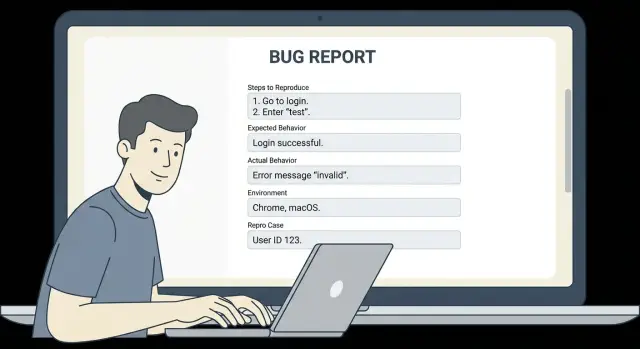
Why engineers get stuck on vague bug reports
A vague bug report doesn’t fail because it’s short. It fails because it leaves too many possible causes. Engineers end up guessing, trying random fixes, or burning time recreating your exact situation.
“I clicked around and it broke” usually hides the details that matter: which page you were on, what you clicked, what you typed, and what you expected to happen. To an engineer, that could be a front-end bug, a back-end error, a permissions issue, a bad browser cache, or a one-time network glitch. Without a clear path to reproduce it, the bug can look invisible.
Even when the bug is real, it may only happen under certain conditions. Maybe it only happens for new accounts, only after a password reset, only on a specific plan, or only when a field is left blank. If those conditions aren’t written down, the team may test the happy path and conclude it’s “working on my machine.”
You don’t need to be technical to help. Your job is to be specific and consistent, so someone else can follow your steps and see the same failure.
If you have 5 minutes, do these high-impact basics:
- Write the exact steps you took, one action per line
- Copy the exact error text (or capture a screenshot)
- Say what you expected to happen vs what happened
- Note the device and browser you used
- Try again in a private window to see if it repeats
A clear report beats a long message every time. One page of precise steps is more useful than ten paragraphs of context.
If you’re dealing with an AI-generated prototype that behaves unpredictably, clarity matters even more. Small details can trigger big failures.
What an actionable bug report includes
An actionable bug report lets an engineer reproduce the problem, understand the impact, and know when the fix is finished. If any one of those is missing, the report turns into a guessing game.
Start by making the bug easy to locate. Name the exact place it happens (page, feature, screen, or API route) and the action that triggers it. “Checkout fails” is vague. “Checkout: clicking Pay on the Shipping step returns a 500” is something a developer can search for.
Next, define the boundaries. Call out what’s affected and what’s not. This prevents wasted time testing unrelated areas. Examples:
- Only happens for new users; returning users can pay
- Only breaks on mobile; desktop is fine
Include the essentials in plain language:
- Where it happens (screen, URL path, or feature name)
- How to reproduce it (a short sequence someone else can follow)
- What you expected to happen vs what actually happened
- How urgent it is (blocked sale, minor UI glitch, rare edge case)
- What “done” means (the exact result you want after the fix)
A good report also shows impact without drama. “Users can’t log in, so they can’t reach the dashboard” is more useful than “This is critical!!!” If you have numbers, add them: “3 out of 5 test accounts hit it.”
Keep it testable. If the report asks for a fix but doesn’t describe a check, the engineer can’t confidently ship it. A simple “done” statement helps, like: “A brand new user can sign up, confirm email, and reach the home screen without an error.”
If you’re using an AI-generated codebase (from tools like Cursor or Replit), include that context too. It often changes where engineers look first, and it can affect scope and risk.
The founder-friendly bug report template (copy and fill)
Use this template when you want an engineer to reproduce the issue quickly and ship a fix without a long back-and-forth.
TITLE
[What broke] in [where: page/feature] for [who: user type]
Example: “Checkout error on Payment step for logged-in users”

IMPACT
- Who is blocked:
- How often it happens (every time / sometimes / first time today):
- Business effect (can’t sign up, can’t pay, data wrong, security risk):

STEPS TO REPRODUCE (numbered, exact)
1) Start state (logged out/in, which account, which plan):
2) Go to:
3) Click/type:
4) Select:
5) Submit/refresh/wait:

EXPECTED VS ACTUAL (one sentence each)
Expected:
Actual:

ENVIRONMENT (what you used when it failed)
- Device (phone/laptop, model if known):
- OS version:
- Browser + version (or app version):
- Account type/role (admin, member, trial, paid):
- Time it happened + timezone:

SMALLEST REPRODUCIBLE CASE
What is the minimum setup that still fails?
- Smallest test account/data needed:
- One setting/flag that seems required:
- Minimal path (fewest steps) that still triggers it:

NOTES (optional)
- First time you noticed it:
- Recent changes (new prompt-generated code, new deploy, new integration):
- Workaround (if any):
Tip: if you can reproduce it in a fresh test account with one sample record, include that. It often cuts debugging time in half.
Step-by-step: how to write reproduction steps
Reproduction steps are the fastest way to turn a complaint into a fix. The goal is simple: make it possible for someone who has never seen your app to hit the same bug in under 2 minutes.
Start from a clean state so your steps match what most users experience. That usually means logging out, doing a hard refresh, or opening a new tab (private/incognito helps). If the bug depends on being logged in, say so and include what type of user you used.
Write the steps like a recipe, not a story. Use the exact names people see on screen: page titles, button labels, field names, and menu items. If your UI says “Create workspace” but you write “add a space,” an engineer can easily end up in the wrong place.
A quick checklist you can reuse:
- Reset to a clean state (log out, refresh, new tab)
- Assume the reader is new to the product
- Use exact UI text (buttons, pages, fields)
- Include the data you entered (email, plan, example input)
- Stop at the first moment the bug appears
A concrete example (good level of detail): you open a new incognito window, go to the Login page, sign in with [email protected] (Admin role), click “Billing” in the left menu, click “Upgrade plan,” select “Pro,” and click “Confirm.” The bug appears right after you click “Confirm” (the page freezes and the spinner never stops).
One change that helps immediately: don’t mix symptoms and guesses into the steps. Keep steps pure, then save your thoughts for a separate “Notes” line.
Expected vs actual behavior (make it unambiguous)
The fastest way to get a fix is to describe the outcome you wanted (expected) and the outcome you got (actual) in plain, testable words. Think of “expected” as the user goal, not how the app is built.
Expected behavior should read like a simple promise to the user. Good: “After I click Pay, the order is created and I see a confirmation page with an order number.” Not great: “The Stripe webhook should fire and update the DB.” (That’s an implementation guess.)
Actual behavior is what you can see and copy. Include exact error text, button labels, and what the page shows. If there’s an error message, paste it exactly. If there’s no message, say that too.
Partial failures matter. Many bugs are “it works, but…” cases: it logs in but shows the wrong account, it saves but changes the date, it uploads but loses the filename. Call out what worked and what’s wrong, so engineers don’t stop at the first “success.”
To make this section easy to scan, use this mini format:
- Expected: (one sentence user outcome)
- Actual: (what you saw, include exact text)
- Frequency: every time / sometimes / first time only (add % if you can)
- What I tried: (reset password, different browser, reloaded, etc.)
Example: Expected: “Invite sends an email within 1 minute.” Actual: “Toast says ‘Invite sent’, but no email arrives. No error shown. The user appears in the list with status Pending.” Frequency: “Happens 3 out of 5 times.” What I tried: “Tried two emails, waited 10 minutes, checked spam, retried once.”
Environment details engineers actually need
If a bug only happens for some people, the fastest way to unblock a fix is to write down the exact setup where it fails. Without that, engineers can spend hours testing on the wrong device, the wrong account type, or the wrong network.
Include these basics when you can:
- Browser + version (example: Chrome 121, Safari 17). If it’s in an app, include the app version.
- Device + OS (example: iPhone 14 on iOS 17.2, Windows 11 laptop, macOS 14).
- Account state (new user vs existing user, admin vs member, paid plan vs free, invited vs self-signup).
- Time window + timezone (example: “Jan 18, 9:30-10:00am PT”). This helps match server logs.
- Network notes (home Wi-Fi vs office, cellular, VPN on/off, country). Some bugs only show up behind certain VPNs or in certain regions.
A simple way to capture this is to copy the “About” or version screen from your browser/app, then add one line about who you were logged in as.
Example:
“Fails on Safari 17.1 on iPhone (iOS 17.2). Works on Chrome 121 on my Mac. I’m logged in as an existing paid admin. Happened today around 10:15am ET. VPN on (US location).”
If you inherited an AI-generated app and the behavior changes across browsers or accounts, that’s a strong clue the code has hidden edge cases. In that situation, many teams start by recreating your exact environment, then patch the logic and harden the weak spots so the bug stops coming back.
Finding the smallest reproducible case
A “smallest reproducible case” is the shortest path that still breaks in the same way, every time. Engineers can fix faster when they can trigger the issue on demand, without guessing which detail mattered.
Start by removing anything that isn’t required to make the bug happen. If you can delete a step and the bug still happens, that step was noise. If a page has three actions, try to narrow it to the single click, form submit, or API call that triggers the problem.
A practical way to shrink the problem is to switch to a clean setup. Real customer data often adds confusion (permissions, old records, edge cases). Use a fresh test account and one simple, repeatable sample input.
A method that works even if you’re not technical:
- Reproduce the bug once, then write down every step you took
- Repeat it, but skip one step (or use simpler data) to see if it still fails
- Move to a fresh test account and try the simplest possible input
- Reduce it to one page and one action, if possible
- Keep the one sample input that triggers it 100% of the time
Then write two versions of the steps: the minimal path and the full story. The minimal path is what an engineer will run first; the full story is context that may explain why it matters.
Example: your AI-built app’s signup fails only for some users. The full story might involve invites, a paid plan, and a specific email domain. The smallest reproducible case might be: “New test account -> Signup -> Enter email [email protected] -> Submit -> Error.”
Evidence: errors, screenshots, and recordings without noise
Good evidence turns a “can you fix this?” message into something engineers can act on quickly. The goal is simple: make the failure obvious, and make it easy to match what you saw to what they can see in logs.
First, copy the exact error text. Don’t paraphrase. Paste it with the same punctuation, wording, and any codes. If the UI shows an ID (order ID, user ID, invoice number, workspace name), include it too. Those little strings often let an engineer find the right log entry in seconds.
Screenshots help most when they show context. A cropped error toast can be misleading because it hides what page you were on and what fields were filled. Capture the full screen, including the URL bar if it’s a web app, and the visible inputs.
Recordings are even better when the issue depends on timing or a specific click path. Keep it short (20-60 seconds), but include the lead-up steps and the exact moment it fails.
Most useful evidence, in order:
- Exact error message text (copy/paste), plus any visible IDs
- Full-screen screenshot right after it fails
- Short screen recording showing the steps and the failure
- What you entered or selected (form values), with secrets removed
- Any timestamp and your time zone (helps match logs)
Example: “Checkout fails with ‘Payment session invalid.’ Order ID: 18492. Screenshot shows the checkout page with the coupon applied. Recording shows: Cart -> Apply coupon SAVE10 -> Pay -> error. Used test card ending 4242. No real customer data.”
If you’re sharing form values, remove passwords, API keys, and full card numbers. Replace with placeholders like [REDACTED].
Example: a realistic bug report from a founder
Here’s a filled example. Scenario: a new user tries to sign up, but gets stuck in a password reset loop.
Title
- Signup sends users into password reset loop

Impact
- New users cannot create accounts. This blocks onboarding and sales demos.

Urgency
- High (we have 3 demos tomorrow). If there’s a safe workaround, that’s fine for now.

Where it happens
- /signup page and the “Forgot password” email link

Reproduction steps
1) Open the app in Chrome.
2) Go to /signup.
3) Enter a new email that has never signed up before.
4) Enter a password (any).
5) Click “Create account”.
6) You see “Account already exists. Reset your password”.
7) Click “Reset password”.
8) Open the reset email and click the link.
9) After setting a new password, you return to /signup and step 6 happens again.

Expected behavior
- Step 5 creates a new account and logs the user in.

Actual behavior
- The app claims the account exists and forces password reset, but the reset does not allow signup to complete.

Environment
- Browser: Chrome 121 (also reproduced on Safari iOS 17)
- Device: MacBook + iPhone
- Account state: email never used before
- Time: started today around 10:30am local

Evidence
- Error shown: “Account already exists. Reset your password”
- Console error: POST /api/auth/signup 409
- Server log snippet: Unique constraint failed on users.email

Workaround tried
- Tried a different email. Same behavior.
- Cleared cookies. No change.

Notes
- Project was generated with an AI tool and then edited in Cursor.
Details founders often miss at first: whether the email was ever used (including in staging), whether the problem happens in another browser, and the exact error code (409 matters).
How the smallest reproducible case tightens it: “New email + click Create account = 409 on /api/auth/signup every time.” That points directly to duplicate user creation or an auth flow mixing signup and reset.
The impact and urgency are clear without noise: it blocks onboarding, and there’s a deadline.
Common mistakes (and how to avoid them)
Most slow bug fixes aren’t “hard bugs.” They’re missing details. A template is mainly a way to remove guesswork so an engineer can reproduce the problem fast.
1) The steps start from a fuzzy place
If your steps begin with “open the app” or “log in,” the engineer still doesn’t know what state you were in. Start with a clear starting point: which page you were on, which account you used (admin vs regular), and whether the data already existed.
Simple fix: add one line before the steps like “Starting state: logged in as a free-plan user, on Settings page, with no team created.”
2) You paraphrase the error (or skip it)
“Server error” and “it crashed” aren’t enough. Copy the exact error text. If there’s a code (500, 401, “JWT expired”, “SQLSTATE”), include it. Exact words matter because they often point to one specific file or service.
3) You combine multiple issues into one report
Engineers can fix one thing quickly, or three things slowly. If login fails and the dashboard loads slowly, make two separate reports. If you’re not sure they’re related, say so, but keep them separate.
Common mistakes and the quick fix:
- Too many steps: cut anything that doesn’t change the outcome
- Missing trigger: write the exact click, input, or API call that causes it
- No expected result: say what you thought would happen
- No environment: include device, browser, and build/version
- Sensitive data included: replace with fake values and note what you changed
4) You share secrets or private user data
Founders often paste logs that include API keys, cookies, or real emails. Before sending, redact anything sensitive. If you’re working with an AI-generated app (for example from Bolt, v0, Cursor, or Replit), exposed secrets are common, so be extra careful.
5) You report the symptom, not the trigger
“It doesn’t save” is a symptom. The trigger is “I type X in field Y, click Save, then refresh, and the change is gone.” If you can reduce it to the smallest reproducible case, the fix usually follows fast.
Quick checklist and next steps
If you only do one thing, use a consistent template so every report arrives with the details an engineer needs to reproduce and fix it.
Copy-paste quick checklist
- Title + impact: What’s broken, and what it blocks (checkout fails, signup stuck, data wrong)
- Steps to reproduce: Numbered, exact clicks and inputs, starting from a clear starting point
- Expected behavior: What should happen (one sentence)
- Actual behavior: What happens instead (include the exact message if any)
- Evidence: One clean screenshot/recording or the key error text (no extra noise)
Before you send it, add the environment details that usually explain “works on my machine” problems: device type, OS version, browser and version (or app version), account/role used, and the time it happened (with timezone if your team is remote).
Final checks (takes 60 seconds)
- Repro test: Can someone else follow it in under 2 minutes, without guessing?
- Smallest case: Remove optional steps until it breaks in the simplest flow
- Safety: Remove passwords, API keys, tokens, and any personal data from screenshots/logs
- Fresh run: Try once in a private window or after logout/login, and note the result
- If it’s AI-generated code: When bugs keep stacking up (auth breaking, secrets exposed, messy structure), start with a focused diagnosis
If your app was built with AI tools and keeps failing in production, FixMyMess (fixmymess.ai) can help by diagnosing the codebase, repairing broken logic, and hardening security issues that often hide behind “random” bugs. If you want a clear map of what’s wrong before committing to changes, their free code audit is designed for exactly that.
FAQ
What makes a bug report “actionable” to an engineer?
Aim for someone else to reproduce the bug in under two minutes without guessing. If your report clearly shows where it happens, the exact trigger, and what “fixed” looks like, an engineer can usually start debugging immediately.
How detailed should my reproduction steps be?
Write the steps like a recipe from a clear starting state, using the exact button labels and field names you see. Stop at the first moment it fails, and include any specific input you typed that might matter.
What’s the difference between “expected” and “actual” behavior?
Expected is the user outcome you wanted, stated in plain words someone can test. Actual is what you saw instead, including the exact error text and any visible codes, so the engineer can match it to logs and confirm the fix.
Which environment details are worth including every time?
Include your device, OS, browser (and version), account type or role, and roughly when it happened with your timezone. These details often explain “works on my machine” issues and save hours of back-and-forth.
What is the “smallest reproducible case,” and how do I find it?
It’s the shortest set of steps and simplest data that still triggers the same failure consistently. Start with your full flow, then remove steps or simplify inputs until you find the minimum path that still breaks every time.
What evidence should I include without creating noise?
Copy and paste the exact error message if you can, because wording and codes matter. If you send a screenshot or recording, show enough context to prove where you are in the app and what you clicked right before it failed.
How do I communicate urgency without sounding dramatic?
Give the impact in a calm, concrete way, like what users can’t do and what it blocks for the business. If you have a rough frequency, include it, because “every time” vs “sometimes” changes how engineers investigate.
Should I combine multiple problems into one bug report?
Split them into separate reports whenever the triggers or outcomes are different, even if they happened on the same day. One report per bug helps engineers ship fixes faster and avoids mixing symptoms that aren’t actually related.
How do I share logs or screenshots safely without leaking secrets?
Redact passwords, API keys, tokens, and real customer data before sharing anything. If a log line or screenshot might contain sensitive values, replace them with placeholders like [REDACTED] and mention what you changed so the report stays useful.
Why do AI-generated prototypes have “unpredictable” bugs, and when should I ask FixMyMess for help?
AI-generated codebases often have hidden edge cases, inconsistent state handling, and security gaps that make bugs feel random across browsers or accounts. If you’re stuck in repeated failures like broken auth, exposed secrets, or messy structure, FixMyMess can diagnose and repair the code and harden security, starting with a free code audit and typically finishing most projects in 48–72 hours.