Build a job board with AI tools: approvals, paid posts, anti-spam
Build a job board with AI tools while handling posting approvals, paid listings, and anti-spam basics founders often forget before launch.
What makes job boards fail early (and how to avoid it)
Job boards fail early for a simple reason: they attract bad behavior faster than almost any other listings product. The moment you get indexed, bots show up. They post scams, SEO junk, and copy-pasted roles. If your “post a job” form has no friction, you’ve basically opened a mailbox with no lock.
Visitors also arrive with high expectations. They want trust (real companies, real roles), speed (no hoops to browse and apply), and freshness (jobs that are still open). If someone sees three scam posts or a week of stale listings, they rarely come back.
Founders usually get stuck in two places: approvals and payments. If every post needs manual review, you become the bottleneck and postings pile up. If you skip review entirely, spam floods the site. Payments create their own problems: “Did the charge go through?”, “Why is this post still pending?”, “How do refunds work?” Those edge cases show up early, especially when the first build has gaps in state changes and error handling.
“Good enough” for a first launch isn’t perfection. It’s a small set of rules that keeps the board clean while you learn what users actually do. Start with email verification before a post can go live, a simple status flow (draft, pending review, live, rejected), lightweight friction (rate limits, CAPTCHA when needed, a blocked-words list), and clear payment gating (a paid post can’t go live until payment is confirmed). Then give yourself an admin view that shows the newest submissions with quick approve/reject actions.
If you launch on Monday and wake up Tuesday to 40 submissions, you should be able to approve the real ones fast and reject the rest in one click. If your code can’t reliably handle “pending vs live” (or leaks admin actions), that’s not a minor bug. It’s a trust problem.
Decide your MVP: who posts, what’s paid, what’s reviewed
The biggest early decision isn’t design. It’s rules: who can post, what they can buy, and what must be checked before a job goes live.
Start with “who can post?” Open posting grows fast but attracts spam. Invite-only keeps quality high but slows growth. Verified employers sits in the middle, but it only works if you have a verification step you can actually run every day.
Next, define listing types. Keep it small so users understand it in seconds. A practical starting point is a free listing, a paid listing with more visibility, and one premium option like “featured” or “pinned.” Too many tiers means you spend your first month answering pricing questions and handling edge cases.
Your pricing rule should fit in one sentence. For example: “$99 for 30 days of featured placement.” If you can’t say it clearly, you won’t enforce it cleanly in code.
Decide what the admin must control on day one. At minimum, you need the ability to approve/reject (and occasionally edit) posts before they publish, pause a live post with an internal note, mark an employer as trusted or blocked, and issue a refund that also removes any featured status.
A common failure mode: you launch with open posting and a $49 featured upgrade. On day two, a spammer pays for featured and floods the homepage. If you can’t pause the post instantly and block the employer, you lose real employers.
Basic structure: job posts, users, and status changes
A job board feels simple until you need to answer basic questions: who posted this, is it live, and what changed since it was approved?
Keep job post fields tight at first. You need enough to support search, trust, and moderation, and you can add the rest later. A solid baseline is: title, company name, location (or a single “remote” option), description, apply method (email or external apply page), plus metadata like created_at, expires_at, and a source tag (manual, import, API).
For users, keep it simple too. An account can be a poster, a moderator, or both. The key is tying every post to an owner (user_id) so you can rate-limit, message, or block repeat abusers.
Statuses are your safety rails. You’ll almost always need draft (not submitted), pending (awaiting review), approved/live, rejected, and expired. Treat status changes as controlled actions, not free-form edits. A rule like “only moderators can move pending to approved” prevents accidental publishing.
Add an audit trail from day one: who changed what, when, and why. Even a basic log like (post_id, old_status, new_status, changed_by, changed_at, note) helps when someone says “my post disappeared.”
Edits after approval are where founders get surprised. Pick one policy and make it predictable: either edits to key fields (title, company, apply method) put the post back into pending, or edits are allowed but logged and optionally re-reviewed.
Posting approvals that don’t slow you down
A slow approval process can kill momentum. The goal is simple: keep humans in control, but make the normal case fast.
A simple workflow
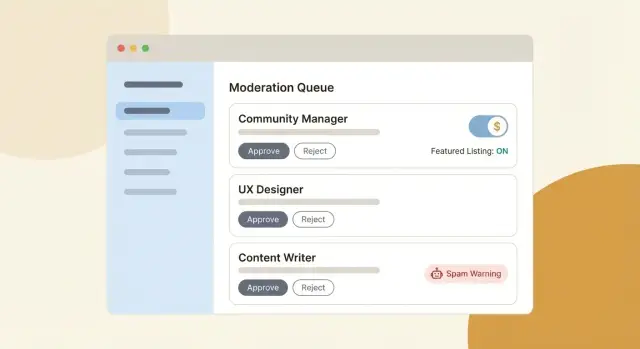
Create one clear review queue that shows only what needs attention. Treat it like an inbox: newest first, basic filters (“needs changes,” “about to expire”), and a single screen where you can approve or reject without jumping through five tabs.
Keep your status model small. Fewer states means fewer edge cases.
Rules that save time
Decide what can be auto-approved versus always reviewed. Start strict, then loosen once you see patterns.
Auto-approve returning posters with a clean history. Always review first-time posters, “urgent hire” claims, and posts with external contact details. Always review edits that change sensitive fields like the title, company name, or compensation. Auto-reject obvious junk (all caps, repeated keywords, very short posts stuffed with links).
When you reject, require a reason the poster can act on. Use a few preset reasons (missing location, unclear role, suspicious email, looks like an ad) plus an optional note. Let posters fix and resubmit without starting from scratch, and add a simple “resubmitted” flag so second reviews stay fast.
Add time limits so nothing sits forever: if a post is pending for 48 hours, notify the admin. If it’s still untouched after a week, expire it.
Paid listings: pricing, checkout flow, and refunds
Treat payments as a product feature, not a button you add at the end. Most payment problems aren’t about the provider. They come from unclear promises and missing states.
Start by deciding what “paid” actually buys, and make it measurable: more visibility (featured placement), more time (30 days instead of 14), or a clear placement rule (pinned for 7 days). Avoid vague “boosts” unless you can explain where the post appears and for how long.
A paid post lifecycle needs explicit states so nothing gets lost. A simple set is: draft, pending payment, active (paid and visible), expired, refunded.
Make checkout boring in a good way. The buyer should see the price, duration, and what happens when it expires. Right after payment, send a clear confirmation message and a receipt that includes the job title and dates. Many chargebacks happen because the buyer can’t find proof they paid.
Decide refund rules before you have your first angry email. One practical policy: refund if the post never went live, or if you remove it for policy reasons within a short window.
Also give yourself admin overrides. You’ll need them early: comp a post for a partner, extend duration after a mistake, or remove “featured” without deleting the job.
Anti-spam basics founders forget until it’s too late
Spam isn’t just annoying. It can flood your database, ruin email deliverability, and make real employers stop posting.
Start with basic account checks. Require email verification before a first post can go live. Keep a blocklist of disposable email domains and update it as you see patterns. If you allow “post without an account,” expect a lot more cleanup work.
Add rate limits early. They’re not glamorous, but they stop bots from hammering your app. Limit job posts per account per hour (and per IP as a backup), limit edits per minute, add a cooldown after repeated failed logins, cap verification email requests, and slow down repeated searches from the same IP if scraping becomes a problem.
Form defenses don’t need to be heavy. A hidden honeypot field catches many basic bots with almost zero user friction. Use CAPTCHA only when someone trips a rule (new account, high velocity, suspicious IP), not on every post.
Finally, add basic content checks: banned keywords, too many links, repeated phone numbers, and near-duplicate posts. A simple duplicate check on title + company + apply URL catches a lot.
Quality controls beyond spam filters
Spam filters catch the obvious junk. What hurts your reputation is the post that passes basic checks but still feels off: a vague role, a fake company, a wrong location, or a “too good to be true” offer.
You don’t need to fully verify every employer, but you can add “looks legit” signals and flag posts that don’t match.
Quick legitimacy checks that scale
A review screen can highlight a few patterns: whether the email domain roughly matches the company name, whether the company website uses a real domain (not a shortener), whether optional LinkedIn fields follow expected formats, and whether wording is repeated across many posts.
Location rules are another easy win. Require a company name and a location that your system can enforce, like “Remote (US only)” or “Berlin, DE.” If you allow “Remote anywhere,” label it clearly so candidates don’t feel tricked.
Stop bait-and-switch after approval
Many founders approve a post once, then forget that edits can turn it into something else. Prevent this by freezing key fields after approval (company name, compensation, location, application method). If an employer edits a frozen field, switch the post back to “needs review,” and keep the last approved version visible until it’s re-approved.
Add a report button on every post. Keep takedown simple: reports create a ticket, the post can be hidden in one click, and the poster gets a short message asking for clarification.
Example scenario: a realistic launch week and what breaks
You launch a niche board for remote design jobs. The plan is modest: about 20 posts a week, mostly from small agencies and founders hiring their first designer. You build the first version over a weekend, publish it, and share it in a couple of communities.
On day 1, the first six posts look great. You’re the only moderator, so you approve twice a day. That works until someone submits at 9am, messages you at 9:10, and expects it live before lunch. Approvals aren’t just safety. They’re also customer support.
By day 3, you add a paid “Featured” option. A common mistake is forcing everyone to pay. Keeping standard posts free while charging for visibility perks lets you learn what people will actually buy.
Then the spam burst hits. One bot submits 40 posts in an hour, each with slightly different titles and a sketchy link.
What breaks first is predictable: your approval queue floods (you need rate limits and caps), spammers create new accounts quickly (you need email verification before review), duplicate content slips through (you need simple duplicate holds), refund requests create chaos (you need a clear rule), and your time disappears (you need a trusted-poster mode that earns auto-approval).
Using AI tools safely to build the first version
Treat AI like a fast junior helper: great at getting you started, risky if you don’t set rules.
Describe the behavior you want in plain English before you generate code. Write acceptance criteria for each key flow, like: “A logged-in employer can create a draft job post, but it is not public until approved by an admin. If payment fails, the post stays private and the employer sees a clear message.” This gives you something concrete to test.
Ask for the boring admin parts early. Most founders build public pages first, then realize they can’t operate the site. You want a review queue, basic user management, payment status visibility, and an easy way to report or remove posts.
Before you ship, add a small set of tests for the failure cases you’ll see on day one:
- Create a job post as an employer and confirm it starts as draft or pending
- Approve and reject a post as an admin and confirm the public status changes
- Simulate a successful payment and confirm the post becomes eligible to publish
- Simulate a failed or canceled payment and confirm nothing public goes live
- Confirm the admin can see payment state and who posted the job
Protect secrets from the start. AI builders often paste API keys into source code, environment examples, or client-side config. Keep secrets on the server, load them from environment variables, and verify nothing sensitive is sent to the browser.
Step-by-step build plan you can ship this month
If you want to launch, write down the flows before you touch the UI. Job boards break when state changes are fuzzy: who can post, what happens after payment, and when something becomes public.
Week 1: get the core flows working
Sketch the lifecycle: post job -> (optional) pay -> review -> publish -> report -> unpublish. Then implement it with clear roles and statuses.
Build authentication and two roles (poster and admin). Define job statuses that match your workflow (for example: draft, pending_review, approved, rejected, published, removed). Create an admin queue that shows pending_review items with quick approve/reject actions. If you offer paid listings, define what gets boosted, for how long, and what happens when it expires. Handle payment webhooks so a post upgrades even if the user closes the tab.
Write your refund policy in plain language and make it match the code. Even a simple rule prevents support chaos.
Week 2: protect it from spam and bad data
Add anti-spam controls: posting rate limits, email verification for posters, and a report flow that creates a clear admin task. Log key events (created, paid, approved, published, reported) so you can debug what happened without guessing.
Deploy with a rollback plan. Keep a way to revert to the previous version and back up your database before each release.
Common mistakes and traps to watch for
The fastest way to ruin trust is auto-approving every post to “save time.” Your board becomes a spam feed, and real employers stop posting. A better default: review new posters once, then let them earn faster approvals.
Paid listings have their own trap: taking money without a clean way to void or refund a listing. Chargebacks hurt, but the bigger cost is support time. You need one clear admin action when a post is fraudulent or the company made a mistake.
Editing after approval is the classic scam path. Someone gets approved with a normal role, then swaps the apply email, compensation, or company name. Lock sensitive fields after approval, or require re-approval when they change.
A few guardrails that are easy to skip:
- Separate admin permissions so one compromised account can’t do everything
- Keep audit logs for approvals, edits, refunds, and bans
- Make “void listing” different from “delete” so you keep history for disputes
- Validate and rate-limit all user input (URLs, emails, post frequency)
- Don’t ship with shaky auth or exposed secrets
Quick checklist and next steps
Before you open the doors, do one final pass on the parts that create the most support tickets: approvals, payments, and spam.
Pre-launch checklist:
- Roles and permissions: who can post, edit, approve, refund, and ban (test each role on a real account)
- Moderation flow: statuses work end-to-end (draft -> pending -> approved/rejected -> expired), and rejected posts notify the poster
- Payments: a paid post can be purchased, shows as featured, and refunds remove the boost (and log who did it)
- Anti-spam + reporting: rate limits, a report button, and a clear path from report -> review -> action
- Security basics: no secrets in the frontend, auth checks on every admin action, and input validation on titles, URLs, and descriptions
Operationally, decide who watches the queue and how often. A simple rule works: check pending posts twice a day for the first week, and check reports at least once daily. If you can’t staff that, tighten automation: require email verification, add stricter rate limits, and hold first-time posters for review.
If you already have an AI-generated job board prototype and you’re seeing broken authentication, exposed secrets, or status logic that doesn’t match what your MVP promises, FixMyMess (fixmymess.ai) can run a free code audit to pinpoint issues and help turn the build into production-ready software.
FAQ
Why do job boards usually fail right after launch?
Most job boards fail because spam, scams, and low-quality posts arrive faster than real employers. The safest default is to add just enough friction to keep the feed clean: verified posters, clear post statuses, and a review queue you can actually keep up with.
What’s the simplest job post status flow that won’t break later?
Start with a small status flow you can explain in one sentence, like draft → pending review → live → expired, with rejected as a clear off-ramp. Treat status changes as controlled actions with permissions, not just editable fields, so you don’t accidentally publish or unpublish posts.
What fields should I include in a job post on day one?
For an MVP, keep fields limited to what you need for trust, search, and moderation: title, company, location or remote, description, and a clear apply method. Add created and expiry timestamps so you can enforce freshness without manual cleanup.
Should I manually approve every job post or auto-approve?
Default to reviewing first-time posters and auto-approving posters who have a clean history. This keeps quality high early while still letting you move fast once you have trustworthy repeat employers.
How should I structure paid listings without creating a support nightmare?
Keep pricing and tiers extremely simple so buyers know exactly what they’re paying for. A good starting point is free standard posts plus one paid visibility option, and a hard rule that paid posts never go live until payment is confirmed.
What’s the most common payment bug in AI-built job boards?
Make payment state explicit and separate from publishing state, so “paid” and “live” aren’t accidentally treated as the same thing. If a payment fails or is canceled, the post should remain private and the poster should see a clear message about what to do next.
What anti-spam steps should I implement before launch?
Email verification before a first post goes live is one of the highest-impact steps. Add rate limits, a lightweight bot trap like a honeypot field, and only trigger CAPTCHA when behavior looks suspicious so normal employers aren’t punished.
How do I prevent bait-and-switch edits after I approve a post?
Either freeze sensitive fields after approval or force a re-review when they change, especially company name, location, compensation, and apply method. This blocks the common scam pattern where a legitimate-looking post gets approved and then quietly swapped into something harmful.
What should my admin dashboard do in the first version?
Have a single admin queue that shows new submissions and lets you approve or reject in one step, with a required rejection reason that the poster can act on. If you can’t process a burst quickly, your rules are too loose or your admin tools are too slow.
How can I use AI tools to build faster without shipping a broken board?
Write acceptance criteria for each flow first, then test the failure cases: pending vs live, payment success vs failure, and who can run admin actions. If you inherited an AI-generated prototype with broken auth, exposed secrets, or unreliable status logic, FixMyMess can audit it and help you get it production-ready quickly.