Build an inventory app with AI tools that never goes negative
Build an inventory app with AI tools and prevent negative stock using simple receive, sell, and adjustment rules you can test before you deploy.
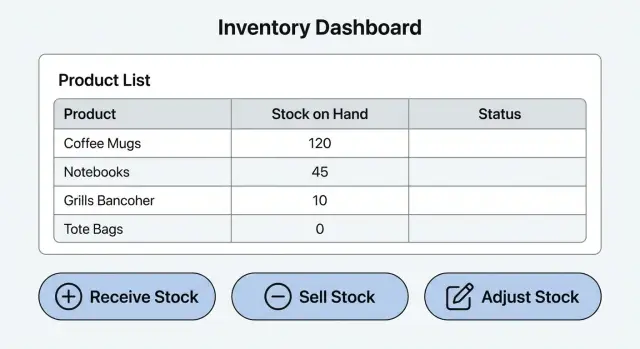
What we are building and why stock goes wrong
When people say an inventory app is "wrong," they usually mean one thing: stock goes negative. Once that happens, every report becomes suspect. You don't know if you're out of stock, if you oversold, or if the number is just the result of a bad update.
The goal isn't a full ERP. It's a small, plain app you can run for one shop or a small catalog where the count stays trustworthy. If you're using AI tools to generate screens and code, the rules still come first.
Keep the system to three actions:
- Receive: stock comes in (delivery, returns to stock, initial stocking).
- Sell: stock goes out (a sale, a shipment, or any outbound use).
- Adjust: stock changes because reality and the system disagree (damage, loss, recount).
"Correct" is easy to define and test:
- Stock never drops below zero for any item.
- Every change has a reason and a timestamp.
- Totals are repeatable: replay the history and you get the same number.
- Any number is explainable by pointing to the transactions that created it.
Stock usually goes wrong for two reasons:
-
The app edits a "current stock" field directly instead of recording a transaction.
-
It records transactions, but forgets to check what's available at the moment of sale.
A quick example: you have 5 mugs. Two people buy 4 mugs each, minutes apart. If your app doesn't lock the check-and-decrement step, both sales can pass the "in stock" check and you end up at -3.
The smallest data model that still works
Start with a data model that's hard to mess up. The main goal is to make it impossible to "edit the stock number" directly. Stock on hand should be a total you calculate from a history of changes.
For most small inventory apps, the minimum set is:
- Product: what you track (name, SKU, active flag).
- Transaction: every stock change (receive, sell, adjust), with quantity and timestamp.
- Location (optional): where stock lives (warehouse, store, van). Add it only if you need it now.
- User (optional): who created the transaction.
A key rule: don't store "stock on hand" as a free-form field you can edit. Compute it as the sum of all transaction quantities for that product (and location, if you use locations). That keeps the number explainable because every unit has a reason.
Single location now, multiple later
If you're unsure about multiple locations, pick one safe path:
- Single location v1: no Location table, totals are per product.
- Future-ready v1: include Location and require
location_idon every transaction, but start with one default location.
Avoid "optional location" on transactions. Null location values almost always create confusing totals later.
IDs and timestamps you will rely on
Decide these upfront:
- Use unique IDs for Product and Transaction.
- Store
created_aton every transaction. - Keep a separate
effective_atonly if you need backdated corrections. - Don't edit quantities in place. Add a new correcting transaction instead.
Example: if you counted 10 units yesterday but entered 8, don't overwrite 8 to 10. Add an adjustment of +2 with a note.
Rules that keep inventory from going negative
The rules matter more than the UI. Most negative stock bugs happen because the app "edits the number" instead of recording what happened.
Think of inventory like a bank account: you only change it through recorded transactions, and you never allow the balance to dip below zero.
Here are the rules that carry most of the weight:
- Stock must never be below zero after any transaction is applied.
- Every change creates a transaction record (no silent edits).
- Quantities are positive numbers; the transaction type decides add vs subtract.
- Any adjustment needs a reason and who made it.
- Protect against two actions happening at the same time.
The "on hand" number isn't the source of truth. The transaction history is.
What "no negative stock" means in practice
Before saving a transaction that removes items, the app checks current on-hand quantity for that item. If the removal would make it negative, reject it (or mark it pending, if you intentionally support that flow).
Concurrency is the sneaky one. Two people sell the last unit at the same time. Both screens show "1 available," both hit Save, and you end up at -1 unless the database enforces the check. The safe pattern is to read current stock and write the transaction in a single database operation, so only one can succeed.
Receiving stock: the simplest safe workflow
Receiving is where your numbers start. If you record a delivery wrong, every sale after that looks wrong too.
Keep the receipt form small so people actually use it. A solid minimum is product, quantity, and timestamp, plus an optional note. Cost and supplier can wait unless you know you need them.
Validation should be strict and boring: quantity must be greater than 0, the product must exist, and the timestamp must be recorded. If any check fails, don't update anything.
On save, create a RECEIVE transaction. If you also maintain a cached on-hand value for performance, update it in the same database transaction so you don't end up with mismatched numbers.
Edge case: duplicate receiving
Duplicates happen when someone double-clicks Save or re-enters a receipt they already logged. Don't delete the old row. Correct with history.
Example: you meant to receive 10 units, but it was entered twice. Add a reversing adjustment (or a void action if you support it) that subtracts 10 and references the mistaken receipt in the note.
Selling stock: checks that prevent overselling
Selling is where inventory apps usually break.
For each sale line, capture product (or SKU), quantity, and timestamp. Price and customer are optional, but a short note can help later when someone asks, "Why did stock drop?"
Two checks matter:
- Quantity must be greater than 0.
- Quantity must be less than or equal to available stock at the moment of sale.
If someone tries to sell 7 when only 5 are available, block it. Show a message that helps them act, like: "Only 5 in stock. Reduce quantity or receive stock first." Avoid vague errors.
Updating stock without losing history
Don't overwrite a "stock on hand" number directly. Record a transaction row for the sale (a subtracting movement) tied to the product and sale record. Stock on hand stays the sum of all movements.
Backorders can wait for v1. The safest early choice is not to allow them. If you must support them, keep them as a separate status that doesn't change stock until items actually ship.
Adjustments: corrections without breaking your history
Adjustments are for real life: damaged goods, theft, a recount, or cleaning up bad data after an import. The goal is to fix today's on-hand number without pretending the past never happened.
Most small apps only need two adjustment styles:
- Set-to: "Make on-hand equal to X" (best after a physical count).
- Delta: "Add or remove N" (best for a known event like "-2 damaged").
Validate adjustments like any other stock move:
- Set-to value must be 0 or higher.
- Delta can be positive or negative, but it can't push on-hand below 0.
- Item and location (if you track locations) must be selected.
- Adjustment time should be recorded.
Make adjustments accountable. Require a reason and who made the change. Keep reasons short and consistent (recount, damage, theft, data cleanup), with an optional note.
Step-by-step: prompting an AI tool to build it safely
If you're using AI tools to build the app, be explicit about what the tool must produce: a database schema, server logic, and a few basic tests. If you only ask for screens, you often end up enforcing rules in the UI, which is exactly how negative stock slips in.
Describe the data model in plain English. Name the transaction types (receive, sell, adjust) and what each one must store: item, quantity, timestamp, note. Ask for an immutable transaction table and a clear way to calculate current stock from the ledger.
Rules must live on the server
Ask for server-side validation and make it clear the UI isn't trusted.
A useful prompt set (adjust to your stack):
- "Generate DB tables for items and inventory_transactions. Transactions are append-only."
- "Create one server function applyTransaction(type, itemId, qty, note) that validates and writes in a DB transaction."
- "Rules: receive adds stock, sell subtracts stock but must not allow stock < 0, adjust can add or subtract but also must not allow stock < 0."
- "Add API endpoints that call applyTransaction. UI is just a client and cannot bypass rules."
- "Generate 3 seed items and 8 sample transactions that demonstrate a blocked oversell."
Also ask for an audit view: a page that shows the transaction list (newest first) and current stock next to each item. That screen is where you spot weirdness fast.
Quick checks before you trust the numbers
Before real users touch it, prove the rules work with a few simple tests. Inventory bugs hide until the exact wrong sequence happens.
Write 5 to 10 test cases in plain language. For example:
- Receive 10, sell 3, confirm on-hand is 7.
- Try to sell 8 when only 7 are available, confirm it's blocked with a clear message.
- Receive 1, sell 1, then sell 1 again, confirm the second sale is blocked.
- Do a recount (set-to) adjustment, confirm the math and history still make sense.
Then test "two sales at once" for the same item. Open the item in two tabs (or two devices) and try to sell the last unit at nearly the same time. You should see one succeed and one fail.
Clear messages matter. "Cannot sell: only 2 available" is helpful. "Error 500" isn't.
Finally, decide your undo policy. Pick one and stick to it:
- Soft delete (hide a transaction, keep it for audit), or
- Reversal transactions (add an opposite entry to undo), which is often safer.
Common mistakes that cause negative stock anyway
Most negative stock problems aren't math mistakes. They come from shortcuts that look fine in a demo, then fall apart the moment two people use the app.
The biggest trap is treating "stock on hand" as a single editable number. It looks simple, but it removes the one thing you need later: a clear story of how the number changed.
The repeat offenders:
- Keeping stock as an editable field without a transaction log.
- Validating only in the frontend.
- Ignoring concurrency.
- Allowing "temporary" negative adjustments.
- No audit trail when someone asks why an item shows -3.
A small scenario that shows the failure: you have 5 units. Two staff members both sell 3 at the same time. If your app checks "stock >= 3" in the browser, both screens see 5 and both pass. Each writes its update and you end up at -1. Fix it by enforcing the rule on the server and making the check and write atomic.
Another easy-to-miss issue is mixing product edits (name, SKU, price) and stock edits on the same form. It invites accidental stock changes and hard-to-explain totals.
Example scenario: one item from delivery to sale to recount
Picture a small shop with one location and three items: Coffee Beans (1 lb bag), Paper Filters, and Oat Milk. Follow just one item, Coffee Beans.
Start of day: on hand = 0.
A safe inventory app stores a transaction list and calculates the current number from that history.
Here is the day with a running balance:
- Receive +10: on hand goes from 0 to 10.
- Sell -3: on hand goes from 10 to 7.
- Adjust -2 (damage): on hand goes from 7 to 5.
- Attempt to sell -6: the app blocks it because 5 - 6 would be -1.
When the cashier tries that last sale, the app should stop it before saving anything. Keep the message simple: "Not enough stock. You have 5, trying to sell 6." The key is that the check happens at the moment of the transaction.
Now the recount: someone counts 5 bags, which matches the balance. Nothing needs to be "fixed" because the ledger already explains the number: one receipt, one sale, one damage adjustment.
Next steps: ship v1, then harden it for real use
Once v1 can receive, sell, and adjust without letting stock go negative, ship it to a small group and use it for real orders. You'll learn more from a week of actual use than from another round of generated screens.
Add only what users actually ask for. Common next steps are multiple locations, simple roles so not everyone can adjust stock, CSV import for starting inventory, low-stock alerts, and a few basic reports.
Then do a short hardening pass. This is where prototypes often fail: authentication, exposed secrets, and inconsistent validation.
A simple checklist:
- Authentication that truly blocks access (not just hidden buttons).
- Secrets kept out of the browser and out of the repo.
- Input validation on quantities, SKUs, and IDs.
- Clear error messages and audit logs for every stock move.
- Basic security checks for common injection and permission gaps.
If you already have an AI-generated prototype that's behaving oddly (negative stock, validations only in the UI, or business logic scattered across pages), FixMyMess (fixmymess.ai) can help by auditing the codebase and moving the rules into a single, enforceable transaction flow. A practical starting point is their free code audit, which maps the issues before you decide what to fix or rebuild.
FAQ
Why does stock go negative even when my math seems right?
Negative stock usually happens when you update a single “current stock” number directly, or when you record transactions but don’t enforce an “available right now” check at the moment of the sale. The safest fix is to treat inventory like a ledger: every change is a transaction, and any transaction that would drop stock below zero is rejected on the server.
What’s the smallest database schema that still works for inventory?
Start with a products table and an append-only inventory_transactions table. Each transaction should include product ID, type (receive, sell, adjust), quantity, timestamp, and a note or reason field so every change is explainable later.
Should I store a “stock_on_hand” field on the product?
No, not as your source of truth. Compute “on hand” from the transaction history so you can replay the ledger and always get the same answer, and so every unit is traceable to a reason.
How do I prevent two people from selling the last item at the same time?
Do the check and the write in one database transaction so two sales cannot both pass the “in stock” check. If your app checks in the browser and then writes later, two people can oversell the last unit even if both screens looked correct.
What validations should I enforce when receiving stock?
Keep receiving boring and strict: quantity must be greater than zero, the product must exist, and the timestamp must be recorded. When you save, write a RECEIVE transaction and avoid editing prior rows so your history stays clean.
What should I do if someone accidentally receives the same shipment twice?
Don’t delete the original entry or quietly edit it. Add a correcting transaction that reverses the mistake, and reference what happened in the note so future you can understand the audit trail.
Should v1 allow backorders or selling into negative stock?
Default to blocking it. When someone tries to sell more than what’s available, reject the transaction and show a clear message like “Only 5 available” so the user can reduce quantity or receive stock first.
When should I use an adjustment instead of editing or deleting a transaction?
Use adjustments for reality: damage, loss, recounts, or cleaning up imported data. Prefer a “set-to” adjustment after a physical count and a “delta” adjustment for known events, and always require a reason plus the user who made it.
How do I prompt an AI tool so it doesn’t build an inventory app that breaks?
Ask the AI for server-side rules and an append-only transaction table, not just screens. Make it generate one central function that validates and writes inventory movements, and add a couple of tests that prove an oversell is blocked and the ledger replays correctly.
How do I know my AI-generated inventory prototype is unsafe, and what can I do?
Look for business rules enforced only in the UI, scattered logic across pages, editable stock fields, missing timestamps, and no clear audit view of transactions. If you inherited an AI-generated prototype with these issues, FixMyMess can run a free code audit and consolidate the rules into a single, enforceable transaction flow so the numbers hold up in production.