Cache invalidation patterns for fast-changing data that work
Practical cache invalidation patterns for fast-changing data: versioned keys, tagging, and short TTLs so users stop seeing stale results.
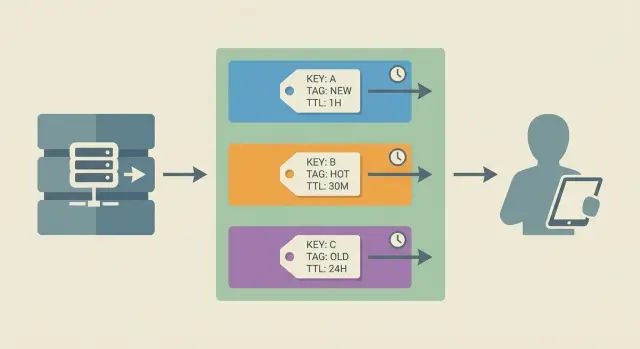
What stale cache looks like in real apps
Stale cache is when your app shows data that was true a moment ago, but is wrong now. Users rarely call it a caching issue. They say, "Your site is broken," because what they see doesn't match what they just did.
It shows up fastest in areas where data changes constantly:
- A cart total is wrong after adding or removing an item.
- A product page shows an old price, but checkout shows a new one.
- Inventory says "in stock," then the order fails because it's sold out.
- A dashboard doesn't reflect a just-finished payment, refund, or status change.
- A profile update "saves," but the old name or avatar keeps coming back.
Fast-changing data is different from mostly static pages because the cost of being wrong is immediate. A stale blog post is annoying. A stale price, quota, permissions list, or delivery status can create lost sales, support tickets, and sometimes security problems (for example, showing data someone should no longer access).
It also helps to be specific about what is being cached. In real apps, caching isn't just "the page." You might cache an API response, a database query result, a computed value (like "recommended products"), or a fully rendered HTML page. Often multiple layers are cached at once, which is why users can refresh and still see the wrong thing.
A common scenario: you deploy a prototype built with an AI tool, it feels fast in testing, then production starts drifting. One endpoint caches "account balance," another caches "recent transactions," and the UI combines both. The result is a balance that looks wrong even though each piece is "correct" in isolation.
Good invalidation aims for one thing: after an update, stop serving the old answer.
Decide how fresh the data needs to be
Before you pick any cache invalidation patterns, decide what "fresh" means for each kind of data. Don't say "as fresh as possible." Put a number on it, like "within 5 seconds," "within 2 minutes," or "must be correct on every request." That decision turns caching from guesswork into a plan.
Ask what happens if a user sees the old value. Sometimes the impact is mild (a dashboard graph is a minute behind). Sometimes it creates real damage (a customer is charged the wrong amount, or checkout shows an item in stock when it isn't). Stale reads don't just look bad, they show up as refunds, support tickets, angry emails, and teams making decisions from the wrong reports.
Most apps need different freshness rules for different data. User-specific data (your profile, your permissions, your cart) usually needs tighter freshness than global content (home page copy, blog posts, public FAQs). Also separate "critical" from "nice to have." A stale marketing banner is annoying. A stale billing status is a crisis.
A practical way to map this is to label each dataset with a freshness budget and a consequence level:
- Must be correct per request: auth, permissions, billing, payment status
- Must be correct within seconds: inventory, price, seat availability
- Can be a minute behind: activity feeds, analytics summaries
- Can be hours behind: static content, long-term reports
This is also a good moment to spot "hidden" staleness. In AI-generated prototypes, caching is often added in the wrong place, like session state or user roles.
The main cache invalidation patterns at a glance
When data changes quickly, caching can feel like a trap: reads get faster, but you risk showing the wrong thing. Most real-world setups use a small set of patterns. The key is choosing the one that matches how often your data changes and how costly "wrong for a minute" would be.
Core approaches:
- Delete (explicit invalidation): remove cached entries when the underlying data updates.
- Expire (short TTL): let entries die quickly so old values don't stick around.
- Bypass: skip the cache for specific requests (or users) when freshness matters most.
- Revalidate: serve from cache, but check whether it's still valid and refresh when needed.
When each is a good fit
Delete works best when updates are clear and not too frequent. Example: an admin edits a blog post. You can clear the cached page (or related keys) right after the save.
Expire (short TTL caching) is a good default when data changes often and you can tolerate brief staleness. If a value changes every minute, a TTL of 10 to 30 seconds can be good enough without complex logic.
Bypass is the right move when correctness beats speed. Example: checkout, account settings, permissions, or anything tied to security. Many apps cache most reads but bypass the risky paths.
Revalidate fits when you want speed and freshness. You serve the cached value, but you also have a rule to detect when it's outdated (like a "last updated" timestamp or version). If it's stale, you refresh in the background or on the next request.
The tradeoff triangle: speed, cost, correctness
Every cache decision trades off:
- Speed: how fast you respond
- Cost: compute, database load, and cache churn
- Correctness: how often users see stale data
Delete and revalidate usually improve correctness, but they add implementation work. Short TTLs are simple, but they increase cost (more cache misses) and still allow some stale reads.
A useful model is keys, groups, and time:
- Keys: the exact lookup names you store and fetch (for example,
product:123). - Groups: ways to invalidate many related keys together (often done with tagging).
- Time: how long entries can live (TTL) before they count as old.
Most solid setups combine these. For fast-changing data, you might use versioned keys (keys), tagging (groups), and short TTLs (time) so you stay fast without getting stuck serving yesterday's truth.
Step-by-step: choose an invalidation approach for your data
Picking the right cache invalidation patterns starts with understanding how data actually moves through your app. Skip that, and you end up clearing the wrong things (or nothing at all) and users keep seeing old results.
Step 1: Draw the read path (what is cached, where, and by whom)
Write down the full journey for a common read. Start from the user action and trace it to the database. Note every cache on the way (browser, CDN, API layer, Redis, in-memory cache). Capture what the key looks like and what the response contains.
A lot of "stale data" bugs are really "cached the wrong shape" bugs, like caching a whole page that includes user-specific data.
Step 2: List the writes that should change the answer
List the events that should make the cached result wrong. Think beyond "edit record": imports, background jobs, refunds, status changes, admin tools, and third-party webhooks often update data without going through your main code path.
Step 3-5: Decide trigger, scope, and your safety net
Use this checklist to match the approach to the risk:
- Choose your trigger: invalidate on write (immediate), use time-based expiry (eventual), or combine both.
- Choose your scope: clear one item, clear a group, or clear everything (rarely the right choice).
- Decide how you will target entries: predictable keys, versioned keys, or tagging.
- Add a fallback for when invalidation fails: a conservative TTL, a re-check against the source of truth, or a freshness check.
- Log it: record when invalidation happens and how many keys were affected.
Example: if a product update changes both the product page and category listings, single-key deletion isn't enough. Group invalidation (tagging) or versioned keys usually fits better.
Versioned keys: stop serving old data by changing the key
Versioned keys are a simple idea that holds up under pressure. Instead of trying to delete the old cached value, you change the cache key when the data changes. New key means new value. The old entry can sit until it expires.
A basic pattern looks like this:
user:123:v17 -> cached JSON for user 123
When the user is updated, bump the version to v18. Every read now misses the old entry and fills a fresh one.
Where the version can come from
Pick a version source that's easy to fetch at read time and hard to get wrong:
- Monotonically increasing number (best for correctness): store
user_versionin the database and increment on write. updated_attimestamp (easy): include a normalized timestamp like20260116T1030Z.- Content hash (accurate but heavier): hash the serialized record or a subset of fields.
Monotonic versions are usually the most reliable because timestamps can run into rounding and clock issues.
Handling related keys (when one change affects many responses)
The tricky part is rarely the single object. It's everything built from it: user:123:profile_page, user:123:dashboard_summary, team:9:members.
One practical approach is to use a shared "anchor version" for the thing that fans out. For example, every response that depends on user 123 includes user:123:v{user_version} in its key. When user 123 changes, all those keys change together, without guessing which cached keys exist.
Pros: no mass deletes, safer under concurrency, works well for CDN-style caching and mostly immutable objects.
Cons: cache can grow (old versions stick around), so you still need TTLs and occasional cleanup if storage is tight.
Tagging: invalidate groups without guessing keys
Tagging is simple: when you write something to cache, you attach one or more tags. Later, when the underlying data changes, you purge by tag (for example, "remove everything tagged product:123") instead of trying to remember every cache key that might include that product.
This works well because it matches how apps behave. One update often affects many cached responses: a product page, a search result, a "related items" widget, and maybe a mobile API payload. Tagging lets you clear the whole set with one action.
A good tag design is boring and predictable. Start with tags that mirror your domain objects and how users view them:
- per user:
user:42 - per account/team:
account:9 - per product:
product:123 - per collection/list:
category:shoesorcollection:summer-2026 - per permission role:
role:admin
Be careful with over-tagging. If every cache entry gets 10 tags "just in case," invalidation becomes expensive and risky. The worst case is a fan-out purge where a single change wipes thousands of keys and triggers a thundering herd of recomputes. A good rule is to tag only by the data that truly changes the output.
The other hard part is bookkeeping: you need a safe way to map tags to cached keys (or use a cache-native tag index). Common approaches include keeping a small tag index with its own TTL, limiting index size per tag to prevent runaway memory use, and treating missing index entries as normal while TTL handles cleanup.
Concrete example: if product 123 is updated, you purge product:123 and category:shoes. That clears product detail caches and the category page cache without needing to know whether the key was productPage:123:en or v2:mobile:product:123.
Short TTLs and controlled refresh
Short TTL caching (time to live) is the simplest way to reduce stale data. You let cache entries expire quickly, so worst-case staleness is capped. It's a safety net, not the whole plan. If data changes at unpredictable times, TTL alone still serves old values until the timer runs out.
TTLs shine when you can tolerate being a little behind and the main goal is speed under load. They fail when an update must be visible immediately (prices during checkout, permissions, account status).
Controlled refresh helps keep the cache fast without pushing the cost of misses onto users. Two common approaches:
- Refresh in the background: serve the cached value, and if it's near expiry (or just expired), trigger a refresh asynchronously.
- Refresh on the next request: the first request after expiry refreshes the data, while others wait or briefly reuse the old value.
Both work better with jitter. If every key expires at exactly 60 seconds, many items can expire together and you get a sudden spike of database calls. Jitter randomizes TTL a bit (for example, 45 to 75 seconds). Freshness stays similar, but expirations spread out.
The other big risk is the thundering herd problem: many requests hit the same expired key at once and all try to rebuild it. Avoid that with request coalescing (often called single-flight): allow only one refresh for a given key at a time, and make other requests wait for the result or accept slightly stale data for a short grace window.
A simple model:
- If a key is fresh, return it.
- If it's stale, let one request recompute it.
- Everyone else waits briefly or reuses the stale value within a small grace window.
TTL-only can be acceptable when eventual correctness is fine, such as analytics dashboards, activity feeds, search suggestions, and read-heavy content that updates in batches.
Example: prices and inventory that change every minute
Picture an online store during a flash sale. Prices change as promotions start and end, and inventory drops with every checkout. If your cache is even slightly wrong, customers see "in stock" when it isn't, or they get a cart total that doesn't match the checkout page.
Teams often cache expensive-to-build responses like product detail pages, category pages, search results, and cart totals. The goal is to combine a few cache invalidation patterns so you don't have to guess every key.
A practical mix that works
Use versioned cache keys for each product's "truth" record. For example, cache product:{id}:v{productVersion} where productVersion increments when price or inventory changes.
Use cache tagging for pages that include many products, like category grids. Tag the category page cache entry with category:{categoryId} and also with tags for the products shown (for example, product:{id}), so one product update can knock out every page that displayed it.
Use short TTL caching for search results. Search queries are too numerous to tag well, and results change constantly. A 10 to 30 second TTL plus controlled refresh (rebuild in the background when it expires) usually beats trying to invalidate every possible query.
Walkthrough: one inventory update
A customer buys the last unit of Product 42. Your system writes the new inventory to the database and increments productVersion for 42.
What should happen next:
- Requests for Product 42 use the new versioned key, so the old "in stock" payload can't be served.
- The category page that included Product 42 is invalidated by the
product:42tag, even if you don't know its exact cache key. - Search results might still show Product 42 for a few seconds, but the TTL limits the drift and the next refresh corrects it.
Failure mode without this mix: you only purge the product page, while category and search still show "in stock," and cart totals stay cached too long.
Common mistakes and traps to avoid
Most cache bugs aren't "the cache is broken." They're small design choices that make updates hard to reason about.
Relying on short TTL caching for critical data is a common trap. TTLs are fine for a homepage feed, but dangerous for billing, permissions, account status, or anything that can lock someone out or charge them. If the data must be correct now, use an invalidation signal (versioned keys or tags), not "wait a minute and it will fix itself."
Another mistake is invalidating too broadly. Purging everything on every update feels safe, but it can cause stampedes, spikes in database load, and slower pages for everyone. It also hides the real problem: you don't know which keys need to change.
People also forget derived caches. You might invalidate the item itself, but leave behind lists, counts, aggregates, and search results built from it. Example: you update a product price, clear product:123, but forget category:shoes:page1, top-deals, and search:shoes:sort=price. Users still see the old number.
Be careful mixing user-specific and shared caches. If a key doesn't include the user (or tenant) when it should, you can leak private data. This shows up often in "my orders" pages, feature flags, and permission-checked responses.
Finally, don't skip logging. Without a record of what invalidated what, bugs become hard to reproduce.
A simple safety list:
- Don't use TTL-only caching for money, auth, or permissions.
- Invalidate narrowly (by tag or by version), not by global purge.
- Map and clear derived views (lists, aggregates, search).
- Separate shared vs user caches with clear key rules.
- Log invalidation events and watch cache misses during updates.
Quick checklist and next steps
When data changes often, the goal isn't "never stale." It's "stale only where it's acceptable, and never stale where it hurts." Write freshness rules per endpoint, not as a vague rule for the whole app.
Quick checks before you deploy
- Mark each response as must be correct vs can be slightly stale (with a max age like 5s, 30s, 2m).
- For every write (create/update/delete), confirm there's a matching invalidation, tag purge, or version bump.
- Review cache keys for missing dimensions: user or account id, role/plan, locale/currency, device, filters/sort/page, and preview vs live.
- Add basic metrics: hit rate, stale rate (how often old data was served), and invalidation counts.
- Test one "bad day" flow: rapid updates, retries, and concurrent users. Make sure you never show one user another user's data.
Next steps that usually pay off
Pick one high-impact area (pricing, inventory, permissions) and make it boring: clear key rules, one primary invalidation method, and a small test that proves updates show up when they should.
If you inherited an AI-generated app, stale data issues often sit alongside other production blockers like inconsistent auth checks and hard-to-follow logic. If you need help untangling it, FixMyMess (fixmymess.ai) focuses on diagnosing and repairing AI-generated codebases, including caching and invalidation paths, so production behavior becomes predictable.
FAQ
What does stale cache actually look like to users?
Stale cache is when your app serves an older answer even though the underlying data has changed. Users notice it as contradictions like a cart total not matching checkout, a profile change “saving” but reverting, or inventory showing “in stock” right before an order fails.
How do I decide how fresh my data needs to be?
Start by writing a freshness budget per dataset, like “must be correct on every request” or “can be up to 30 seconds behind.” Use the consequence as your guide: money, auth, and permissions usually need immediate correctness, while analytics summaries can tolerate delay.
When should I use delete vs TTL vs bypass vs revalidate?
Use explicit invalidation (delete) when you can reliably detect writes and the blast radius is clear. Use short TTL when staleness is acceptable and updates are frequent or hard to track. Use bypass when correctness matters more than speed, like checkout and permission checks. Use revalidation when you want speed most of the time but still need a rule to refresh when the source changes.
What are versioned cache keys, and why do they prevent stale reads?
Versioned keys work by changing the cache key when data changes, so old entries can’t be returned by accident. A common pattern is user:123:v18, where the version increments on every relevant write. This reduces race conditions and “forgot to purge” bugs, as long as you also set a TTL so old versions don’t pile up forever.
How does cache tagging help when one update affects many pages?
Tagging lets you invalidate groups of cached responses without knowing every key name ahead of time. You attach tags like product:123 or category:shoes when writing to cache, then purge by tag when a product or category changes. It’s especially useful when one change affects many pages, widgets, and API payloads.
How do I use short TTLs without causing traffic spikes or slow pages?
Use short TTLs as a safety net for data where brief staleness is acceptable, then add controlled refresh so users don’t pay the cost of cache misses. Add jitter so many keys don’t expire at the same second, and use single-flight (request coalescing) so only one request rebuilds an expired key while others wait briefly or reuse a short grace value.
Why does refreshing the page sometimes still show the wrong data?
Because the cached thing is often not “the page,” but a stack of caches across browser, CDN, API, and in-memory layers. You can refresh and still see the old answer if one layer is still serving a stale API response or a rendered HTML fragment. The fix is to map the full read path and make sure your invalidation strategy covers every layer that can serve that data.
What are “derived caches,” and why do they keep stale data around?
Derived caches include lists, counts, aggregates, search results, and “recommended” blocks built from other objects. A common bug is purging product:123 but forgetting category grids, “top deals,” or a cached cart total that embeds the old price. Plan invalidation around what the user sees, not just the database row that changed.
How do I avoid caching user-specific data the wrong way?
If your cache key doesn’t include the right dimensions, shared cache entries can leak or mix data between users or tenants. This often happens with “my orders,” role-based responses, feature flags, locale/currency, or plan-based access. Default to including user or account identifiers when the output can differ, and bypass caching entirely for sensitive endpoints if you’re not sure.
What should I do if an AI-generated app keeps drifting in production due to caching?
Start by logging invalidation events and tracking when stale values are served, not just hit rate. If you inherited an AI-generated prototype, stale data problems often sit next to auth gaps, inconsistent business logic, and hidden write paths like webhooks and background jobs. If you want a fast, verified fix, FixMyMess can run a free code audit and then repair caching and invalidation paths so production behavior becomes predictable, with most projects finished in 48–72 hours or a focused rebuild from scratch in about a day.