Caching and pagination for slow list pages: practical patterns
Learn caching and pagination for slow list pages with practical cursor pagination patterns, cache key design, and safer alternatives to "load everything" APIs.
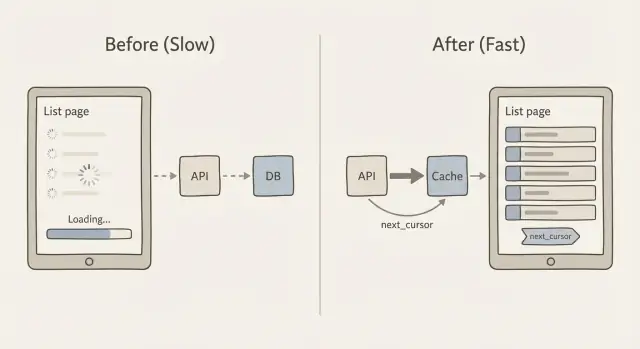
Why list pages slow down as your data grows
A list page often feels fine at 200 rows, then suddenly starts to feel broken at 20,000. Users see slow scrolling, spinners that never stop, and filters that take seconds to respond. Sometimes the page flashes an empty state because the request times out or the client gives up and renders nothing.
The core problem is simple: every extra record makes the system do more work. The database has to find the rows, sort them, and apply filters. The API has to turn them into JSON. The network has to move that data. Then the browser (or mobile app) has to parse it, allocate memory, and render it.
Where the time goes
As your dataset grows, the slowdowns usually come from a mix of these:
- Database work: large scans, expensive joins, and sorting big result sets.
- Payload size: returning hundreds or thousands of rows per request.
- Rendering cost: the UI trying to paint too many items at once.
- Repeated queries: the same list requested over and over with no caching.
Sorting and filtering have a hidden cost because they often force the database to touch far more data than you expect. For example, filtering “status = open” is cheap with the right index, but “search by name contains” or “sort by last activity” can become expensive fast. Even worse, adding OFFSET pagination (page 2000) can make the database walk past thousands of rows just to reach the next page.
The goal is not “make it fast once”. The goal is predictable response time as data scales. That usually means returning fewer records per request, using pagination that does not get slower on deep pages, and caching list responses so repeat visits do not keep paying the full cost.
Avoid "load everything" list endpoints
A common reason list pages get slow is an API that returns the whole table because it was easy at the prototype stage. It often looks like this:
GET /api/orders

200 OK
[
  { "id": 1, "customer": "...", "notes": "...", "internalFlags": "...", ... },
  { "id": 2, ... }
]
This fails at scale because it multiplies work in three places at once: the database must scan and sort more rows, the server must build and send a huge JSON response, and the browser must parse it and render a long list. Even if you later add caching and pagination for slow list pages, a "give me everything" endpoint is still expensive to generate and expensive to ship.
Mobile and flaky networks feel it first. A 5-10 MB JSON response may be fine on office Wi‑Fi, but it can time out on 4G, drain battery, and make the app look broken. It also makes errors harder to recover from: if one request fails, the user loses the entire page instead of just the next slice.
Here’s a simple rule that keeps you honest: ship only what the user can see now. That usually means a small page (for example, 25-100 rows) and only the fields needed for the list view.
When teams bring FixMyMess an AI-generated admin panel, we often find list endpoints returning full records (including big text fields) with no limit. The quick win is to return a compact "list item" shape and fetch details only when someone opens a row. That change alone can cut query time, response size, and client render time without touching the UI design.
Cursor pagination in plain language
Many list endpoints start with offset pagination: “give me page 3” means “skip the first 40 rows and return the next 20.” It feels simple, but it gets slower as your table grows because the database still has to walk past all the skipped rows.
Offset pagination also gets weird when data changes while someone is paging. If new rows are inserted or old rows are deleted, the next page can show duplicates or skip items. You asked for “page 3,” but “page 3” is not a stable thing.
Cursor pagination fixes this by using a bookmark instead of a page number. The client says, “give me the next 20 items after this last item I saw.” That “after” value is the cursor. This is the core idea behind caching and pagination for slow list pages: keep each request small, predictable, and fast.
What the cursor actually is
A cursor is usually a small bundle of values from the last row in the current response. To make it stable, your list must have a consistent sort order that never ties. A common pattern is sorting by created_at with id as a tie-breaker (for example: newest first, and if two rows share the same timestamp, order by id).
That stable sort matters because it guarantees “after this item” always points to exactly one place in the list.
How next_cursor works
Conceptually, the server returns:
- The items for this request (say 20)
- A
next_cursorthat represents the last item in that set
If there are no more items, next_cursor is empty or missing. The client stores it and sends it back to fetch the next slice. No counting pages, no huge skips, and far fewer surprises when the list is changing.
Step by step: implement a cursor-paginated API endpoint
Cursor pagination is the workhorse pattern behind caching and pagination for slow list pages. It keeps pages stable and fast, even when new rows are added.
1) Pick a stable sort order
Choose an order that never changes for a given row. A common choice is created_at desc, id desc. The id tie-breaker matters when many rows share the same timestamp.
2) Define the request and response shapes
Keep the request small and predictable: a limit, an optional cursor, and any filters you already support (status, owner, search).
A simple response shape looks like this:
{
  "items": [/* results */],
  "next_cursor": "opaque-token",
  "has_more": true
}
3) Encode and decode the cursor safely
Do not put raw SQL or a database offset in the cursor. Make it an opaque token that contains only what you need to resume paging, like the last item’s created_at and id.
A practical format is base64-encoded JSON, optionally signed (so clients cannot tamper with it). Example payload inside the token: { "created_at": "2026-01-10T12:34:56Z", "id": 123 }.
4) Query using the cursor (and handle inserts)
With created_at desc, id desc, your next page query should fetch rows “before” the cursor:
created_at < cursor_created_atOR (created_at = cursor_created_atANDid < cursor_id)
This keeps pagination stable even if new items are inserted at the top while the user is paging.
5) Add guardrails
Set a default limit (like 25) and a hard max (like 100). Validate the cursor, limit, and filters. If the cursor is invalid, return a clear 400 error. At FixMyMess, these guardrails are often missing in AI-generated endpoints, which is why list pages can fall over under real traffic.
Designing cache keys for list responses
Caching list pages sounds easy until you remember how many “different lists” your app can produce. One endpoint might support search, filters, sort options, different page sizes, and cursor pagination. If your cache key ignores even one of those inputs, you risk showing the wrong results to the wrong person.
A good cache key is simply a unique fingerprint of the exact list response. Include anything that changes what rows appear or in what order. Typically that means:
- Scope: public vs per user vs per org (and the actual id)
- Query inputs: filters, search text, and sort
- Pagination: cursor (or “first page” marker) and limit
- Version: an optional schema or “list-v2” tag so you can change formats safely
Keep the key readable. A simple pattern that works well is:
resource:scope:filters:sort:cursor:limit
For example: tickets:org_42:status=open|q=refund:created_desc:cursor=abc123:limit=25. Normalize the inputs so different spellings do not create pointless cache misses (trim whitespace, sort filter params, and use a consistent separator).
Decide what you are caching. Many teams cache only the first page because it is hit the most and benefits most from a short TTL. Caching every page can help too, but it explodes the number of keys and increases invalidation work when data changes.
Do not cache when it is likely to be wrong more often than it is helpful: highly personalized lists (like “recommended for you”), lists that change every few seconds, or lists that include permission checks that are hard to encode safely in the key.
If you are working on caching and pagination for slow list pages in an AI-generated app, watch for endpoints that accidentally treat “cursor” as optional and fall back to “return everything”. That is a common issue FixMyMess audits and fixes by tightening pagination defaults and making cache keys include the full query context.
Keeping cached lists fresh without overcomplicating it
Most list pages do not need perfect, instant freshness. They need to feel fast and be “recent enough” for the user’s goal. That is the key to making caching and pagination for slow list pages work without turning cache invalidation into a second product.
TTL vs event-based invalidation (plain English)
A TTL (time to live) is the simplest option: cache the list for, say, 30-120 seconds, then refresh it. It is easy and reliable, but it can show slightly old data.
Event-based invalidation tries to be exact: when a record changes, you delete the affected cached lists right away. It can be very fresh, but it gets tricky because one change might affect many filters and sort orders.
A practical middle ground is stale while revalidate: serve the cached list even if it is a bit old, then refresh it in the background. Users get fast pages, and the cache heals itself quickly after changes.
Targeted invalidation that stays manageable
Instead of “delete everything,” invalidate only what you can describe clearly:
- By user or tenant (only their lists)
- By resource type (orders vs customers)
- By filter group (status=open, tag=vip)
- By “collection version” (a counter you bump on writes)
That last option is often the simplest: include collection_version in your cache key. When something changes, increment the version, and old cache entries stop being used.
Cache stampedes happen when many requests miss the cache at once and all rebuild it. Two simple protections help:
- Add TTL jitter (randomly +/- 10-20%)
- Request coalescing (one builder, others wait)
- Serve stale for a short grace window
Finally, decide what consistency you actually need. For most admin and feed-style list pages, “updates appear within 1-2 minutes” is fine. For money movement or permissions, don’t cache the list response at all, or keep TTL very short and validate on the detail page.
Client-side pagination patterns that stay fast
Most list screens have a clear traffic pattern: people land on page 1 far more than any other page. Cache the first page in the client (memory or local storage) with a short TTL, and show it immediately while you refresh in the background. This alone fixes the "blank screen" feeling that makes a list seem slow.
When you use cursor pagination, treat the cursor like part of the page identity. Keep a small map like cursor -> rows so going back does not trigger new requests, and so your UI stays responsive even on flaky networks.
Prefetching the next page helps, but only if you do it gently. A safe approach is to prefetch when the user is close to the bottom (or after they pause scrolling), and cancel the request if they change filters or sort.
- Prefetch only one page ahead
- Debounce the trigger (for example, 200-400ms)
- Block prefetch while a request is already in flight
- Do not prefetch for expensive filters (like full-text search)
- Stop prefetching when the tab is hidden
Loading states matter more than people think. Use a "soft" loading indicator (keep existing rows visible) and an obvious retry button for failures. On retry, append results only after you confirm they belong to the same query (same filters, sort, and cursor), otherwise you get duplicated or mixed rows.
Client-side deduping is your safety net. Always merge rows by a stable ID (like id), not by array index or timestamp. If you receive the same row twice, replace it in place so the list does not jump.
Infinite scroll is not always better. It can be worse for admin screens where people need to jump, sort, and compare. If users often say "I was on page 7", use paged navigation with clear page size, and reserve infinite scroll for feeds where exact position does not matter. This is a common fix we apply when repairing AI-generated list UIs that accidentally hammer the API and feel laggy.
Database and payload basics that make caching work better
Caching helps, but it does not erase slow queries. A cached list response still has to be generated at least once, and cache misses happen more than people expect (new filters, new users, expired keys, deploys). If the database query is shaky, the whole system feels flaky.
Indexes are the first place to look. For list pages, the winning pattern is simple: your index should match how you filter and how you sort. If your endpoint does WHERE status = 'open' and ORDER BY created_at DESC, the database should have a path that supports both.
A practical rule of thumb for list queries:
- Index the columns you use in
WHEREmost often. - Include the column you sort by (the
ORDER BY) in the same index when possible. - If you always filter by a tenant or user, that column should usually come first.
- Prefer stable sort keys (created time, id) so pagination and caching stay predictable.
- Re-check indexes after you add new filters, not months later.
Next: stop sending extra data. Many slow list pages are slow because they move too much JSON, not because the database is dying. Avoid SELECT *. Pick the fields you actually show in the table. If the UI only needs id, name, status, and updated_at, return only those. You get faster queries, smaller payloads, and higher cache hit rates because responses are cheaper to store and serve.
Be careful with sorting on computed fields, like "full_name" (first + last), "last_activity" from a subquery, or "relevance" from a custom formula. These often force scans, join-heavy plans, or sorting large result sets in memory. When you can, precompute the value into a real column, or sort by a simpler field and compute the fancy value in the UI.
Before tuning further, measure two numbers:
- Query time (p50 and p95, not just one run).
- Payload size for a single page.
- Rows examined vs rows returned.
- Cache hit rate for the list endpoint.
- The slowest filter + sort combination users actually click.
This is especially common in AI-generated apps we see at FixMyMess: list endpoints “work” in a demo, but once real data lands, missing indexes and oversized payloads make caches look like they are “not working.” Fix the basics first, then caching becomes a multiplier instead of a bandage.
Example: fixing a slow admin list page in a growing app
A common story: an admin dashboard started as an AI-generated prototype. It worked with 200 rows. Six months later it has 200,000, and the “Users” list times out or takes 10 to 20 seconds to load. People refresh, filters feel random, and the database CPU spikes.
The bad version usually looks like this: the client calls an endpoint that returns everything (or uses offset pagination with huge offsets), the response includes heavy fields (profiles, settings, audit history), and every scroll triggers another expensive query. There is no caching, so the same first page is recomputed for every admin.
Here’s a practical fix for caching and pagination for slow list pages that keeps behavior predictable.
What we changed
We kept the UI the same, but changed the API contract:
- Use cursor pagination: return
items,nextCursor, and always request withlimit. - Sort by a stable key (for example,
created_atplusid) so cursors do not skip or repeat. - Cache only the first page for common views (like “All users, newest first”), because that page is requested the most.
- Restrict filters to safe, indexed fields (status, role, created date). Reject “contains” searches on big text columns unless you have search support.
- Trim payload: the list returns only what the table needs. Details load on the user row page.
A simple response shape:
{ "items": [{"id": "u_1", "email": "[email protected]", "createdAt": "..."}], "nextCursor": "createdAt:id" }
What admins noticed
The first screen appears fast, and scrolling stays steady because each request is bounded. Refreshing the list stops hammering the database because the first page comes from cache. Filters feel consistent because the sort order and cursor rules are clear.
To roll it out safely, ship the new endpoint behind a feature flag for internal admins first, compare results side by side, and log cursor errors (duplicates, missing rows). If you are inheriting a broken prototype from tools like Bolt or Replit, teams like FixMyMess often start with a quick audit to find the “load everything” endpoints and the queries that must be fixed first.
Common mistakes and traps to watch for
Most “slow list page” fixes fail for simple reasons: the paging is unreliable, the cache is unsafe, or the endpoint can be abused. If you’re working on caching and pagination for slow list pages, these are the gotchas that cause the most pain later.
Offset paging is the classic trap. It looks fine with small data, but if you sort by a field that is not unique (like created_at), new rows can slide into the middle while a user is paging. That creates duplicates, missing items, or a page that “jumps.” Cursor pagination avoids this, but only if your sort order is stable (for example: created_at plus a unique id as a tie-breaker).
Cursors themselves can be a security and correctness problem. If you put raw IDs, SQL fragments, or filter expressions inside the cursor, you risk users guessing values, breaking decoding, or forcing expensive queries. A safer pattern is: encode only the last seen sort values, then validate them server-side before querying.
Caching introduces a different class of mistakes. The biggest one is forgetting scope. If your cache key doesn’t include user, tenant, role, and filters, you can leak data across accounts. Also watch your “freshness” story: status changes and deletes are the first things users notice when cached lists lag too long.
A quick example: an admin “Orders” page shows paid and pending orders. If the cache key ignores the status=pending filter, an admin can see a mixed list that looks wrong, and the cache may even be shared with non-admin views.
Here are five guardrails that prevent most incidents:
- Always add a max
limitand enforce it server-side. - Use a stable sort with a unique tie-breaker.
- Make cursors opaque and validate decoded values.
- Build cache keys from user scope + filters + sort + page size.
- Decide how long stale data is acceptable, then invalidate or shorten TTL for high-change lists.
If you inherited an AI-generated app with flaky paging, unsafe cache keys, or unbounded list endpoints, FixMyMess can audit the codepath and point out the exact failure modes before you ship them.
Quick checklist and next steps
Use this as a final pass when you are improving caching and pagination for slow list pages. Small details here decide whether your list stays fast at 1,000 rows and at 10 million.
Build it safely (API and cache)
- Set a hard limit cap (and a sensible default) so no one can request 50,000 rows by accident.
- Use a stable sort (for example, created_at + id) so paging does not reshuffle items between requests.
- Keep the cursor opaque. Treat it like a token, not something the client edits.
- Confirm the query uses indexes that match your filters and sort order.
- Scope cache keys to what changes the response: user or tenant, filters, sort, page size, and cursor.
Caching works best when the first page is easy to reuse, so start there. Pick a TTL that matches how often the list actually changes, and add basic stampede protection (lock, request coalescing, or serve stale while revalidating) so traffic spikes do not melt your database.
Prove it works (tests and operations)
- Create new items while paging and confirm you do not see duplicates or missing rows.
- Change filters mid-scroll and confirm the client resets state instead of mixing old and new pages.
- Simulate a slow network and verify the client dedupes results and ignores out-of-order responses.
- Monitor query time, cache hit rate, error rate, and payload size after launch.
- Log the slowest list endpoints with their filters so you can target the real offenders.
Next steps: if your AI-generated prototype has slow or broken list endpoints, FixMyMess can run a free code audit to pinpoint pagination, caching, and security issues before you ship.