CDN caching for Next.js: cache headers without user leaks
CDN caching for Next.js speeds up pages and assets, but bad headers can cache user data. Learn what to cache, header examples, and traps.
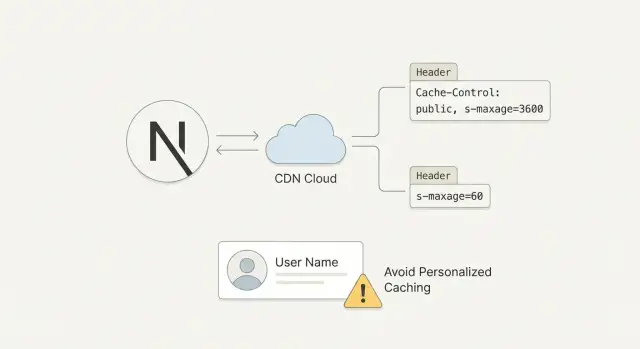
Why CDN caching can break a Next.js app
CDNs make sites feel fast by saving copies of what your server sends, then serving those copies from a location close to the visitor. Done well, it cuts load time and reduces server cost. Done carelessly, it can break logins, show the wrong data, or seem to "randomly" fix itself later.
A CDN can cache two kinds of things:
- Files (images, JS, CSS)
- Full HTTP responses (HTML for a page, JSON from an API route)
The tricky part is that a Next.js app often serves both public pages and user-specific pages from the same domain. If your CDN treats them the same way, you can end up caching something that should never be shared.
Two problems cause most headaches:
- Stale content: you update a page, but people still see the old version because it was cached.
- Cached personal responses: the CDN saves a response meant for one person, then serves it to someone else.
A common failure looks like this: you have a marketing homepage and a dashboard at /app. A user signs in, visits /app, and the server returns HTML that includes their name and recent activity. If that HTML response gets cached, the next visitor who hits /app might see the first user’s dashboard shell, or get stuck in a broken auth loop.
So CDN caching for Next.js is less about "turn caching on" and more about setting clear rules. Decide what is safe to cache (usually static assets and truly public pages), what must never be cached (personalized HTML, auth flows, and most user-specific APIs), and how long cached content should live.
Map your app into cacheable and non-cacheable parts
Before you touch headers, map what your app actually serves. CDN caching works best when you treat each response type differently. A single rule for everything is how user data gets cached by mistake.
Start by listing the main response types you return:
- Static files (JS, CSS, fonts)
- Images (including optimized variants)
- HTML pages (marketing, docs, dashboards)
- API responses (JSON, webhooks, auth callbacks)
Next, group your routes by how public they really are:
| Route group | Examples | Can be cached at CDN? | Changes often? |
|---|---|---|---|
| Public | /, /pricing, /blog/* | Usually yes | Sometimes |
| Semi-public | /account, /checkout | Usually no | Often |
| Private | /dashboard, /admin | No | Often |
Now mark "high churn" areas. Prices, inventory, and anything that shows live status (orders, usage, messages) can go stale fast. Dashboards are the obvious one, but checkout pages, onboarding steps, and even "Welcome back" blocks can be personalized.
Different content types need different rules because the risks are different. Caching a JS bundle aggressively is usually safe. Caching HTML that depends on cookies can leak one user’s page to another.
One real-world example: a site has a public marketing homepage, but the header shows the user’s name when logged in. That one detail turns an otherwise cacheable page into a risky one unless you split the experience (public shell plus private data fetched separately) or disable caching when cookies are present.
Cache static assets safely (JS, CSS, fonts, images)
Static assets are the easiest win because they usually don’t change per user. Think of files that are downloaded by the browser and reused across many pages.
Typical static assets include:
- Next.js build files under
/_next/static/(JS chunks, CSS) - Fonts and icon files (woff2, ttf, svg)
- Images and favicons
- Anything in your
public/folder
For versioned files (the ones with a hash in the filename), long-lived caching is the right default. The hash changes when the content changes, so the file is effectively immutable.
A common header for these is:
Cache-Control: public, max-age=31536000, immutable
Before you set a one-year TTL, make sure "immutable" is really true in your setup. If you serve logo.png from public/ and later replace the file but keep the same name, a long TTL can keep the old logo in caches for a long time. For non-versioned filenames, keep TTLs shorter, or add a build step that fingerprints filenames.
Images often need their own strategy. If you generate multiple sizes or formats (like WebP and AVIF), caching is only safe when the final URL uniquely identifies the output. If an optimized image endpoint varies by width, quality, or format, those inputs must be part of the cache key. Otherwise, users can get the wrong variant.
A quick sanity check: pick one JS chunk and one font file, open them, and confirm they never change unless you deploy a new build.
Cache pages and HTML: what is safe and what is risky
The biggest win (and the biggest risk) is caching full HTML pages. HTML is what the user sees, so if you cache the wrong thing, you can show the wrong person the wrong content.
Safe-to-cache HTML is usually content that is the same for everyone: marketing pages, pricing, docs, public landing pages, most blog posts. A simple test: open the page in an incognito window. If it looks the same when logged in and logged out, it’s a good candidate.
Risky-to-cache HTML is anything that changes per user, per session, or based on private data: dashboards, account settings, checkout, order history, pages that show a name, email, saved items, billing status, or "you last logged in at...". Caching these at the CDN is how user data leaks happen.
A simple rule of thumb:
- Cache public pages with controlled lifetimes.
- Don’t cache user pages unless you’re 100% sure the response is identical for everyone.
- When in doubt, treat HTML as private and disable caching.
ISR (Incremental Static Regeneration) sits in the middle. It lets Next.js serve a cached page fast, then refresh it in the background on a timer. It’s great for pages like blog posts that change occasionally. It’s a bad fit for personal pages, because freshness doesn’t solve "wrong user".
One more gotcha: caching HTML is not the same as caching data calls. A page might be safe to cache while an API it calls is not. Or you might keep HTML private, but cache truly public data (like a product listing) with a short TTL. Mixing these up is how "it worked in staging" turns into stale content or accidental exposure.
Cache headers you need to know (without the jargon)
Most caching problems come from one thing: the CDN and the browser guess how long something is safe to reuse. Cache headers are how you tell them, clearly.
Cache-Control: the main one
Cache-Control is a set of instructions. The most common parts are:
max-age=...: how long the browser can keep it (seconds)s-maxage=...: how long shared caches (a CDN) can keep it. If present, CDNs usually follow this instead ofmax-age.public: OK to store in a shared cacheprivate: only a user’s browser may store it (a CDN should not)no-store: don’t store it anywhere (use for personal or sensitive responses)
A simple rule: if the response can ever differ per user, avoid public caching. For dashboards and account pages, default to no-store unless you have a very specific reason not to.
stale-while-revalidate: show old, refresh in the background
stale-while-revalidate=... lets a cache serve a slightly old version for a short time while it fetches a fresh one.
This works well for content that can be a little behind (like a marketing homepage). It’s risky for anything that must be correct right now (like billing or permissions).
ETag and Last-Modified: how caches check if something changed
With ETag or Last-Modified, a cache can ask, "Has this changed?" If not, the server replies with a small "not modified" response instead of resending the full body.
This matters most when responses are large, content updates often, or you want quick updates without turning caching off.
Vary: the "depends on" label
Vary tells caches which request headers can change the response. This matters when cookies or auth are involved.
If HTML changes based on login state, and you don’t handle Vary plus cache rules correctly, a CDN can serve one user’s version to another. Common Vary headers include Cookie, Authorization, and Accept-Encoding.
Step-by-step: set cache rules for a typical Next.js app
A practical way to approach this is to start with the safest things, then move toward content that can change.
1) Start with the safest targets
Begin with files that are the same for everyone: JavaScript bundles, CSS, fonts, and versioned images. These are low risk and usually give the biggest speed win.
2) Set cache times based on what can change
Use very long caching for immutable assets (files that change name when content changes). For pages and HTML, use shorter caching, because content can update without a filename change.
A checklist that holds up in the real world:
- Start with
/_next/static/*, your clearly versioned assets, and other files with hashed filenames. - For immutable assets, send a long
Cache-Controlplusimmutable. - For public, non-personalized pages (marketing pages, docs), use a shorter shared cache (minutes to hours) and consider
stale-while-revalidate. - For anything user-specific (dashboards, account pages, API routes that depend on cookies), force
Cache-Control: privateorno-store. - Decide how you’ll bust cache: rely on deploys that change asset filenames, and have a clear purge plan for HTML when you ship urgent updates.
3) Test before you trust it
Don’t stop at "it loads fast". Do a hard refresh and compare signed-out vs signed-in behavior.
A quick reality check: open the same page in an incognito window and in a logged-in session. If HTML, headers, or visible data ever match when they shouldn’t, treat it as a leak and stop caching that route.
CDN cache keys and rules that decide what gets served
A CDN doesn’t "cache a page" in the abstract. It caches a response under a cache key. That key is usually built from the request path, and sometimes query string, headers, and cookies.
If the key is too broad, users see the wrong content. If it’s too specific, you get a low cache hit rate and slower pages.
What usually belongs in the cache key
Start simple: for public pages, the path is often enough. Add other parts only when they truly change what the user should see.
- Path:
/pricingvs/blog/slugshould be separate. - Query params: include only those that change content (for example,
?page=2). Ignore tracking params likeutm_*. - Headers: include only real variants (for example, language).
- Cookies: avoid using cookies for public content. They explode the number of cache variants.
The dangerous case is when a CDN caches a response that was personalized because a cookie was present. Even if the cookie is not part of the key, caching a personalized response can still leak data.
Variants: locale and device
If your HTML changes by locale, use a clear signal and vary on it (often Accept-Language, or a dedicated header you control).
Be careful with device-based variation. Varying on User-Agent creates too many versions and is easy to get wrong. Prefer responsive design, or a small explicit header you control if you truly need separate HTML.
Finally, set bypass rules for anything that should never be cached: /admin, /api routes that return personal data, authenticated dashboards, and any route that checks a session cookie.
How to avoid caching personalized responses
A CDN is great until it accidentally saves a response meant for one person and serves it to someone else. This is the biggest risk: cached HTML or JSON can become a data leak if it includes a name, email, billing status, or anything tied to a logged-in session.
Personalization usually sneaks in through cookies and auth headers. If a request includes Cookie or Authorization, assume it can produce user-specific output unless you’re completely sure it does not.
Use clear cache headers for anything behind login. For dashboards, settings, billing pages, and user-specific API routes, prefer Cache-Control: no-store (or at least private, no-store). That tells browsers and CDNs not to keep a copy.
Practical red flags that should push you toward not caching:
- The request includes
Cookie,Authorization, or a session token header. - The response depends on who the user is (even if the URL is the same).
- The HTML includes account data, recent activity, or billing state.
- An API returns user records, tokens, or anything sensitive.
- You can’t explain your CDN cache key in one sentence.
Mixed pages are tricky. A common pattern is a public marketing shell that also shows "Hi Sam" or a notification count when logged in. If the HTML is personalized, don’t cache it publicly. A safer pattern is: cache the public shell, then fetch personalized fragments client-side (or from a separate uncacheable endpoint).
If you can, separate public and private endpoints so your rules stay simple. Keep cacheable routes clearly public, and keep authenticated routes clearly uncacheable.
Common mistakes that cause stale content or data leaks
Most caching failures happen when something "looked fast" in a quick test, but behaves differently once real users log in. The danger isn’t only stale pages. It’s also serving one person’s content to someone else.
Mistakes that show up again and again:
- Caching HTML for logged-in routes because it seemed safe during anonymous testing.
- Marking responses as
publiceven though they change based on cookies, an auth header, or geolocation. - Giving a long
max-ageto assets that aren’t versioned (like/app.css), then shipping an update and users keep the old file. - Forgetting that redirects, error pages, and 404s can be cached too, which can lock in a temporary outage or a wrong route.
- Trusting default behavior from hosting or the framework without checking what the CDN is actually storing.
A quick way to spot risk: ask, "Could this response be different for two users?" If yes, it shouldn’t be cached publicly. Even a tiny difference like a greeting means the HTML is personalized.
Also watch for invisible caching: a cached 302 redirect to /login, a cached 404 for a newly launched page, or a cached 500 error during a deploy.
Quick checks before you ship caching to production
Before you roll out caching, do a quick pass with real requests, not just what you expect your code to do. Small header mistakes can turn into stale pages or, worse, the wrong user seeing the wrong content.
Start with the basics:
- Public pages that are the same for everyone should send
Cache-Control: publicand a sensibles-maxageso the CDN can cache them. - Anything behind login should be
Cache-Control: privateorno-store.
If you’re unsure, default to no-store and loosen it later.
Pre-ship checks that catch most problems:
- Open a public page and confirm it’s actually cacheable (
Cache-Control: publicwiths-maxage). - Open an authenticated page and confirm it’s not shared-cacheable (
privateorno-store, neverpublic). - Check static assets: long cache is only safe when filenames are versioned (hash in the name). If not, keep cache short.
- Hit APIs that return user data and confirm they’re not cacheable by the CDN.
- Test two accounts: sign in as Account A in one browser, Account B in another, and load the same URLs. Nothing personal should ever cross over.
Also watch query parameters. If your CDN caches by full URL, ?ref=, ?utm_, and random filters can create endless cache variants. Decide which params should be ignored and which should be part of the cache key.
A realistic example: marketing site + dashboard on the same domain
A startup ships a Next.js app that mixes a public marketing site and a logged-in dashboard under the same domain. Traffic spikes after launches, so they add CDN caching to keep pages fast.
They split the app into two groups.
Cache what is safe and identical for everyone:
- Versioned JS and CSS files (long cache, because filenames change on deploy)
- Images, fonts, and icons (long cache if filenames are versioned; shorter if overwritten)
- Marketing pages like
/,/pricing,/blog(short CDN TTL so edits show up quickly)
For marketing HTML, they set a short shared cache time and a small stale-while-revalidate window. The CDN can serve a slightly older page for a moment while it refreshes.
Never cache what varies by user:
/dashboardand anything under it- Settings and billing pages
/api/user(and anything that returns account data)- Authentication pages and callbacks
To verify they didn’t create a user leak, they test like a paranoid customer would: two accounts, two browsers, hard refresh, and a quick header check. Personalized pages must never show public cache directives.
When something goes wrong (a user sees the wrong name, or stale subscription status), they roll back the CDN rule first. Then they tighten headers on the risky routes (start with /dashboard and /api) before re-enabling any caching.
Next steps: roll out safely and get help if it is messy
Start small and make the wins boring. Cache immutable static assets (hashed JS and CSS, fonts, versioned images) with long TTLs. Once that’s stable, add caching for truly public pages. Treat anything that can vary by user, cookie, or auth as uncacheable unless you’ve designed it specifically for edge caching.
Write your cache rules down in plain English. Many caching bugs happen months later when someone adds a new header, introduces a redirect, or changes auth. A short "caching contract" makes reviews easier: what’s cacheable, what must never be cached, and which signals (cookies, headers, query params) change the response.
If you inherited an AI-generated Next.js codebase, double-check headers and auth flows. These projects often ship with mixed routing patterns, inconsistent Cache-Control, and sessions that work locally but fall apart behind a CDN.
If you’re seeing broken authentication, risky caching behavior, or you just can’t confidently explain what your CDN is storing, FixMyMess (fixmymess.ai) does codebase diagnosis and repairs for AI-generated apps, including untangling cache headers and auth boundaries. They also offer a free code audit to identify issues before you change anything in production.