Centralize application configuration to stop dev-prod drift
Centralize application configuration to keep defaults, secrets, and validation consistent across dev, staging, and prod without surprises at deploy time.
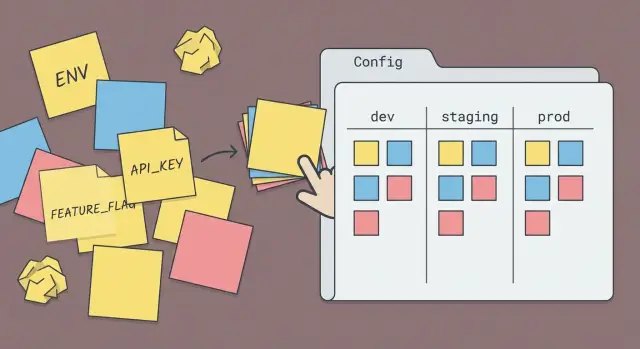
What configuration sprawl actually is
Configuration sprawl is what happens when the settings that control your app are scattered across too many places. One value is an environment variable on a machine, another is hard-coded in a helper file, and a third overrides both in a YAML file. Then nobody can answer, with confidence, “what is the app actually using right now?” without digging.
In real projects it looks like this: a feature flag exists in three forms (a boolean in code, a default in a config file, and an env var override), timeouts differ between services because each team “just set it locally,” and secrets get copied into random .env files. The app behaves differently in dev, staging, and prod because each environment ends up with a different mix of defaults, overrides, and missing values.
A useful line to draw:
- Configuration: values that change by environment or deployment (URLs, credentials, rate limits, feature flags, log level).
- Code: the rules and behavior (how retries work, how flags are evaluated, how a timeout is applied).
The goal of centralize application configuration isn’t “one giant file.” It’s one config layer: a single place that defines names, defaults, precedence (what overrides what), and validation rules. With that in place, dev, staging, and prod can differ where they should, but not by accident.
Signs your config is causing dev-staging-prod drift
If the same commit behaves differently across environments, it’s often not the code. It’s the settings around the code. Drift usually builds up slowly: a quick fix in a deploy script, a “temporary” default in a module, a toggle set in a dashboard nobody remembers.
Signs you’re dealing with drift:
- Local and staging give different results with the same commit (often around auth, emails, background jobs, or third-party APIs).
- You keep discovering hidden defaults in random places: app code, Docker files, CI scripts, hosting dashboards, database migrations.
- Onboarding is a ritual: “set these 14 variables and it might work,” plus a few unspoken steps that only one person knows.
- Deploys break only in prod, often because prod is the only place with real traffic, real secrets, or stricter network rules.
- Nobody can answer quickly: “What values are we running with right now?” without checking three tools and two repos.
A common scenario: staging works because a script quietly sets CACHE_ENABLED=false by default. In production that script isn’t used, caching turns on, requests start timing out, and the team blames the latest code change. The fix isn’t another patch. It’s to centralize application configuration so every environment follows the same rules for defaults, overrides, and validation.
What a single config layer should do
A single config layer is where every setting is defined, given a sensible default (when safe), and checked before your app starts. It keeps the same inputs producing the same behavior in dev, staging, and prod.
It also draws a clear line between config (inputs) and app logic (behavior). Config answers “what values are we running with?”, while your code answers “what do we do with them?”. When those get mixed, people start “fixing” problems by changing random env vars or hardcoding values, and drift follows.
A good config layer:
- Defines required values and safe defaults in one place.
- Loads config the same way everywhere: web server, worker, CLI scripts, migrations, tests.
- Validates at startup with readable errors that say what’s missing and how to fix it.
- Treats secrets differently from normal settings: never print them, never commit them, and fail fast if they’re missing.
- Produces a single object the rest of the app reads from.
Validation isn’t optional. It prevents silent bugs like an unset timeout becoming zero, or a feature flag string like "false" being treated as true.
Example: an AI-generated prototype might read DATABASE_URL in one file, DB_URL in another, and a third place falls back to localhost. A single config layer forces one name, one rule, one outcome.
Inventory your settings before you refactor
Before you centralize application configuration, map what exists today. Drift usually comes from the same setting being defined twice under two names, with two different values.
Start by listing every place configuration can live. Don’t assume “we only use env vars” until you’ve checked:
- Environment variables (local shells,
.envfiles, container settings) - Config files (JSON/YAML, app config modules)
- Database-stored settings (admin panels, tenant settings, feature toggles)
- CI/CD and build pipelines (build-time vars, secrets injectors)
- Hosting dashboards (platform UI values, runtime overrides)
For each setting, capture two facts: where it’s set, and where it’s read in code. A simple table works: name, current value per environment, source, file/module that reads it, and owner.
Next, label each item as secret (API keys, tokens), non-secret (timeouts, log levels), or derived (built from other values, like a base URL plus path). Derived values usually shouldn’t be stored in multiple places.
Finally, mark what should differ by environment (like database host) versus what should stay the same everywhere (like feature flag names). If you find duplicates like STRIPE_KEY and PAYMENTS_STRIPE_KEY, note which one the code actually uses and which one is legacy.
Design the config model: names, defaults, and precedence
If you want to centralize application configuration, make the “shape” of your settings boring and predictable. Most drift happens when the same idea is named three different ways, or when nobody knows which value wins.
Names that people can guess
Pick one naming scheme and stick to it everywhere. Use consistent terms (for example, always use DATABASE_URL, not DB_URL in one place and POSTGRES_URL in another). Decide casing (often ALL_CAPS for environment variables) and use a small set of prefixes so related settings group naturally.
It also helps to group settings by area:
- auth (sessions, OAuth, JWT, cookie settings)
- database (URLs, pool sizes, timeouts)
- email and notifications (provider keys, sender)
- storage (bucket, region, public/private)
- feature flags
Defaults and precedence (who wins)
Decide what “default” means: a safe value that works locally, or a placeholder that forces you to set a real value in staging and prod. Defaults are fine for non-sensitive things (log level, pagination size). They’re risky for anything that affects security or data (auth secrets, database URLs).
Write the precedence order down and make it true in code. A common approach:
- Hardcoded defaults in the config layer
- Environment-specific file (optional)
- Environment variables override everything
- Runtime overrides (only if you truly need them)
For missing or invalid values, be strict on anything that can cause a bad deploy (wrong domain, empty secret, unsafe flag). Use fallbacks only when the impact is low and obvious.
Add validation so bad config can’t silently pass
Centralizing config is only half the job. The other half is making sure every value is the right type, shape, and range before your app starts doing real work.
Treat config like an input contract. Define a schema that spells out what each key must look like, then validate it on startup. If something is wrong, fail fast with a clear error so you catch it during deploy, not after users hit a broken path.
A practical schema checks:
- Types (string, number, boolean) plus formats like URL
- Allowed values for certain keys (for example,
LOG_LEVEL) - Required vs optional keys, with safe defaults for optional ones
- Ranges and limits (timeouts, retry counts, max upload size)
- Cross-field rules (if
AUTH_ENABLED=true, thenAUTH_PROVIDERmust be set)
Good errors save hours. They should name the key, what was expected, what was received, and show an example.
ConfigError: DATABASE_URL must be a valid URL.
Got: "postgres://" (missing host)
Expected: "postgres://user:pass@host:5432/dbname"
Where: staging environment
Document each setting right next to the schema with a one-line purpose. When teams inherit AI-generated code, missing or unclear config is a common source of drift.
Step-by-step: migrate to one config layer without downtime
The safest way to centralize application configuration is a gradual rollout, not a big switch. Old and new config paths should work side by side until the last call site is updated.
A migration plan that keeps production stable
Add the new config layer, but don’t remove anything yet. Then move usage over in small, reviewable changes:
- Create a single config module (or package) that is the only place allowed to read environment variables and load files.
- Add a temporary mapping from old setting names to the new model (aliases), so existing deployments keep working.
- Move all hardcoded defaults into the config layer, so every environment gets the same baseline behavior.
- Update call sites one area at a time (auth, email, database, payments) to read from the new config object.
- After you confirm all usage is migrated, remove the old paths and delete the aliases.
Avoid downtime by shipping this in at least two deploys: the first deploy adds the new layer plus aliases, the second removes old code once you’ve confirmed nothing depends on it.
Add a safe startup summary
After the app boots, print a short config summary to logs so you can spot drift quickly. Keep it non-sensitive: environment name, feature flags on/off, region, which database host is selected. Never print secrets or full connection strings.
Keep environments aligned without mixing them up
You want dev, staging, and prod to feel the same, without pretending they are the same. The goal is environment parity: the app behaves consistently, while a small set of settings can safely differ.
Decide up front what’s allowed to vary by environment, and put only those values behind environment overrides. Common examples:
- External endpoints (payment sandbox vs live, email provider test vs live)
- Logging level and log destinations
- Domain names and callback URLs
- Scaling knobs (worker count, rate limits)
- Secrets (always different per environment)
Everything else should stay consistent, especially behavior-critical defaults. If staging has a different timeout, cache setting, or auth mode, you’re not testing what you ship.
Avoid special prod-only logic like if (ENV === "prod") { ... } that changes how features work. If something must be production-only (for cost or compliance), make it a feature flag that’s explicit and traceable: it has a name, an owner, and a reason.
A simple example: a team disables strict cookie settings in staging “to make login easier.” The app passes staging tests, then fails in production when auth cookies stop being sent on cross-site redirects. Keeping the same auth settings across environments would have exposed the issue early.
How to test config changes safely
When you centralize application configuration, the biggest risk isn’t the code. It’s the unknown setting that used to “just work” in one environment and now breaks everywhere.
Treat config like an input you can load in tests. Create three small sample sets for dev, staging, and prod (checked into your repo with fake values). Your test should load each set and assert that the final merged config has the same shape every time. This catches missing keys and surprising precedence rules early.
Then add a failure test on purpose: remove a required setting and confirm the app exits with a clear error that names the field. “DATABASE_URL is missing” is far easier to fix than “it started but behaved weird.”
Quick safety tests worth keeping
- Try dangerous values: empty strings, wrong types, invalid URLs, out-of-range numbers.
- Confirm secrets never appear in logs (no full tokens, passwords, or private keys).
- Assert feature flags accept only known values (for example, true/false, not
"yes").
Dry-run startup in CI
Run a “startup only” job in CI that loads config using safe placeholders, builds the app, and initializes core wiring (routes, DB client, auth providers) without touching real services. If the app can’t boot with placeholders, it probably won’t boot in staging.
Common mistakes that recreate config sprawl
Most teams refactor once, feel relief, and then slowly slide back into chaos. The culprit isn’t the new config system. It’s the habits around it.
One classic mistake is keeping implicit defaults. Someone adds “if value is missing, assume X” in one service, but another service assumes Y. In dev it works because your laptop has extra env vars. In staging it flips behavior and nobody can explain why. Make every default explicit and defined in one place.
Another is accepting unknown keys. A typo like PAYMNTS_ENABLED silently becomes a brand-new setting, so the real flag never turns on. This is exactly what config validation should prevent.
Secrets also tend to creep into the wrong places: pasted into “temporary” JSON files, logged as part of a full config dump, or shipped in sample .env files with real values. Keep secrets separate from non-secrets, and never print them.
Mistakes that commonly show up after a “successful” refactor:
- Using different names for the same setting across services (for example,
DATABASE_URLvsDB_URL) - Letting hosting dashboards override code without a clear rule for precedence
- Adding one-off env vars during incidents and never removing them
- Copying config into README docs that go stale
- Turning feature flags into permanent forks in behavior
Quick checklist before you ship the refactor
Before you merge, confirm you truly have one place that decides behavior. The app should act the same everywhere unless you intentionally change a setting.
- One config layer loads every setting (env vars, files, flags) and validates types before the app starts.
- Defaults live in one spot, are easy to find, and match what you actually want in production.
- Missing required values fail fast with clear errors that say what key is missing and where to set it.
- Dev, staging, and prod differ only in a small, explicit set of values (like database URL or feature flags).
- Secrets never show up in logs, error pages, build output, or client-side bundles.
Do a quick reality test: start the app with an intentionally wrong value (like a string where a number is expected) and confirm it refuses to boot. Then deploy to staging and verify the same rules run there.
Write a short handoff note for the next person: where config lives, how precedence works, and 2-3 common examples (for example, how to enable a feature flag in staging without touching prod). That note prevents config sprawl from creeping back in a week later.
Example: a staging deploy that fails because of scattered config
A common story with AI-generated prototypes: everything works on a laptop, then staging breaks right after the first deploy. The UI loads, but login fails. Users get sent to a blank page or an error like “redirect_uri mismatch.”
The root cause is usually boring: the auth callback URL is set in two places, and they disagree. Locally, the app uses http://localhost:3000/callback. In staging, someone updated the auth provider to use https://staging.example.com/callback, but the app still reads an old value from a leftover env var or a hard-coded config file. At the same time, staging is missing one secret (like the session signing key), so even if the redirect succeeds, the app can’t keep you logged in.
With a single config layer, there’s one source of truth and one set of rules. On startup, the app checks that:
- The callback URL matches the current environment
- Required secrets are present (not empty, not placeholders)
- Values are in the right format (URLs look like URLs)
Instead of failing after users click “Log in,” the deploy fails fast with a clear message like “Missing SESSION_SECRET in staging” or “AUTH_CALLBACK_URL does not match staging base URL.” That same check helps prevent the issue from slipping into production.
Next steps if your AI-generated app keeps drifting
Dev-prod drift is extra common in AI-generated codebases because config logic is often duplicated in multiple files, sprinkled into helpers, and backed by hidden defaults.
If the app mostly works and the main pain is inconsistent behavior, refactor incrementally. Add a single config layer that reads from one place, sets defaults, and validates required values. Then move one group at a time (auth, database, email, third-party APIs) until all reads go through that layer.
If the app is already fragile (random crashes, unclear startup path, “works only on my machine”), a clean rebuild or partial rewrite can be faster. That’s especially true when you find multiple config paths doing the same thing with different names, or when defaults are hard-coded in several places.
A quick audit helps you choose. It should answer:
- Where each setting is defined, overridden, and used
- What the default is (and whether it’s safe)
- What breaks if the value is missing or malformed
- Which secrets are stored incorrectly
If you’ve inherited an AI-built prototype from tools like Lovable, Bolt, v0, Cursor, or Replit and it keeps breaking outside your laptop, FixMyMess (fixmymess.ai) focuses on diagnosing where config and logic diverge, then repairing and hardening the codebase so it behaves predictably in staging and production.
Set one clear milestone: one config layer merged, validated (fails fast on bad values), and deployed to staging with behavior that matches dev.