Choose hosting after a prototype: serverless vs containers
Choose hosting after a prototype with a simple decision table for traffic, background jobs, and databases across serverless, containers, and managed platforms.
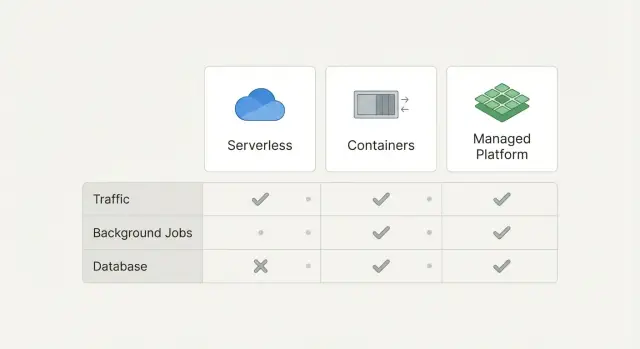
Why hosting gets hard right after the prototype
A prototype feels fast because it only has to work for a small group, for a short time, in a controlled setup. You might be testing with seed data, one admin user, and a handful of pages. Once real users show up, the same app behaves differently: more logins, more uploads, more refreshes, and more edge cases.
Hosting decisions get harder because prototypes often skip the boring parts that decide whether an app survives in production: uptime, retries, rate limits, secrets, and how the database behaves under load. When you finally need those basics, you end up choosing between options that sound similar but behave very differently.
Common signs you’ve outgrown your current setup:
- Pages get slow when a few people use the app at once
- Background tasks fail sometimes, with no clear reason
- Database connections time out or you hit “too many connections”
- Deploys feel scary because one change can break everything
- You find API keys or passwords sitting in plain text
You don’t need deep DevOps knowledge to make a solid hosting choice. You need a clear way to match your app’s needs to the right kind of hosting, so you don’t rebuild twice.
When people say “traffic, jobs, and database”, they usually mean:
- Traffic: users loading pages and calling APIs. The key question is whether usage is steady (predictable) or spiky (quiet most of the day, then suddenly busy).
- Jobs: work that runs in the background, like sending emails, generating reports, processing uploads, or syncing data. The key question is whether it must run reliably even when no one is actively using the app.
- Database: where your app stores data and state. The key question is whether it needs long-lived connections, migrations, backups, and consistent performance.
This post compares serverless, containers, and managed hosting platforms using simple decision tables.
What to write down before you compare options
Before you pick serverless, containers, or a managed platform, write down what your app actually does day to day. This keeps you from choosing based on vibes and then reworking it later.
Start with a simple map of your pages and flows. List the main screens (marketing page, dashboard, settings, admin, checkout) and mark which ones must feel fast every time. “Fast every time” usually means login, the first screen after login, and anything tied to money.
Then estimate traffic in a low-effort way. You don’t need exact numbers yet. Use a label like low, medium, spiky, or unknown. Spiky can mean “we might get 10 users most days, but 5,000 show up on launch day” or “a webhook partner can suddenly send a burst.” If traffic is unknown, write that down too, because it changes what you optimize for.
Next, separate background work from page loads. Many apps look fine in a demo but break in production because background tasks have nowhere safe to run. Common examples:
- Sending emails or SMS (signup, receipts, password reset)
- Imports and exports (CSV uploads, data sync)
- Long AI tasks (generate reports, summarize docs, batch processing)
- Media work (image resize, video processing)
- Webhooks (retry logic when other services fail)
Now capture your data needs in plain words. You don’t have to choose vendors yet. Just describe what kind of state you have and what happens if it’s lost:
- SQL data (users, payments, permissions)
- Files (uploads, invoices, avatars)
- Search (full-text, filters, relevance)
- Caching (speed up hot pages, rate limits)
Finally, write down constraints that matter more than any technical detail: time to ship, budget, and who will maintain it. If you’re a solo founder with no on-call team, say that. If you need something running in 48 hours, say that too.
A quick example: if you have a prototype with a fast dashboard, spiky launch traffic, a daily import job, and a SQL database, you already have enough to compare options without guessing.
Serverless, containers, and managed platforms in simple terms
Choosing hosting after a prototype is mostly about deciding how much of the “running the app” work you want to own.
Serverless: code runs only when it’s needed
Serverless means your code wakes up on demand and goes back to sleep when there’s nothing to do. You don’t manage a long-running server. You ship small pieces of code (functions) or a serverless web service, and the platform handles scaling.
The tradeoffs are real: requests can start slower after idle time, and you often need to design around limits (timeouts, stateless execution, and specific patterns for database connections). Serverless can be great for spiky traffic or simple APIs.
Containers: you control more, and you carry more
A container is your app packaged with its runtime so it runs the same way anywhere. You choose how it starts, what runs alongside it, and how it uses CPU and memory.
The upside is control: background workers, predictable runtimes, and fewer “platform rules.” The downside is operations work: keeping services healthy, setting scaling rules, handling logs, secrets, patches, and incident response.
Managed platforms: the middle ground
Managed platforms sit in between. You deploy an app, and the platform runs it for you on their infrastructure. “Managed” often includes build steps, HTTPS, autoscaling, and basic health checks.
What stays your job: app bugs, database design, background job behavior, and keeping secrets out of your repo.
A simple pricing mental model:
- Serverless: pay per request and compute time. Cheap at low or bursty traffic, but costs can jump with steady heavy usage.
- Containers: pay for reserved capacity (machines you keep running), even when traffic is quiet. More predictable with consistent load.
- Managed platforms: usually a base monthly cost plus add-ons (databases, logs, bandwidth). Often the easiest to budget early on.
Deployments and rollbacks also feel different:
- Serverless: fast deploys, but more moving parts if you have many functions. Rollbacks are usually easy, but debugging across functions can be harder.
- Containers: clean versioned releases and quick rollbacks, but you must set up the process.
- Managed platforms: “push to deploy” is simple. Rollbacks are often one click, but customization can be limited.
If your prototype is a small API with occasional traffic and a couple scheduled tasks, serverless can be a low-effort start. If you already need a worker queue, long-running jobs, or strict control over runtime, containers (or a managed platform that supports workers) is often calmer.
Decision table part 1: traffic patterns
Traffic is the first thing to sort out because it affects cost, reliability, and the amount of work you do to keep things stable.
| Your traffic pattern | What it usually feels like | Typical best fit | Watch-outs |
|---|---|---|---|
| Steady (similar load most hours) | Predictable usage, like an internal tool or B2B app | Containers or a managed platform running long-lived services | You still need scaling rules and health checks. “Always on” costs money even when idle. |
| Spiky (big bursts, quiet in between) | Launches, ads, demos, daily peaks | Serverless for the web layer, sometimes mixed with managed services | Cold starts can be visible. Concurrency limits and timeouts can surprise you. |
| Unknown (you truly don’t know yet) | Prototype going public, waiting to see demand | Start with managed platforms or serverless, then measure | Don’t lock into complex infra too early. Logging and metrics matter more than “perfect” scaling. |
Cold starts matter when users feel them. If your app is checkout, login, or anything where people click and wait, a 1-3 second pause can hurt. If it’s a small internal admin tool, cold starts often don’t matter.
Real-time needs can change the answer. If you need WebSockets, long streaming responses, or live collaboration, long-lived services are usually simpler. Containers or managed platforms tend to be the least painful. Some serverless setups can do real-time too, but they add extra pieces and more ways to break.
Autoscaling expectations are often too optimistic. “Serverless means infinite scale” is not how it feels in practice. You still hit limits: concurrent request caps, database connection caps, and third-party API rate limits. Containers autoscale too, but they can react slower if you don’t keep some capacity warm.
Rule of thumb:
- Steady traffic: containers or a managed platform, keep it boring.
- Spiky traffic: serverless works well for bursty web requests, but plan for cold starts and limits.
- Unknown traffic: start simple, instrument early, then adjust once you see real usage.
Decision table part 2: background jobs and queues
Background jobs are everything your app needs to do outside the main page request: sending emails, resizing uploads, syncing data, charging cards, generating reports, or calling an AI model. For many prototypes, this is the deciding factor, because jobs reveal what breaks once real users arrive.
Most job problems are less about “where it runs” and more about the basics: timeouts, retries, idempotency (so retries don’t duplicate work), and safe concurrency.
Serverless can be great for jobs when each task is small and independent. You get automatic scaling and you only pay when work runs. It gets painful when tasks regularly hit time limits, need steady CPU for a long time, or require heavy dependencies that make cold starts slow.
Containers are often simpler for long-running jobs and dedicated workers. A worker container can pull from a queue, stay warm, and handle larger memory or CPU needs without fighting function limits. The tradeoff is you must think about scaling, restarts, and ensuring only one worker processes a job at a time.
Managed platforms help most when they bundle the boring parts: hosted queues, scheduling, worker autoscaling, dashboards for failures, and dead-letter handling.
| Job length | Retry needs | Concurrency needs | Good default | Watch-outs |
|---|---|---|---|---|
| Under 30s | Low to medium | Spiky or unpredictable | Serverless + managed queue | Timeouts, cold starts, duplicate runs |
| 30s to 15m | Medium to high | Moderate | Managed workers or containers | Needs idempotency and backoff |
| Over 15m or heavy CPU | High | Controlled | Containers with a queue | Scaling rules, stuck jobs, costs |
A concrete example: a SaaS prototype that generates invoices can run PDF creation in serverless if it finishes quickly. If customers start uploading huge invoices and generation takes minutes, a container worker pulling jobs from a queue is usually calmer to operate and easier to debug.
Decision table part 3: database and stateful services
Start with the most “sticky” part of your app: the database and anything that keeps state. You can swap web hosting later. Moving data and state is where teams lose weeks.
If your prototype uses Postgres or MySQL, keep it. Managed Postgres/MySQL is usually the safest default because upgrades, disk issues, and backups are where self-hosted databases most often fail.
If your prototype uses SQLite, treat it as a warning sign. It’s fine for a demo, but it breaks down fast when you add concurrent users, multiple app instances, or background jobs.
Managed DB vs self-hosted DB: what breaks
Self-hosting a database inside a container can work, but the failure modes are usually boring and expensive: storage fills up, backups aren’t real, a minor upgrade breaks an extension, or a restart corrupts data because volumes were misconfigured. A managed database reduces these risks, especially when you’re still changing the schema often.
Beyond the database, list your other stateful needs:
- File uploads usually need object storage (not your app’s local disk).
- Search often needs a separate search service if you want fast filtering at scale.
- Caching often needs something like managed Redis if you rely on sessions, rate limits, or expensive queries.
Connection limits matter more than people expect. Each open DB connection costs memory on the database server. Serverless apps can create many short-lived connections, which can trigger “too many connections” errors. The usual fix is connection pooling: your app talks to a pool, and the pool reuses a smaller number of database connections.
| Question | If “low/early” | If “growing/high” | What to pick |
|---|---|---|---|
| Read/write load, migrations, backups | Light reads, few writes, migrations weekly, basic backups ok | Heavy reads/writes, migrations often, need point-in-time recovery | Managed Postgres/MySQL + automated backups; add pooling when you scale |
How to choose: a step-by-step path you can follow
Trying to compare every feature across every platform is a fast way to stall. A better approach: start from the thing most likely to break first, then pick the simplest option that prevents it.
Step 1: Pick your current bottleneck
Be honest about what hurts today, not what might matter in a year:
- Traffic: pages are slow, timeouts happen, or you get rate-limited.
- Background jobs: emails, imports, AI calls, or scheduled work fails or runs twice.
- Database/state: data is inconsistent, migrations are scary, or you’re storing files/sessions in the wrong place.
Once you pick one bottleneck, you can ignore most of the noise.
Step 2: Choose the simplest hosting that removes that bottleneck
Aim for the least moving parts that still meets your need.
If traffic is the issue, serverless or a managed platform is often enough because it scales without you tuning servers. If long-running requests or WebSockets are central, containers can be simpler than fighting limits.
If jobs are the issue, prioritize a real queue and a worker that can retry safely. That might still be serverless, but only if you can control timeouts and retries. Otherwise, a small container worker can be easier to reason about.
If the database is the issue, get a stable managed database first. Your app hosting choice matters less than having backups, migrations, and clear connection limits.
Step 3: Run one small load test and one failure test
Keep it small. You’re looking for obvious breakpoints.
Load test: simulate a modest spike (for example, 5-10x your normal traffic for 10 minutes) and watch errors and response times.
Failure test: force something to crash and confirm it recovers cleanly. The simplest test is a restart. For jobs, also test retries: make one job fail on purpose, then confirm it retries once and doesn’t create duplicates.
Step 4: Define a basic deployment flow
You need a minimum safe path from code change to production:
- Staging and production (even if staging is tiny)
- A deploy process that doesn’t rely on manual clicking
- A rollback plan (ideally one command or one setting)
If you can’t explain your rollback in one sentence, your hosting isn’t “simple” yet.
Step 5: Plan what you will monitor
Pick a few signals you’ll actually check weekly: error rate, latency, and job failures are usually enough. Add one database signal (slow queries or connection count) if your app is database-heavy.
Common traps that cause rework later
The fastest way to waste a month is to pick hosting based on what sounds “real” instead of what your app actually does. The right choice is usually the one your team can run calmly every week, not the one with the fanciest diagram.
One trap is picking containers because they feel professional, then realizing nobody wants to own the ops work. Containers are fine, but they often mean you must handle updates, monitoring, scaling rules, and incident fixes. If your team is small, that work shows up at the worst time.
Serverless has the opposite trap: it’s easy to start, but it bites when work runs too long. If you have video processing, large imports, AI calls chained together, or report generation that takes minutes, you can hit time limits or cost spikes. Teams then bolt on queues and workers later and end up redesigning under pressure.
Rework triggers to watch for:
- Treating secrets as an afterthought (keys in code, shared .env files, no rotation plan)
- Shipping database schema changes and app code in the same step, without a safe rollback
- Choosing a platform that makes auth flows awkward (callbacks, session storage, custom domains)
- Not planning for file uploads and storage early (where files live, how permissions work)
- Assuming real-time features will “just work” (WebSockets, long connections, background consumers)
One concrete example: a prototype might use a simple login library, store files on local disk, and run a nightly job inside the web server. That can look fine in demos, but in production it often breaks as soon as you add multiple instances or deploy a new version.
Example: moving an AI-generated prototype to production hosting
A founder ships an AI-built prototype made with a tool like Replit or Cursor. It runs fine on a laptop. After launch, it starts failing in production: users get random logouts, emails send twice, and the database times out during peaks.
This happens because prototypes often mix everything together: web requests, background work (imports, emails), and database access in the same process. When traffic spikes, everything competes for the same resources.
Walking through the decision table
Traffic: The launch brings spiky traffic (big bursts from social posts, then quiet). That points toward a front end and API that can scale quickly. Serverless functions can be a good fit for the web/API layer if requests are short and stateless. If requests are long or you need tight control over runtime, a small container service is usually safer.
Background jobs: Sending emails and running CSV imports shouldn’t happen inside the web request. Spikes make web servers slow, and retries can cause duplicates. Jobs need a queue and a worker that can run longer than a typical request timeout.
Database and auth: Timeouts often come from too many connections and slow queries. Auth breaking under load is often a mix of misconfigured cookies, missing session storage, or rate limits and timeouts when calling the database.
A realistic hosting combo for this case:
- Serverless or a managed web service for the API (fast scaling for spiky traffic)
- A managed queue plus a worker (container or managed job runner) for emails/imports
- A managed database with connection pooling (and basic monitoring)
- Managed secrets storage so keys aren’t hardcoded in the repo
This isn’t about the fanciest stack. It’s about splitting responsibilities so one problem (imports) doesn’t take down everything.
A simple first-week plan: stabilize, then optimize
Week one should focus on reliability before cost tuning:
- Day 1: Add request logging, error tracking, and health checks so failures are visible.
- Day 2: Move emails and imports into a queue + worker, add idempotency (no double sends).
- Day 3: Fix database timeouts with pooling, indexes for slow queries, and sensible timeouts.
- Day 4: Stabilize auth (sessions, cookies, redirects) and add basic rate limiting.
- Day 5: Load test the main flows and set scaling limits so a spike doesn’t create a surprise bill.
Quick checklist and next steps
If you want to choose hosting after a prototype without getting stuck in endless comparisons, keep the decision small and practical. You’re not picking “the forever platform.” You’re picking the safest next step for real users.
Start with these checks:
- Traffic shape: mostly steady, or spiky with sudden peaks? Note whether users are mostly in one region.
- Job length: are background tasks quick (seconds) or long (minutes)? Do they need retries, schedules, or guaranteed delivery?
- Database growth: how fast will data grow, and do you need migrations or strict backups soon?
- State and files: do you store uploads, sessions, or generated files that must survive restarts?
- Team ownership: who is on call when it breaks, and how comfortable are they with deploys and debugging?
Before you launch anything public, get the “minimum production basics” in place:
- Backups you’ve tested: not just enabled, but restored once.
- Logs you can search: requests, jobs, and database errors in one place.
- Error alerts: notify a human quickly, with enough detail to act.
- Rollbacks: a way to undo a bad deploy without heroics.
Keep one thing simple on purpose. For many teams, that means using a managed database and avoiding custom database operations early, even if the app runtime choice is still evolving. Also write down what you’re choosing to postpone (like multi-region, perfect autoscaling, or complex queues) so it doesn’t turn into an accidental surprise later.
Next steps that work well for most teams:
- Document your choices in one page: runtime, jobs/queue, database, storage, and who owns each.
- Run a small production trial: a limited release with real monitoring, then fix the top issues you see.
- Load test one core flow: sign up, checkout, or your main API endpoint, enough to catch obvious limits.
- Practice one failure: restart the app, break a config value, or simulate a queue backlog and see what happens.
- Set a review date: two weeks after launch, decide if you stay put or upgrade one piece.
If you’re inheriting AI-generated code that’s already fragile, it’s worth fixing the fundamentals (auth, secrets, job retries, and database access patterns) before you change hosting. FixMyMess (fixmymess.ai) focuses on diagnosing and repairing AI-generated prototypes so they’re ready for production, including security hardening and deployment prep, and they offer a free code audit to surface the issues that usually derail hosting migrations.
FAQ
What should I write down before picking hosting?
Write down three things: your traffic pattern (steady, spiky, or unknown), what background jobs you run (emails, imports, AI tasks, uploads), and what data you store (SQL data, files, sessions). Those three details usually point to the simplest safe option without getting stuck in platform comparisons.
If I don’t know my traffic yet, what’s the safest default?
Start with a managed platform or a simple serverless setup, then add basic monitoring so you can see real usage. The goal is to learn quickly without building a complex setup you’ll throw away.
Will serverless cold starts actually hurt my app?
It can, but it’s most noticeable on login, checkout, and the first page after login. If those flows must feel instant every time, prefer a long-lived service (containers or a managed web service) or keep some capacity warm.
When should I avoid serverless and use containers instead?
Choose containers or a managed platform that supports long-lived services and workers. Real-time features are simpler when your app can hold connections open without fighting timeouts or platform limits.
Do I really need a queue for background jobs?
No. Background jobs often fail first in production because they need retries, timeouts, and protection against double-runs. A queue plus a worker (serverless or container) is usually the difference between “works in a demo” and “works all week.”
Should I self-host my database inside a container?
Use a managed database as your default, especially early on. Most painful failures come from backups, storage, and upgrades, not from writing SQL, and managed databases reduce those risks.
My prototype uses SQLite—do I need to change it before launch?
SQLite is fine for a demo, but it breaks down with concurrent users, multiple app instances, and background workers. If you’re going public, moving to managed Postgres or MySQL is usually the cleanest step to avoid random locks and data issues.
What causes “too many database connections,” and how do I fix it?
It’s usually a connection limit problem, not “the database is down.” Add connection pooling and make sure your app reuses connections sensibly, especially if you’re using serverless where many instances can spike connection counts.
What’s the minimum testing I should do before switching hosting?
Do one small load test (a short traffic spike) and one failure test (restart something on purpose) before you launch. You’re checking for obvious breakpoints like timeouts, job duplicates, and slow pages under modest load.
If my app was generated by an AI tool, should I fix the code before changing hosting?
Yes. AI-generated prototypes often ship with fragile auth, exposed secrets, and messy background-job behavior that will break no matter where you host. If you want a fast, low-drama path to production, FixMyMess can run a free code audit and then repair the codebase (auth, secrets, job retries, database access, deployment prep) so it’s stable within 48–72 hours, or rebuild from scratch when that’s faster.