CI/CD for inherited prototype code: a simple pipeline blueprint
CI/CD for inherited prototype code made simple: a practical pipeline with linting, tests, build checks, preview deploys, and safer production releases.
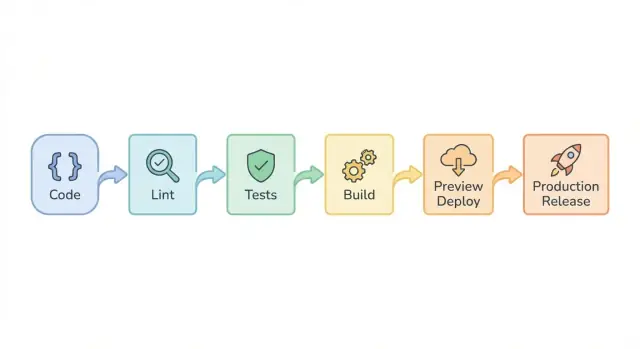
Why inherited prototypes need a different CI/CD approach
Inherited prototype code is usually a mix of quick experiments, copied snippets, and half-finished features. It often has weak structure, unclear ownership, and "temporary" shortcuts that became permanent. If AI tools helped build it, you may also see inconsistent patterns, missing error handling, and logic that looks fine until real users hit edge cases.
That’s why it can run on one laptop and fall apart in production. The original setup may depend on hidden local files, a specific runtime version, a seeded database, or environment variables nobody wrote down. One teammate runs it with a warmed-up cache; another installs fresh and gets a blank screen. Production adds stricter security, different network conditions, and real data volume, which exposes problems like broken authentication, exposed secrets, and fragile database queries.
A better CI/CD approach here isn’t about perfect engineering on day one. It’s about fewer fire drills. A simple pipeline catches common failures early, makes releases repeatable, and gives you a safer way to change things without needing a big rewrite first.
This blueprint focuses on practical guardrails: basic linting, a small set of tests that matter, reliable builds, deploy previews for review, and safer production releases with a rollback path.
If the foundation is badly broken (for example, tangled authentication, unsafe query patterns, or security holes like SQL injection), you’ll get more value from a short diagnosis and targeted repairs first. Then CI/CD helps keep the same problems from coming back.
Define the goal: what "safe enough to ship" means
Inherited prototypes fail in unpredictable ways. Your pipeline goal isn’t perfection. It’s faster feedback, fewer broken deploys, and releases you can repeat without holding your breath.
Write down what "safe enough" means for your app this month, not your dream version six months from now. A practical starting promise is simple: every change runs the same checks, every time. No "quick hotfix" exceptions, because exceptions become your new normal.
A definition the team can repeat
A change is "done" when two things are true:
- The pipeline is green.
- It produces something you can actually ship (a deployable artifact), not just code that compiles on one laptop.
If checks pass but you can’t deploy, the pipeline isn’t finished.
Keep your definition short. For most teams, it’s enough to require: linting and a basic test set, a clean build in CI, a preview or staging deploy for review, and a production release that follows the same path with an explicit approval step.
What to postpone (on purpose)
Trying to fix everything on day one is the fastest way to abandon CI/CD. It’s fine to postpone full test coverage and big refactors while you get reliable gates in place.
If login sometimes breaks, don’t start by rewriting authentication. Start by making "safe enough" mean: login has one automated smoke test, secrets aren’t exposed, and the build produces a releasable artifact. Once releases stop failing, you can expand coverage and refactor with less risk.
Prep the repo: branches, environments, and secrets
Before wiring up CI/CD, make the repo predictable. Most prototype pain comes from mystery settings: branches no one trusts, environment variables scattered across chat logs, and secrets accidentally committed.
Keep branches boring
You usually only need one long-lived branch plus short-lived work branches:
mainis always deployable.- Changes happen in short feature branches that merge back quickly.
Avoid mega branches (like a long-running dev) that drift for weeks. Tag releases on main so you can roll back to a known good point.
Make environments and secrets explicit
Pick a single source of truth for configuration. A simple pattern is: local uses an example env file, CI uses the CI secret store, and production uses your hosting provider’s env settings. The key is consistency: the same variable names exist everywhere.
Minimum essentials:
- Maintain one documented list of required env vars (what they do, safe defaults).
- Keep a
.env.examplewith names only, never real values. - Remove committed secrets and rotate anything that was exposed.
- Keep keys and URLs out of code.
A useful reality check: if a new teammate can’t run the app without asking for "the right .env", your pipeline will be fragile too.
Also add a short README note with copy-paste commands to run lint, tests, and a build locally. If it’s awkward locally, it will be worse in CI.
Quality gates that catch most issues early
Prototype code tends to break in predictable ways: messy formatting, hidden runtime assumptions, and "works on my machine" installs. Quality gates are the checks your pipeline runs on every change so problems show up minutes after a commit, not during a late-night deploy.
Start with one formatter and one linter, then make them non-optional. Consistency matters more than perfection. Automated checks stop style debates and prevent small issues from hiding real bugs.
Add lightweight type checks where they fit. You don’t need a rewrite to get value. Even basic type checking can catch wrong arguments, missing fields, and unsafe null handling before they turn into production errors.
For tests, keep the bar realistic. Define a minimum set that must always pass, even if the rest of the suite is still growing. A practical minimum usually covers the flows that cost you the most time:
- Login and session handling (including logout)
- One core "happy path" for the main feature
- One critical API endpoint (or background job) that hits a real database call
- Basic permission checks (users can’t see other users’ data)
- A smoke test that the app boots without errors
Finally, make builds repeatable. Pin the runtime version (Node, Python, etc.), use lockfiles, and do clean installs in CI. That way you’re testing what you’ll actually ship.
Step-by-step pipeline blueprint (lint -> test -> build)
The point of the pipeline is to fail fast and tell you what to fix.
Run it on every pull request, keep it consistent, and keep it fast enough that people don’t try to skip it.
A simple order that works
-
Format and lint first. Auto-formatting reduces noisy diffs. Linting catches easy problems early (unused variables, wrong imports, unsafe patterns) and helps the code stay readable as you fix it.
-
Run tests with clear output. Make failures obvious: which test failed, the error message, and where it happened. Reviewers shouldn’t have to dig through logs.
-
Build like production. Use the same build command and runtime version you expect in production. Use the same environment variable shape (but never real secrets). This step catches missing assets, wrong config, and "works on my machine" surprises.
-
Add one fast security check. Keep it lightweight: scan dependencies for known vulnerable packages and scan for accidentally committed secrets. AI-assisted code is especially prone to hardcoded tokens or sample credentials.
-
Publish build artifacts. Save build output (and test reports) so deploy steps reuse them instead of rebuilding.
Deploy previews: review changes without risking production
A deploy preview is a temporary copy of your app that runs the exact code from a single pull request. It behaves like the real product, but it’s isolated. This is helpful for non-technical reviewers because they can click through the real flow without installing anything.
Previews are one of the fastest ways to catch "it works on my machine" problems. They also surface UI issues, broken redirects, missing env vars, and slow pages before anything reaches production.
Create previews for every PR by default. Skip them only when they add no value (like documentation-only changes). Consistency matters: reviewers learn that every change has a safe place to test.
Make previews realistic (without copying production)
If previews start with a blank database, many pages will look broken even when the code is fine. Plan simple seed data up front:
- Create a small set of fake users and sample records on deploy.
- Add a clear "demo mode" banner.
- Provide one or two pre-made test accounts for review (never real accounts).
Keep previews safe
Preview environments should never use real customer data or production secrets. Treat them like a public sandbox.
Good defaults: separate preview keys and databases, disabling destructive jobs (billing, emails, webhooks), and auto-expiring previews after a short time.
Safe production releases: approvals, rollbacks, and monitoring
A safe release process makes hidden risks visible and easy to undo.
Make every production release traceable. Use version tags (for example, v1.8.0) so you can answer: what code is running right now, who approved it, and what changed since the last release.
Even in small teams, add a manual approval step before production. CI can run checks, but a human should confirm the preview looks right, verify release notes, and make sure there’s a rollback plan. In inherited codebases, a small change can break a critical flow.
Rollbacks should be fast and boring. Before you need one, make sure you can redeploy the previous tag in one action, handle database changes safely (or avoid risky migrations during releases), restore environment settings without guesswork, and confirm success with a quick smoke check.
If you want extra safety, use a progressive rollout (canary or percentage-based release). Release to a small slice of traffic, watch for problems, then roll out to everyone. If errors jump, stop or roll back while most users are unaffected.
After a release, watch the few signals that tell you whether the app is usable:
- server and frontend errors (spikes, new error types)
- login and signup success rate
- payments or checkout completion (if relevant)
- performance (slow pages, timeouts)
- key background jobs (emails, webhooks, queues)
When tests are missing or flaky: a practical path forward
Inherited prototypes often have either no tests or tests that fail "sometimes." You still need confidence, but you also need progress. The goal is predictable signals you can trust.
Flaky test or real bug?
A flaky test usually fails in different places without any code change. A real bug tends to fail the same way until you fix it.
Quick ways to tell:
- Re-run the same commit 3-5 times. Random passes point to flakiness.
- Look at the error. Timeouts, "element not found," and network hiccups often mean flakiness.
- Watch for shared state: order-dependent tests, reused databases, cached sessions.
- Compare local vs CI. CI-only failures often mean timing issues or missing config.
Don’t ignore flakiness. Quarantine the test (mark it non-blocking) and open a task to fix it so the pipeline stays useful.
No tests yet? Start with smoke tests
If you have zero tests, begin with a tiny smoke set that protects the most important paths:
- App boots and the home page loads
- Login works (happy path)
- One critical create/read action works
- Logged-out users can’t access a private page
- One API health check returns 200
Keep these fast (a few minutes) and make them blocking.
To stabilize without slowing everyone down, split tests into tiers: smoke tests block merges; longer end-to-end tests run on a schedule or before release. Limit retries to one, and treat "retry passed" as a warning, not a success.
For coverage, set a goal that grows slowly: start at 10-20% on core logic, then raise it over time.
Common mistakes that make CI/CD painful
The fastest way to end up with a pipeline nobody trusts is to make it "perfect" on day one. With inherited code (especially AI-written code), aim for progress you can repeat, not a wall of red checks everyone learns to ignore.
One common trap is making quality gates so strict that every run fails for minor style issues. Linting is useful, but if it blocks all work, people start bypassing CI or merging without fixing anything. Start with rules that catch real bugs, then tighten over time.
Another mistake is auto-deploying to production on every merge with no pause button. That turns a small mistake into a customer-facing incident. Keep production boring: approval before release, a clear rollback option, and a way to stop a release if something looks off.
Preview deploys can also backfire. A preview that reads your production database or uses production API keys isn’t "safe" - it’s production with fewer eyes on it. Use separate preview credentials and a preview database (or mocked services) so reviews don’t risk data or money.
Other pain-makers that show up often:
- Building one way in CI but a different way in production (different runtime, env vars, flags).
- Putting off dependency updates until a security issue forces a rushed upgrade.
- Skipping basic checks because "it worked on my machine."
Quick checklist: is your pipeline ready to trust?
A pipeline is worth trusting when it answers two questions every time: "Did we break anything?" and "Can we roll back fast if we did?"
Look for these minimum signals:
- Linting and formatting run automatically on every change and fail fast.
- Tests run reliably and finish in a reasonable time.
- The build is reproducible and produces a deployable artifact.
- Preview deploys are isolated (no real customer data, no production secrets).
- Production releases require explicit approval and have a written rollback plan.
If you can only do one thing this week, make previews safe. Use a test database, fake payment keys, and stubbed emails so reviewers can click around without sending real messages or touching real records.
Then focus on the first hour after release:
- Error tracking is on and you know where to look.
- Alerts exist for spikes in 500s, login failures, and slow requests.
- A quick health check confirms core flows (sign in, create a record, save, log out).
- Logs are searchable and don’t include secrets.
- Someone is assigned to watch it.
Example: turning a shaky AI-built prototype into a releasable app
You inherit a prototype built in Lovable (or Bolt/v0) that worked in a demo, then breaks the moment you try to deploy it. Logins fail, environment variables are hard-coded, and the build passes on one laptop but not in CI. This is where a simple pipeline stops the guessing and makes changes safer.
The first week should be small and boring, by design. You’re not trying to perfect everything. You’re trying to make every change visible, testable, and reversible.
A practical week-one plan:
- Day 1: Get a clean install and a single "one command" build in CI
- Day 2: Add linting/format checks and fail on obvious errors
- Day 3: Add 2-5 smoke tests for critical paths (login, a key API route, a main page)
- Day 4: Enable deploy previews for every pull request
- Day 5: Add a simple release gate (manual approval) for production
Deploy previews change the conversation with stakeholders. Instead of "I think it’s fixed," you send a preview and approval becomes a clear yes/no.
If previews reveal deeper issues like broken authentication, exposed secrets, unsafe database queries, or architecture that makes changes risky, pause pipeline work and fix the fundamentals first.
If you’ve inherited an AI-generated codebase that’s too messy to stabilize quickly, a focused audit and repair pass can help. FixMyMess (fixmymess.ai) starts with a free code audit, then handles targeted fixes like logic repair, security hardening, refactoring, and deployment prep so your pipeline has something solid to protect.