Community app moderation workflow for AI-built communities
A practical plan for a community app moderation workflow: invites, role-based actions, reports, and review steps that keep your space safe.
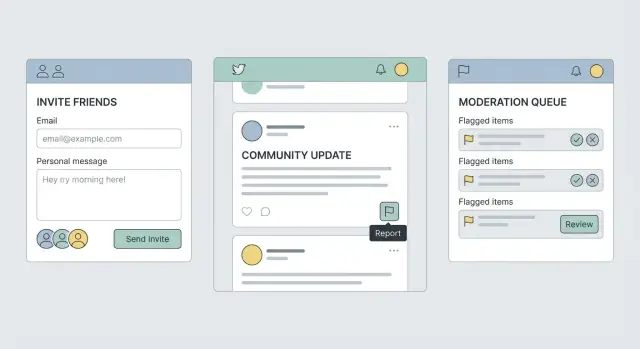
Why safety workflows make or break a community app
A community app can feel friendly on day one and messy by week two. That shift usually isn’t about features. It happens when there’s no clear safety workflow: people don’t know how to report issues, moderators don’t know what to do next, and bad actors learn they can push limits without consequences.
Without a plan, the same problems repeat: spam accounts posting links, harassment in replies and DMs, impersonation of trusted members, and scams aimed at new users. Even a few incidents can set the tone. Regular members stop posting, and the people you most want to keep leave first.
Fancy features rarely fix this. Invitations and reporting matter more because they control who gets in and what happens when something goes wrong. If invites are easy to abuse, you’ll see waves of low-effort accounts. If reporting is confusing or feels pointless, members will fight in public, leave quietly, or take problems elsewhere.
A solid community app moderation workflow isn’t about being strict. It’s about being consistent. The same kind of behavior should lead to the same next step, and members should understand what to expect.
For a small team, “safe enough to launch” usually means you can do four things reliably:
- Reduce abuse at the door with basic invite checks and rate limits.
- Let anyone report in a few taps, with clear reasons and optional details.
- Give moderators a small set of actions (warn, remove content, mute, ban) with clear escalation.
- Keep a lightweight record of what happened (who did what, when, and why).
If your app was built quickly with AI tools, test these flows early. Teams often discover that auth, permissions, or reporting screens look fine but fail in real use.
Set clear rules you can actually enforce
Rules only work if you can apply them the same way every time. Start by defining who the community is for in one sentence, and add one sentence about what it isn’t. Example: “A peer group for new product managers. Not a place to sell services or recruit for unrelated jobs.” That line will guide decisions later.
Next, turn your rules into a few plain categories you can tag and act on quickly. If a rule can’t be mapped to a category, it’s hard to enforce.
- Spam and scams (mass posting, referral links, fake giveaways)
- Harassment and hate (insults, threats, targeting someone)
- Unsafe content (self-harm encouragement, sexual content involving minors)
- Misinformation (harmful medical claims, impersonation)
- Privacy violations (doxxing, sharing private screenshots)
Then decide what’s automatic versus what needs a human. Keep the “automatic” list short and obvious. False positives feel unfair, and they train people to distrust reporting.
A practical split looks like this: automatically block clear spam patterns, obvious scams, doxxing, and child sexual content; automatically hide content pending review when there are repeated reports, slurs, or impersonation claims; and send context-heavy cases (disputes, sarcasm, borderline jokes) to human review.
Write short user-facing messages before you need them. They should say what happened, why, and what to do next.
Example removal message: “We removed your post because it included a sales link. This space is for discussion, not promotion. You can repost without links.”
Example warning: “Please stop commenting on personal traits. Critique ideas, not people. Next time may result in a temporary mute.”
Design an invite and onboarding flow that reduces abuse
A good invitation and onboarding flow does two things at once: it helps real people join quickly, and it makes it annoying for bad actors to show up in bulk. When you get this right, moderation stays calmer because fewer problems enter the space.
Pick the right “door” for your community
Choose the simplest entry method that matches your risk:
- Open join: best for low-risk spaces, but expect more spam and drive-by trolling.
- Invite-only: best early on and for paid groups; slower growth, safer tone.
- Waitlist: useful when you need time to review profiles or control growth.
- Referrals: strong when members vouch for new people and you can trace abuse back to a source.
You can start strict and relax later. Tightening rules after the community is already messy is much harder.
Add light friction that blocks bulk abuse
Most abuse isn’t “one person having a bad day.” It’s repeated attempts, automated signups, and link sharing. A few guardrails go a long way:
- Make invite links expire (for example, 24 to 72 hours) and support one-time use codes.
- Rate limit invite creation and signups (per account, per IP, and per device when possible).
- Require a verified email before posting or sending DMs; consider optional phone verification for higher-risk groups.
- Limit how many accounts can be created from one device in a time window.
Tie friction to power. New accounts can read and react, while posting, linking out, and DMing unlock after verification or a short “good behavior” period.
Onboarding that sets norms before problems start
Onboarding isn’t just a welcome screen. It’s your first chance to set expectations in plain language. A short “community promise” checkbox plus a few prompts can reduce bad behavior and give moderators something concrete to point to later.
Example: a local founders group can ask, “What are you building?” and “What are you here for: feedback, hiring, or networking?” Then show three rules: no harassment, no spam, and keep pitches in the right channel.
Log enough to investigate, not enough to creep people out
For invites, log what helps you trace abuse without collecting extra personal data:
- inviter ID, invite type, and when it was created and used
- invite status (expired, used, revoked) and how many times it was attempted
- basic signals like IP region or a device fingerprint hash (if you use it), not raw device details
- the first actions a new account took (joined, posted, DM sent), with timestamps
Build reporting that is easy to use and hard to game
A good in-app reporting system should take seconds to use, protect the person reporting, and give moderators enough context to act.
Put “Report” where harm actually happens: on posts and comments, inside DMs and message threads, on user profiles (for impersonation or repeat harassment), and at the group or channel level (for spam rings).
Keep the report form short. Ask for a category first (harassment, spam, hate, impersonation, self-harm concern, violence threat, doxxing, other). Then offer optional notes and a simple way to attach evidence, like a screenshot or a message ID your app captures automatically.
Let people protect themselves while they report. A “Block” or “Mute” option inside the reporting screen reduces harm right away. If blocking also changes access to a shared group, say so before they confirm.
Set expectations on the final screen. Tell them what happens next, what you can and can’t share, and what a typical response time looks like. If you can’t promise a timeline, give a range and explain what changes it (severity, repeat offenses, missing details).
Make the flow harder to abuse. Rate-limit reports from new accounts, watch for repeated false reporting, and require a short reason when someone reports the same person again. Avoid exposing details that could identify the reporter.
Emergency cases need a faster path. Add an “urgent” option only for high-risk categories and trigger immediate alerts for:
- credible threats of violence
- self-harm threats or suicidal intent
- doxxing (home address, workplace, private phone)
- child safety concerns
Example: someone receives a DM with their address. They report the DM, choose “Doxxing,” the app attaches the message automatically, and they block the sender. The confirmation screen explains that the message is locked for review, and a moderator sees it at the top of the queue with an urgency tag.
Moderation actions and escalation rules
A community app moderation workflow needs two things: a clear menu of actions, and clear rules for when to use each one. Without that, outcomes feel random, and bad actors learn where the gaps are.
Actions that support, not just punish
Start with a small set of actions that cover most cases:
- Remove content (hide or delete a post/comment)
- Warn (cite the rule and what needs to change)
- Timeout (temporary read-only or can’t post for a set period)
- Suspend (account paused for a set number of days, requires review to return)
- Ban (permanent removal, with device/IP safeguards if you use them)
Soft actions matter too, especially when someone is borderline or when a thread is getting heated. Things like slow mode, temporary link restrictions, or requiring approval for brand-new accounts can stop damage without jumping straight to bans.
Escalation and appeals
Define who can do what. A simple path works: moderator handles first response, admin handles repeat offenses and edge cases, and the owner makes calls on permanent bans or high-risk issues (harassment, doxxing, threats). For actions that are hard to undo (like a ban), require a second person to confirm.
Appeals should exist, but not for everything. Allow appeals for long timeouts, suspensions, and bans. Don’t allow appeals for obvious spam or clear safety violations. Ideally, assign an appeal reviewer who wasn’t involved in the original decision and set a time limit (for example, within 7 days) so cases don’t linger.
Consistency gets easier with three small tools: canned reasons that map to your rules, internal notes that stay hidden from members, and a simple strike counter so repeat issues escalate predictably.
Step-by-step: set up the full workflow from invite to resolution
Treat the workflow like an assembly line: who can do what, where reports go, and how decisions get made. Set it up once, then stick to it.
Step 1: Define moderation roles and permissions
Start with roles you can explain in one sentence each: member, trusted, moderator, admin. “Trusted” helps because it gives proven members more freedom (posting links, inviting others) without handing them full moderation power.
Write down what each role can see and do. Keep it boring and specific.
A quick checklist:
- Who can invite new users
- Who can see reporter identities
- Who can hide content versus delete it
- Who can issue timeouts versus bans
- Who can view the moderation log
Step 2: Create report queue states
Give every report a status so nothing gets lost. A simple set is: New, Triage, Resolved, Appealed.
New means it just arrived. Triage means a moderator is checking context (message history, screenshots, past reports). Resolved means an action was taken or the report was closed with a reason. Appealed means the user challenged the decision and it needs a second look.
Step 3: Add notifications that keep people informed
Notify moderators when a report enters New, and again if it sits too long. Notify the reporter when the report becomes Resolved, even if you can’t share details. A short message like “Thanks, we reviewed this and took action” prevents repeat reporting and frustration.
Avoid noisy alerts. Bundle low-priority items, but send immediate alerts for high-risk reports (threats, doxxing, child safety, scams).
Step 4: Add rate limits and abuse checks
Abuse often shows up through invites and reporting. Add simple limits early:
- limit invites per account per day (stricter for new accounts)
- slow down repeat reports from the same user in a short window
- detect report bursts and route them to review
- require a short note for severe report categories
- flag accounts with many rejected reports for closer review
Step 5: Use a decision template for consistency
Every moderation action should record the same minimum fields: reason, action, and follow-up.
- Reason: which rule was involved (plain language)
- Action: what happened (hide post, warn, mute 24h, ban)
- Follow-up: what the user can do next (edit and repost, appeal, safety resources)
If your app is AI-built, plan extra time to test edge cases, like whether “mute” really blocks notifications or whether hidden content still shows up in search.
Logs, audit trails, and privacy basics
A community can feel “moderated” even when it isn’t fair. Good logs fix that. They let you review decisions, spot patterns, and explain what happened without relying on memory.
Decide what you must record to make decisions traceable, and nothing more. Store the facts needed to understand a case, not a complete copy of everyone’s private life.
A minimum set that usually holds up:
- Report details: category, free text reason, relevant message/post IDs
- Action taken: none, warning, content removal, mute, ban (plus duration)
- Timestamps: when reported, when reviewed, when actioned
- Actors: who reported, which moderator handled it, who approved escalation
- Evidence pointers: attachment IDs or message snapshots (only what’s needed)
Privacy problems often come from “just in case” data. Avoid logging full message history, raw IP addresses, or copying entire user profiles into every report record. If you must store sensitive content (screenshots, message excerpts), limit who can see it. Separating “content view” permissions from “action” permissions helps junior mods process queues without browsing private material.
Audit trail basics
Every moderation action should write one clear event: who did what, to whom, when, and why. Make “why” required for serious actions (long mutes, bans). If you allow edits to reports, keep version history so changes are visible.
Simple dashboards that actually help
You don’t need fancy analytics. A small dashboard that updates daily is enough:
- queue size and oldest open report
- repeat offenders (users with multiple confirmed actions)
- top report categories
- moderator workload (cases per moderator)
- overturned actions (appeals that reversed a decision)
Set retention rules before launch. Keep action logs longer than raw evidence. For example, keep audit events for 12 to 24 months, but delete attachments and message snapshots sooner (30 to 90 days) unless a case is escalated.
Common mistakes that create unsafe or unfair outcomes
Most community apps fail on safety for one simple reason: the rules are written, but the workflows aren’t.
Too much power in one moderator account
A common misstep is giving moderators full access to user profiles, emails, IP data, private messages, or billing details just so they can handle basic reports. That’s risky for privacy and can cause real harm if someone goes rogue or makes an emotional call.
Keep permissions narrow and task-based. A moderator who can hide a post shouldn’t automatically be able to view a user’s full history or export member lists.
No guardrails against spam and brigading
If invites and reports can be used unlimited times, bad actors will use that. You’ll see invite spam, fake accounts, and coordinated report storms designed to silence someone.
Add friction that doesn’t punish normal users: limit invites for new members, throttle repeat reports, detect bursts, and require a short reason for certain report types.
Edge cases that break trust
Moderation gets messy in the corners: a post is deleted before review, two users block each other, a member is banned from one group but not the whole app, or a reported message is in a private thread. If your UI says “Report submitted” but moderators can’t actually see the content, users feel ignored.
Make sure every report can resolve cleanly even when content is missing. Store a minimal snapshot (what happened, when, and why) so reviewers can act without exposing more data than needed.
Confusing messages and no appeals
Generic notifications like “You violated guidelines” without context make people feel punished at random. Silence after a report does the same.
Every action should include a plain-language reason, what happens next, and how to appeal (when appeals apply). Even a simple “request review” option reduces churn and public blowups.
Quick pre-launch safety checklist
You can ship fast and still ship safe if you check the boring details before real people arrive.
Run this checklist on a staging build (or private beta) and write down what you see. If something is unclear for you, it’ll be confusing for moderators and users too.
- Invites behave predictably: invites expire, can be revoked, and can’t be reused by accident. Test what happens if someone forwards an invite.
- Reporting is truly quick: from posts, comments, DMs, and profiles, a user can report in about two taps, add a short note, and submit.
- Moderators have one clear queue: new reports land in a single inbox with basic filters (new, in review, resolved).
- Every action leaves an audit trail: bans, mutes, deletes, warnings, role changes, and report outcomes all write a log entry with who did it, when, and why.
- Blocks are enforced: blocked users can’t contact the blocker (DMs, replies, mentions, invites). Check that blocking doesn’t leak presence info like online status.
After the checklist, do five quick abuse drills with a teammate: one spam burst, one impersonation attempt, one harassment thread (replies and DMs), one evasion attempt (new account after ban), and one false report attempt (trying to weaponize reporting).
Example scenario and next steps to ship safely
A realistic test is simple: a brand-new member joins through an invite and starts sending spam DMs within minutes.
For the targeted member, the flow should feel fast and protective. They open the DM, tap Block, then tap Report. The report form is short: pick a reason (Spam), add an optional note, and submit. The confirmation should be clear: “Thanks, we received your report. You will not receive messages from this account.”
For moderators, the report should arrive with enough context to act without exposing unnecessary private data: account age, invite source (who invited them), recent message counts, the reported content, and whether other users reported the same account.
The decision point is usually timeout vs ban. If it’s minor, first-time, and low-volume, a short timeout plus a warning can be enough. If the account is brand new, sends many DMs fast, and has multiple reports, banning is the safer move. The key is consistency: similar behavior should lead to similar outcomes.
A simple decision rule:
- Timeout for minor, first-time, low-volume cases.
- Ban for high-volume spam, repeat behavior, or multiple reports.
- Revoke invite privileges (or flag the inviter) if the same inviter keeps bringing in bad actors.
- Escalate to an admin for threats, minors, or doxxing.
Reporters should get a status update that doesn’t reveal private action details: “We reviewed your report and took action under our rules.” If you offer appeals, keep them straightforward. The banned user can request review, but shouldn’t be able to message moderators from the same blocked account.
If you inherited an AI-generated prototype where roles, audit logs, or report flows don’t hold up under these drills, FixMyMess (fixmymess.ai) can diagnose what’s broken and help get the safety basics working before launch, including a free code audit.