Consent logging for terms and privacy changes, versioned
Set up consent logging for terms and privacy changes by storing what the user agreed to, when, and from where, with minimal UI and database changes.
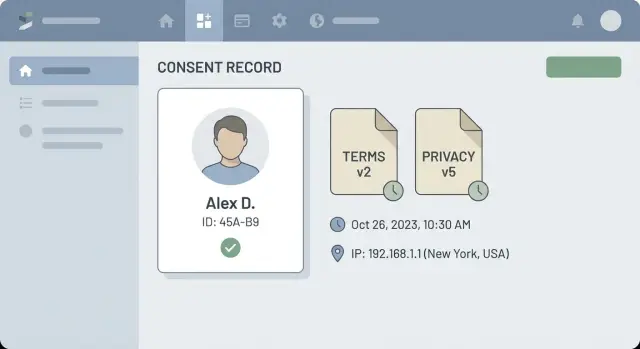
Why versioned consent matters (in plain terms)
If you ever need to prove a user agreed to your Terms of Service or Privacy Policy, “they clicked accept” isn’t enough. The real question is: which exact text did they accept?
Policies change, but many apps store consent as a simple yes/no flag. That works until someone disputes a clause that was added later: “I never agreed to that new data sharing section” or “those fees weren’t in the Terms when I signed up.” If you can’t show the exact version in effect at the time, your audit trail turns into guesswork.
Versioned consent helps you answer three basics with confidence: what the user saw, when they agreed, and where it happened.
Common situations that force you to care about this show up earlier than most teams expect. For example, you ship a feature that changes how data is used, you add a new vendor (analytics, email, payments, support), you copy in a policy template that quietly changes meaning, or you expand into a region that requires different notices.
The good news: “minimal UI and schema changes” is realistic. You don’t need a full consent center on day one. In practice, it’s usually one extra confirmation moment (at signup or next login after an update) plus a small log record that stores the policy version, timestamp, and a basic source (web/mobile) along with limited technical context like IP or user agent.
A simple example: a user accepted Privacy Policy v3 on March 2 from an iPhone app. In July, you publish v4. The next time they open the app, you ask once, record v4, and you can prove both events later.
What to record: what, when, and from where
Good consent logging is mostly about being able to answer one question later: exactly what did this person see, and did they agree to it?
The “what” (what they were asked to accept)
Record:
- Document type (Terms of Service vs Privacy Policy)
- Version identifier
- A stable reference to the exact content shown
A practical approach is to store both a document version ID and a content hash. The version makes reporting readable; the hash helps prove the content didn’t change after the fact.
Also capture the context in which it was shown: which flow triggered it (signup, first login after an update, checkout) and the language/locale if you support multiple languages.
The “when” (when it happened)
Store a server timestamp in UTC for every consent event. If you want to display local time to users, you can also store the client timezone offset, but don’t rely on client time as the source of truth.
If the user can accept later, log each decision as its own event. The latest accepted event for each document type is what you use for “is this user compliant right now?”
The “from where” (where it happened)
Capture enough context to defend the record without collecting more personal data than you need. Usually that means:
- IP address (or a truncated/anonymized form, depending on your privacy posture)
- User agent string (browser/app info)
- App version/build number (especially important for mobile and desktop)
- Session ID or request ID (helps trace bugs)
Avoid device IDs unless you truly need them and can justify storing them.
Tie each event to a clear identity: account ID for logged-in users, and an anonymous session key for pre-signup flows. Finally, record the outcome (accepted, declined, dismissed, accepted_later) so gaps don’t turn into guesswork.
How to version your Terms and Privacy text
A “version” is just a label that lets you point to the exact Terms of Service and Privacy Policy a user agreed to. Keep it boring and consistent. The goal is simple: anyone should be able to match a consent record to the wording that was shown at the time.
Pick a version format you can stick with
Most teams do fine with one approach:
- Incrementing numbers (TOS v3, Privacy v5)
- Date-based versions (2026-01-20)
- Semantic versions (1.2.0) if you already use them elsewhere
Use separate version series for Terms and Privacy. They change on different schedules.
Snapshot vs hash: what should you store?
A hash proves a specific text existed, but it isn’t readable by itself. A snapshot is readable, but it must be protected from edits.
A practical rule:
- Store a snapshot of the text you showed (or frozen rendered HTML) for anything you might need to produce in an audit.
- Also store a hash of that snapshot to detect tampering.
Small edits still matter. If you fix a typo, you might decide not to force re-consent, but bumping the version keeps your history honest. Mark the change as non-material so reporting stays clear. For material changes (data sharing, retention, arbitration, pricing-related clauses), bump the version and require re-consent.
Where should versions live? A database table is an easy fit because it naturally supports history. A config file or CMS export can work too, as long as you can freeze past versions and retrieve them later.
Whatever you choose, don’t overwrite old versions. Keep the effective date, version label, and the exact content that was displayed.
Minimal UI changes that still hold up
You don’t need a full redesign to do this well. A lightweight prompt, shown only when something changed, is usually enough. Reuse what you already have: a modal, a top banner, or the same component you use for “new feature” announcements.
Keep the prompt simple:
- One clear sentence: “Please review updates to our Terms and Privacy Policy.”
- One main action: “Review and agree.”
- One secondary action: “Not now” or “Sign out” (depending on how strict you need to be)
If you need to record declines, make that explicit with “I do not agree.”
People don’t want a long explanation, but they do want a reason. Add a one-sentence summary of what changed (in plain language), then let them open the full text before agreeing.
Decide upfront when you block access versus allow limited access. Material changes (new data sharing, pricing changes, mandatory arbitration) often require a hard stop. Minor clarifications can allow read-only access until they accept.
A simple gating rule set that tends to hold up:
- Material update: block key actions until consent is recorded
- Non-material update: allow browsing, block checkout/posting/account changes
- Security or legal emergency update: require immediate accept or sign out
Accessibility still matters, even for a small banner. Make sure keyboard users can reach it, read it, and respond.
Quick UI checks:
- Move keyboard focus into the modal and return it after closing
- Use clear button labels (“Agree” beats “Continue”)
- Keep text readable (font size, contrast, short lines)
- Support screen readers with proper headings and labels
- Don’t hide the prompt behind other popups
Minimal schema changes: a practical data model
If you want a defensible audit trail without a big rebuild, aim for one append-only log table. You can keep your existing users table as-is and avoid touching most of your product flows.
The core table: consent_events
Create a single table that only ever gets inserts. That keeps the audit trail clear and avoids tricky updates that muddy what happened.
A practical set of columns:
id(uuid or bigint),user_iddoc_type(for example,terms,privacy)doc_version(string or integer)accepted_at(timestamp)ip(store raw IP only if you truly need it)user_agent(short text)
Every time a user accepts, write one row. When a new version is published, they accept again, and you add another row.
Optional: a documents (or policy_versions) table
If you can afford one more table, store version metadata so you can prove what the user saw:
doc_type,version,published_at,content_hash
You can also store the full text, but a hash plus properly frozen content is often enough.
For performance and reporting, add a few indexes:
(user_id, doc_type, accepted_at desc)to find the latest acceptance(doc_type, doc_version)to count who accepted a given version(accepted_at)for time-based audits
Consider a unique constraint on (user_id, doc_type, doc_version) if you never want duplicates.
Decide retention early. Many teams keep timestamps and versions indefinitely, then rotate or remove IP/user-agent after a defined period if they don’t need them.
Step by step: implementing version checks and logging
Start by making your app able to answer one question at any time: what is the current required version for each document (Terms of Service, Privacy Policy)? Keep it in config or a small table so you can change it without a deploy.
Then put the check in two places:
- On login
- Right before sensitive actions (checkout, exporting data, changing email/password)
That keeps prompts rare, but still defensible.
A simple flow:
- Load current required versions.
- Fetch the user’s latest accepted versions.
- If anything is behind, show the prompt. Optionally log an “impression” event so you can measure how often users are asked.
- When the user accepts, call one server endpoint that validates and records the consent.
- Continue the login/action only after the server confirms the write.
On the server endpoint, don’t trust the client. Use the authenticated user ID, set the timestamp on the server, and reject unknown versions. Store basic request context (IP, user agent, app/web, correlation ID) so you have a usable trail later.
For existing users with unknown consent, pick a backfill strategy that matches your risk level. A common approach is to mark consent as unknown and prompt on their next login or next sensitive action. If you want less friction, allow a short grace period, but still log impressions and acceptance.
Edge cases you will hit early
Consent logging gets tricky as soon as real people use your app in messy ways. If you design only for the happy path, your records will look inconsistent even when users did nothing wrong.
Multiple devices and repeated prompts
A user accepts on their laptop, then opens the mobile app and gets prompted again. That feels broken.
The usual fix is to make consent checks server-side against the latest required versions and keep the client logic thin. You can cache locally to reduce prompts, but treat the server as the source of truth.
Anonymous users, merges, and changing identity
You may collect consent before sign-up (newsletter, checkout, waitlist). Log it against a session or temporary identifier, then attach it to the new user after registration. Don’t overwrite the original event. Keep the original anonymous event and the later attachment.
Account merges and email changes happen too. Store consent events by stable user ID, not email. If you merge accounts, preserve both histories and record a merge event so you can explain why one user has multiple consent records.
Revocation, deletion, and offline clients
Consent to Terms is usually not “revoked” in the same way marketing consent is, but users can request deletion. Logs should be immutable, yet you may need to delete or encrypt personal fields while keeping minimal proof (version, timestamp, document type).
Mobile and offline clients often queue events. Expect duplicates when the network returns. To prevent double logging, use an idempotency key (for example: userId + documentType + version + deviceId) and ignore repeats.
Data integrity and security basics for consent logs
Consent logs aren’t normal “app data.” Treat them like audit data: you want them to be trustworthy later, even when your app changes. That usually means append-only records, with very few code paths allowed to write them.
A simple rule: the client can request consent, but the server decides what gets recorded. Always validate the document version on the server and refuse to log anything that references a version you don’t recognize. This blocks easy tampering like sending a fake “accepted v999.”
Keep the log hard to fake
Keep the consent write path boring and locked down:
- Only create new rows; don’t update or delete existing ones
- Require an authenticated user (or a verified session for pre-signup flows)
- Record the server timestamp, not the device timestamp
- Store a stable document identifier + version (and ideally a hash of the published text)
- Restrict who can call the endpoint (rate limits, CSRF protection where relevant)
Protect metadata (IP, user agent) without over-collecting
IP and user agent help with investigations, but they also raise privacy and security concerns. Consider storing a shortened IP (or a keyed hash) and a trimmed user agent string. If your risk profile is higher, encrypt these fields at rest.
Be careful not to log secrets by accident. Many teams dump full requests for debugging and end up storing headers, cookies, auth tokens, or session IDs inside “consent metadata.” Keep the payload explicit and whitelisted.
Add basic monitoring too. Watch for spikes in declines, a drop in logged acceptances, or increases in logging errors.
Common mistakes and traps
The most common mistake is treating consent like a simple on/off switch. A field like termsAccepted=true tells you nothing about which Terms the user agreed to, and it becomes useless the moment you publish an update.
Another trap is overwriting a single “current consent” row. That destroys your history. If a user asks “what did I accept last year?” you need a timeline of events, not just the latest state. Keep each acceptance as its own record, even if you also cache a “latest version accepted” value for quick checks.
Time is easy to get wrong. If you rely on the user’s device clock, you’ll get messy data (wrong timezone, incorrect system time, or deliberate tampering). Use server time for the official timestamp, and store client time only as optional context.
Many teams also forget to store the exact thing the user agreed to. If you only store a URL or a label like “Privacy v3,” you might not be able to prove what was shown if that page changes later. Store a verifiable reference (like a content hash) and/or the rendered text snapshot that was presented.
Prompt fatigue is the silent killer. Bad version checks can trigger the modal too often, training users to click “Accept” without reading. Common causes include comparing the wrong fields (Terms vs Privacy), checking on every page load instead of on session start or key actions, failing to persist the latest accepted version after acceptance, or treating a network error as “show consent again.”
Quick checklist before you ship
Before release, do a fast “prove it” test. Pretend you’re support, legal, and an engineer all at once: can you quickly answer what the user saw, what they accepted, and when it happened, without digging through raw logs?
Run this in staging (and once in production with a test account):
- Pick a terms version and privacy version and confirm you can display the exact text for that version later (not today’s latest copy).
- For a specific user, confirm you can show a record proving they accepted version X at time T (timezone-safe).
- Verify you capture “where it happened” in a privacy-aware way: IP (or hashed IP), user agent, app build/version, and which screen/flow triggered consent.
- Test retries and double clicks: the same acceptance sent twice shouldn’t create duplicate records, and it should be safe if the client retries after a timeout.
- Time your support workflow: can someone answer “Did user Y accept the new Privacy Policy?” in under 2 minutes using your admin tools or database notes?
Then do one failure drill. Change the required version, open an older app build, and confirm the user is prompted again and the system logs the new acceptance cleanly. Also check that a user who declines is handled consistently (blocked from continuing, or limited access), and that you record the decline event if you need it.
A simple end-to-end scenario
You update your Privacy Policy because you add a new analytics vendor. Nothing else changes, but you want a clean audit trail in case a customer asks later.
A returning user logs in from a new laptop. Your app checks: “Is there a consent record for the latest privacy version?” There isn’t. The user agreed to version 4 last month, and you’re now on version 5. So you show a one-time prompt with two buttons: Agree or Sign out.
When the user clicks Agree, you write one row to consent_events. Even with minimal schema, that record answers the key questions:
doc_type: privacydoc_version: 5user_idconsented_at(server timestamp)ip_addressuser_agent
Six months later, the user claims they never accepted the updated policy. You can export a clear record showing the document type and version, when it was accepted (based on server time), and basic “from where” info (IP and user agent). That’s usually enough to stand up to internal audits because it’s specific, timestamped, and easy to explain.
Next steps if you want this done quickly and safely
Start with the smallest change that creates a real audit trail: give your Terms and Privacy text a version number, store that version on every consent event, and show one clear prompt when the version changes. You can expand later, but this gets you to a defensible baseline fast.
A practical first pass:
- Assign a new version ID whenever you change Terms or Privacy (even for small edits).
- Add one consent log table that records user ID, document type, version, timestamp, and source (app/web, plus limited context like IP/user agent if you collect it).
- Add one re-consent check at sign-in or the first sensitive request after release.
- Keep the prompt simple: “We updated our Terms/Privacy. Please review and agree to continue.”
If your app started as an AI-generated prototype and the auth or state logic is brittle, this is one of those features that can look fine in demos but fail quietly in production (prompts looping, events not recorded, or the server trusting the client too much). If you need help turning that kind of prototype into something production-ready, FixMyMess (fixmymess.ai) can diagnose and repair the flow, including logging, version checks, and security hardening. They also offer a free code audit to map issues before you commit to changes.