Correlation IDs to Trace Clicks Across APIs and Jobs
Correlation IDs connect a user click to API logs and background jobs so you can pinpoint failures fast, share clear bug reports, and fix issues with less guessing.
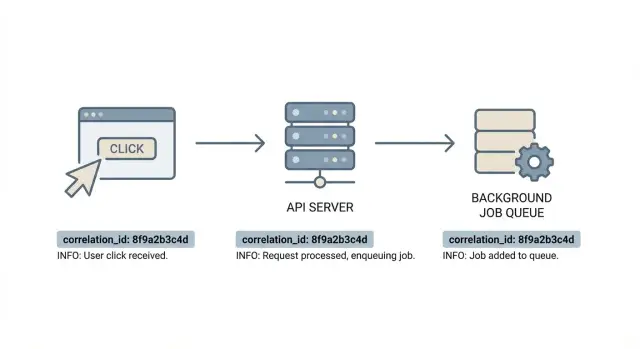
Why debugging feels random without a shared ID
A bug report often starts simple: “I clicked Save and it failed.” Then you open logs and everything turns into guesswork. The browser console has one set of messages, the API logs are somewhere else, and background job logs live in another system. Even if each place logs a lot, none of it lines up.
That’s when debugging feels random. You search by time range, user ID, or vague text like “payment failed,” hoping you land on the right lines. If multiple users are active, or retries are happening, it’s easy to follow the wrong thread.
This is also why “it worked on my machine” shows up so often. On your laptop, you retry the same click and it succeeds. In production, that same click might hit a different server, miss a cache, call a slow third party, or enqueue a job that fails later. Without one way to connect those events, the story gets split into fragments.
One user action can fan out quickly: a frontend click triggers one or more API calls; the API touches the database and maybe other services; it might enqueue jobs for email, billing, image processing, or indexing; and those jobs can run later on different machines, sometimes with retries. Webhooks and callbacks can add even more steps.
The goal is simple: one trail you can follow from start to finish. With correlation IDs, you can take a support ticket, grab one identifier, and pull the related frontend event, the exact API request, and every log line from the jobs that ran afterward. Debugging stops being a scavenger hunt and becomes a timeline you can trust.
What a correlation ID is (and what it is not)
A correlation ID is a single label that follows one piece of work as it moves through your system. Think of it as “one user action” worth of context: one click, one API request, the background jobs it triggers, and any downstream calls.
Every log line that belongs to that chain includes the same ID. That lets you search once and see the whole story.
A correlation ID is not a user identifier. It shouldn’t describe who the user is, what they clicked, or what data was involved. It’s an opaque tag that helps you connect events across systems without guessing.
People often mix it up with other IDs:
- Session ID ties many actions over time to one browser session. Useful for auth and analytics, but too broad for tracing one broken action.
- Database record ID identifies one row (like an order ID). Useful for business logic, but it doesn’t automatically connect frontend, API, and queue processing.
- Correlation ID (request ID) ties together all steps of one flow, even when multiple services and jobs are involved.
When should you create it? Ideally at the edge: in the browser when the action starts (then send it as a header), or at the first API entry point (gateway/load balancer/app server) if you can’t trust the client. Many teams accept a client-provided ID, validate the format, and generate a new one if it’s missing or invalid.
What should it look like? Make it unique, opaque, and safe to log. A UUID or ULID-style value works well. Don’t embed emails, user IDs, or anything sensitive.
Where the ID should travel in a typical app
A correlation ID only helps if it survives the whole trip. Think of it as a label that follows a user action from the browser, through your API, and into background work, so every log line can be tied back to the same moment.
In most apps, that means carrying the same ID through:
- the frontend event (click or form submit)
- the API request
- downstream calls (internal services and third parties)
- background jobs (publish and worker processing)
- final side effects (writes, emails, file processing)
Use the same few “containers” everywhere. On the web, the most common carrier is an HTTP header (many teams use a name like X-Request-Id or X-Correlation-Id). On the server, store it in per-request context so every log line can include it automatically. For jobs, include it in job metadata or payload so the worker can restore it before logging.
Traceability usually breaks at boundaries:
- redirects and cross-domain navigation that drop custom headers
- retries and timeouts that create a new request ID without copying the old one
- queue publishers that forget to include the ID in the job payload
- worker code that logs before it loads the ID into log context
- fan-out work (one click triggers many jobs) without a clear parent-child relationship
A simple rule that avoids a lot of confusion: the first backend that receives the request is the source of truth. The frontend can forward an existing ID when it already has one, but the backend decides what’s accepted and what gets generated.
Step by step: add correlation IDs end to end
Pick one header name and use it everywhere. Consistency matters more than the exact spelling, because every hop (browser, API, queue, worker) must recognize the same field.
Start in the frontend. When the user clicks a button, either reuse an existing ID for the current action or create a new one. Keep it in memory (or a short-lived request context object) and attach it to every API call triggered by that click.
On the API side, read the header in middleware. If it’s missing, generate one. Save it in request context so logs, errors, and downstream calls can include it. Also echo it back in the response header, so the browser (and support) can reference the exact ID that was used.
A practical flow looks like this:
- Frontend sets
X-Correlation-Idonce per user action and reuses it for related requests. - API accepts the header (or creates one), stores it in request context, and includes it in responses.
- Enqueue copies the same ID into job metadata or payload.
- Worker restores the ID into the worker’s context before logging.
- Errors include the ID in responses shown to users or support.
Retries are where teams often lose the trail. If a request is retried because of a timeout, keep the same ID so you can tell it’s still the same user action. If the user clicks again later, generate a new ID.
If you’re working in a messy codebase, implement this in one place per layer first: one frontend helper, one API middleware, and one job wrapper. That’s usually enough to make debugging feel predictable.
Logging that makes the ID useful
A correlation ID only helps if it shows up in the logs you actually read. The easiest way to make it searchable is to log in a consistent, structured format. JSON logs are easy to filter by correlation_id and compare across frontend, API, and background jobs.
At minimum, each request-related log line should include a few fields you can trust:
correlation_idroute(oraction)status(HTTP status or job result)message(short, human-readable)duration_ms(when it applies)
Don’t log everything. A clean baseline is one line at request start, one at request end, and extra lines only for important branches like validation failures, retries, external API calls, and exceptions.
Here’s what “visible in success and failure” looks like:
{"level":"info","message":"request_start","correlation_id":"c-9f3a","route":"POST /checkout","user_id":"u_42"}
{"level":"info","message":"request_end","correlation_id":"c-9f3a","route":"POST /checkout","status":200,"duration_ms":184}
{"level":"error","message":"payment_failed","correlation_id":"c-9f3a","route":"POST /checkout","status":402,"error":"card_declined"}
Be careful with what you log. Don’t dump full request bodies, auth headers, tokens, cookies, or secrets. Instead, log small summaries like items_count, plan=pro, provider=stripe, or email_domain=gmail.com. This matters even more in fast-built prototypes, where logs sometimes accidentally print environment variables or database URLs.
Background jobs: keeping the trail through queues
Request logs and job logs answer different questions. Request logs cover what happened while the user waited: the click, the API call, the response. Job logs cover what happened after: emails sent, files processed, retries, and failures that show up minutes later. Without one shared identifier, those two worlds never meet.
When you publish a message to a queue, attach the same ID you used for the API request. Some teams put it in message metadata (headers/attributes) and also in the payload as a fallback. The key is consistency: pick one field name and use it everywhere so log search is predictable.
A pattern that stays readable:
- Use one root correlation ID per user action.
- When the API enqueues a job, include that root ID and optionally a separate job ID.
- If one click creates multiple jobs, keep the same root ID for all of them.
- For scheduled jobs with no user click, generate a new root ID at the scheduler.
On the worker side, treat the ID as the first thing you read. Before you log anything, pull the ID from the message, set it into log context, then start processing. Otherwise the most painful failure happens: the job does useful work, throws an error, and only then logs something without the ID.
Fan-out deserves one extra rule: keep the shared root ID, but add a child identifier per job so you can see which branch failed.
Making the ID visible for support and bug reports
If only engineers can see the ID, it won’t help when a customer reports “the button did nothing.” Make the correlation ID easy to find when something goes wrong, so support can ask for it and engineering can jump straight to the right logs.
A simple approach is to show a short label on error states, not on every screen. Put it where users already look for details: an error toast, a failed form submission message, or a “Something went wrong” page.
How to show it without confusing users
Use a calm line like: “Reference: ABCD-1234.” Avoid words like “trace” or “distributed.” If the ID is long, show a shortened version (for example, the first 8-12 characters) and keep the full value available via a “Copy” button.
Support also needs a consistent script. Keep it simple: ask for the “Reference” code, and if they don’t see it, ask them to reproduce and screenshot the error. If possible, collect the approximate time and what they clicked, then paste the code into the ticket so engineering can search immediately.
Privacy note
Treat correlation IDs as a diagnostic label, not personal data. Don’t encode emails, user IDs, or device fingerprints inside the value. Keep it boring and random so it’s safe to share in a screenshot or ticket.
Common mistakes that break traceability
Most tracing failures aren’t fancy bugs. They’re small choices that cut the chain between a user click, an API request, and a background job.
- Generating a new ID at every hop. New IDs are fine for sub-operations, but keep the original as the parent.
- Overwriting an existing ID from upstream. Gateways, CDNs, or partner services may already send a request ID. If you replace it, you lose the ability to match their logs with yours.
- Dropping the ID when you enqueue work. If the API log shows the ID but the job log has nothing, you’ll be stuck guessing.
- Logging it in only one tier. Frontend-only IDs don’t help when the server fails before responding. Server-only IDs don’t help support connect what the user saw.
- Treating the ID like security. A correlation ID is not a session token. Don’t use it for auth, and don’t put secrets in it.
A quick example: a user clicks “Export.” The browser creates an ID, but the API generates a fresh one and logs only that. The export job later logs its own random ID. Now you have three unrelated IDs for one click.
A simple rule fixes most of this: accept an incoming ID, validate its format, then pass it through unchanged. If you need extra detail, add a second field like parent_id or job_id.
Quick checklist to confirm it works
You know correlation IDs are doing their job when one ID can answer: “what happened after that click?”
Test one action (staging is fine): click “Save,” grab the correlation ID from the UI or response header, then search for it in server logs. You should see a clear request start and end, plus any downstream calls.
Checklist:
- One ID finds the API request start, key steps, and request end.
- The same ID appears in every background job created by that request (enqueue, job start, job end).
- Errors include the ID and a plain message about what failed (not only a stack trace).
- Retries keep the same correlation ID for the same user action and add an attempt number.
- Support can ask for the ID and find the full trail without guessing.
Reality checks: if searching by correlation ID returns only one line, you’re not attaching it to all log lines. If one click produces multiple unrelated IDs, you’re generating new IDs in the API or job runner instead of passing the original through.
Example: tracing one failed click through an API and a job
A customer clicks “Pay” on your checkout page. The button spins for a second, then the UI shows a generic error: “Something went wrong.” Without a shared ID, you guess. With correlation IDs, you follow one thread from the browser to the backend to the job queue.
In the browser, the app creates an ID as soon as the click happens and sends it with the API call in a header (for example, X-Correlation-Id). The user only sees it if you choose to display a reference code on errors.
What you look for, in order:
- Browser console:
pay_click correlationId=7f3a... - API access log:
POST /api/pay correlationId=7f3a... status=500 - API error log:
correlationId=7f3a... error="Stripe token missing" userId=... - Queue record:
job=enrich_receipt correlationId=7f3a... queued - Job worker log:
correlationId=7f3a... failed error="DB timeout" retry=1
Now the search is fast. Instead of scanning every payment error for the last hour, you filter logs by correlationId=7f3a... and get a tight timeline: click at 10:14:03, API error at 10:14:04, background job retry at 10:14:20.
Often you uncover two problems at once: the product bug (“Stripe token missing”) and the missing observability that made it feel random (the job worker didn’t log the same ID, or the queue message dropped it).
Next steps if your app is hard to debug today
If your app feels impossible to follow, don’t try to fix everything at once. Roll this out in one small slice, prove it works, then expand.
Start with one user action that often breaks (for example, “Save settings”) and trace it through one API endpoint and one job type. Pick something you can trigger repeatedly. When you can take a single ID from the browser and find every related log line, you’ve built the pattern you’ll reuse everywhere.
Write a short convention note to prevent drift:
- which header name you accept and forward
- which log field name you write
- where the ID is generated and when it’s reused
- how it’s passed into background jobs
- where support can see it in the UI
If you inherited an AI-generated prototype that’s breaking in production, it often helps to start with a focused audit of where IDs and logging context get lost across API, queues, and workers. Teams use FixMyMess (fixmymess.ai) for that kind of codebase diagnosis and repair, especially when they need the existing app to become production-ready quickly.
Once the first endpoint and job are traceable, expand one slice at a time. Debugging gets better every week, without waiting for a big rewrite.
FAQ
What is a correlation ID in plain English?
A correlation ID is a single opaque value that tags one flow end-to-end, like one click and everything it triggers. It lets you search logs once and see the related frontend event, API request, downstream calls, and background jobs.
Where should the correlation ID be generated?
Create it at the earliest trustworthy edge, usually the first backend entry point (gateway or API middleware). If the client sends one, accept it only if it matches your expected format; otherwise generate a new one and use that as the source of truth.
Should a correlation ID contain user or business data?
Treat it as a diagnostic label, not a user identifier. It should not include emails, user IDs, order IDs, or anything sensitive, because it will end up in logs, screenshots, and support tickets.
How do I pass the correlation ID from the browser to the API?
Pick one header name and send it on every API request related to the same user action. Also echo it back in the response header so the browser and support can reference the exact ID that the server used.
Should retries reuse the same correlation ID or generate a new one?
Yes, as long as the retries are for the same user action. Keeping the same ID makes it obvious that multiple attempts belong to one click, and you can add an attempt counter in logs if you need more detail.
How do I keep the correlation ID when work moves to a queue/background job?
Copy the same correlation ID into the job message metadata or payload when you enqueue work, and make the worker load it into logging context before it logs anything. If the worker logs without restoring the ID first, your trail will break right where you need it most.
What if one click triggers multiple background jobs?
Use one root correlation ID for the whole click, and add a separate job identifier for each branch if you need to distinguish them. That way you can search by the root ID to see the full story, and still pinpoint which job failed.
What should I log alongside the correlation ID to make it actually useful?
Log it as a consistent field on every request- and job-related line, ideally in structured logs so it’s easy to filter. A simple baseline is one line at start, one at end, and extra lines only for important branches like external calls, retries, and exceptions.
How can I expose the correlation ID to users and support without confusing them?
Show it only on error states as a simple “Reference” code so non-technical users can share it without confusion. If the full ID is long, display a short version and keep a copyable full value available for support.
What’s the quickest way to implement this in a messy or AI-generated codebase?
It’s often fastest to add one frontend helper, one API middleware, and one job wrapper to standardize IDs and logging, then expand endpoint by endpoint. If you inherited an AI-generated app where IDs, auth, or logging are tangled, FixMyMess can run a free code audit and typically fix production-breaking issues within 48–72 hours, including getting end-to-end traceability working.