CORS errors after deployment: real causes and fixes
CORS errors after deployment usually come from preflight failures, bad credentials settings, or wildcard origins. Learn a repeatable fix checklist.
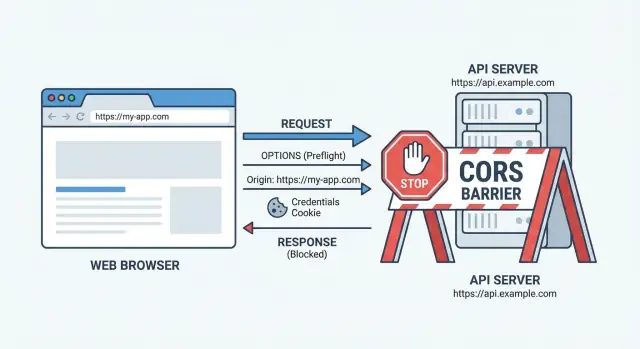
Why CORS can suddenly break after you deploy
CORS is a browser rule, not a server rule. Your frontend JavaScript runs in a browser tab, and the browser decides whether it is allowed to read a response from a different origin (domain, protocol, or port). If your backend does not return the right CORS headers, the browser blocks the response even if the server actually sent data.
That is why CORS errors after deployment feel confusing: nothing “changed” in your code, but the origin did. Locally you might call http://localhost:5173 to http://localhost:3000. After deploy it becomes something like https://app.yourdomain.com calling https://api.yourdomain.com. Different domains, HTTPS, and sometimes different ports means a different origin, so the browser re-checks permissions.
Common symptoms usually look like one of these:
- “Blocked by CORS policy” even though the API works in Postman or curl
- A preflight (OPTIONS) request fails before your real request runs
- CORS headers are missing on errors (401/403/500), so it only fails when something goes wrong
- Requests with cookies suddenly stop working
Deployment also adds invisible moving parts. A reverse proxy, CDN, or platform setting can override headers, strip them, or cache the wrong version. Switching to HTTPS can change cookie behavior (SameSite and Secure), which then affects “credentials” requests.
A realistic example: your frontend starts sending fetch(..., { credentials: 'include' }) in production to keep users signed in. If the backend replies with Access-Control-Allow-Origin: *, the browser rejects it because wildcard origins cannot be used with credentials.
If you inherited an AI-generated frontend-backend setup, these mismatches are common. At FixMyMess, the fastest win is usually to verify the deployed origin, then ensure every response path (including errors) returns consistent CORS headers.
Preflight 101: the OPTIONS request you did not notice
A lot of CORS errors after deployment are not about your real API call at all. The browser often sends a quiet “preflight” request first. This is an OPTIONS request that asks the server, “If I send this real request from that origin, will you allow it?”
Simple vs preflighted requests
Some requests are “simple” and skip preflight. Many modern frontend calls are not simple, so the browser preflights them.
Preflight is triggered by things like:
- Methods other than GET/POST/HEAD (for example PUT, PATCH, DELETE)
- Sending JSON with
Content-Type: application/json - Any custom header (like
Authorization,X-Requested-With, orX-Api-Key) - Using
fetchoptions that add headers you did not expect
That means you can hit your endpoint directly and see “200 OK”, yet the browser still blocks the call. Why? Because the browser never got past the OPTIONS step. If OPTIONS returns 404, 401, 500, or missing CORS headers, the real request is never sent.
Why redirects often break preflight
A common production-only failure is an unexpected redirect on OPTIONS. For example, your API might redirect HTTP to HTTPS, add or remove “www”, or send unauthenticated requests to a login route. Browsers handle redirects on preflight poorly, and many will treat it as a failure even if the redirected URL would work.
A practical example: your frontend on https://app.example.com calls https://api.example.com. The API is fine, but OPTIONS to /v1/data gets a 301 to /v1/data/ (trailing slash). Your GET might still succeed in tests, but the browser blocks it because preflight did not get a clean CORS-approved response.
The fix is usually: ensure OPTIONS returns a direct success (often 204 or 200), includes the same CORS headers as real responses, and never redirects.
Origins: what must match, and what people misread
Many CORS errors after deployment happen because the allowed origin you configured is not the same string the browser is sending.
The key thing people mix up is Origin vs Host. Your server receives a Host header (where the request is going) and the browser sends an Origin header (where the page making the request is hosted). CORS decisions are based on Origin, not Host.
An origin is not just a domain. It is an exact trio: scheme + domain + port.
Exact origin matching (scheme, domain, port)
If your frontend runs at https://app.example.com and your API is https://api.example.com, the browser will send Origin: https://app.example.com. Your backend must reply with Access-Control-Allow-Origin: https://app.example.com (or a server-side allowlist that resolves to that exact value).
http vs https is the classic deployment trap. Locally, you might test from http://localhost:3000. After deployment, the site becomes https://... and your allowlist still only includes the http version, so the browser blocks it.
Common mismatches to hunt down
Check for these small differences that break CORS:
https://example.comvshttps://www.example.com- A missing port:
https://example.comvshttps://example.com:8443 - Staging domains:
https://staging.example.comvshttps://app.example.com - Unexpected local origins:
http://127.0.0.1:3000vshttp://localhost:3000 - Mobile or preview builds that use a different domain than production
A quick real-world scenario: your frontend is served from https://www.brand.com, but you only allowed https://brand.com. Everything “looks” the same to a human, but to the browser it is a different origin.
If you inherited an AI-generated backend, it often has a hardcoded origin list that never got updated for the live domain. FixMyMess typically starts by reading the actual Origin values in production logs and then aligning the allowlist to those exact strings.
CORS response headers that must be correct every time
CORS is not a one-time setting. The browser checks specific response headers on every cross-origin request, and it is strict about them. If a header is missing on just one route (often the OPTIONS route), you can get CORS errors that look random.
The browser mainly wants to know: is my Origin allowed, and for this request type, are the method and headers allowed? That means your API must return Access-Control-Allow-Origin that matches the requesting origin (for example https://app.example.com). If you return the wrong origin, or forget it on some endpoints, the browser blocks the response even if the server sent back a 200.
Preflight failures usually come from Access-Control-Allow-Headers. The preflight request includes Access-Control-Request-Headers with what the browser plans to send. If your response does not include every one of those headers (common misses: Authorization, Content-Type, X-Requested-With), the browser stops before the real request.
Caching can also make CORS feel inconsistent. If you allow multiple origins, add Vary: Origin so CDNs and proxies do not cache one origin's CORS response and serve it to a different origin later.
For OPTIONS preflight, returning 204 No Content is fine, but the headers still must be there. A clean preflight response usually includes:
Access-Control-Allow-OriginAccess-Control-Allow-Methods(include the method you will use, likeGET, POST, PATCH)Access-Control-Allow-Headers(cover what the browser requested)Vary: Origin- Optional:
Access-Control-Max-Ageto reduce repeated preflights
One practical tip: make sure your CORS middleware runs before routing, auth checks, and error handlers. Otherwise, 401/403/500 responses may skip CORS headers and trigger confusing “CORS blocked” messages that are really auth or server errors.
Credentials and wildcards: the most common production trap
A lot of CORS errors after deployment come from one rule people only learn in production: you cannot combine credentials with a wildcard origin.
If the browser sends cookies (or you tell it to send credentials), the server must reply with a specific origin, not *. So this will fail:
Access-Control-Allow-Origin: *Access-Control-Allow-Credentials: true
Cookies vs Authorization: why they behave differently
Cookies are automatically attached by the browser, which is why they are tightly controlled. If your frontend and API are on different domains, cookies will not be sent unless you opt in on the frontend and allow it on the backend.
An Authorization: Bearer ... header is different. It does not rely on cookies, but it often triggers a preflight because it is not a simple request. That can still break, but the “wildcard + credentials” trap is usually about cookies.
On the frontend, this one line changes the whole requirement:
fetch("https://api.example.com/me", {
  credentials: "include"
})
Once you add credentials: "include" (or withCredentials: true in Axios), the browser will reject responses unless the backend is very explicit.
What the backend must send (every time)
Make sure your API responses include:
Access-Control-Allow-Origin: https://your-frontend.com(exact match)Access-Control-Allow-Credentials: trueVary: Origin(so caches do not mix origins)
Example scenario: locally you call http://localhost:3000 to http://localhost:8000 and it works. In production you switch to https://app.yourdomain.com and start using cookies for login. If your server still replies with Access-Control-Allow-Origin: *, the browser blocks the response even if the API returns 200.
If you inherited AI-generated backend code, this misconfig is common. FixMyMess often finds the right headers in one route, but missing on auth refresh or error responses, which makes the bug feel random.
Proxies, CDNs, and platform config that override your app
CORS errors after deployment often show up because your frontend is no longer talking to your app server directly. A reverse proxy, load balancer, CDN, or platform “security” layer can change requests and responses in ways your local setup never did.
When the edge changes your headers
Many proxies can add, strip, or duplicate headers. If your app returns the right Access-Control-Allow-Origin, but the proxy overwrites it (or adds a second one), browsers can reject the response. Another quiet issue: the proxy compresses or redirects responses differently, and the redirect response is missing CORS headers even though the final endpoint is correct.
A common production-only failure is that OPTIONS requests never reach your app. Some platforms treat OPTIONS as suspicious, block it with a firewall rule, or route it to a default handler that returns 404/405 without any CORS headers. From the browser side, it looks like “CORS is broken,” but the real problem is routing.
CDN caching can serve the wrong CORS headers
If a CDN caches API responses without varying by Origin, it can accidentally serve a response with CORS headers meant for a different site. Example: user A hits your API from https://app.example.com and the CDN caches the response with that origin allowed. User B hits the same URL from https://admin.example.com and receives the cached headers, which do not match, so the browser blocks it.
Here’s what to verify, in order:
- Check the response headers at the edge (CDN/proxy) and at the app server, and confirm they match.
- Confirm
OPTIONSrequests are allowed and routed to your app, not blocked or handled by a default rule. - Ensure redirects (http to https, apex to www) return CORS headers too.
- If caching is involved, make sure responses vary by
Originor disable caching for API routes. - Compare staging vs production proxy rules line by line.
If you inherited an AI-generated backend, this proxy layer mismatch is a frequent culprit FixMyMess finds during a code audit, because the app “looks right” but the edge config is silently disagreeing.
Environment variables and domain allowlists: quiet breakpoints
CORS errors after deployment often trace back to one boring change: your frontend is now calling a different URL than you think. Locally, a dev server might proxy requests and hide the problem. In production, the browser talks directly to the API, so any mismatch shows up immediately.
A common failure is shipping the frontend with the wrong API base URL. For example, your build picks up API_URL=https://staging-api... (or an old preview URL) because the production environment variable was never set, or the hosting platform cached a previous build. The browser then sends requests from your live domain to a staging API that does not allow that origin.
Another quiet breakpoint is the backend allowlist. Teams add http://localhost:3000 during development and forget to add the real domain later. It gets worse when you have multiple domains: www vs non-www, a marketing domain, an app subdomain, and a preview domain. If even one origin is missing, that environment will “randomly” fail.
To avoid drift, centralize your allowed origins and treat them like a real config surface, not scattered strings.
A practical way to prevent config drift
Keep the rules in one place and keep them strict:
- Use one environment variable for allowed origins (comma-separated), parsed on startup.
- Normalize domains (include the exact scheme and host you serve:
https://app.example.com). - Maintain separate values for dev, staging, and production, and document which frontend URL maps to which API.
- Log the resolved allowlist at boot (and the request Origin on CORS failures).
- Add a quick smoke test after every deploy: one API call from the real domain.
If you inherited an AI-generated app, this is a frequent FixMyMess diagnosis: the frontend points to one environment while the backend CORS config points to another, and nobody notices until the first real deploy.
A repeatable CORS fix strategy (step by step)
When CORS errors after deployment show up, treat it like a debugging task, not a guessing game. The goal is to find the exact request the browser is blocking and the exact header that is missing or mismatched.
Start in your browser DevTools Network tab. Filter by the failing API call, then look for an OPTIONS request right before it. If you see OPTIONS, you are dealing with a preflight. If you do not, the error is usually on the real request (often a missing header on a 401/500 response).
Use this sequence and do not skip steps:
- Reproduce and capture the failing request: copy the request details from the Network tab, including method, URL, status code, and whether an OPTIONS preflight happened.
- Confirm the exact Origin: read the
Originrequest header and write it down exactly (scheme + domain + port). Many “it matches” problems are reallyhttpvshttpsorwwwvs non-www. - Check headers on both responses: open the OPTIONS response and the real request response. Both must include the right CORS headers (especially
Access-Control-Allow-Origin, and for cookies:Access-Control-Allow-Credentials). - Eliminate redirects and middleware surprises: if the API redirects (301/302) or forces a slash, preflight often fails because the redirected response does not include CORS headers. Make OPTIONS return 200/204 directly with the headers.
- Switch from “*” to an explicit allowlist: set a short list of allowed origins for production, retest, then add only what you truly need.
A quick sanity check: if you use cookies or auth headers, you cannot use Access-Control-Allow-Origin: *. You must echo a specific allowed origin and enable credentials.
If your backend was generated by an AI tool and the CORS logic is scattered across routes, proxies, and platform settings, FixMyMess can pinpoint the single source of truth and patch it safely after a free code audit.
Common mistakes that keep CORS broken
A lot of CORS errors after deployment are self-inflicted. Things look fine locally because you are on one origin, using simple requests, and your dev server is forgiving. Production is stricter: different domains, HTTPS, cookies, and sometimes a proxy or CDN in front.
Here are the mistakes that show up most often when a frontend talks to a separate backend:
- Allowing any origin during development, then turning on cookies or auth in production without changing CORS (you cannot use
*with credentials). - Adding CORS headers only on the happy path, but not on 401/403/500 responses, so the browser hides the real error behind a CORS message.
- Forgetting that the browser sends an
OPTIONSpreflight for many requests, and your server, router, or middleware does not answer it with the same CORS headers. - Trusting framework defaults (or a copy-pasted CORS snippet) without checking the actual response headers in production.
- Trying to fix it in the frontend by changing fetch/axios settings, even though CORS is enforced by the browser and must be fixed on the server.
One easy-to-miss trap: you add Access-Control-Allow-Origin for your GET /api/me, but your auth layer blocks the request early. The 401 response does not include CORS headers, so the browser reports a CORS failure instead of “unauthorized”. It feels like CORS is broken, but the real issue is “CORS headers are missing on errors”.
Another common trap is mixing credentials and wildcards. If your frontend uses cookies (or Authorization headers) and you set withCredentials: true, your backend must return a specific origin (like https://app.example.com) and also allow credentials. Returning * will fail.
If you inherited AI-generated code, these issues are often scattered across middleware, serverless functions, and reverse proxies. FixMyMess regularly sees projects where CORS is “set” in one place, but overwritten somewhere else. The fastest way forward is to verify real production responses for both OPTIONS and the final request, including error cases.
Example: frontend works locally, breaks on the live domain
A common story: you built a React app on http://localhost:3000 and an API on http://localhost:8080. You log in, the API sets a cookie, and every request works.
Then you deploy. The React app moves to https://app.yourdomain.com, the API is https://api.yourdomain.com, and suddenly you see CORS errors after deployment. The confusing part is that the code did not change.
What actually changed is the browser’s rules. Cross-site cookies and preflight checks are stricter on real HTTPS origins. Locally, you might not trigger preflight, or your dev server might be quietly proxying requests so the browser never sees a cross-origin call.
Here’s what typically fixes this exact setup:
- Set
Access-Control-Allow-Originto the exact frontend origin (https://app.yourdomain.com), not*. - Set
Access-Control-Allow-Credentials: trueon both the preflight (OPTIONS) and the real response. - Make sure your server responds to
OPTIONSfor the same route with a 200/204 and the same CORS headers. - On the frontend, send cookies intentionally (for fetch:
credentials: "include"; for Axios:withCredentials: true). - Ensure cookies are compatible with cross-site requests (often
SameSite=None; Secure).
How to confirm the fix in production: open DevTools Network, find the failing request, and check two entries. First, the OPTIONS preflight should return success and include the allow-origin and allow-credentials headers. Second, the real API call should return the same headers and actually set or send the cookie.
If an AI-generated backend is inconsistent (OPTIONS handled by one layer, real request by another), platforms like FixMyMess often find the mismatch quickly during a code audit and patch it safely.
Quick checklist and next steps
When you see CORS errors after deployment, treat it like a header-matching problem, not a mystery. Start by checking what the browser actually received on the failing request and (if it happens) the preflight.
Here are fast checks that catch most real-world issues:
- Confirm the Origin matches exactly what the server allows (scheme + domain + port).
https://app.comandhttps://www.app.comare different origins. - If you send cookies or auth, make sure credentials rules are correct: the response must include
Access-Control-Allow-Credentials: trueand the origin cannot be*. - Open the network panel and inspect the OPTIONS preflight: it should return a success status (typically 200 or 204), with the same CORS headers as the real request.
- Verify
Access-Control-Allow-Headersincludes what you actually send (common misses:Authorization,Content-Type,X-Requested-With). - Make sure the preflight is not being redirected (301/302). Redirects often happen after deployment due to HTTP to HTTPS, or a missing trailing slash.
If those look right but it still fails, the problem is often one layer above your code: a proxy, CDN, or platform config rewriting headers, caching an old response, or answering OPTIONS differently than your app.
Next steps that prevent this from coming back:
- Write down the allowed origins per environment (local, staging, production), and keep them in config, not scattered across files.
- Add a simple integration check that runs against the deployed domain and verifies the preflight response headers.
- Decide one auth approach (cookies or tokens) and align CORS and session settings to it.
- Log OPTIONS requests in production, at least temporarily, so you can see status codes and headers.
If your app was generated by tools like Lovable, Bolt, v0, Cursor, or Replit and the CORS setup is tangled across backend code and deployment settings, FixMyMess can run a free code audit and get the backend headers and platform config working together quickly.