Custom domain redirect loop fixes for www, apex, cookies, TLS
Custom domain redirect loop issues often appear when adding a domain late. Learn how to fix www and apex redirects, cookies, and TLS settings safely.
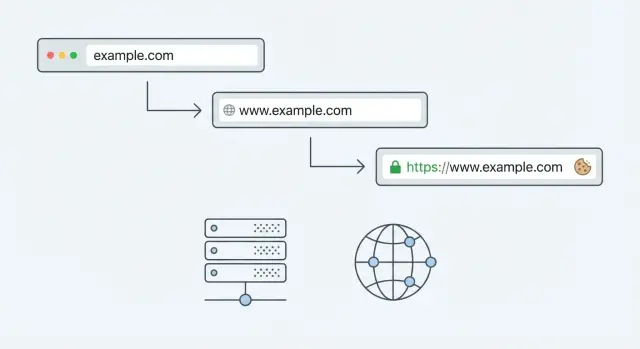
What breaks when you add a domain late
Adding a custom domain after your app already works on a default URL sounds simple. In practice, the app often keeps "remembering" the old address. Your domain provider, hosting layer, CDN/proxy, and app settings may all try to help by redirecting traffic. If two places disagree, users can get stuck bouncing between URLs.
The first signs are usually obvious:
- Pages that reload over and over
- "Too many redirects" errors
- A home page that loads only sometimes
Login is another classic symptom. A user signs in, gets sent back to the app, then lands on the login screen again because the session cookie never sticks.
Late domain changes are more likely to break because you already have working assumptions baked in. Redirect rules were built for the original URL (like a platform preview domain). Cookies were scoped to the old host. TLS and security settings were issued for one hostname but not the other.
One small mismatch can trigger several symptoms at once. For example, forcing HTTPS at the CDN while the app also forces HTTPS (and both rewrite www to apex differently) can create a loop. Meanwhile, if your cookie domain is set to www.example.com but users land on example.com, login can fail even if the redirects look "right".
A common scenario: your AI-built prototype worked on a Replit URL. You add www.yourapp.com later, point DNS, and suddenly half your users see redirect errors and the other half can't stay logged in.
The goal is straightforward: one canonical URL (either www or apex) that stays stable, keeps sessions, and loads cleanly over HTTPS.
Key terms: www, apex, redirects, cookies, and TLS
Redirect loops are rarely one big failure. They're usually a few small settings that disagree.
Apex domain vs www subdomain: the apex domain is the root name, like example.com. The www version is a subdomain, like www.example.com. They can both point to the same app, but you should pick one as the canonical address.
Redirect: a redirect tells the browser "go over there instead." For example, sending example.com to www.example.com. A redirect loop is when the browser gets stuck bouncing between two addresses (or two rules), like www -> apex -> www -> apex, until it gives up.
Redirect loops often happen when your app redirects one way, but another layer (hosting, CDN, proxy, platform settings) redirects back.
TLS/SSL: TLS is what puts the lock icon in the browser. It encrypts traffic and proves the site matches its hostname. If TLS is missing, issued for the wrong host (only www but not apex, or the reverse), or mixed with old HTTP rules, browsers can warn users, block requests, or quietly fail to load important files.
Cookies and login sessions: cookies are small pieces of data the browser stores for a site, often used to keep you logged in. Cookies are strict about where they apply. The most common gotchas are:
- Cookie domain: a cookie set for
www.example.comwon't reliably work onexample.com. - Secure: many auth cookies should only be sent over HTTPS.
- SameSite: affects sign-in flows, especially when redirects or third-party providers are involved.
If your app "logs in" and then immediately sends you back to the login screen, a cookie domain mismatch is one of the first things to check.
Why redirect loops happen with www and apex
A loop usually means multiple redirect rules are firing. One rule says "go to https," another says "go to www," and a third says "go back to apex." Each rule can look reasonable on its own. Together, they can create a bounce the browser can't escape.
The most common trigger is having more than one place doing redirects at the same time. Your app may force HTTPS, your hosting dashboard may force www, and a CDN or framework setting may also rewrite the host.
Order matters too. If HTTP -> HTTPS happens first, and then www -> apex happens second (or the reverse), you can accidentally bounce between two "canonical" URLs. This is easy to introduce when you add a domain late and copy settings from older environments without checking how they combine.
Proxy confusion is another frequent cause. Your app may receive traffic over HTTP from the platform (the origin connection), even though users are visiting over HTTPS. If proxy headers like X-Forwarded-Proto are missing or ignored, the app thinks it must upgrade to HTTPS, and the platform then re-applies its own rules.
Cached redirects can make the problem feel random. Browsers cache 301 responses, and CDNs can cache them too. You fix the rules, but your test machine keeps looping because it's still honoring an old redirect.
A few fast ways to narrow it down:
- Test in a private window to reduce browser cache effects.
- Check one request in DevTools Network and read the
Locationheaders. - Temporarily disable redirects in either the app or the host to find the "extra" rule.
- Confirm proxy/forwarded headers are set the way your app expects.
Step by step: choose one canonical domain and fix redirects
A redirect loop usually means two (or more) layers are arguing about where your site "should" live. The fastest fix is to pick one canonical URL and make every other version point to it.
First, decide whether you want the apex or the www version as the one true address. Either is fine. Consistency is what matters across DNS, TLS, app settings, and redirects.
A simple 5-step fix
- Pick the canonical host: choose
https://example.comorhttps://www.example.com. Write it down. - Choose one place to redirect: do redirects in a single layer if possible (edge/CDN, load balancer, or app). Multiple layers are the usual cause of loops.
- Create one rule: redirect the non-canonical host to the canonical host, keeping the same path and query string. Avoid extra "cleanup" rules until the basics work.
- Make the app generate the canonical host: check settings like base URL, public URL, site URL, and auth callback URL. If the app builds absolute links with the wrong host, users will bounce between domains.
- Test from a clean browser state: use a private window or a fresh profile so old cookies and cached redirects don't hide the real behavior.
After you set the redirect, confirm you're not also forcing redirects inside the app (for example, "enforce HTTPS" plus an edge rule that also rewrites protocol/host). One redirect is enough.
A quick sanity check: type both variants (www and apex) into the address bar. You should land on the same final URL every time, with one redirect at most. If it flips back and forth, something else is still redirecting and needs to be removed or disabled.
Cookie domain issues that break login and sessions
If login works on one host (say, www.example.com) but fails on another (example.com), cookies are usually the reason. Common signs are endless "please log in" screens, sessions that disappear after a refresh, or users getting logged out when they move between hosts.
A frequent mistake is setting the cookie Domain to the wrong place. If you set Domain=www.example.com, that cookie won't be sent to example.com (and won't cover other subdomains). If you need one shared session across subdomains, you usually need Domain=example.com (the apex). If you don't need sharing, host-only cookies (no Domain attribute at all) are often safer because they can't leak to other subdomains.
HTTPS changes can also break sessions. After a late domain migration, apps often switch to HTTPS and start forcing redirects. If the session cookie is missing Secure, browsers may refuse to send it on HTTPS requests. If SameSite is too strict, cross-site steps like OAuth sign-in or payment return pages can fail silently, leaving the user "logged in" on one tab and anonymous on the next.
Subdomains add another trap: app.example.com and api.example.com may need to agree on cookie scope. If your frontend expects an auth cookie that was set by the API, both must use compatible domains, and your CORS plus credential settings must allow cookies to be included.
To confirm what's happening, open your browser DevTools and check:
- Which cookies are set after login, and their
Domain,Path,SameSite, andSecurevalues - Whether the cookie appears on both
wwwand apex hosts - Whether requests show a
Cookieheader being sent, or the browser is dropping it
Cookie problems often get mistaken for redirect problems. Sometimes the redirect chain is fine, but the session never sticks, so the app keeps sending users back to sign-in.
TLS settings that cause warnings, blocks, and failed loads
TLS problems often look like "the site is down," but the real issue is the browser refusing to trust what it's seeing. During a domain change, it can feel inconsistent because some users hit www while others hit the apex.
Start with the basics: your certificate must cover the exact hostnames you serve. A common mismatch is having a certificate for www.example.com only, while DNS or redirects still allow users to land on example.com (or the reverse). Browsers treat those as different names.
Know where HTTPS actually ends
HTTPS can terminate at different places: a CDN, a load balancer, a reverse proxy, or your app server. Trouble starts when one layer thinks traffic is HTTPS but the next layer thinks it's HTTP. That can cause loops (the app keeps "upgrading" to HTTPS) and it can break secure cookies.
If you're unsure, check:
- Which component has the TLS certificate attached (CDN, load balancer, or server)
- Whether the app receives an original protocol header (often
X-Forwarded-Proto) - Whether the app is configured to trust the proxy
- Whether both
wwwand apex routes are handled the same way
HSTS and mixed content: two easy ways to get stuck
HSTS tells the browser "always use HTTPS for this domain." If you enable HSTS before HTTPS is correct everywhere (including redirects, APIs, and subdomains), you can lock users into failures that are hard to undo quickly.
Mixed content is the other silent problem. If your HTML loads scripts, images, or CSS over http, the browser may block them on an https page. The result can look like "the login button does nothing" or "the page loads without styling."
App config gotchas: proxies, base URLs, auth callbacks
A lot of "redirect" problems aren't really about DNS. They're your app arguing with your hosting platform about what the real public URL is.
Proxies and the headers your app trusts
If your app sits behind a reverse proxy or CDN (common on managed hosts), the request that reaches your server might look like plain HTTP, even when the visitor used HTTPS. Apps handle this using headers like X-Forwarded-Proto and X-Forwarded-Host.
If your framework doesn't trust those headers, it may think every request is insecure and force an HTTPS redirect. If the platform is already forcing HTTPS, the user can get bounced between rules.
Also watch for settings like "force HTTPS," "trust proxy," and "secure cookies only." They're good settings, but they must match how your platform terminates TLS.
Base URLs, callbacks, CORS, and integrations
Once you choose a canonical host (www or apex), you need to update every place that stores a full URL. If even one setting still points to the old host, you can get broken logins, failed OAuth handshakes, or API calls that fail without much feedback.
Common places that need attention:
- App base URL (used to build absolute links and redirects)
- Auth callback or redirect URLs (OAuth providers are strict)
- Allowed origins for CORS (the frontend host must match exactly)
- Webhook endpoints (payments, email, CRM, etc.)
- Environment variables like
NEXTAUTH_URL,PUBLIC_URL, or similar
Example: your login page is on https://www.example.com, but your OAuth provider is configured with https://example.com/auth/callback. The provider redirects back to the apex, your app redirects to www, and the provider rejects the response because the callback URL no longer matches.
Common mistakes that make the problem worse
Most domain problems get worse when you change settings in three places at once. A redirect that looks harmless in your app can fight with a redirect at your CDN or hosting provider, and you end up with a loop that's hard to spot.
The "it worked for a minute, then broke again" pattern usually means caching is involved. The browser cached one redirect, a proxy cached another, and now requests take different paths depending on where they start.
Mistakes that cause the most trouble:
- Turning on redirects in multiple layers (hosting panel, CDN/edge, and the app).
- Adding more redirects until one seems to work, while breaking API calls, callbacks, or assets.
- Forgetting login cookies and auth callbacks are still tied to the old domain.
- Enabling HSTS too early.
- Testing only one browser profile and missing what new users see.
A simple test habit prevents hours of guesswork: verify in a fresh profile (or incognito), then a second browser, then on mobile. If behavior differs, you're likely fighting cache, cookies, or HSTS, not your latest redirect rule.
Quick checks before you call it fixed
Before you stop debugging, run checks in a normal browser window (not incognito) and in an incognito window. Redirect and cookie problems often hide until you repeat a login flow.
Redirect checks (the "exactly once" rule)
Type each variant into the address bar and watch the URL you end up on. You want one clean jump, not a bounce between hosts or protocols.
http://yourdomain.comshould go tohttps://exactly once.http://www.yourdomain.comshould go tohttps://exactly once.- The non-canonical host (www or apex) should redirect to your canonical host exactly once.
- Pasting the final canonical URL again should not redirect at all.
Even if one host always redirects, both hosts should still present a valid certificate during the TLS handshake.
Session and padlock checks
Log in on the canonical host, then refresh, close the tab, and reopen the site. If you get logged out, suspect a cookie domain mismatch, SameSite settings, or a callback URL pointing at the wrong host.
Also check the browser security indicators. You should see a valid padlock on both apex and www (even if one immediately redirects). Then open a couple of key pages and confirm there are no mixed content warnings (for example, an old http:// script or image).
A realistic example: adding a domain after an AI-built prototype
A founder ships an AI-generated SaaS prototype from a preview URL (like a platform subdomain). Signups work, the dashboard loads, and payments pass a quick test. Then they add a custom domain the night before a demo and everything falls apart: the site bounces between www and the apex, login keeps kicking them back to sign-in, and the browser shows security warnings.
What changed isn't one thing. The browser now sees a different host, so cookies may no longer match. OAuth providers (Google, GitHub, etc.) may reject the redirect because the callback URL changed. And the hosting layer may start forcing HTTPS while the app still generates HTTP URLs internally.
A recovery plan:
- Pick one canonical host (www or apex) and make everything point there.
- Put redirects in one place and aim for a single hop: non-canonical -> canonical.
- Fix cookie scope to match the canonical plan, and mark auth cookies
Securewhen using HTTPS. - Update auth settings: callback URLs, allowed origins, and any hardcoded base URL.
- Re-test in a fresh browser session to avoid old cookies hiding the real issue.
If you find yourself changing three dashboards at once (app config, auth provider, hosting rules) and the behavior keeps changing, pause and simplify. Redirect loops and session bugs can look random because one stale cookie or one extra redirect step changes the outcome.
Next steps: lock in a stable domain setup
Write down your one source-of-truth URL first. Include scheme and host, like https://www.example.com (or the apex). Then be explicit about the one redirect rule you want: every other host should land on that exact URL with a single 301.
Next, list every place that can redirect requests or influence sessions: domain/DNS settings, CDN or edge rules, load balancers or proxies, app base URL and auth callbacks, and cookie/session settings. The goal is simple ownership: one place handles redirects, one place terminates TLS, and one place defines the public base URL.
If the app was generated by tools like Lovable, Bolt, v0, Cursor, or Replit, assume there are hidden defaults and config drift. A prototype might work on one host because a framework auto-detects URLs, then fail after a late domain change when you add a proxy, a CDN, or a stricter HTTPS policy.
If you're stuck in a loop and the codebase is messy, FixMyMess (fixmymess.ai) specializes in diagnosing and repairing AI-generated apps, including redirect rules, cookie/session scope, and TLS/proxy settings. A free code audit can quickly identify the handful of mismatches that are causing the whole chain reaction.
FAQ
Why do I get “Too many redirects” after adding a custom domain?
Pick one canonical URL and make every other variant redirect to it with a single hop. Most loops happen because redirects are enabled in more than one place (CDN plus app plus hosting panel) and they disagree about www vs apex or HTTP vs HTTPS.
Should my canonical domain be www or the apex?
Choose either https://example.com (apex) or https://www.example.com as the canonical host and stick to it everywhere. Either choice is fine; the important part is that your redirects, app base URL, auth callbacks, and cookies all match the same decision.
Why does it keep bouncing between www and the apex?
Because something is still redirecting back the other way. Common causes are an app-level rule forcing apex while the CDN forces www, or one layer forcing HTTPS while another rewrites the host first, creating a back-and-forth bounce.
Why does login work, then immediately send me back to the login page?
The session cookie usually isn’t being sent on the final host. Check whether the cookie was set for www.example.com but the user ends up on example.com (or vice versa), or whether the cookie is missing Secure after moving to HTTPS.
How do I fix a cookie domain mismatch between www and apex?
The cookie Domain attribute decides where the browser will send that cookie. A cookie scoped to www.example.com won’t reliably work on example.com; for shared sessions across subdomains you typically use Domain=example.com, while host-only cookies (no Domain set) are often safer when you don’t need sharing.
Can TLS/SSL settings cause redirect loops or broken pages?
Yes. If the certificate only covers one hostname (only www or only apex) but users can still land on the other, browsers may warn, block requests, or fail to load assets. Make sure both hostnames are covered even if one immediately redirects.
What does “proxy header” confusion mean when changing domains?
Because the app may think the request is HTTP when the visitor is actually using HTTPS, so it tries to “upgrade” to HTTPS again. Fix this by ensuring proxy headers like X-Forwarded-Proto are passed through and that your framework is configured to trust the proxy.
What app settings should I update after switching to a custom domain?
Update any setting that stores a full URL, not just DNS. Typical culprits are app base/public URL, OAuth callback URLs, allowed CORS origins, webhook endpoints, and environment variables like NEXTAUTH_URL or PUBLIC_URL that frameworks use to generate absolute links.
Why does it still loop on my machine after I “fixed” the redirect rules?
Both browsers and CDNs can cache 301 redirects, so you might keep seeing the old behavior even after fixing rules. Test in a private window, a different browser, or a fresh profile, and try to reduce redirects to one place so there’s only one authoritative answer.
My AI-built prototype broke after adding a domain—what’s the fastest way to recover?
When the codebase is AI-generated, it often has hidden defaults for base URLs, proxy trust, and cookie settings that worked on the preview domain but fail on a real domain. FixMyMess can run a free code audit to pinpoint the mismatches and repair redirects, sessions, and TLS/proxy config so the app becomes production-ready quickly.