Database lock contention: fix hot tables and lock waits fast
Learn how to diagnose database lock contention: spot lock waits, redesign write patterns on hot tables, and shorten transactions to prevent system-wide slowdowns.
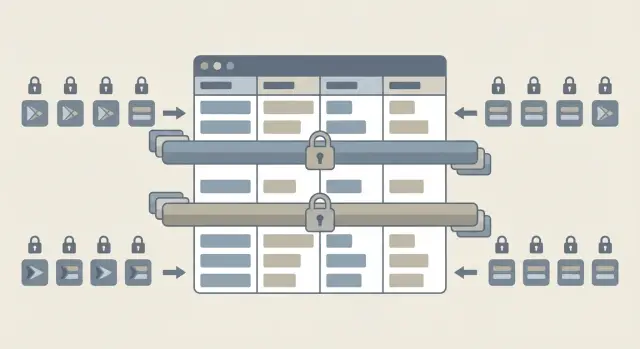
What lock contention looks like in plain terms
A database lock is like a reserved sign on a row or table. While one request changes data, the database can block other requests from changing the same data at the same time. Some operations can still read, others must wait, depending on the database and the lock type.
Lock contention is what happens when that waiting line gets long. The database isn’t “down.” It’s busy forcing requests to take turns.
This often centers on a hot table: a table that gets hit constantly by writes. Common examples include an orders table during checkout, a sessions table updated on every page view, or a counters table used to generate sequential numbers.
What users feel is frustrating and inconsistent. Pages that usually load in 200 ms suddenly take 10 to 30 seconds, then recover. Background jobs look stuck. You see timeouts, retries, and sometimes a wave of errors that disappears before anyone can reproduce it.
It can look like random slowness because the servers may look fine. CPU isn’t maxed, memory is stable, and average query time might even look normal. But during spikes, a few blocked writes can cause a traffic jam, and everything that needs the same rows or table ends up waiting.
Why hot tables become bottlenecks
A hot table is a table that lots of requests touch at the same time, often in the same few rows. When many sessions try to update the same data, the database has to queue them. That queue is what people experience as contention: pages load, then hang, then suddenly finish.
The most common trigger is high write volume concentrated in one spot. A huge table can be fine if writes are spread out. A small table can be worse if every request hits it, like a single row that stores a global counter, “last invoice number,” or a shared status flag.
Hotspots tend to come from the same patterns:
- One row everyone updates (counters, global settings)
- Read-modify-write loops on the same records
- “Upsert everything” designs where conflicts are expected
- Background jobs touching the same rows users are touching
- Extra work inside a transaction (API calls, file uploads, long calculations)
Long transactions are especially harmful because they hold locks while doing unrelated work. Even if the update itself is fast, keeping the transaction open prevents other sessions from moving forward.
Timing matters too. A nightly job that recalculates totals might be harmless at 3 a.m., but painful if it overlaps with peak traffic. Deployments can also make this worse: a schema change, an added index, or a new trigger can increase how long each write takes, stretching lock time.
Example: a checkout flow updates an inventory row and then calls a payment provider before committing. If that call takes 10 seconds, every other checkout that needs the same row waits behind it, and the whole system feels stuck.
Quick signs it is locks, not just a slow database
Lock problems feel like “everything is slow,” but the signals differ from a database that’s simply underpowered.
Separate the symptoms:
If CPU is pegged and queries are doing lots of compute, you’re often dealing with expensive queries, missing indexes, or too much work per request. If CPU is normal but active connections keep climbing, requests are piling up. When you also see many queries stuck in a waiting state (not running), lock contention is a strong suspect.
A classic pattern is sudden p95 and p99 latency spikes while p50 stays mostly fine. One request hits a locked row or table and waits, then a queue forms behind it. You may also see overall throughput drop even though the database isn’t busy on CPU.
Logs usually give early hints: timeout errors that appear in clusters, deadlock messages, and a rising number of retries (from your app, job workers, or ORM). If you recently increased worker counts and things got worse, that’s another strong sign that concurrent writers are colliding.
During an incident, capture a small bundle of facts so you can match the spike to a specific lock wait later:
- Exact timestamps (start, peak, recovery)
- Slow query samples plus their parameters (or anonymized equivalents)
- Top endpoints or background jobs at that time
- Database snapshots: number of active connections and waiting queries
- Worker and queue counts (web, jobs, cron)
Example: checkout latency jumps from 300 ms to 20 s, CPU stays flat, and connections double. That combination usually means “waiting,” not “working.”
How to identify lock waits step by step
Lock waits are an easy way for contention to hide in plain sight. The database is up, CPU looks fine, but requests pile up because one transaction is holding a lock others need.
Step 1: Find who is blocked, then who is blocking
Start in your database’s built-in session and lock views (active sessions, lock tables, wait events). You’re looking for a chain: many sessions waiting, and one session at the front holding the lock.
A practical workflow:
- List active sessions and filter to those waiting on locks
- For each waiter, fetch the blocking session id
- Check the blocker’s transaction age (how long it has been open)
- Pull the SQL text for both the blocked and blocking queries
- Note the wait type and the object involved (table, index, row key if available)
Step 2: Connect the SQL to a real user action
SQL text alone isn’t enough. Tie it back to what the app was doing: an endpoint name, background job, queue worker, or admin task. Query tags, a connection application name, and request/job logs help.
A useful pattern check: if the same table shows up every time, and the same key range or index is involved, you likely have a real hot spot (for example, everyone updating the same status row).
Step 3: Decide on “kill session” only after you assess risk
Killing the blocker can restore service fast, but it can also roll back work and trigger retries. Before you do it, confirm:
- It’s truly stuck or far past normal runtime
- Rolling it back won’t leave external side effects (emails sent, payments captured)
- You know what will retry it, and whether that retry will cause another pileup
Pinpoint the exact table, query, and code path
The fastest wins come from naming the exact table, the exact statement, and the exact place in your app that sends it. Otherwise you end up guessing and changing the wrong thing.
Start by listing every write that can touch the suspect table: INSERTs, UPDATEs, DELETEs, and UPSERTs. Don’t rely on what the feature “should” do. Pull it from logs, ORM query output, or database statement stats. Hot tables often get written by background jobs, web requests, and retries at the same time.
Then validate the “one row change” assumption. A common surprise is an UPDATE with a broad WHERE clause (or no usable index) that scans many rows and locks far more than expected. If lock waits spike during a small update, check indexes early. Missing or wrong indexes can turn a quick lookup into a large locked scan.
Also look for locks taken during reads. If you see SELECT ... FOR UPDATE or similar patterns, confirm the lock is truly needed. Many apps add it “just to be safe” and end up blocking unrelated work.
A quick way to connect DB evidence to app code:
- Capture the blocking query text and its transaction age
- Match it to an endpoint, job name, or worker in your logs
- Confirm how many rows it touches (estimated vs actual)
- Check whether the app is retrying on timeouts and piling on more writers
- Identify the exact function or service method that builds the query
Example: a nightly cleanup job runs an unindexed UPDATE, takes minutes, and checkout starts timing out. The DB tells you the query, and logs tell you which worker ran it. Fixing the index or narrowing the WHERE clause usually stops the pileup fast.
Reduce long transactions that block everyone
Long transactions are one of the fastest ways to create contention. While a transaction is open, it can hold locks on rows (and sometimes more) that other requests need. If the transaction includes slow work, everyone else waits.
A good rule: keep only database reads and writes inside the transaction. Everything else should happen before you begin or after you commit.
Fixes that often make an immediate difference include moving slow steps outside the transaction (API calls, file uploads, sending emails, generating PDFs, heavy calculations), committing earlier when it’s safe, and breaking large updates into smaller batches.
Retries can also multiply the problem. If timeouts trigger a storm of replays, you’re adding more writers to the same bottleneck. Idempotency keys (for example, a request id) help you re-run safely without creating duplicate rows.
Concrete example: a checkout flow starts a transaction, inserts an order, then calls a payment API and sends a confirmation email before committing. If the payment API stalls for 30 seconds, the order rows stay locked for 30 seconds too. Write the order quickly, commit, then handle payment and email after, with clear retry rules.
Redesign write patterns for hot tables
Hot tables become hot because many requests fight over the same few rows. You can often fix contention without changing hardware by changing what you write, where you write it, and how often you update the exact same row.
A common example is a single shared counter (like next_invoice_number or daily_signups). Every write queues behind the same row lock. A safer pattern is to keep counters per tenant, per user, or per shard, then aggregate when you need a global number. Most products don’t need a perfectly real-time global counter.
Another frequent cause is updating the same status row repeatedly (progress updates, last_seen timestamps, retry counts). If that row is touched on every request, it will eventually choke. Prefer append-only event rows (audit_log, events, status_history) and compute current state from the latest event, or roll up in the background.
A few patterns that consistently reduce lock waits:
- Replace single counters with per-tenant (or per-account) counters plus periodic aggregation
- Use append-only events instead of updating one row over and over
- Move non-critical writes to a queue and update asynchronously
- Split hot data by a stable key (tenant_id, account_id) so writes spread out
Concrete scenario: checkout writes to an inventory row and also updates user_last_purchase, daily_sales_total, and marketing_attribution in the same transaction. Under load, the shared totals row becomes the bottleneck and blocks inventory updates too. If you keep the inventory change in the transaction but push totals and marketing updates to a background job, checkout stays fast and the hot row stops blocking everyone.
Isolation levels and lock scope: small choices, big impact
Isolation levels decide how strict the database is when one transaction reads data that another transaction is writing. Stricter levels can prevent confusing reads, but they often hold locks longer or take more locks to keep things consistent. That’s why a small config change can turn a small queue into a real incident.
Most teams think in terms of row locks: “only one row is blocked.” In practice, some engines also lock gaps between rows or whole ranges to stop other transactions inserting into that range while you’re reading or updating it. An “update everything from date X to date Y” can end up blocking inserts for that date range, even if you didn’t touch those new rows yet.
Safer patterns that usually reduce lock scope without changing business logic:
- Prefer point updates by primary key over wide range updates
- Add tight WHERE clauses and batch when you must update many rows
- Keep your access order consistent (for example, always lock parent before child) to avoid deadlocks
- Watch foreign keys and cascades: one delete or update can lock multiple tables longer than you expect
- Avoid “select then update later” flows that keep transactions open while the app does extra work
Timeouts help you fail fast instead of building a traffic jam. Set reasonable lock timeouts and statement timeouts so a stuck query returns an error quickly, and your app can retry or show a clean message.
Example: a background job runs at a strict isolation level and updates all unpaid invoices from last month. It holds range locks while it scans. At the same time, checkout tries to insert a new invoice in that range and waits. Shorter batches and a less strict isolation level often fix it.
Example scenario: one job blocks checkout for 20 minutes
A startup has a simple setup: a orders table (hot), a checkout endpoint, and a background job that “keeps data tidy.” On a busy afternoon, checkout suddenly crawls. Some users get timeouts, others see repeated “try again” messages.
The trigger is a long-running report query that someone ran inside a transaction. It starts with BEGIN, then reads a big slice of orders to compute metrics. The developer thought, “It’s read-only, so it’s safe.” But the transaction stays open for a long time, holding locks longer than expected under the current isolation setting.
At the same time, a background job kicks in and updates thousands of rows in orders (for example, backfilling a new column) during peak traffic. Those updates need locks too. Now the wait queue grows: checkout tries to write a new order and waits, retries kick in and add more pressure, connections pile up, and everything feels slow.
One more twist makes it worse: the checkout endpoint uses an upsert like “insert or update,” but the table is missing the right unique index. The database scans to find matches, touching more rows than it should, so each write holds locks longer.
The fix changes the system’s behavior quickly. The report stops using a long transaction (or moves to a read-only replica). The background job switches to small batches (say 500 to 1,000 rows) with a commit after each batch. And the missing unique index is added so the upsert can find rows fast.
A quick checklist before you change code
Before you rewrite anything, take 15 minutes to confirm you’re dealing with contention (not a random slowdown). These checks often point to the cause and keep you from “fixing” the wrong thing.
Start with transaction age during peak traffic. If you see transactions staying open longer than a few seconds, that’s a red flag. Long transactions hold locks longer, and even a single one can make fast queries line up behind it.
Then find the top blocker. Most databases can show which session is blocking others. The biggest blocker is often something boring: an admin script, a background job, or a retrying worker.
Checklist to run in order:
- Find the oldest open transaction at peak time and note what it’s doing
- Identify the top blocking query and capture its SQL plus the app action that triggered it
- Verify updates and deletes use the expected index (the right key, not a full table scan)
- Check for retry storms and missing timeouts
- Check recent schema changes (migrations can be a common trigger)
Example: a worker updates rows without using the intended index, scans many rows, and keeps a transaction open while it calls an external API. Checkout requests wait on locks, retry, and make the pileup worse.
Common traps that keep lock contention coming back
Contention often returns because the first fix treats the symptom (timeouts, deadlocks) instead of the cause (how and when you hold locks).
The biggest mistake is keeping a transaction open while you do anything that can pause. A payment API call, webhook, email send, file upload, or even a slow cache request can freeze the transaction and hold locks the whole time. Do the database work, commit, then do the outside work.
Another common trap is big write queries that touch too many rows at once. A batch UPDATE without a limit, without a selective WHERE, or without the right index can lock a large range of rows and block unrelated requests.
Deadlocks are often “fixed” by adding more retries. Retries can hide the problem, but they also add load and increase lock pressure. If two code paths always fight for the same rows, retries just repeat the fight.
Also watch for a single global row used as a counter or state flag (like one row in a settings table). Under load, that one row becomes a shared choke point.
Finally, fast-built or AI-generated database code often gets transaction boundaries wrong. It may wrap too much work in one transaction or mix reads and writes in surprising ways. If you inherited a prototype, reviewing transaction scope is often the fastest win.
Questions to ask when it keeps recurring:
- Does any transaction include network calls or long loops?
- Are batch writes chunked and index-friendly?
- Do conflicting updates touch rows in a consistent order?
- Is there a single row everyone updates?
- Are transactions explicit and minimal, not accidental?
Next steps: stabilize now, then prevent repeats
Fast wins usually come from making the busiest transactions shorter, not from bigger servers. Stabilize first, then redesign the writes so the same problem doesn’t return next week.
Prioritize fixes in this order: shorten transactions, reduce pressure on the hot table, then do deeper refactors.
A practical order of operations:
- Find the top 1 to 3 queries holding locks the longest and cut work inside the transaction
- Add or tighten timeouts so one stuck request can’t block the whole system
- Break large updates into smaller batches, or move non-critical work to async jobs
- Redesign hot writes (append-only logs, sharded counters, queue tables) once the system is stable
- Re-test the worst-case flows under load (checkout, login, backfills, cron jobs)
Monitoring doesn’t need to be fancy. A few signals will tell you quickly when locks are building again: lock wait time, transaction age, deadlocks, and how often statements hit timeouts. Alert on trends, not one-off spikes.
If you’re dealing with an inherited AI-generated codebase and the lock bugs are hard to trace, FixMyMess (fixmymess.ai) focuses on diagnosing and repairing issues like long transactions, unsafe write patterns, and security gaps in AI-built apps. A quick audit is often enough to pinpoint the blocking query and the exact code path that needs to change.
FAQ
What is database lock contention, in simple terms?
Lock contention is when one transaction holds a lock and other transactions line up waiting for it. The database is still running, but requests that need the same rows or table can pause for seconds and trigger timeouts or retries.
How can I tell if slowness is lock contention and not just a slow database?
Look for normal CPU but rising active connections, plus many queries in a waiting state rather than actively running. Another strong hint is p95/p99 latency spiking while p50 stays mostly normal, which usually means a subset of requests got stuck behind locks.
What’s the fastest way to find the blocking query?
Start by finding sessions that are waiting on locks, then identify the blocking session and how long its transaction has been open. Next, grab the SQL text for both the blocked and blocking statements and tie them back to an endpoint, job, or worker so you know the exact code path to fix.
What should I capture during an incident so I can diagnose it later?
During a spike, record exact timestamps, the top slow queries with parameters (or anonymized equivalents), and a snapshot of active connections and waiting queries. Also capture which endpoints and background jobs were busiest, because contention is often caused by one worker or job overlapping with peak traffic.
Why does lock contention feel random and hard to reproduce?
Because locks depend on timing and concurrency, the problem can appear only during brief overlaps, like a backfill job running during peak traffic. It can also “self-heal” when the blocking transaction finishes, which makes it feel random even though the root cause is consistent.
What makes transactions “too long,” and how do I shorten them?
A long transaction holds locks for the entire time it is open, even if the actual UPDATE or INSERT is fast. The most practical fix is to keep only database reads and writes inside the transaction, then do slow work like API calls, file uploads, emails, or heavy computation after commit.
What causes a hot table, and what are the simplest design fixes?
Hot tables become bottlenecks when many requests update the same few rows, like a single global counter, a shared totals row, or a frequently updated status record. Spreading writes out by tenant or user, switching to append-only event rows, and moving non-critical updates to async processing usually reduces lock waits quickly.
Can isolation levels or range locks make contention worse?
It can be, because strict isolation can increase how long locks are held or expand lock scope into ranges rather than single rows. A safe default is to avoid wide range updates during peak traffic, keep WHERE clauses tight and index-friendly, and batch large writes so locks are held for shorter bursts.
Should I kill the blocking database session to recover faster?
Only do it when the blocking transaction is clearly abnormal and you understand the rollback impact. If the transaction already triggered external side effects like payments or emails, killing it can leave your system in a confusing state and may cause retries that recreate the pileup.
Why do AI-generated apps often have lock contention problems, and how can FixMyMess help?
They often wrap too much work in one transaction, add unnecessary SELECT ... FOR UPDATE, or use upserts without the right unique indexes, which can turn a small write into a large locked scan. If you inherited an AI-built prototype and lock issues keep coming back, FixMyMess can audit the codebase, pinpoint the blocking path, and implement safe transaction and schema fixes quickly.