Database transactions for atomic writes: stop half-saved data
Learn how database transactions for atomic writes prevent half-saved records, with simple steps, rollback handling, and quick checks for safer apps.
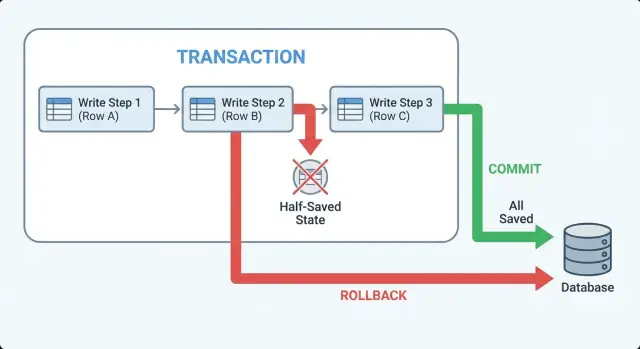
What “half-saved” records are and why they happen
A “half-saved” record shows up when one user action requires several database changes, but only some of them succeed. The user thinks they finished the task, but the database now holds a partly completed version of it.
Example: a checkout should (1) create an order, (2) reserve inventory, and (3) record a payment attempt. If the order row is created but the inventory update fails, you have an order that can’t ship. If inventory is reserved but the payment row is missing, support sees stock disappear with no matching revenue.
This kind of inconsistency creates bugs that feel random:
- missing rows (an order exists, but no order items)
- mismatched totals (invoice total doesn’t match line items)
- orphan records (a payment references an order that was never created)
- duplicated records (a retry creates a second order)
- “stuck” states (status says “paid” but nothing else agrees)
Users experience this as high-stakes confusion: a signup that says “Welcome” but can’t log in later, an order confirmation email with an empty order, or a payment that looks successful but no subscription shows up.
Half-saved data usually happens when code runs multiple inserts and updates separately, without treating them as one unit. A network blip, a server crash, a validation error, or a timeout in the middle is enough to leave early steps committed and later steps skipped.
It’s especially common in AI-generated prototypes because they focus on the happy path. Edge cases like partial failure, retries, and cleanup are often missing, so actions that should be atomic end up as a chain of independent queries with no clear rollback plan.
When you should use a transaction (and when you should not)
Use a transaction when one user action creates or changes data in more than one place, and “half done” isn’t acceptable. The goal is simple: either every related change is saved, or none of them are.
Transactions are a good fit when records depend on each other, like creating an order header and its line items. If the order saves but the items don’t, your app has a record that looks real but can’t be fulfilled.
They’re also the right tool when changes must fail together because money or limits are involved: inventory counts, account balances, credits, and quota usage. If one update happens without the other, you can oversell, double-charge, or let users exceed limits.
A practical rule: if you’re touching multiple tables as part of one outcome, start by assuming you need a transaction.
If a workflow crosses services (database write plus sending an email or charging a card), keep external side effects outside the transaction. Save state first, commit, then trigger the email or payment step in a way you can retry safely.
Signs you probably need transactions (or tighter ones) include recurring cleanup scripts after failures, support tickets like “I see it in one screen but not another,” dashboards that disagree because rows are missing, and code where saves are scattered across helpers.
When not to use a transaction: for long, slow work (file processing, large batch jobs, waiting on third-party APIs). Keeping a transaction open too long can block other users and make timeouts more likely.
Transactions in plain terms: commit, rollback, atomic
A transaction is a safety wrapper around a set of database writes. It turns “save these 3 things” into one all-or-nothing action.
“Atomic” means either every change in the group is saved, or none of them are. There’s no middle state where some rows exist and others don’t.
Think of a checkout where you (1) create an order, (2) reserve inventory, and (3) record a payment attempt. Without a transaction, a crash between steps can leave you with an order that looks real but has no reserved items, or reserved items with no order. With a transaction, the database treats those steps as one unit.
These are the terms you’ll see in code and logs:
- Begin: start the transaction. Changes are temporary until the end.
- Commit: make it permanent. All changes land at once.
- Rollback: undo it. The database discards everything since the begin.
Commit and rollback are the two clean endings. If your app can exit early (error, timeout, validation failure), you want the code to make it obvious which ending happens.
One sentence on isolation
Isolation means your transaction is protected from surprises caused by other people writing at the same time, so you don’t read or write based on data that changes underneath you.
If you only remember one rule: group related inserts and updates that must succeed together, and don’t let side effects (emails, webhooks, background jobs) happen until after the commit.
Step by step: wrapping a multi-step write in one transaction
Half-saved data happens when an early step succeeds (like creating a row) and a later step fails (like updating a balance). The fix is to treat the whole set of changes as one unit of work.
Start by choosing the boundary: everything that must be true together goes inside the transaction. For example, “create order + reserve inventory + record payment intent” should either all happen, or none of it happens.
A reliable flow looks like this:
- Begin a transaction before the first insert/update in the unit of work.
- Run statements in a safe order (parent row first, then children, then derived updates).
- After each critical statement, check you got what you expected (row count, returned id, constraints).
- If any step fails, stop immediately and roll back.
- Commit only when every step has succeeded, then return one clear success response.
Here is the shape in pseudocode:
BEGIN;

-- 1) Create parent
INSERT INTO orders(...) VALUES(...) RETURNING id;

-- 2) Create children
INSERT INTO order_items(order_id, ...) VALUES (...);

-- 3) Update derived state
UPDATE inventory SET reserved = reserved + 1 WHERE sku = ? AND available > 0;

COMMIT;
Two details make or break this pattern.
First, don’t swallow errors. If step 3 updates 0 rows, treat that as a failure, raise an error, and roll back.
Second, don’t send a success response until after the commit completes. “OK” before commit is how partial work leaks out as “success.”
If you inherited AI-generated code, watch for fake transactions where each query opens its own connection. The code can look transactional while the queries are actually running on different sessions.
Handling failures: explicit rollback paths and clear errors
Half-saved data often comes from treating errors as “someone else’s problem.” Decide up front what counts as a failure, and make every failure path obvious in code.
Roll back on more than crashes. Roll back on exceptions (timeouts, constraint errors, deadlocks), failed checks (an update affects 0 rows when it must affect 1), validation that depends on current state (“user already has an active subscription”), or dependent writes that return unexpected values.
Then make rollback explicit. Avoid patterns like “catch and ignore” or returning false without cleanup. A simple structure keeps you honest:
begin transaction
try:
  write A
  write B
  verify row counts
  commit
  return success
except error:
  rollback
  log safe context
  return clear failure
finally:
  close connection
Clear errors matter. The caller should know what to do next (“please retry” vs “invalid input”), but the message should not leak secrets like SQL text, tokens, or environment variables. A practical approach is a short reason plus an internal error id you can find in logs.
Never leave a transaction open. Open transactions can lock rows, block other users, and make later requests fail in strange ways. Always commit or roll back, and always close the connection (or release it back to the pool) in a finally block.
Log enough to reproduce the issue without dumping private data: operation name (signup, checkout), relevant ids, row counts, and the error type. One common failure in AI-generated codebases is catching errors, returning “success,” and leaving the database split between two versions of reality.
Retries and idempotency: staying safe under timeouts
Timeouts create a tricky situation: the client gives up, but the server may still finish the work and commit. If the client retries, you can create the same order twice, grant access twice, or charge twice.
Transactions keep each attempt all-or-nothing, but they don’t stop the same attempt from happening again. That’s what idempotency is for.
Idempotency means the same request, repeated, produces the same result. A common pattern is to require an idempotency key (a random ID from the client) and store it with the final outcome. On retry, you look up that key and return the original result instead of running the whole flow again.
Practical ways to make retries safe:
- Add unique constraints that match real business rules (one profile per user, one membership per user per workspace).
- Store the idempotency key with a unique index and save the created record ID alongside it.
- Use upsert when it matches the business rule (create if missing, otherwise reuse the existing row).
- Treat “unique constraint violation” as a normal retry outcome: fetch the existing row and return it.
- Keep external side effects (payments, emails) idempotent too.
Example: a checkout request times out right after the database commit, but before the response reaches the browser. The retry comes in. With a unique constraint on (user_id, cart_id) and an idempotency key stored with the payment_intent_id, the second request returns the same order and doesn’t create a second charge.
Design tips: keep transactions small and side effects separate
Transactions work best when they cover one clear business action. Put the key business rules at the boundary: validate what must be true, write the related rows, then commit.
Long transactions hurt because they keep locks open. Other requests pile up behind them, and timeouts become more likely. Do the minimum work needed to make the database consistent, then get out.
Keep the transaction focused
A common mistake is treating a transaction like a general “try/catch” for anything that might fail. Keep unrelated work outside of it.
Rules of thumb:
- Put only reads and writes that must succeed together inside the transaction.
- Avoid calling external services while the transaction is open.
- Avoid slow queries or large batch updates in the same transaction as user-facing writes.
- Keep the code path easy to reason about (one entry point, one commit).
Separate side effects from data changes
Side effects like sending emails, charging cards, creating files, or uploading images are not database work. If you do them inside the transaction, you risk sending a confirmation and then rolling back the data.
A safer pattern is: write the data, commit, then trigger side effects.
If you need strong reliability, write an “outbox” record as part of the same transaction (for example, “send welcome email to user 123”). After commit, a worker reads the outbox and performs the side effect. If it fails, you retry without corrupting your core records.
Common mistakes that still cause half-saved data
Many half-saved bugs aren’t caused by missing transactions. They happen when a transaction is used in a way that quietly breaks the all-or-nothing guarantee.
One classic mistake is saving the “main” record, committing, and only then creating required related rows (audit log, profile row, join table entry). If the second step fails, you end up with a record that looks valid in one table but is missing its required companions.
Another common issue is error handling that skips cleanup. A transaction can be opened correctly, but one branch returns early (or throws inside a callback) without a rollback. Depending on the stack, that can leave the connection in a bad state or lead to unexpected commits.
Failure patterns that show up often in AI-generated code:
- Catching an error, logging it, and still returning a “success” response.
- Doing a third-party API call (email, payments, file upload) while the transaction is open, so a slow network keeps locks held.
- Mixing database clients, so one write runs on a different connection and isn’t part of the same transaction.
- Retrying the request without idempotency, which creates duplicates after a timeout.
Example: a signup flow inserts into users, then user_profiles, then org_members. If the profile insert fails but the user insert already committed, the next signup attempt may hit “email already exists” and the user is stuck in limbo.
Two practical rules prevent a lot of this: keep the transaction limited to database work, and make every exit path explicit. If you need an external call, commit first, then do the call, and if it fails, record a separate “needs retry” status.
Quick checks before you ship
Before releasing a feature that does multi-step inserts and updates, write the “unit of work” in one sentence. Example: “Create an order, reserve inventory, and record a payment intent.” If you can’t say it clearly, your transaction boundaries are probably fuzzy.
A quick sanity test is to follow the connection. Every query that must succeed or fail together has to run on the same database session/connection. This is a frequent failure mode in AI-generated code: one helper uses a pooled connection while another opens a new one, so the transaction only covers part of the work.
A short pre-ship checklist:
- Define the unit of work in one sentence and wrap only that in a single transaction.
- Verify every related write uses the same connection/session object from begin to commit.
- Make failure paths boring: on any error, rollback once, return a clear error, and stop.
- Add constraints that make retries safe (unique keys for “one per user” records, idempotency keys for requests).
- Keep side effects out of the transaction: send emails, webhooks, and file uploads only after commit (or queue them).
Then do one “break it” run: force an error on step 2 of 3 (for example, violate a constraint on the third table). After the request fails, check the database. You should see zero new rows, not “some rows with missing pieces.”
Example: signup flow that writes to 3 tables
Imagine a signup that needs to write three rows:
users(email, password hash)profiles(user_id, display_name)subscriptions(user_id, plan)
If you run those as three separate writes, you can get half-saved data. For example, the users row is created, but creating profiles fails because display_name is too long or a required field is missing. Now you have a real account that can’t finish onboarding, and future retries may fail because the email is already taken.
What it looks like without a transaction
A common AI-generated pattern is: insert user, then insert profile, then insert subscription, each with its own call. When step 2 fails, step 1 already committed. You now need cleanup code (delete the user) and you need to decide what happens if that cleanup also fails.
The same flow with a transaction and explicit rollback
With atomic writes, you treat the three writes as one unit: either all three succeed, or none of them exist.
BEGIN;

INSERT INTO users (email, password_hash)
VALUES (:email, :hash)
RETURNING id INTO :user_id;

INSERT INTO profiles (user_id, display_name)
VALUES (:user_id, :display_name);

INSERT INTO subscriptions (user_id, plan)
VALUES (:user_id, :plan);

COMMIT;
-- If any statement fails, ROLLBACK;
Two rules make this reliable:
- Only send “success” to the user after
COMMITsucceeds. - If anything throws, catch it,
ROLLBACK, and return one clear error message.
Post-commit actions like welcome emails should happen after the commit (or be queued), so you don’t email someone for an account that never actually saved.
To test it, add an intentional failure in the middle (for example, force an invalid display_name) and confirm the database has zero rows for that email after the request fails.
Next steps: fixing transaction bugs in AI-built apps
If you inherited an app generated by tools like Lovable, Bolt, v0, Cursor, or Replit, half-saved records usually point to missing or incomplete transaction boundaries. It often looks fine in happy-path testing, then breaks under real traffic, timeouts, or one unexpected null value.
Common signs the code is missing a proper transaction (or uses it only halfway):
- One API call writes to multiple tables, but each write happens in separate functions with their own database calls.
- Errors are caught and logged, but the code keeps going and returns success.
- Background jobs, emails, or payment calls happen in the middle of database writes.
- A retry creates duplicate rows because nothing enforces idempotency.
- You see orphan rows (a profile without a user, or an order without items).
When you ask for a code audit, don’t just ask “do we use transactions?” Ask where they start and end, and what happens on failure. A solid audit should flag data integrity risks (foreign keys, constraints, partial writes), plus related issues that often travel with AI-built code, like broken authentication flows, exposed secrets, and SQL injection risks.
If you’re deciding whether to refactor or rebuild: refactor when the data model is sound and the flow is mainly missing a clear transaction boundary plus clean error handling. Rebuild when the workflow is tangled, tables don’t match the product, or every fix creates a new edge case.
If you’re actively seeing half-saved data in an AI-generated codebase, FixMyMess (fixmymess.ai) focuses on diagnosing the code, repairing logic, hardening security, refactoring risky areas, and getting the app ready for deployment. Their free code audit is a practical way to pinpoint the exact endpoint where atomicity breaks and what the safest rollback behavior should be.