Dead-letter queue for background jobs: retries and safe replay
Learn how a dead-letter queue for background jobs helps capture poison messages, cap retries, and replay safely without duplicating side effects.
What goes wrong when background jobs keep failing
A background job usually runs out of sight: send an email, charge a card, resize an image, sync a record. When it fails once, a retry often fixes it. The trouble starts when the same job fails again and again, with no limit and no clear place to put it.
That kind of job is often called a poison message. Plain meaning: one bad input or one broken situation that makes the worker fail every time it touches it. It might be a malformed payload, a missing database row, an expired API key, or a code bug that only shows up for one customer.
Endless retries hurt more than you think. They can:
- Create an outage by keeping workers busy on the same failing work instead of processing healthy jobs.
- Drive costs up (more compute, more queue operations, more database traffic).
- Spam logs and alerts until real problems get ignored.
- Trigger repeated side effects, like charging or emailing twice, if the job fails after doing the action.
A common failure pattern is partial success. Example: your job sends an email, then crashes while writing “sent” to the database. The next retry sees no “sent” flag and sends the email again. Now you have duplicates, angry users, and a messy audit trail.
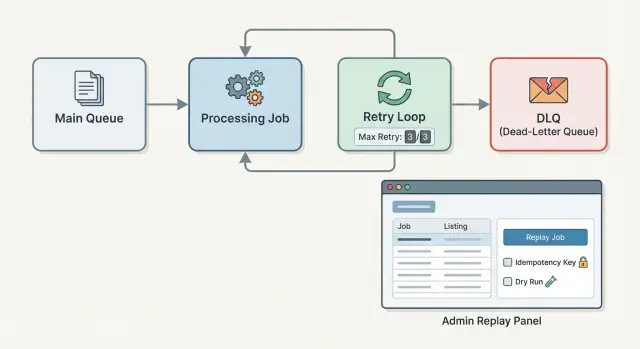
This is why teams add a dead-letter queue (DLQ) for background jobs. Instead of retrying forever, you cap retries and move the failing job aside with its error details. Then you fix the cause and replay it on purpose.
A solid setup has three pieces: a retry policy that stops before things melt down, a DLQ record that preserves what happened, and a replay flow that’s careful about duplicates. If you inherited a shaky worker (including one generated quickly by an AI tool), these guardrails can turn a noisy system into one you can trust.
Dead-letter queues, explained without jargon
A dead-letter queue (DLQ) is a holding area for background jobs that failed and should not keep retrying automatically. It’s not a place where work quietly disappears. It’s where failures become visible, reviewable, and fixable.
Think of it as moving a stuck job out of the main line so the rest of the system can keep moving. You’re choosing clarity over endless retries.
A few terms that get mixed up:
- Retry queue: jobs that failed but are expected to succeed later (for example, a temporary network issue). They run again after a delay.
- DLQ: jobs that failed and need human attention, a code fix, a data fix, or a decision before trying again.
- Parking lot queue: a broader bucket some teams use for “not urgent” items. In practice, it often becomes an informal DLQ without clear rules.
So when do you retry versus send to a DLQ? Retry when the failure is likely temporary and safe to repeat. Move to a DLQ when retries are unlikely to help, or could cause damage. For example, “rate limited by provider” is usually retryable. “Invalid customer ID” or “missing required fields” usually needs a data correction or code change, so it belongs in the DLQ.
When a job is moved to the DLQ, it should carry enough context to debug and replay safely later:
- The job payload (exact inputs used)
- Error message and stack trace (or equivalent)
- Retry count and timestamps (first failure, last attempt)
- A stable idempotency key or job fingerprint
- The last known side effect state (if any), like “charge created” or “email sent”
That last detail matters. A DLQ isn’t just about catching failures. It’s about making the next attempt a controlled, informed decision.
Decide what is retryable and what is not
Retries only help when the problem is temporary. When the problem is permanent, retries just waste worker time and hide the real issue. This is the first decision behind any dead-letter queue for background jobs: what should be tried again, and what should stop quickly.
A simple rule works well: retry when the job could succeed later without changing the code or the input. If it can never succeed with the same payload, don’t retry.
Classify failures with intent
Instead of treating all exceptions the same, map them into a few clear buckets:
- Transient: network timeouts, database connection drops, temporary 5xx from a provider.
- Throttling: rate limits (429), quota exceeded, “try again in 60 seconds”.
- Not found / missing state: related record deleted, user no longer exists.
- Invalid input: payload fails validation, required field missing, wrong format.
- Auth / permissions: expired credentials, revoked access, forbidden action.
That classification should drive what happens next: immediate retry, delayed retry, or move to the DLQ with a clear reason.
Example: a job that charges a card fails with a timeout from the payment API. That’s transient, so retrying makes sense. But if the job fails because the customer ID is missing from the payload, retrying will never fix it. Put it in the DLQ and alert someone to fix the data (or the job producer).
Why this matters for alerting and replay
A DLQ is not just a parking lot. The reason you moved a job there tells you what to do next:
- Transient failures often mean you need better backoff, not a human.
- Invalid input usually means a bug fix or data correction before replay.
- Auth failures usually mean rotating keys before anything else.
This also makes replay safer. If a job is in the DLQ for “invalid payload”, your admin tool can block replay by default and ask for a fix first. Many inherited workers fail here because everything gets treated as “retryable” until someone adds clear categories and stop rules.
Set a retry policy that will not melt your system
Retries are useful, but uncontrolled retries can turn one broken job into a system-wide outage. A good policy limits damage, spreads load over time, and stops early when a job is clearly not going to work.
Max attempts should match the failure type. “One size fits all” is how you end up retrying the wrong things. A flaky network call might deserve 5-10 tries. A bad payload (missing required fields) should not get 10 tries - it should go to the DLQ quickly. Treat the DLQ as the place where jobs go once your retry budget is spent.
Backoff and jitter, in plain terms
Backoff means you wait longer between attempts. This gives downstream services time to recover and keeps your workers from hammering the same endpoint.
- Fixed backoff: wait the same time every retry.
- Exponential backoff: wait longer each time.
- Jitter: add a small random delay so many jobs don’t retry at the same second.
Example: your payment provider has a brief outage. Without jitter, every failed job retries at exactly 30 seconds and causes a second wave of failures.
Time limits that prevent “infinite pain”
Set two clocks:
- Per-attempt timeout (how long one try can run before you cancel it).
- Overall time window (how long you’re willing to keep retrying before you give up).
A practical default for many teams is: 3-5 attempts, exponential backoff starting at 10-30 seconds, small jitter (like 0-10 seconds), a per-attempt timeout that matches normal call time, and an overall window like 15-60 minutes. The goal isn’t perfection. It’s stopping runaway retries before they pile up and block healthy work.
What to record when you move a job to the DLQ
When a background job lands in a dead-letter queue (DLQ), you’re not just saving a “failed message”. You’re creating a case file someone may need to understand, fix, and safely replay days later.
Start with the minimum data you need to reproduce the failure and decide what to do next. A good DLQ record usually includes:
- Job type (what worker should handle it) and version (if your payload shape changes over time)
- Original payload (as received) plus a redacted admin-safe summary
- Attempt count and retry history (how many times, and why it kept failing)
- Timestamps: first seen, last attempt, moved to DLQ
- Error details: last error message/stack, plus the root cause chain if you have it
A stable job ID is critical. Generate one when the job is first created, and keep it the same across retries and replays. Then add a dedupe or idempotency key that represents the side effect you’re trying to do (for example, “send_invoice_email:invoice_123:recipient_456”). That’s what lets you replay without doing the action twice.
Be careful with what admins see. Payloads often contain secrets, tokens, or personal data. Store the raw payload if you must for debugging, but also store a safe summary field that’s redacted (for example, show the user ID, not the email; show the last 4 digits of a card, not the full token).
Finally, keep both the last error and the original cause when you can. Example: a job may end with “timeout calling provider”, but the root error was “missing API key”. If your DLQ keeps the chain, the fix is obvious and replay is safer.
Step by step: add DLQ and capped retries to your worker
Treat every job run as a small transaction: either it finishes, or it fails in a way you can reason about later. A dead-letter queue for background jobs is just the place where “we tried enough, now a human needs to look” jobs go.
A simple flow that works in most stacks:
- Run the handler inside a try/catch (or equivalent) that captures a typed error, not just a string.
- On failure, increment an attempt counter and compute the next run time using backoff (for example: 1m, 5m, 20m), with a little jitter so retries don’t bunch up.
- If the error is clearly not retryable (bad input, missing record, permission denied), or attempts hit the cap, move the job to the DLQ instead of retrying again.
- Trigger an alert with enough context to debug (job type, id, attempt, error class, first seen time). Avoid dumping full payloads into alerts since they often contain secrets or personal data.
- Track a few counters so trouble shows up early.
try {
  handle(job)
  markDone(job)
} catch (err) {
  attempts = job.attempts + 1
  if (!isRetryable(err) || attempts >= MAX_ATTEMPTS) {
    moveToDLQ(job, err)
    alert(job, err)
  } else {
    reschedule(job, backoff(attempts))
  }
}
For dashboards, you don’t need anything fancy. Track inflight jobs, jobs currently scheduled for retry, DLQ depth, and “DLQ added per hour”.
Prevent duplicate side effects when you replay
Replaying a failed job is where the real risk hides. The original job may have already done the dangerous part (charge a card, send an email, write a row), then crashed while logging, updating a status, or doing a second step. If you replay it from the DLQ without protection, you can double charge, double email, or double create records.
The simplest way to stay safe is idempotency. In plain words: the same request should produce the same result, even if you run it twice. Your job should be able to say, “I already did this,” and exit without repeating the side effect.
Practical ways to do that:
- Idempotency keys: generate a stable key per real-world action (like
invoice_123_charge) and store it with the result. On replay, look up the key first. - Unique constraints: make the database enforce “only one” (one payout per order, one welcome email per user) and treat duplicates as success.
- Outbox pattern: write the intent to the database once, then have a separate sender deliver it. Replays re-check and only send what’s still pending.
A good mental model is “write once, send later.” First, record a durable fact like “Payment for order 8821 is authorized” in a transaction. Only after that do you call the external service (email provider, payment gateway). If the job dies mid-way, the replay sees the stored fact and does the minimum remaining work.
Example: a job sends a receipt email after a purchase. If it sends the email and then crashes before marking receipt_sent=true, replaying will send a second receipt. Fix it by storing receipt_sent_at with a unique key like receipt:{order_id} before sending, or by queuing the email in an outbox table and letting a dedicated sender handle delivery.
Build an admin replay flow that is safe by default
If people can replay dead-lettered jobs with one click, they will. The admin flow has to assume mistakes, pressure, and partial context. Safe by default means the easiest action is also the safest one.
Start with a small set of views that answer the basics quickly:
- DLQ list: filter by job type, error class, date, and environment.
- Detail view: payload, idempotency key, headers/metadata, and the exact error.
- Replay: options for replay now vs schedule, single vs batch.
- Dismiss/resolve: a place to mark “won’t fix” with a reason.
On the detail view, show the attempt history: timestamps, worker version, retry count, and any side effects you recorded (for example, “created invoice #1234”). That’s what good decisions are based on.
Replay controls should force the operator to state intent. Batch replay should require a filter preview (“32 jobs match”) and a second confirmation that names the job type and side effect risk (“may send email”). A dry run mode is worth it: validate current inputs and dependencies without performing writes or external calls, then show what would happen.
Guardrails prevent replay from turning one bad job into two bad outcomes:
- Block replay if the same idempotency key already succeeded.
- Default to schedule (a few minutes later) for batch actions, not immediate.
- Require an explicit choice when the job is known to be non-idempotent.
- Rate limit replays per job type to avoid bursts.
- Always write an audit log entry.
Permissions matter. Limit replay to a small role, and log who replayed what and when, including the reason note.
Common mistakes and traps to avoid
Most DLQ setups fail for boring reasons: the rules are unclear, retries are too aggressive, or replay is treated like a harmless button.
Common traps (and how to avoid them):
- Retry everything forever. If every failure is “try again,” you never learn what’s broken. Pick clear DLQ rules (bad input, missing records, auth failures, third-party 4xx errors) and move those jobs out of the hot path quickly.
- No cap + no backoff = retry storms. One outage can turn into a flood that slows your whole system. Set a max attempt count, use exponential backoff with jitter, and stop retrying when the error is clearly not temporary.
- A replay button that can double side effects. Replaying a job that already charged a card or sent an email can do real damage. Make handlers idempotent (idempotency key, unique constraints, or an “already processed” marker) and design replay to be safe even if clicked twice.
- Logging secrets inside payloads or errors. DLQs often store the original job body. If that includes tokens, passwords, API keys, or full customer data, you’ve created a quiet leak. Redact sensitive fields before enqueueing, and sanitize error messages before storing them.
- Using the DLQ as long-term storage. A DLQ without ownership becomes a graveyard. Assign an owner, set a retention policy, and schedule cleanup. Track a small set of metrics (DLQ size, oldest item age, replay success rate) so it stays under control.
A simple rule helps: your DLQ should be a short-lived inbox for investigation, not a dumping ground. If it grows, that’s a product bug or an ops issue, and someone should be on the hook for fixing it.
Example: a failed email job that should not send twice
A user signs up, and your app enqueues a “send welcome email” background job. The job includes user_id, to_email, template_id, and a send_id (a unique idempotency key for this email).
One signup has a bad address like alex@@example.com. The worker calls your email provider, gets a 400 “invalid recipient”, and fails.
Your retry policy tries again a few times (for example, 3 attempts over 10 minutes) in case the error was temporary. Each attempt fails the same way, so the job is moved to the DLQ with a clear, non-retryable reason: “Invalid email format: alex@@example.com”. That one sentence matters because it tells an admin what to fix without digging through stack traces.
During the incident, your logs and metrics should make the story obvious:
- Job attempts: 3 (all failed with the same 400)
- DLQ count: +1 (tagged
reason=invalid_recipient) - Email sends: 0 (no provider message id stored)
- Time-to-DLQ: 10m (shows retries are capped)
An admin opens the DLQ item, edits the input (or fixes the user record), and clicks replay. The replay flow should be safe by default: it re-queues the job with the same send_id, and the worker checks a “sent_emails” table first. If a row already exists for send_id, it stops. If not, it sends the email, stores the provider message id, then marks the job complete.
To prevent the same failure next time, validate early (reject bad emails before enqueue) and keep idempotency on every side effect (emails, charges, webhooks).
Quick checklist and next steps
A dead-letter queue for background jobs only helps in production if the boring details are right. Those details are what keep failures from turning into duplicates, outages, or silent data messes.
Build checklist for retries and DLQ capture:
- Cap attempts and define backoff (for example, 5 tries with exponential backoff and jitter), plus a hard timeout per attempt.
- Write down what is retryable vs not (network hiccups, 429/503, temporary DB lock) and treat everything else as non-retryable by default.
- Add a stop condition for poison messages (same error signature repeating, invalid payload, missing required fields) so they go to the DLQ early.
- Record DLQ basics: job type, args (redacted), attempt count, last error class and message, stack trace, timestamps, and worker version.
- Redact secrets and personal data before storing anything (tokens, passwords, full emails, raw request bodies) and keep an audit trail of who changed what.
Replay safety checklist:
- Pick an idempotency strategy per job type (idempotency key, unique constraint, or “already processed” marker) and test it by replaying the same job twice.
- Separate replay from retry: replay should require a human decision, and ideally a reason note.
- Lock down permissions (admin only), add a clear confirmation step, and show a preview of what will happen (including side effects like payments or emails).
- Decide what changes are allowed before replay (edit payload, change destination, override config) and log every edit.
- After replay, write back the outcome (succeeded, failed again with a new error, or cancelled) so the DLQ doesn’t become a black hole.
If you’re dealing with an AI-generated codebase where retries, idempotency, and safe replay were never designed, FixMyMess (fixmymess.ai) can help diagnose the worker and queue behavior, repair the logic, and harden it for production.
FAQ
What is a “poison message” in a background job queue?
A poison message is a job that fails every time with the same input, so retries don’t help. The fix is to stop automatic retries early, move it to a DLQ with the error and payload, then correct the code or data before replaying it on purpose.
What’s the difference between a retry queue and a dead-letter queue (DLQ)?
A retry queue is for failures that are likely temporary and safe to repeat, like timeouts or brief outages. A DLQ is for jobs that need a decision or a fix first, like invalid payloads, missing records, or permission problems, so they don’t keep clogging workers.
How many retries should a background job get before going to the DLQ?
A practical default is a small number of attempts with increasing delays, and a hard stop after a set time window. Start with 3–5 attempts and exponential backoff, then move the job to the DLQ when the retry budget is spent so one bad job can’t starve the whole system.
How do I decide what errors are retryable vs non-retryable?
Retry only when the exact same payload could succeed later without changing code or data. Timeouts, temporary 5xx errors, and brief database disconnects are usually retryable; invalid input, missing required fields, and “not found” conditions usually belong in the DLQ quickly.
What should I store when a job is moved to the DLQ?
Record enough to reproduce and safely replay: the job type, payload (with sensitive fields redacted), attempt count and timing, and the full error details. Also store a stable job ID and an idempotency key so replay can detect “already done” work instead of repeating side effects.
How do I prevent double charges or duplicate emails when replaying DLQ jobs?
Idempotency is the main protection: the job should be able to run twice and produce the same outcome without doing the side effect twice. Use a stable idempotency key, enforce a unique constraint for the real-world action, or record “already processed” state before sending emails, charging cards, or creating external resources.
What does a safe admin replay flow look like?
Make replay require intent and add guardrails: show the payload and error, block replay if the idempotency key already succeeded, and log who replayed it and why. When in doubt, replay a single job first and verify the side effect state before doing any batch replay.
Why are endless retries so dangerous in production?
Endless retries can create worker starvation and turn a single bad job into an outage. They also inflate compute and queue costs, drown real alerts in noise, and increase the chance of repeated side effects when the job partially succeeds and then crashes.
How do I avoid leaking secrets or personal data through DLQ payloads and errors?
Sanitize both the payload and error details before storing or displaying them, because jobs often contain tokens, credentials, or personal data. Keep a redacted summary for admins, store only what you truly need to debug, and make sure logs and alerts don’t dump raw secrets.
Can FixMyMess help if my background job system was generated by an AI tool and keeps failing?
Yes, especially when the worker and retry logic were generated quickly and never designed for idempotency or safe replay. FixMyMess can audit the queue and worker behavior, identify why jobs are failing and duplicating side effects, then repair and harden the code for production, often within 48–72 hours after a free code audit.