Delete account safely: revoke access, tokens, and billing
Delete account safely with a practical runbook to revoke sessions, detach OAuth tokens, cancel subscriptions, and protect shared workspaces.
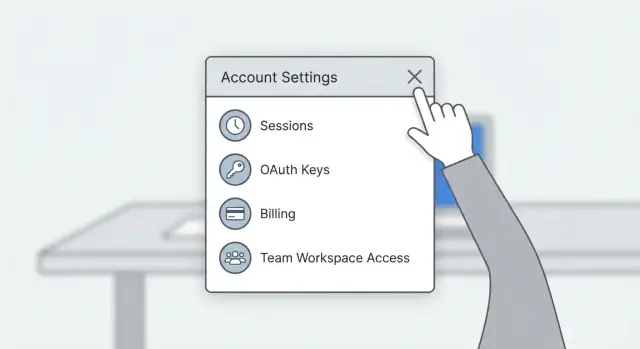
What “delete account” really means
“Delete account” sounds like one button that wipes everything. In practice, it often only removes your profile while other access paths stay alive unless you shut them down on purpose.
To delete an account safely, think “close every door,” not “remove the nameplate.” Most accounts are tied to more than a username and password: logged-in devices, browser sessions, third-party sign-ins, subscriptions, and shared workspaces where other people still depend on what you set up.
When people get burned, it’s usually for one of three reasons:
- A session stays valid on an old device or browser.
- A token (OAuth, API key, personal access token, webhook secret) still has permissions.
- Billing renews somewhere else.
A common scenario: you delete a project management account after a trial. Your laptop still has a valid session, your “Sign in with Google” connection is still approved, and your card is still on file. Two weeks later you’re charged again, or someone can still access something you assumed was gone.
This happens even more in rushed or messy apps, especially prototypes stitched together quickly. “Delete account” exists, but session revocation, billing cleanup, and role handoffs weren’t implemented carefully.
Before you delete: take inventory
Account deletion is hard to reverse. Spend 10 minutes listing what lives in the account, what depends on it, and what you might need later. This prevents the most common surprise: something important breaks after the account is gone.
Start with what’s inside the account. Think beyond “files” and include the stuff you’ll wish you had later:
- Your content (projects, docs, messages, attachments)
- Settings you tuned over time (templates, automations, preferences)
- Security and recovery items (backup codes, passkeys, trusted devices)
- Business records (invoices, receipts, audit logs)
Next, identify where this account is used as a login. “Sign in with X” is convenient until you delete X and get locked out of other services. Your password manager and inbox are usually the fastest way to find dependencies. Search for messages like “new sign-in,” “connected app,” and “verification code.”
Finally, map who else depends on this account. If you’re an owner or admin anywhere, deletion can orphan assets. Decide who should own shared work after you leave, then transfer ownership before you touch deletion. Don’t stop at “they can view.” Confirm they can manage settings, members, and billing.
Revoke active sessions and device access
Don’t start with the delete button. Start by killing sessions so no browser tab, phone, or old laptop can keep working after you think you’re gone.
Most products have a “sign out of all devices” option. Use it first. Then verify it worked: refresh your current browser session, open the mobile app, and check any desktop client. If the app has a sessions page, make sure it shows nothing active.
If the product doesn’t properly revoke sessions, a password change can be a last-resort breaker (when the app is built to invalidate sessions on reset). Change your password to something random, confirm you’re logged out everywhere, then continue.
A quick reality check that catches a lot of problems: after revocation, try logging in from a different device using an old saved password or an existing “remembered” browser. If anything still works that shouldn’t, pause and investigate.
Detach OAuth connections and revoke tokens
OAuth connections are the “Sign in with Google/GitHub/Slack” type of access. You don’t share your password. You grant the app a token that lets it act on your behalf. To delete an account safely, you want that token gone, not just your profile record.
Do two passes:
- Inside the app you’re leaving: disconnect connected apps and integrations. Look for sections like “Connected apps,” “Integrations,” or “Security.”
- At the provider (Google/GitHub/Microsoft/Slack): revoke the app’s access there too. This is especially important if the original app is buggy or if you’re not sure what it stored.
Also hunt down non-OAuth credentials. These often outlive account deletion:
- API keys and personal access tokens (PATs)
- Webhooks and webhook signing secrets
- Automation tokens used by scripts or CI jobs
Practical order: disconnect OAuth first, then delete keys and tokens, then remove webhooks and rotate any shared secrets.
Cancel subscriptions and clean up billing
Billing is often separate from login, so treat it as its own cleanup task. Account deletion should never be the moment you discover a subscription is still running.
Start by finding everything that can charge you: plans, free trials that will convert, add-ons, and seat-based pricing. Seat billing is easy to miss because it can keep charging even if you personally stop using the product.
Cancel auto-renew first, then note the end date. Some services let you keep access until the term ends. Others cut you off immediately. Write down what you expect to happen so you can spot an unexpected charge.
Also check “alternative billing paths.” Many surprise renewals happen because billing was created somewhere else, such as an app store subscription or a separate billing portal under a different email.
Handle shared workspaces without breaking the team
Shared workspaces are where deletion can hurt other people. Before you delete an account safely, confirm what role you have: owner, admin, or member.
If you’re an owner, look for anything that’s “owned by you” rather than “owned by the workspace.” Common trouble spots include:
- Projects or repos created under your user
- Shared storage where you’re the only manager
- Dashboards and reports people rely on
- Integrations, webhooks, or automation jobs that run as you
Transfer ownership first. Then confirm the new owner can actually manage members, settings, and billing.
Pick a handoff date and send a short note so teammates aren’t surprised. Something as simple as “I’m transferring X today and removing my access Friday at 5pm” avoids last-minute chaos.
Backups, exports, and proof of deletion
Before you delete anything, pull out what you might need later. Deletion often removes access to invoices, dashboards, and support history, even if the product keeps some data internally.
Export what would help you rebuild the account’s story if something goes wrong: key files and projects, invoices and receipts, audit/access logs (if you have them), and a snapshot of integrations and roles.
Know the difference between deactivation and deletion. Deactivation usually blocks login but keeps data and can be reversible. Deletion aims to remove data and close access, but many services still retain some records for taxes, fraud prevention, legal requirements, or backups.
When you submit a deletion request, keep proof. Save the confirmation email or reference ID. If there’s no email, capture the final confirmation screen and note the date and time.
Step-by-step runbook you can follow
Treat this like closing a bank account: stop money first, lock access, remove keys, then clean up what others depend on.
- Stop billing. Cancel paid plans, trials, add-ons, and extra seats. Save the confirmation and note the end date.
- Revoke sessions. Use “log out all devices.” Verify you’re logged out on web, mobile, and desktop. Change your password if the app uses password resets to invalidate old sessions.
- Remove third-party access. Disconnect OAuth logins and integrations. Revoke API keys, PATs, and webhooks so background jobs can’t keep pulling or pushing data.
- Fix shared workspace ownership. Transfer ownership of projects and admin roles. Make sure someone else can manage billing and members.
- Export, delete, verify. Export what you need, delete the account, then test that every door is closed: logins fail, OAuth access is revoked, integrations stop working, and billing shows no future charges.
A quick reality check: if you used “Sign in with Google” and also connected GitHub, you need to clean up both. Canceling a plan doesn’t automatically kill tokens.
A realistic example: closing an account without surprises
Maya is shutting down a side project. Her account touches three things: a shared team workspace where she’s an admin, “Sign in with Google” used across a few tools, and a subscription managed in a separate billing portal.
She follows this order:
-
She transfers workspace ownership and confirms another admin can manage billing and members.
-
She logs out everywhere and checks for any still-active sessions tied to old devices.
-
She reviews connected apps in her Google account. For other services that relied on “Sign in with Google,” she adds a password or alternate login first and tests it in a private window.
-
She cancels in the billing portal (not just the app UI), saves the confirmation, and verifies auto-renew is off.
-
She deletes the account last, then confirms she can’t log in again.
Common mistakes that leave doors open
The biggest trap is treating deletion like a single button. In practice, you can delete your profile and still leave access paths open through billing, tokens, or third-party connections.
Common mistakes:
- Deleting before canceling billing. Some services keep charging until the subscription is canceled, even if the user record is gone.
- Confusing “log out” with “revoke access.” Logging out ends one session, not necessarily every session or refresh token.
- Leaving long-lived credentials behind. API keys, PATs, webhook secrets, and service account keys can keep working long after you stop using the app.
- Orphaning shared assets. Domains, repos, cloud projects, analytics properties, and billing accounts often have separate ownership rules.
- Forgetting provider-side cleanup. Disconnecting inside the app isn’t always the same as revoking access from Google, GitHub, Microsoft, or Slack.
Quick checklist before you hit delete
Run this once, then again right before you confirm deletion:
- Billing: auto-renew is off, trials are canceled, seats/add-ons are removed, and you’ve saved invoices and cancellation proof.
- Sessions: you’ve signed out of all devices and confirmed no active sessions remain.
- Integrations: OAuth connections are removed on both sides, and API keys, PATs, and webhooks are deleted or rotated.
- Shared work: ownership and admin rights are transferred, and teammates can still manage what they need.
- After deletion: logins fail, you stop receiving service emails, and no new charges appear.
Next steps if you’re unsure or the app is already messy
If you can’t find where sessions, API keys, or OAuth tokens live, pause before you click delete. Many products spread access across the app, the database, a third-party login provider, and a billing system.
Ask support for exact steps, and look for a reply that clearly states:
- where to revoke sessions
- where to disconnect integrations
- what “deletion” removes vs what’s retained
- how billing is handled and where it’s managed
If the account is tied to an app you built (even a small internal tool), plan the handoff first. Deleting an “owner” account can lock a team out of data, break automations, or strand billing in a hard-to-fix state.
For AI-generated prototypes in particular, it’s worth doing a quick audit before shutdown or transfer. These projects often have hidden secrets in code, half-working auth, or tokens that stay valid even after you “disconnect” them in the UI.
If you inherited an AI-built app made with tools like Lovable, Bolt, v0, Cursor, or Replit and want a clean shutdown, FixMyMess (fixmymess.ai) can help by auditing the codebase for lingering sessions, exposed secrets, and broken billing or permission paths before you close everything down.
FAQ
Does “delete account” really remove everything and stop all access?
Usually it deletes your profile record and stops normal logins, but it may not automatically cancel subscriptions, revoke OAuth tokens, or invalidate every active session. Treat deletion as a process: close access paths first, then delete.
Why should I revoke sessions before I hit the delete button?
Because old browser sessions, mobile tokens, and integrations can keep working even after your profile is gone. Revoking sessions and tokens first prevents “ghost access” from a device or script you forgot about.
How do I know I’m truly logged out everywhere?
Use the product’s “sign out of all devices” (or similar) and then actually test it by trying the web app, mobile app, and any desktop client again. If you still stay logged in somewhere, pause and fix that before deletion.
Do I need to revoke “Sign in with Google/GitHub” access from both sides?
Disconnect them in two places: inside the app you’re leaving and in the provider account (like Google, GitHub, Microsoft, or Slack). If you only disconnect on one side, a buggy app or leftover grant can keep the connection alive.
What tokens and keys should I clean up besides OAuth?
API keys, personal access tokens, webhook secrets, and automation credentials often keep working independently of your interactive login. Delete or rotate them before deletion so background jobs can’t continue reading or writing data.
How do I avoid getting charged after I delete an account?
Cancel auto-renew first and save whatever confirmation you get, because billing is often managed separately from login. Also check for alternate billing paths like an app store subscription or a separate billing portal under a different email.
What should I do if I’m an owner or admin in a shared workspace?
Transfer ownership and admin roles before deletion, then verify the new owner can manage members, settings, and billing. Deleting an owner account can orphan projects, break automations, or lock a team out of critical settings.
What should I export or save before deleting an account?
Export what you might need for records and recovery, especially invoices, receipts, and any audit or access logs you can access. Deletion can remove your ability to retrieve those later, even if the service retains some data internally.
What’s the difference between deactivation and deletion?
Deactivation typically blocks login but keeps the account and data recoverable, while deletion aims to remove access and reduce retained data. Even after deletion, some records may be kept for legal, tax, fraud prevention, or backup reasons.
What if the app is messy and I can’t find where sessions, tokens, or billing are managed?
Stop and do a quick audit before you proceed, because messy implementations often leave sessions valid, secrets exposed, or billing detached from the UI. If you inherited an AI-generated app and need a clean shutdown or handoff, FixMyMess can audit the codebase to find lingering tokens, broken auth revocation, and billing pitfalls before you pull the plug.