Dependency pinning strategy for stable, repeatable deploys
Use a dependency pinning strategy to stop surprise updates, control transitive packages, and ship repeatable builds across dev, CI, and prod.
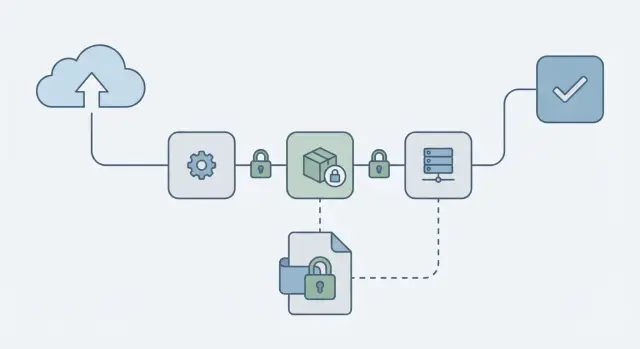
Why deploys break when dependencies float
When your dependencies are allowed to float, a deploy can change even if your code didn’t. That happens when your package file uses loose version rules like ^1.2.0, ~1.2.0, or latest. The next install can pull a newer release that still matches the rule, and now your app is running different code than it was yesterday.
It’s not just the packages you chose directly. Most projects rely on transitive dependencies (the dependencies of your dependencies). A small update deep in that tree can change behavior, add a new peer requirement, or ship a breaking bug. Without locked versions, you often won’t know what changed until something fails.
This is how dev, CI, and production drift apart:
- A developer installs today and gets versions A, B, C.
- CI runs tomorrow and gets versions A, B, D.
- Production rebuilds next week and gets versions A, E, D.
A repeatable build means you can install the project again, on a different machine, and get the same dependency versions and the same results. You can rebuild an older commit and trust it will behave the same way.
When versions float, teams usually see the same few failure modes: flaky tests that fail only on CI, sudden runtime errors after a “no-code” deploy, builds failing because a dependency changed its tooling requirements, new security alerts from a freshly pulled package, or behavior that appears and disappears across machines.
A solid pinning approach makes deploys boring again: behavior changes only when you intentionally update dependencies, not when the ecosystem updates underneath you.
Key terms: direct, transitive, lockfiles, semver
A stable dependency policy is easier to set when a few terms are clear.
Direct dependencies are the packages you choose and list in your manifest (like package.json, requirements.txt, or pyproject). Transitive dependencies are the packages your dependencies pull in. Think of it like ordering a sandwich: you pick the sandwich (direct), but the shop picks the bread supplier and mayo brand (transitive). If the shop changes suppliers, your sandwich changes even though you ordered the same item.
A lockfile records the exact versions that were installed, including transitive ones, at a point in time. It helps teammates and CI install the same set again. It’s not magic, though: if the lockfile is ignored, constantly regenerated, or resolved differently on another platform (often due to native modules), installs can still drift.
Semver (semantic versioning) is the common x.y.z format:
- Patch (x.y.Z): small fixes, usually safe
- Minor (x.Y.z): new features, intended to be backward compatible
- Major (X.y.z): breaking changes are allowed
A version range is any rule that allows movement, like ^1.4.2, ~1.4.2, >=1.4 <2, or 1.x. Ranges can silently pick newer versions on a fresh install, especially through transitive updates. That’s where surprises start.
Pick a pinning policy that fits your team
The goal is simple: fresh installs and CI builds should behave the same way today and next week. How strict you should be depends on what you ship, how often you ship, and how much change your team can safely absorb.
For most apps (web, mobile, backend), strict pins are the safest default. Apps care about stability more than “compatible with many versions.” If a patch release breaks you, users still see downtime. Tight pinning also makes bugs easier to reproduce because everyone is running the same code.
Libraries are different. If you publish a package others install, you often want to allow a wider semver range to stay compatible with users. Even then, you should still use a lockfile in development so your tests run on known versions, and you can widen or narrow ranges on purpose.
Semver helps, but it’s not a guarantee. Minor updates can still be risky when maintainers ship breaking behavior behind a minor bump, tooling changes default configs or build output, or a transitive dependency shifts even when your direct dependencies don’t.
Team size and release frequency matter, too. A small team shipping weekly might prefer strict pins plus scheduled updates. A larger team shipping daily might allow patch updates (still locked in CI) if they have strong tests and fast rollback.
Set your rules: what to pin and where
Start with one decision: which file is the source of truth for versions. Most teams use a mix: the manifest states intent, and the lockfile guarantees the exact install.
Use the manifest (package.json, requirements.txt, Gemfile, and so on) to describe what your app needs. Use the lockfile (package-lock.json, yarn.lock, pnpm-lock.yaml, Pipfile.lock, Gemfile.lock, and so on) to record the exact versions that were installed.
If you let the manifest float too much and treat the lockfile as optional, fresh installs can pull different code than last week. That’s how “nothing changed” turns into a broken deploy.
Simple rules that prevent surprises
Keep the policy small and apply it everywhere:
- Pin direct dependencies tightly (exact or patch-only), especially anything tied to auth, database, payments, or build tooling.
- Allow wider ranges only where you can tolerate sudden behavior changes.
- Commit lockfiles and treat them as required, not “generated files.”
- Use one package manager per repo, and one lockfile per repo.
- Decide how you’ll handle overrides/resolutions for urgent transitive fixes.
Standardize install commands so everyone respects the lockfile. For example, use locked install modes in CI and locally:
# Examples (use the one that matches your stack)
npm ci
pnpm install --frozen-lockfile
yarn install --frozen-lockfile
Document the policy in the repo (README or CONTRIBUTING). This matters most when a project changes hands and people guess at the “right” install steps.
Step by step: make installs repeatable
A policy only works if every install follows the same rules. The aim is straightforward: a fresh install today should produce the same dependency tree tomorrow, on a laptop and in CI.
1) Rebuild the lockfile from a clean slate
Start clean so you’re not carrying hidden state.
- Delete install artifacts (like
node_modules) and the lockfile. - Install once and let your package manager generate a fresh lockfile.
- Run the app and tests to confirm the new tree still works.
If you manage multiple apps, do this one repo at a time. Large, all-at-once changes are harder to review.
2) Treat the lockfile as required, not optional
Commit the lockfile and review it like code. Any dependency change should include both the manifest update and the lockfile update.
If someone updates a dependency but forgets the lockfile, you’re back to “it works on my machine.”
3) Make CI installs deterministic
In CI, avoid commands that can silently update versions. Use the “use the lockfile exactly as-is” mode:
# Examples (pick the one for your tooling)
npm ci
yarn install --frozen-lockfile
pnpm install --frozen-lockfile
4) Fail the build if the lockfile changed
Add a check that ensures installs don’t rewrite the lockfile:
git diff --exit-code -- package-lock.json yarn.lock pnpm-lock.yaml
5) Verify it matches on different machines
Do a quick sanity pass: have a teammate run a fresh install and run tests. If results differ, you likely have OS-specific optional dependencies, different package manager versions, or a missing CI flag.
Managing transitive dependencies without guesswork
Most surprise breakages don’t come from the package you chose on purpose. They come from the packages that package pulls in, and the packages those pull in.
The most practical way to control this is to treat your lockfile as a first-class artifact. Don’t just pin top-level packages. Make transitive choices visible, reviewable, and repeatable.
See what changed before you ship it
When something breaks after an install, compare the last known-good lockfile to the new one. Focus on a few signals: a transitive version bump that happened even though your direct dependencies didn’t change, a new dependency subtree added by a minor update, or multiple versions of the same package appearing.
Often that’s enough to find the one small update that caused the real change.
Overrides and duplicated versions
Overrides (npm overrides, Yarn resolutions, pnpm overrides) are useful, but easy to forget. If you use one, leave a short note in the repo: why it exists, who owns it, and when you expect to remove it.
If you see duplicated versions, don’t automatically dedupe. Dedupe when versions are compatible and you need fewer copies (size, bugs, or consistent behavior). Leave it alone when different parents truly require different major versions.
When a transitive package is vulnerable
Start with the least risky move: update the direct dependency that brings it in. If you can’t do that quickly, use an override to force a patched version, then schedule a follow-up to remove the override once upstream catches up.
A safe update workflow (so pinning doesn’t freeze you)
Pinning keeps deploys calm, but it shouldn’t mean “never update anything.” Treat updates like a normal part of shipping, not a random event.
Pick a cadence and stick to it. Many teams do routine dependency updates weekly or every two weeks, then handle urgent security fixes as soon as they land. Separating those two paths keeps you from rushing a big upgrade just because one security alert popped up.
A workflow that stays manageable:
- Batch routine updates on a schedule.
- Keep update PRs small (one package family or one app area at a time).
- Prefer patch and minor upgrades first; plan majors.
- Write a short note in the PR about what changed and why.
- Merge only when tests pass and the lockfile is updated in the same PR.
Define the minimum checks you’ll run before any dependency bump, and keep them consistent: a clean install from scratch, your core test suite, a production build, and one or two critical user flows (login, checkout, onboarding). If you already run a security scan in CI, keep it in the loop.
CI checks that catch drift before it ships
If you want repeatable deploys, CI has to act like a fresh machine: no hidden global tools, no local-only installs, and no silent upgrades.
Start by pinning the runtime. A lockfile can be perfect and you can still get different results if CI runs Node 18 one day and Node 20 the next, or if Python minor versions differ. Record the runtime version in the repo and make CI install that version before running any package install.
Good CI guardrails usually include: locked installs that fail if they would change the lockfile, checks that manifest and lockfile changes stay in sync, and a short smoke test that exercises imports and startup (often the first place a bad transitive update shows up).
Be careful with caching. Restore caches for speed, but make sure the lockfile remains the source of truth, and wipe caches on lockfile changes. If your CI restores node_modules (or a pip cache) without verifying it matches the lock, you can get “random” behavior that’s really just a stale cache.
Common mistakes that still cause surprise deploys
Most “random” deploy failures come from a few repeatable mistakes.
Mistake 1: Trusting caret and tilde ranges
^ and ~ feel safe, but they still allow new versions that can break you through a transitive update, a changed build step, or a bugfix that assumes a newer runtime. If you need stable deploys, treat floating ranges as an opt-in, not the default.
Mistake 2: The lockfile is missing or stale
Teams update locally, tests pass, and then forget to commit the lockfile. CI installs a different tree and you get a new error in production. Lockfiles aren’t clutter. They’re part of your release.
Other common causes include mixing package managers (npm vs Yarn vs pnpm), leaving overrides/resolutions in place forever, and ignoring runtime or OS differences (Node version, OpenSSL, Linux vs macOS, CPU architecture) that change what gets installed or how native modules compile.
A simple example: a founder tests on macOS with Node 20, but production runs Linux on Node 18. A transitive dependency publishes a new build that expects Node 20. Locally everything works, but the production build fails during install.
Quick checklist for stable dependency management
If you make the same inputs produce the same install every time, deploys stop turning into surprise debugging sessions.
- Commit the lockfile and treat it as required. Reviews should include lockfile changes when dependencies change, and CI should fail if the lockfile is missing or out of date.
- Use one package manager and one install command everywhere. Don’t mix tools or use different commands locally vs CI.
- Pin runtime versions, not just libraries. Keep Node/Python/Ruby versions consistent across local, CI, and production.
- Set a regular update routine. Small, scheduled updates are easier to review, test, and roll back.
- Make CI check for drift. Locked installs, lockfile checks, and a basic smoke test catch most issues early.
Also decide what your “break glass” path looks like for urgent security patches: who approves, what tests must pass, and how you deploy quickly without skipping the basics.
Example scenario: a “working” app breaks after a fresh install
A two-person startup ships an AI-generated web app built with Cursor and Replit. It runs fine on the developer’s laptop and even passes a quick demo. Then the first real deploy fails. Nothing changed in their code, but the build server installs dependencies from scratch and the app crashes on startup.
The cause is indirect: their code depends on a popular auth package, and that package depends on another library with a floating semver range like ^2.3.0. Overnight, a new minor version is released. It still installs cleanly, but it changes runtime behavior. Now the app throws an error like “Cannot read properties of undefined” when users log in.
They fix it by treating installs as part of the product, not a one-time setup:
- Regenerate the lockfile once on a clean machine, then commit it.
- Replace loose ranges in direct dependencies where stability matters (auth, database, build tooling).
- Make CI fail if the lockfile changes during install.
- Use the lockfile install mode in CI (for example,
npm ci).
After that, deploys become repeatable because every environment gets the same versions, including transitive ones.
To avoid getting stuck on old versions forever, they add a weekly update window. On Friday, they update dependencies in a branch, run tests, deploy to staging, and only then merge. If something breaks, the blame window is small and the rollback is clear.
Next steps if your deploys are already unpredictable
If deploys feel random, pick one dependency pinning policy and write it down in the repo. The same commit should install the same dependency tree every time, on every machine.
First, decide what “pinned” means for your team. Some teams allow semver ranges in the manifest but treat the lockfile as the source of truth. Others pin direct dependencies to exact versions. Either can work as long as everyone follows the same rule.
A practical plan that doesn’t require a big rewrite:
- Today: choose your policy and add it to the README so new contributors don’t guess.
- This week: add CI checks that fail fast when installs drift (locked install, lockfile diff checks).
- Next week: run a controlled update cycle on a small set of packages, test, and write down what broke and why.
- Ongoing: review lockfile diffs, not just direct dependency bumps.
If you inherited an AI-generated codebase and installs are already unpredictable, dependency drift often sits alongside deeper issues like broken auth flows, exposed secrets, or fragile build scripts. FixMyMess (fixmymess.ai) can start with a free code audit to separate “version drift” from real defects, then help get the project into a deployable, repeatable state.
After your first cycle, you should be able to answer one question: “If we reinstall from scratch, will we get the same app?” If the answer is still “not always,” look next at scripts, hidden postinstall steps, and making CI rebuild from zero every time.
FAQ
Why can my deploy break even when I didn’t change any code?
Because your dependency rules allow different versions to be installed over time. Even if your code stays the same, a fresh install can pull newer direct or transitive packages that change behavior, break builds, or introduce new peer requirements.
What does a lockfile actually do, and should I commit it?
A lockfile records the exact versions that were installed, including transitive dependencies, so a reinstall produces the same tree. Commit it and treat it like release-critical code, because it’s what makes builds repeatable across laptops, CI, and production.
Are caret (^) and tilde (~) ranges safe for production apps?
^ and ~ allow updates within a range, so a clean install can silently move to a newer version that still “matches.” If you want boring deploys, use tighter pins for app code, especially around auth, database, payments, and build tooling, and rely on the lockfile to make installs deterministic.
What should I run in CI to prevent dependency drift?
Use the install mode that refuses to change the lockfile. For Node projects, npm ci is designed for clean, repeatable installs in CI, while a normal install can update the lockfile and shift versions unless you’re careful.
Do I need to pin Node/Python/Ruby versions too, or is the lockfile enough?
Pin the runtime version in the repo and in CI, so you don’t accidentally build with Node 20 one day and Node 18 the next. A perfect lockfile won’t save you if the runtime changes and a dependency requires a newer engine or different native build setup.
How do I handle transitive dependency updates without guessing?
First compare lockfile changes to spot the exact package that moved, even if your direct dependencies didn’t. Then either update the direct dependency that pulls it in, or temporarily use an override/resolution to force a known-good transitive version while you plan a proper upgrade.
When should I use overrides/resolutions, and how do I avoid them becoming permanent?
Use it as a temporary safety valve, not a permanent fix. Add a short note in the repo explaining why it exists, who owns removing it, and what upstream change will let you delete it later, otherwise it becomes a hidden source of surprises.
Why do things work on my machine but fail on CI or production?
Because the install artifacts and resolution rules can disagree about what “the same project” means, and teammates can accidentally regenerate lockfiles with different tools. Pick one package manager per repo, standardize the install command, and make CI fail if the lockfile changes during install.
What if dependencies install differently on macOS and Linux?
It often points to OS- or architecture-specific dependencies, especially native modules that compile differently on macOS vs Linux. Make sure everyone uses the same package manager and runtime, and verify with a clean install on a second machine before you trust a release.
I inherited an AI-generated app and deploys feel random—what should I do first?
Start by making installs deterministic: regenerate the lockfile from a clean slate, tighten important direct dependency ranges, and add CI checks that prevent lockfile drift. If the project is AI-generated and already flaky, FixMyMess can run a free code audit to separate dependency drift from deeper issues like broken auth, exposed secrets, or fragile build scripts, then get it to a deployable state fast.