Dependency and supply-chain cleanup for fast prototypes
Dependency and supply-chain cleanup for fast prototypes: audit packages, remove unused deps, patch CVEs, and reduce left-pad style outages.
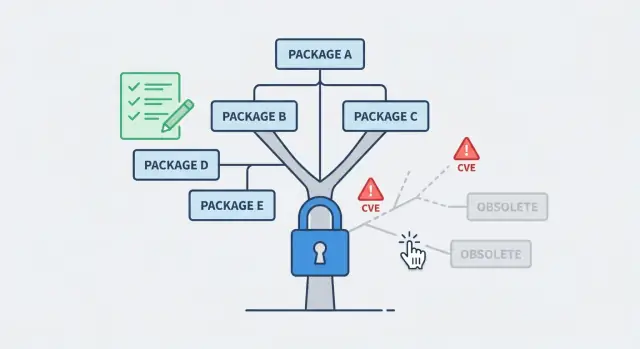
Why prototype dependencies become a problem
Fast prototypes grow by grabbing the quickest package that seems to solve a problem. A date library here, an auth helper there, a UI kit, a CSV parser, a one-off “fix” copied from a snippet. After a few days, nobody remembers what was added, why it was added, or whether it is still used.
That is how dependency and supply-chain cleanup becomes necessary. Supply-chain risk is simple: your app depends on code you do not control. If someone else ships a bad update, gets hacked, yanks a package, or changes behavior, your app can break even if you did not change anything.
It helps to separate three different failure types:
- Bugs: your app logic is wrong (it fails every time in the same way).
- Vulnerabilities: the app can be attacked (it might work “fine” until someone exploits it).
- Outages: installs or builds fail because a dependency changed, disappeared, or no longer matches your environment.
Prototypes are especially exposed because they often have loose version ranges and half-finished experiments. For example, a prototype might pull in three overlapping libraries for uploads, plus a transitive dependency that later gets removed from the registry. Everything works on one laptop, then a new install fails on a fresh server.
A realistic goal is not “perfect security.” It is:
- fewer dependencies that you actually use
- pinned versions with lockfiles
- repeatable installs across machines and CI
- a small, controlled way to accept updates
Teams like FixMyMess often see AI-generated prototypes where this is the main reason “it worked yesterday” turns into “it won’t deploy today.”
What to collect before you touch anything
Before you start dependency and supply-chain cleanup, grab a few basics so you do not “fix” your way into a broken build. The goal is simple: be able to reproduce today’s behavior, measure changes, and roll back fast if something surprises you.
First, get full access to the code and where it runs. That means the repo (including branches and tags), the lockfile (package-lock.json, pnpm-lock.yaml, yarn.lock, poetry.lock, Pipfile.lock, or similar), and the exact commands used to build and start the app. If the app is deployed, capture the deployment target and settings too (hosting provider, environment variables, and any build steps the platform runs for you).
Also decide what you are cleaning up. Runtime dependencies are the ones shipped to users and servers. Dev tooling is for local work (linters, test runners, TypeScript). CI-only tools live only in your pipeline. Mixing these up is a common reason “it worked locally” turns into “it fails in production.”
Here’s the minimum set of inputs that saves hours later:
- The current working commit or the exact deployed version
- The lockfile and package manager version
- One “golden” build command and one “golden” start command
- A copy of current environment variables (with secrets handled safely)
- Notes on where the app runs (Node version, Python version, OS)
Pick a baseline you trust: the current production deploy, or the last known good build from CI. If you do not have one, create it now by building from scratch on a clean machine.
Finally, set a rollback plan before changing packages. Tag the baseline, keep a clean diff, and write down how you will revert. If you inherited an AI-generated prototype with unknown changes, teams like FixMyMess often start with a quick audit so you know what can be upgraded safely and what needs careful testing first.
Map your dependency tree without guessing
Before you remove anything, get a clear picture of what your app actually installs and uses. Dependency and supply-chain cleanup goes wrong when people rely on memory, copy-paste from a template, or assume a package is unused because they do not see it in the code.
Start by identifying which package managers are in play and whether lockfiles exist. One repo can hide multiple ecosystems: a web app with npm plus a Python API with pip, or a monorepo with pnpm workspaces. Lockfiles matter because they tell you the exact versions your deploy will pull, not the versions you wish it pulled.
Next, separate direct dependencies (the ones you chose) from transitive dependencies (pulled in by other packages). Transitives are often where risk and bloat live, but you usually should not edit them directly. Instead, you change the direct dependency that brings them in, or apply an override supported by your tool.
While mapping, flag high-risk areas where a single vulnerable or outdated package can become a real incident: authentication libraries, crypto utilities, file upload and image processing, and database drivers. These are also the areas most likely to break if versions drift.
A quick way to capture the full picture is to record:
- Package managers and lockfiles present (and whether they are committed)
- Top direct dependencies by purpose (auth, DB, uploads, UI)
- The biggest transitive chains (what pulls in what)
- Where packages come from: public registry, git URLs, or local paths
- Any postinstall scripts or build steps that fetch extra code
Example: a rushed AI-generated prototype might install three auth packages, plus a git-sourced fork for one of them. That fork can bypass normal CVE alerts, so you want it marked early before you touch anything else.
Remove unused dependencies safely
Unused packages are not harmless. Every extra dependency is more code you do not control, more updates to track, and more chances for a surprise break. If you are doing dependency and supply-chain cleanup, start by removing what you do not need before you patch and pin.
Begin with an unused-dependency check, then confirm each result with a quick search in the codebase. Tools are helpful, but they do not understand your runtime paths. A package can look unused while still being required by a script, a config file, or a deployment step.
Watch for the usual false positives
Before you delete anything, sanity-check the “unused” callouts against cases that scanners often miss: dynamic imports (for example, loading a module by name), CLI entry points (packages used via a command), build tooling referenced only in config, and code that runs only in production (or only in tests). Also check package scripts like postinstall, build, and migrate, since they may call tools that are not imported anywhere.
When you remove packages, do it in small batches, not all at once. That way, when something breaks you know what caused it.
A simple rhythm that works well:
- Remove 1-3 related packages (for example, old UI libs or unused lint plugins)
- Regenerate lockfiles, then run install from scratch
- Run tests, build, and start the app locally
- Try one real user flow (login, checkout, upload, etc.)
- Commit with a clear message so you can revert fast
If you decide to keep a dependency that looks unused, write down why. A one-line note in your README or a short comment near the config is enough. “Kept because the deployment build calls it” saves hours for the next person.
Example: an AI-generated prototype might include three date libraries, two HTTP clients, and an unused auth SDK. Removing the extras one group at a time often cuts install size and reduces future break risk without changing any product behavior.
Find and patch known CVEs with minimal breakage
Start by running a vulnerability scan and saving the raw output somewhere you can share. You want three details for each finding: severity, the dependency path (which package pulled it in), and the first safe version. Without the path, people often upgrade the wrong thing and the warning comes right back.
If your goal is dependency and supply-chain cleanup, prioritize based on real exposure, not fear. Fix what is reachable in production first (server routes, auth, file handling, payment webhooks). Then handle high-risk dev tooling that could affect builds or publish steps. Low severity issues in test-only packages can wait until the app is stable.
Patch with the smallest compatible change. Prefer upgrading a direct dependency that pulls in the vulnerable package, instead of bumping a dozen unrelated libraries. If a fix requires a major version jump, pause and ask: is this library actually used, and is there a safer alternative? Sometimes the cleanest fix is removal.
After upgrades, re-test the flows that attackers target and users feel.
- Sign up, login, logout, password reset
- Payments or checkout (including webhooks)
- File uploads and downloads
- Admin pages and role checks
- Any public form that writes to your database
Keep notes on what changed, what still remains, and why. That paper trail helps when a scan flags the same CVE next week under a different dependency tree.
A practical example: an AI-generated prototype might include an old auth helper plus two different cookie libraries. The scan flags a critical issue deep in a transitive dependency. The least risky fix is often to upgrade the top-level auth helper to a patched minor version and delete the duplicate cookie package, then confirm login and admin access still work.
If you are inheriting a messy AI-generated codebase, FixMyMess often starts with a quick audit, then applies the smallest set of safe upgrades with human verification so security fixes do not turn into new bugs.
Pin versions and control updates going forward
Fast prototypes break when installs are not repeatable. One person runs npm install on Monday, another runs it on Friday, and they end up with different dependency versions. Lockfiles fix that by recording the exact versions that worked, so every install matches what you tested.
Treat the lockfile as a first-class artifact: commit it, review changes to it, and avoid deleting it “to fix things.” If the lockfile changes unexpectedly, that is a sign you are pulling new code from the internet, even if your own code did not change.
Where stability matters most, pin versions on purpose. For example, keep exact versions for auth, payments, database clients, and build tools. For less critical tooling (linters, formatters), allowing minor updates can be fine if you have quick checks.
A simple policy that prevents surprises:
- Commit lockfiles and fail CI if they are out of sync.
- Pin critical packages; allow ranges only for low-risk dev tools.
- Batch updates (weekly or biweekly), not a constant drip of tiny bumps.
- Require a short review plus a smoke test before merging updates.
- Keep a rollback plan (previous lockfile + tag) for fast recovery.
Automated update bots can help, but only if you control the flow. Set rules so updates come in grouped PRs, run a minimal test suite, and deploy to a staging environment first. Even a 5-minute smoke test (login, one write to the database, one key page load) catches most breakage.
Private or forked dependencies need ownership. Keep them in a single place, document who maintains them, and track changes with clear version tags. If you inherited an AI-generated prototype (the kind FixMyMess often repairs), forks appear a lot - naming them clearly and pinning them avoids “mystery code” updates later.
This is the core of dependency and supply-chain cleanup: repeatable installs today, controlled change tomorrow.
A practical workflow you can follow step by step
If you want dependency and supply-chain cleanup to go smoothly, treat it like a small migration, not a quick tidy-up. The goal is simple: know what you rely on, change one thing at a time, and always keep a working build you can ship.
Start by writing down what must not break. For most prototypes, that is login, payments, file upload, background jobs, and anything that touches production data. Run the app and click through these paths so you can spot breakage fast.
Here is a workflow that works well for rushed codebases:
- Inventory what you have. Export a list of direct dependencies and lockfile entries. Mark which features depend on them (for example, "auth", "emails", "database").
- Remove unused packages in small batches. Delete 1 to 3 dependencies at a time, rebuild, and run a quick smoke test. If anything breaks, revert that batch and try smaller cuts.
- Patch vulnerabilities by severity. Fix high severity CVEs first, then medium, then low. Prefer the smallest safe version bump, and re-test your critical paths after each change.
- Make lockfiles non-optional. Ensure local setup and CI both install from the lockfile, and fail the build if the lockfile is missing or out of sync.
- Add a tiny release checklist plus rollback. Before deploy: install fresh, build, run basic tests, and confirm secrets are not bundled. Keep a rollback plan (last known-good build or tag) so you can recover quickly.
If this is an AI-generated prototype, expect hidden surprises like duplicate libraries, unused SDKs, or packages added for a feature that never shipped. Teams like FixMyMess often start with a quick audit to identify which changes are safe to batch and which need careful, manual verification.
Common mistakes that create outages or new bugs
Most prototype breakages during dependency and supply-chain cleanup happen for predictable reasons: changes are made faster than the app can be checked end to end. The goal is not to avoid updates, but to update with proof.
A common trap is running an auto-fix command that quietly upgrades major versions. It looks like progress, but major bumps often change defaults, remove options, or alter build output. You only notice after deploy, when auth redirects stop working or server routes return 404.
Another frequent cause is deleting packages because they seem unused, without checking how the app starts in each environment. Many AI-generated prototypes switch behavior based on environment flags (like production vs preview) or dynamic imports. A package can look unused in local runs but be required in a production build step.
Here are mistakes that often create outages or new bugs:
- Applying bulk “fix all” upgrades that include major version jumps without testing key flows.
- Removing dependencies without checking runtime entry points, build scripts, and environment-specific paths.
- Ignoring transitive dependencies (the deps your deps pull in) that can introduce risky packages even if your direct list looks clean.
- Updating packages and accidentally shipping exposed secrets or permissive configs (for example, debug mode enabled, wide-open CORS, or a newly added sample .env).
- Assuming dev-only tools cannot affect production: bundlers, linters, and build plugins can change output, tree-shaking, or env injection.
A simple example: a rushed prototype uses a build plugin only in “production” mode. You remove it because the app runs locally, but the production build now fails, and the deploy is stuck.
If you’re inheriting an AI-generated codebase, this is where small surprises pile up fast. FixMyMess often starts with a quick audit to find the hidden build dependencies, transitive risks, and secret leaks before any changes go live.
Quick checklist before you deploy
Right before you ship, do a short dependency and supply-chain cleanup pass. The goal is not perfection. It is to make the build repeatable, reduce surprise breakage, and know what risks you are accepting.
Pre-deploy checks (15 to 30 minutes)
- Do a clean install from scratch using only the lockfile (new folder or fresh container). If it fails, fix that first.
- Scan your manifest for direct deps you no longer use, then remove them and re-run tests. Keep changes small so you can spot what broke.
- Review security alerts and fix the high-severity ones you can patch without large refactors. If you cannot fix one today, write down why you are accepting it and when you will revisit.
- Run a quick smoke test on the most important paths: sign up/login, one main “happy path” action, and any payment or data export flow.
- Deploy with a clear rollback plan (who does it, how long it takes, and what “bad” looks like).
If you are working with both npm and pip, do the same for each ecosystem: clean install, remove extras, patch what you can, and confirm the app still behaves the same.
Rollback readiness
A rollback is your safety net when a dependency update breaks production.
- Keep the last known-good build artifact or release tag available.
- Make sure config and secrets are compatible with the previous version.
- Verify your database changes are reversible (or delayed until after deploy).
- Confirm your monitoring will show errors quickly (basic logs and a health check).
If this is an AI-generated prototype, this step often finds hidden risks like unused auth libraries or outdated packages. Teams like FixMyMess usually start here before deeper repair, because it prevents repeat outages while you fix the bigger issues.
Example: cleaning up a rushed AI-generated prototype
A founder ships a demo built with an AI code tool. After a few prompt rounds, the repo now has a huge package list: a React UI kit, three date libraries, two auth SDKs, unused server helpers, and a Python script folder with extra ML packages that never run. Installs are slow, warnings scroll for pages, and nobody knows which dependency is actually needed.
Here’s a dependency and supply-chain cleanup sequence that keeps risk low while you reduce the mess.
First, take an inventory. Capture the exact install state (lockfiles included), record the runtime versions (Node, Python), and run the app once to confirm the current behavior. Then map what’s actually used: search for imports, check build output, and compare that with what’s listed in package manifests.
Next, remove dead weight in small batches. Instead of deleting half the dependencies at once, pick the obvious duplicates (like two HTTP clients), remove one, reinstall, and run a basic smoke test. Repeat until the dependency list matches what the app truly uses.
Then patch known vulnerabilities with minimal breakage:
- Run your package security audit and export the results
- Patch direct dependencies first, then reassess transitive ones
- For risky upgrades, test only the areas that dependency touches (auth, uploads, payments)
- If you must postpone a patch, write down why and set a reminder date
A realistic “left-pad” style failure: the build suddenly breaks because a tiny transitive package gets yanked or republished with a breaking change. If you rely on floating versions, your next install can pull a different tree even if your code did not change. Pinning versions with lockfiles reduces that impact because installs stay consistent across machines and days.
The end state is easy to feel: faster installs, fewer warnings, and a shorter list of dependencies you can explain. For teams that inherited an AI-generated prototype, FixMyMess often starts with this exact cleanup so the codebase is stable before deeper work like auth fixes or security hardening.
Next steps to keep your prototype stable
Dependency work only sticks when someone owns it. Pick a clear owner for dependency and supply-chain cleanup: the founder for small apps, the agency if they are still shipping changes, or a named maintainer if the app is moving toward production. “Everyone” usually means “no one”, and that’s how old packages and risky transitive updates sneak back in.
Set a simple rhythm you can actually keep. Weekly, do a quick scan to catch urgent advisories and surprise updates. Monthly, do a deeper review where you decide what to update, what to pin, and what to remove. If you wait until “after launch”, you’ll be doing it during an outage.
A practical cadence that works for many teams:
- Weekly (15 minutes): run your security audit and check for unexpected version changes
- Monthly (60-90 minutes): update a small batch of packages, re-run tests, and refresh lockfiles
- Quarterly: review high-risk packages (auth, crypto, upload, database drivers) and replace if needed
If your codebase was generated quickly (especially with AI tools), instability often comes from a mix of fragile dependencies, copied snippets, and half-configured auth or deployment scripts. In that case, don’t just “update everything”. Do a focused audit first, then repair the critical paths (login, payments, database access, build pipeline) so updates stop breaking the app.
A good sign you need outside help: you patch one CVE and three other things break, or you can’t explain why a package is installed.
If that’s where you are, FixMyMess can run a free code audit and then remediate the problems fast (most projects take 48-72 hours), including dependency cleanup, security hardening, and making the prototype production-ready.
Before each release, keep one short rule: if you can’t rebuild from scratch on a clean machine using your lockfiles, you’re one bad update away from downtime.