Direct-to-object-storage uploads that avoid timeouts
Direct-to-object-storage uploads prevent timeouts by sending big files straight to storage, using signed URLs and resumable upload steps that keep apps responsive.
Why large uploads keep failing in real apps
Users notice it fast: the progress bar crawls to 90%, then freezes. They refresh, try again, and it fails somewhere else. On mobile or shaky Wi-Fi, it starts to feel like gambling, even when the file is fine.
When uploads fail, people don't just lose time. They lose trust. A creator who spent 20 minutes exporting a video won't happily re-upload it three times. A recruiter attaching a big portfolio will abandon the form. Then your team gets the fallout: "It's stuck," "It says failed," "Where did my file go?"
Retries often make things worse. Many systems restart from zero, burn bandwidth, and leave behind duplicate "almost uploaded" files or half-finished database records. If your app saves metadata before the upload truly finishes, you end up with entries that look real but point to nothing.
Large uploads stress the weakest parts of a typical stack. Long-lived connections time out. Proxies and load balancers cut requests off. Servers spike CPU and memory if they buffer big payloads. One slow upload can tie up resources meant for everyone.
The goal is simple: make big files upload reliably without turning your app server into a fragile middleman. Direct-to-object-storage uploads do that. Instead of pushing gigabytes through your backend, the user's device uploads straight to storage. Your app focuses on permissions, tracking, and confirming the final result.
This is also where prototypes often crack: they "work on small files," then collapse in production.
What usually causes upload timeouts
Most upload timeouts happen because your app server is acting like a relay. The browser sends a huge file to your server, your server holds that connection open, then forwards the same bytes to object storage. If the user is slow, your server is stuck waiting. Meanwhile, memory and CPU rise, and other requests start to lag.
Timeouts can also come from anywhere along the path. A single limit is enough to kill an upload even if everything else is healthy: the browser tab (backgrounding, sleep, network switches), a proxy or load balancer with a hard request limit, your app server's worker timeouts, framework body size and parsing limits, or the storage client call itself.
The usual reaction is "just increase the timeout." That might buy you a day, but it rarely fixes the root problem. Bigger timeouts mean more long-running connections, and overload becomes more likely. One person uploading a 2 GB video on shaky Wi-Fi can occupy a worker for minutes, and suddenly normal users see slow pages or failed logins.
Picture a common scenario: a user uploads from coffee shop Wi-Fi. Halfway through, the connection drops for 10 seconds. The browser retries, your server is still holding a half-finished request, a proxy kills it at 60 seconds, and the user gets "Upload failed" with no clear reason.
Direct-to-object-storage uploads help because they remove your app server from the heavy data path.
What direct-to-object-storage uploads mean (plain English)
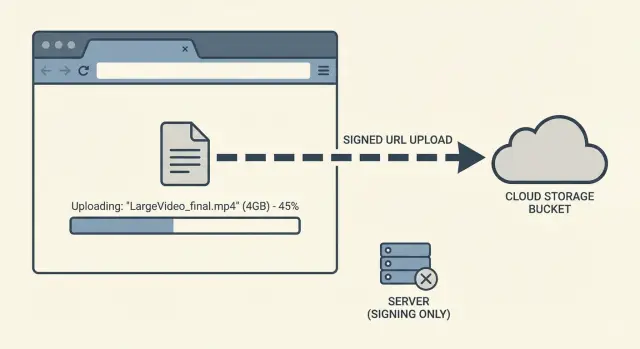
Direct-to-object-storage uploads means the file goes straight from the user's device (browser or mobile app) to your storage bucket, instead of traveling through your app server first. Your app still runs the show, but it doesn't carry the file bytes.
Think of it like this: your server hands the user a one-time, limited permission slip. The user uses it to upload directly to storage. That permission can be locked down to a single file, a single destination, and a short time window.
In practice, your backend does three small jobs:
- confirm the user is allowed to upload
- create the short-lived upload permission (often a signed URL)
- record metadata and later verify the upload finished
The win is immediate: fewer timeouts, less server bandwidth pressure, and a smoother experience. Storage services are built to accept lots of large uploads at once.
A simple example: a founder tests by uploading a large demo video. With "upload through my server," the request can die at 60 seconds, 120 seconds, or whenever a proxy decides it's waited long enough. With the direct approach, the browser uploads to storage, and your app only handles a quick "start" request and a quick "confirm" request.
Signed uploads: the safe way to let users upload directly
A signed upload is that short-lived permission slip your backend creates so a user can upload a file to object storage without your app server sitting in the middle.
The "signed" part matters because the URL (or form fields) includes proof your backend approved the upload under specific rules. If someone copies the URL later, it should be useless because it expires quickly and only allows a narrow action.
What limits should a signed upload include?
Signed uploads should be strict by default. Good limits include an expiration time (minutes, not hours), a hard file size cap, allowed content types (for example, video/mp4 or image/png), and a locked destination key or path pattern so users can't overwrite other files. If you rely on metadata (like an owner ID), validate that too.
A typical flow: the user selects a 1 GB video. Your backend checks their account and the expected file type and size. Then it returns a signed URL valid for, say, 10 minutes. The browser uploads directly to storage, and your backend gets a small "upload completed" message afterward.
Single shot vs multipart uploads
Use a single-shot signed URL when files are small enough that one request usually finishes, and you don't need resume.
For bigger files, prefer multipart uploads. Multipart splits the file into chunks so you can retry only the failed part instead of restarting from zero. That's often the difference between "works on office Wi-Fi" and true reliability.
Resumable strategies that survive flaky connections
Big uploads fail for boring reasons: Wi-Fi drops, a laptop sleeps, a phone switches networks. If your upload depends on one long, continuous request, any hiccup can force the user to start over.
Resumable uploads fix that by turning one fragile transfer into many small, retryable transfers. This pairs naturally with direct-to-object-storage uploads because your app server isn't babysitting a huge file for minutes.
How resumable uploads work
Instead of sending the whole file at once, the client splits it into parts (chunks). Each part uploads separately, and the system tracks what arrived.
A simple approach:
- split the file into fixed-size chunks (for example, 5-25 MB each)
- upload chunks in order (or a few in parallel) and record completed chunk numbers
- retry only the chunks that fail, with backoff (wait a bit longer each retry)
- resume later by asking, "Which chunks do you already have?" then continue
- finalize by telling storage to assemble the parts into one object
If the browser crashes or the device sleeps, the next session can pick up from the last confirmed chunk.
What users should experience
Resumable isn't just a backend choice. It changes how the upload feels. Users should see progress based on confirmed chunks and get controls that match real life: pause, resume, and a clear "reconnecting" state when the network stutters.
Example: someone uploads a 3 GB video on a train. The connection drops twice. With resumable uploads, they only re-send two missing chunks, progress stays honest, and the upload finishes without the "start from 0%" frustration.
Step by step: a reliable upload flow you can implement
A reliable flow keeps your app server out of the data path. Your server sets the rules and confirms outcomes. The browser sends the file straight to object storage.
A practical sequence:
- Client asks to upload (metadata only). Send file name, size, type, and context (project, user), but not the file itself.
- Server validates and returns signed upload info. Enforce limits, create a draft record in your database, then return signed upload info plus an upload ID/key.
- Browser uploads directly and shows progress. Upload from the client to storage and update progress. If you support chunking, store chunk state locally so a refresh can continue.
- Client confirms completion. After storage reports success, the client calls your server with the upload ID/key and expected size.
- Server verifies and finalizes. Confirm the object exists, matches size/type, and belongs to the right user. Then mark the record as ready.
A small detail that prevents a lot of pain: treat the upload as a state machine. "Draft" isn't "ready." Only flip to "ready" after server-side verification.
Keep post-upload work out of the upload request. Queue tasks like thumbnails, virus scanning, or video transcoding so users aren't stuck waiting and timeouts don't stack.
Making uploads feel trustworthy for users
People forgive a slow upload. They don't forgive a confusing one. Even with direct-to-object-storage uploads, the connection is usually the weak link, so your UI has to set expectations and keep its promises.
Make progress feel honest. A percentage alone is misleading for large files because speed changes. Show uploaded size out of total size, and treat "time left" as an estimate. If the upload is stalled, say so. "Paused, trying to reconnect" beats a frozen 72%.
A simple pattern:
- show uploaded MB of total MB and current speed
- show an ETA only after a few seconds of stable transfer
- detect no progress for N seconds, then switch to "reconnecting"
- offer a clear "Pause" or "Retry" action
Uploads also feel safer when they survive normal behavior. If someone refreshes, closes the tab, or their laptop sleeps, keep enough state locally (file name, size, upload session ID, completed parts) to resume instead of restarting.
When errors happen, be specific and give a next step. "Upload failed" is useless. "Your connection dropped. We saved your progress. Click Resume." is reassuring. If the user picked the wrong file type or exceeded a limit, say what's allowed.
Accessibility matters because upload status is time-based. Use readable status text (not just color), keep focus on the action the user clicked, and announce key changes (started, paused, resumed, complete) so keyboard and screen reader users aren't left guessing.
Common mistakes and traps to avoid
The biggest trap with direct-to-object-storage uploads is assuming "the browser handled it, so we're done." Storage is reliable, but your app still has to control access, confirm completion, and keep your database honest.
Trusting the browser too much
A signed upload proves the user had permission at the start. It doesn't prove what they uploaded, or that the upload finished.
After upload, verify on your server that the object exists and matches the expected size and content type, that it landed in the correct path/prefix for that user or project, and that any metadata you rely on matches. Only then mark the upload as "ready."
Signed URLs that are too permissive
Some systems "fix" timeouts by making signed URLs last for hours and allowing any file. That's risky. Keep the URL short-lived and narrowly scoped: limit size, limit MIME types, and lock the destination path.
Records for uploads that never finished
If you create a database record as "uploaded" before confirmation, you'll accumulate broken entries and missing files. Create it as "pending," then switch to "uploaded" only after you confirm the object exists (or after a storage callback event if you use one).
Heavy processing inline
Don't make the user wait while you transcode video, scan files, or generate thumbnails. Accept the upload, confirm it, then queue processing in the background and show clear status.
Accidentally sending files through your API
If your frontend falls back to posting the file to your API when direct upload fails, you're back to timeouts. Keep auth and control traffic on your API, but keep file bytes going straight to storage.
Quick checklist before you ship
Before you call the upload feature "done," run a quick pass on reliability and safety. Most upload bugs only show up when real users try big files on shaky Wi-Fi, or when background work takes longer than your HTTP timeout.
- Resume works without starting over. If the connection drops at 80%, the user should continue from where they left off.
- Limits are enforced before permission is granted. Check type and size early and refuse to issue upload permission for files you'll never accept.
- Signed permissions are short-lived and tightly scoped. One file, one path, one method. Not "upload anything anywhere."
- Completion is verified in storage. Don't mark an upload "done" because the client said so.
- Heavy work is moved out of the upload request. Convert, scan, OCR, and thumbnail after upload.
If processing takes time, show two separate statuses: "Uploaded" and "Processing." Users trust systems that explain what's happening.
A realistic example: a big video upload that does not fail
A creator sits in a cafe trying to upload a 3 GB video. The Wi-Fi drops for a few seconds now and then, and their laptop goes to sleep once. They still expect the upload to finish without starting over.
With the old approach, the browser uploads the whole file to your app server first, then your server forwards it to object storage. After 30 to 120 seconds (depending on your setup), something times out: the load balancer, a reverse proxy, a serverless limit, or a single slow request. The user sees an error, refreshes, and the upload restarts from 0%. Support gets a message like, "I tried three times and it never works."
Now compare that to direct-to-object-storage uploads using a signed URL plus resumable uploads. Your app server only hands out short-lived permission and an upload plan. The browser sends the file straight to storage in parts (for example, 10-50 MB chunks). When the cafe Wi-Fi blips, only the current part fails.
Instead of losing everything, the client retries the failed chunk, continues from the last confirmed part, keeps progress believable, and finishes even if the connection is imperfect.
Your product team can measure the difference quickly: upload completion rate, average retries per upload, and time to first playable or processable asset. The best sign is fewer support requests about "uploads stuck" or "uploads restart," because the system recovers quietly and your app server stays responsive.
Next steps if your current upload flow is already messy
If uploads are already flaky, don't rebuild everything at once. The fastest wins come from narrowing scope, making failures visible, and removing the riskiest part (your app server proxying large files).
Start with one upload type, like videos or PDFs. Pick the one causing the most support tickets or the largest files. Keep the old path for other types until the new one proves itself.
Before changing behavior, add basic tracking so you can see what's breaking. Timeouts often hide multiple issues: slow networks, retry storms, misconfigured CORS, expired tokens, and users leaving the tab.
A cleanup plan that tends to work:
- migrate one screen and one file type to direct-to-object-storage uploads
- instrument upload start, bytes sent, completion, and a clear failure reason
- confirm your auth boundaries: mint short-lived signed permissions, never ship long-lived keys to the browser
- remove exposed secrets and tangled logic (hardcoded keys, duplicated endpoints, mixed responsibilities, endless retry loops)
- centralize the upload flow (one client module, one API endpoint that issues signatures)
If you inherited an AI-generated app, spend extra time on authentication and secrets handling. "It works on my machine" prototypes often skip server-side checks or couple uploads to your app server in ways that collapse under real traffic.
If you want a second set of eyes, FixMyMess (fixmymess.ai) can run a free code audit to find the upload and security issues, then help repair the flow so it's production-ready.
FAQ
Why do large uploads fail even when my server seems fine?
Most failures happen because the upload is going through your app server first. That creates a long-lived request that can be cut off by a browser, proxy, load balancer, serverless limit, or your server’s own worker timeout. Moving the file bytes out of your backend (direct-to-object-storage) removes the most fragile part of the path.
What exactly should my backend do in a direct-to-object-storage upload flow?
Your server should only handle permission, tracking, and verification. It can validate the user, create a short-lived signed upload permission, create a draft database record, and finalize the record after it verifies the object exists in storage. The server should not stream or buffer the file itself.
What is a signed upload, and why is it safer?
A signed upload is a short-lived permission your backend creates that lets a client upload directly to object storage under strict rules. It’s safer than exposing long-lived credentials because it expires quickly and can be limited to one file, one destination, and specific constraints.
What limits should I put on signed upload permissions?
Start strict and relax only if you have a clear reason. Use a short expiration (minutes), a hard size cap, allowed MIME types, and a destination key or prefix that prevents overwriting other users’ files. These limits reduce abuse and also prevent confusing “uploaded but unusable” files.
When should I use multipart uploads instead of a single signed URL?
Use single-shot uploads for small files where a single request reliably completes. Use multipart (chunked) uploads for large files or when you need resume, because a single network hiccup won’t force a restart. Multipart is the practical choice for real users on mobile data or unstable Wi‑Fi.
How do resumable uploads actually work in practice?
Chunk the file into parts, upload parts independently, and keep track of which parts completed. If the connection drops, retry only the missing parts and continue. The key is storing enough state (like an upload session ID and completed part numbers) so a refresh or restart can pick up where it left off.
How do I keep my database from filling with “uploaded” records that have no file?
Don’t mark an upload as complete just because the client says it is. After the client reports success, your server should check storage to confirm the object exists and matches expected size and type, then flip the database record from “pending” to “ready.” This prevents broken records that point to missing files.
What UI changes make uploads feel more trustworthy to users?
Show progress based on confirmed bytes, not just a percentage that can freeze. Tell users what’s happening when progress stalls, like “Reconnecting,” and provide a clear resume or retry action. If possible, preserve state so a refresh doesn’t restart from zero, because that’s the fastest way to lose trust.
Why shouldn’t I transcode or virus-scan during the upload request?
Inline processing increases the chance of timeouts and makes the user wait for work that doesn’t need to block the upload. Accept the upload, verify it, then run scanning, thumbnailing, or transcoding in the background with a separate “Processing” status. This keeps the upload path fast and predictable.
My current upload code is messy (and partly AI-generated). What’s the fastest way to fix it?
Start by migrating one screen and one file type to a direct-to-storage, verified state-machine flow, then measure completion rate and failure reasons. If the codebase is AI-generated, prioritize checking auth boundaries, removing exposed secrets, and eliminating accidental fallbacks that route file bytes through your API. If you want, FixMyMess can do a free code audit and repair the upload flow so it holds up in production.