Document approval workflow with AI tools you can trust
Build a document approval workflow with AI tools that logs approvers, timestamps, versions, and decisions so you can prove who approved what and when.
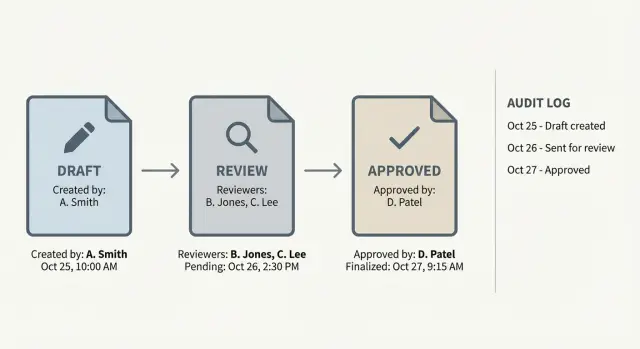
Why document approvals get messy
Approvals often start out fine: someone shares a draft in email or chat, a few people reply “looks good,” and everyone moves on. It falls apart the first time a comment is missed, the wrong file is attached, or a key approver is out. Suddenly you have a pile of messages that feel like proof, but don’t answer the basics.
Email and chat are especially bad at one thing: keeping approval intent tied to the exact version that was reviewed. A “yes” in a thread usually means “the latest doc,” but “latest” changes every time someone uploads a new file, renames it, or copies the text elsewhere.
The same problems show up again and again: ownership is unclear (who’s driving it to the finish line), timestamps are scattered across tools (or missing), and there’s no single “final” version everyone agrees is the approved one. It gets worse when feedback arrives in parallel and different people approve different drafts without realizing it.
When people ask for “records you can trust,” they typically mean you can quickly show what was approved, who approved it, and when, without digging through screenshots or debating which attachment was “the one.” A trustworthy record also explains what changed after feedback and whether the final version was re-approved.
AI tools can help summarize feedback and route tasks, but they don’t solve the core issue on their own. You still need a workflow that locks approvals to specific versions and captures actions automatically.
You usually need a formal process when the document affects customers, money, or legal risk; when more than a couple of people must sign off; when approvals repeat every week or month; or when audits and contract terms require proof. A simple rule: if you’d feel nervous defending the approval later, your process is already too messy.
What a trustworthy approval record includes
A reliable approval record is more than a green checkmark. It should answer five questions without guesswork: who approved, what they approved, when it happened, why they decided that way, and what evidence exists if it’s challenged later.
To make that happen, capture a consistent set of details every time:
- Who: a real identity (name tied to a unique account), their role (for example, Finance approver), and confirmation they had permission to approve that document type.
- What: the exact document and exact version (not just a filename), plus a short summary of what changed since the previous version.
- When: a system timestamp with a clear rule for time zones (store in UTC, display in the viewer’s local time).
- Why: the decision (approved or rejected) plus required fields or notes that make the decision meaningful (like budget code or risk category).
- Proof: an audit log that isn’t casually editable, backed by access controls so only the right people can view or export it.
Example: your team approves a vendor contract. The record should show it was Contract v7, edited by Sam at 10:14 with “updated payment terms,” approved by Dana (Finance) at 16:02, with a note like “within budget; matches PO #1834.” That’s the difference between “we think it was approved” and a record that holds up.
Two details often decide whether the record survives scrutiny:
-
Immutability: approvals should be append-only. If an admin can rewrite history, you don’t have an audit trail.
-
Permissions: logs should show who viewed, approved, and who attempted an action without authority. “Denied” events matter.
Define roles, rules, and where documents live
A document approval workflow with AI tools only stays trustworthy when responsibilities are clear first. If people don’t know who can edit, who can request changes, and who can give final sign-off, you’ll get approvals that look real but don’t mean much.
Start with roles in plain language:
- Author: writes the draft, responds to comments, submits for review.
- Reviewer: checks accuracy and completeness, requests changes, but doesn’t give final approval.
- Approver: makes the final decision and is accountable for it.
- Admin: manages access, templates, and retention rules.
Then set approval rules that match the risk. One approver is fast, but higher-impact documents often need at least two sets of eyes. A practical default is one approver for low-risk docs and two for anything that affects customers, money, or legal obligations.
Next, decide where the document lives during the process. The goal is one source of truth, not attachments floating around inboxes. File storage can work if you lock editing during approval. An in-app editor often makes versioning and comment history easier. A hybrid setup is fine if you clearly state which system is the system of record.
AI is most useful for drafting, summarizing changes, and routing items to the right reviewers based on simple tags. Don’t let AI act as the approver. Approvals should be tied to a real person’s identity and permission level.
Finally, decide what you must store for audits or compliance before you roll anything out. If you build first and ask retention questions later, you’ll spend more time patching records than improving the workflow.
Step-by-step: a simple approval workflow you can follow
The best workflows are boring and repeatable. Everyone knows what happens next, and the system can prove what happened later.
- Start an approval request with the document location, the purpose (what decision it supports), and the owner (who answers questions). If the doc isn’t in a shared place, move it before review starts.
- Gate the request with required fields like title, department or project, expected impact, and what kind of approval is needed (legal, finance, security, brand).
- Send to reviewers with a due date and clear instructions on what to check. Keep reviewer selection tight: one primary reviewer per area beats a crowd.
- Collect feedback in one place and default to “request changes” when something is unclear. Ask reviewers to mark comments as required vs optional.
- Route to the final approver with a clear statement: “This is the version ready to approve,” plus a short summary of what changed since the last review.
When it’s approved, finish with a real record, not a thumbs-up in chat. Freeze the approved version (lock it or move it to an Approved area), record who approved what version and when, and notify stakeholders so nobody keeps reviewing old drafts.
Example: a startup founder approves a new customer contract template. Reviewers request edits, the author submits Contract v3, and the system locks that exact file and logs the timestamp. Months later, you can point to one approved version and one decision record.
Version control: stop people approving the wrong draft
Most approval chaos starts with one simple problem: people aren’t looking at the same file. Versioning needs to be obvious and hard to misunderstand.
Label versions so the right file wins
Use a version label that’s easy to read and consistent. Put it in the filename, inside the document (header or footer), and in the approval request.
A practical pattern:
- Document name + version (v1.0, v1.1, v2.0)
- Status (DRAFT, REVIEW, FINAL)
- Date (YYYY-MM-DD)
- Owner initials
One rule that prevents a lot of pain: don’t send an approval request for anything labeled DRAFT.
Require a change summary every time
Every new version should include a short change summary. Without it, reviewers re-read everything or approve based on assumptions.
Keep it small and structured: what changed, why it changed, what needs review, and what didn’t change. AI can draft the summary from edits, but the author should confirm it’s correct before it goes to approvers.
Keep old versions, but lock them
Don’t delete drafts. Mark older versions as “Superseded” and make them read-only. Preserve history without allowing accidental reuse.
A practical approach: after v2.0 is approved, freeze all v1.x versions. Any change becomes v2.1, not an edit to v2.0.
Treat attachments as part of the version
Approvals often depend on attachments like spreadsheets, screenshots, or redlines. Tie them to the exact document version (for example, “Attachment A for v1.2”) and store them together. If an attachment changes, the document version should change too.
Audit trail and permissions that hold up later
A document approval workflow with AI tools is only as strong as its audit trail. If someone asks “Who approved this, and what exactly did they approve?” you should be able to answer without digging through chat history.
What to log
Log the smallest set of events that still tells the full story, and log them automatically. Each event should include the actor, action, timestamp, and outcome.
At minimum, record:
- Document ID and version (or an immutable revision number/file hash)
- Action (submitted, approved, rejected, revoked, overridden)
- User ID and role
- Timestamp with a clear time zone rule
- A short note (required on reject or override)
Store approval evidence with the record, not in a separate message thread. If an approval has conditions, capture them as structured fields, not just free text.
Permissions that reduce risk and confusion
Most audit failures come from blurry permissions. Keep roles explicit:
- Authors can edit drafts but can’t approve their own work.
- Approvers can approve or reject but can’t edit content.
- Admins can manage users and settings but shouldn’t be able to change past log entries.
- Auditors can view logs and exports but can’t change anything.
Make logs append-only. If something changes, create a new event (“approval revoked”) rather than overwriting history. Where overrides exist, require extra justification and tighter controls.
Example: Legal approves v3 at 10:42. The document is edited at 11:05. The system should mark v3 as outdated and block approval reuse. The next approval must reference v4.
Notifications, rework loops, and exceptions
Speed only helps if people actually see requests and know what to do next. The goal is steady progress with clear records, not notification spam.
Notification rules that keep work moving
A few simple rules beat a complex setup nobody understands:
- Send one clear request when approval is needed, including document title and version.
- Add reminders on a schedule (for example, after 24 hours and again after 48 hours).
- Escalate to a backup person after a defined delay.
- Respect quiet hours.
- Bundle low-priority updates (like comments) into a daily summary.
If you notice people approving from the notification alone, change the message so it forces them to open the exact version being approved.
“Request changes” without losing context
A good rework loop keeps the why attached to the what. When someone requests changes, capture a short reason and point to the exact section (page, paragraph, or heading). Route it back to the author with the discussion still visible.
When someone rejects, decide the outcome upfront: is it a rework (same request continues) or a cancel (the request ends and must be restarted)? Rework is best when the direction is still valid. Cancel is safer when the scope changes or the wrong document was submitted.
Exceptions: out-of-office, delegates, and stalls
Exceptions are where records get fuzzy, so plan for them:
- Out-of-office: allow delegation and record who delegated to whom and for how long.
- Reviewer swap: record the reason (left team, conflict, unavailable).
- Partial approvals: avoid unless you can clearly mark what was approved and what wasn’t.
- Stalled requests: after escalation, pause or cancel instead of letting them linger.
Example: Legal requests changes on v3. The author updates to v4 and resubmits in the same request thread. Legal re-approves v4, while Finance’s v3 approval stays tied to v3 and doesn’t silently carry forward.
Common mistakes that make records hard to trust
Trust breaks when approvals feel automatic instead of accountable. Faster approval workflows only help if you can still answer later: who approved, what version they approved, and whether anything changed after.
The biggest failures tend to be:
- Identity gaps: bots approving on someone’s behalf, shared accounts, or unclear role authority.
- Version mismatch: approvals not tied to a fixed version (immutable revision, locked snapshot, or file hash).
- Silent edits after approval: “minor edits” allowed without re-approval.
- Security and privacy leaks: sensitive data pasted into AI prompts, comments, or logs, leading teams to delete evidence and create gaps.
- No clear owner for disputes: nobody accountable to pause, override, or document exceptions.
Example: Legal approves a vendor contract on Monday. Sales edits a clause on Tuesday “to fix wording” and sends it out. If the system still shows “Approved,” the record looks clean but is misleading.
Approval workflow checklist before rollout
Before you invite the whole team, run a quick trust test. If any item feels “kind of true,” fix it now.
- Each approval record clearly shows who approved (unique identity), what they decided, when they did it, and which exact version they reviewed.
- Approved files are locked or clearly read-only, so nobody can quietly edit after sign-off.
- Only the right roles can approve, override, or reopen approvals, and those actions are logged like normal approvals.
- The audit log is readable and exportable without screenshots or manual cleanup.
- You’ve tested a full reject path (revise and re-approve), not just the happy path.
Run one end-to-end test with a real document and 2 to 3 real people (not the project owner). Don’t coach them. Then review the records like a skeptic: does the second approval point to the new version, and does the first rejection remain visible in history?
Example workflow and next steps
Picture a 6-person team updating a security policy or approving a client contract. They want speed, but they also need trustworthy approval records that still make sense months later.
Keep the first rollout simple: one shared home for the document, one owner, and two roles (Reviewer and Approver). Every material change creates a new version.
A clean small-team flow:
- Owner submits v3 for review, and the system marks it “Under review.”
- Reviewer approves or requests changes with a short note.
- If changes are needed, the owner edits and submits v4 (not v3).
- Approver gives final approval on a specific version (v4), and that version is locked.
Final approval should be recorded as an event, not a chat message. Store the document ID and exact version, approver name and role, timestamp, decision, and any required attachments.
If you’re relying on an AI-built internal tool to run this and you’re seeing issues like editable logs, version mix-ups, or broken permissions, FixMyMess (fixmymess.ai) can diagnose the codebase and harden it so approvals, audit trails for approvals, and document version control approvals actually hold up in production.
FAQ
When do we actually need a formal approval workflow instead of email or chat?
Start when the document affects customers, money, legal risk, or security, or when more than a couple of people must sign off. If you’d feel uneasy defending the approval months later, you need a tighter process now.
How do we stop people from approving the wrong document version?
Tie every approval to a specific version, not “the latest file.” Freeze or lock the approved snapshot, and require a new version (with a new approval) for any material change.
What information should an approval record include to be trustworthy?
A trustworthy record shows who approved, what exact version they approved, when it happened, why they decided that way (at least a short note when needed), and proof in an audit log that isn’t casually editable. If any of those pieces are missing, you’ll end up arguing about what “was approved.”
Who should be allowed to approve vs review documents?
Keep roles simple and explicit: an author prepares the draft, reviewers request changes, and an approver gives the final decision. Don’t let people approve their own work, and make it clear who owns moving the document to the finish line.
What parts of the workflow can AI help with safely?
Use AI to summarize feedback, draft change summaries, and route the request to the right people. Don’t let AI be the approver; approvals should be tied to a real person’s identity and permissions.
What should we log in the audit trail, and how strict should it be?
Store a consistent minimum set: document ID and version, action taken, user identity and role, timestamp (store in UTC), outcome, and notes on reject or override. Make the log append-only so changes create new events instead of rewriting history.
How do we handle out-of-office approvers and delegation without breaking the record?
Allow delegation, but record who delegated to whom and for what time period, and keep the delegate’s action visible in the log. If you can’t clearly show the chain of responsibility, delegation will weaken trust instead of improving speed.
How should we handle attachments like spreadsheets or redlines during approval?
Treat attachments as part of the version being approved by storing them together and labeling them to match the document version. If an attachment changes, the document should get a new version and go back through approval.
What’s the best rule for edits after a document is approved?
Don’t let approved content be edited in place, even for “minor wording.” If something changes after approval, create a new version and require re-approval so the record stays honest.
Our AI-built approval tool has editable logs and broken permissions—what can we do?
Often it’s because the workflow app wasn’t built with immutable logs, strict permissions, and version locking, especially if it was generated quickly by an AI coding tool. FixMyMess can audit the codebase and harden it so versioning, permissions, and approval logs hold up in production, usually within 48–72 hours after a free code audit.