Field-level encryption: what to encrypt, keys, migrations
Field-level encryption helps protect sensitive fields while keeping your app usable. Learn what to encrypt, how to manage keys, and migrate safely.
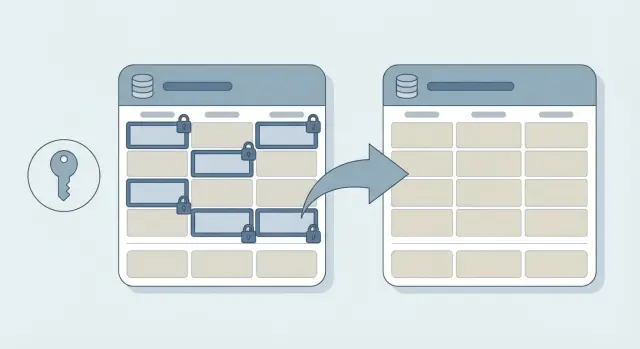
What problem field-level encryption actually solves
If someone gets a copy of your database, they can read whatever is stored in plain text. That can happen through a misconfigured backup, a stolen laptop with a database dump, an exposed admin tool, or a bug that leaks data. When that happens, the damage is not just “we got hacked.” It’s “every user record is readable.”
Field-level encryption reduces the blast radius. Instead of relying only on disk or network protections, you protect specific values inside the database so they’re unreadable without the right key. If an attacker grabs rows from the database, encrypted fields look like nonsense.
It helps to separate the layers:
- TLS protects data while it travels between your app and the database.
- Full-disk encryption protects the storage device when it’s offline.
- Field-level encryption protects specific columns even if the database contents are copied.
The tradeoff is real: once you encrypt a field, the database can’t easily search, sort, or group by it. Reports, filters, and “find user by X” features may need changes. Many teams keep a limited lookup value (like a keyed hash of an email) to preserve common queries without storing the underlying value in plaintext.
Field-level encryption is usually about a few concrete goals: limiting what a leaked dump can reveal, meeting privacy expectations for sensitive data, reducing downstream harm (identity theft, targeted scams), and lowering internal access risk, especially in shared or messy codebases.
Deciding what to encrypt (and what not to)
Field-level encryption is worth the effort only for data that would cause real harm if exposed. A simple definition of “sensitive” is: if someone got a copy of your database, what would help them steal money, take over accounts, blackmail users, or break privacy promises?
Start by listing the few fields that are truly dangerous in plaintext. Common examples include government IDs (like SSNs), date of birth, API tokens, password reset or recovery codes, private notes, and anything that would let an attacker act as a user or access a third-party service.
Many fields usually don’t need encryption because they’re required for basic behavior and have low impact on their own: internal IDs and foreign keys, timestamps (created_at, last_login), booleans and status flags, public profile fields (display name, bio), and non-sensitive metadata used for sorting and filtering.
Next, decide who must read the plaintext. Some fields should be readable only by your application at runtime (for example, an API token used to call a provider). Others might need tightly controlled access by support staff (a “view last 4 digits” pattern). And some should be readable only by the user, which often means encrypting at rest and limiting where decryption can happen.
Commit to starting small. Encrypting “everything just in case” breaks search, reports, and integrations, and it makes migrations harder later.
Picking an approach that fits your app’s needs
There’s no single “best” way to do field-level encryption. The right approach depends on what your app still needs to do with the data after it’s protected: lookups, exports, support tooling, and audits.
If you only need to read the value back (for example, showing a user their saved tax ID), use random (non-deterministic) encryption. It’s safer because the same input doesn’t produce the same ciphertext each time. The downside is you can’t do exact-match queries on the encrypted column.
If you must do exact-match lookups (like “find user by SSN” or “detect duplicate bank account numbers”), deterministic encryption is tempting because it supports equality searches. But it leaks patterns (same value equals same ciphertext). A safer option in many apps is to keep the encrypted value and store a separate keyed hash for lookups.
Use authenticated encryption, not “encryption only.” Without authentication, the app may not detect tampering. With an authenticated mode (often called AEAD), the app can tell if ciphertext was changed.
For key handling, envelope encryption is often the practical middle ground. You encrypt the field with a data key, then wrap that data key with a master key. You can do this per record or per tenant. Per-tenant keys limit blast radius in multi-tenant apps and make offboarding cleaner.
When you don’t need plaintext back, don’t encrypt. Hash instead. Passwords are the classic case: store a slow password hash, not an encrypted password.
Tokenization helps when parts of your workflow can’t handle ciphertext (legacy tools, support dashboards, third-party exports). You replace the sensitive value with a token and keep the real value in a separate, locked-down store.
A quick way to choose:
- Need to show the value later: random encryption with authentication.
- Need exact-match search: encrypted value plus keyed-hash index (or deterministic encryption with care).
- Need tenant isolation: envelope encryption with per-tenant wrapped keys.
- Never need plaintext: hashing.
- Workflows break on ciphertext: tokenization.
Key management basics without the jargon
Field-level encryption is only as safe as your keys. The goal is simple: your app can decrypt when it truly needs to, but keys are protected elsewhere, with tight access rules and good records.
A useful mental model is “separate jobs.” Your database stores ciphertext (locked data). Your app requests encryption/decryption when allowed. A key system guards the keys and decides who can use them.
Where keys should live
For most teams, the safest default is a managed key service, not a homemade setup. Common options are a cloud KMS, an HSM-backed service, or a secrets manager that can provide the right key at runtime.
Avoid the common failures:
- Don’t store encryption keys in the database.
- Don’t commit keys to your repo.
- Don’t keep keys in shared environment files that many people and systems can read.
- Don’t reuse the same key across dev, staging, and production.
A practical access example: if a customer support tool can view masked user profiles, it shouldn’t be able to decrypt full values. Only the main API that serves authenticated users should have decrypt permission in production.
Access and logs (so you can prove what happened)
Key access should be explicit and minimal. Define which services can decrypt which fields, in which environments, and under what identity (service account or role). If a background job only needs to encrypt on write, it might not need decrypt rights at all.
Plan for audits early. You want key usage logs that answer “who used which key, when, and from where.” That makes investigations possible and helps you catch mistakes like a test service calling production keys.
Key rotation and versioning you will need later
Field-level encryption isn’t “set it and forget it.” Plan for key rotation up front, or you’ll end up stuck with risky keys you can’t change without downtime.
First, decide the unit of encryption keys. A single key for the whole app is simplest, but it makes any incident bigger. Per-tenant keys limit blast radius for SaaS. Per-user keys can make access rules clearer, but they add complexity when users share data. Per-record keys are rare unless you have a strong reason.
Whatever you choose, store a key identifier with every encrypted value. That can be a short version label (like v3) or a key ID. The important part is that decryption can look at the ciphertext, see which key version was used, and select the right key without guessing.
A practical rotation setup usually has two layers:
- A data-encryption key (DEK) used to encrypt fields.
- A master key (KEK) used to wrap (encrypt) the DEK.
With this setup, you can rotate the master key without rewriting all your encrypted data. You re-wrap the DEK, which is fast.
Sometimes you do need to re-encrypt the actual data: if a DEK is exposed, if you change algorithms or parameters, or if policy changes require a different key scope (for example, moving from one app-wide key to per-tenant keys).
Don’t skip backup and recovery for keys. Losing keys means losing data. Keep encrypted backups of keys, restrict access, and test restores on a schedule. A common failure mode is “we backed up the database, but not the keys.”
Example: a startup rotates from v1 to v2. New writes use v2, old rows keep v1, and a background job gradually re-encrypts them.
How to add field-level encryption step by step
Treat this like a change to your data model, not a quick “security patch.” A careful rollout is what keeps you from leaking plaintext in logs, exports, or one-off admin scripts.
Start by mapping what’s truly sensitive and where it travels. Don’t only look at the database. Trace create, read, update, background jobs, analytics, and exports. A common miss is encrypting a column but forgetting the CSV export job, which becomes the new leak.
Pick a proven crypto library for your stack and one encryption scheme you can explain to your future self. For most apps, authenticated encryption is the right default. Keep keys outside the database and plan for versioning from day one.
A rollout that tends to work:
- Add new encrypted columns next to the old plaintext ones, and deploy that schema change first.
- Add a small wrapper that does encrypt-on-write and decrypt-on-read, and make the rest of the app call only that.
- Turn off plaintext writes as soon as it’s safe, but keep plaintext reads briefly for the transition.
- Backfill existing rows in batches, with monitoring, rate limits, and a rollback plan.
- Verify with real queries and exports, then remove plaintext fields in a later migration.
During backfill, avoid printing decrypted values in logs, error reports, or admin dashboards. Log record IDs and status counts instead.
Keeping features working: search, reports, and performance
Field-level encryption protects sensitive values, but it can break everyday features if you don’t plan for it. Before you encrypt columns, write down which screens and jobs depend on those fields: search boxes, admin tables, exports, and scheduled reports.
Search and filtering
With random (non-deterministic) encryption, the same input encrypts differently each time. Exact-match lookups and deduping stop working because the database can’t compare ciphertext. If you need exact-match search (like finding a user by SSN), store a separate search token next to the encrypted value, such as a keyed hash.
Partial-match search (contains, starts-with) usually can’t be supported safely on encrypted text without special systems, so most teams remove it for sensitive fields.
Sorting and range queries also usually break. Ciphertext has no meaningful order, so you can’t sort by “salary” or filter “date of birth between X and Y” directly. A common workaround is storing a coarse derivative (like month and year only) or precomputed buckets.
Reports, indexing, caching, and speed
For analytics, plan a separate dataset: aggregates, counters, or a redacted copy that excludes sensitive fields.
A few rules that hold up in practice:
- Index hashes or keyed hashes, not decrypted values.
- Don’t cache decrypted data in shared caches or logs.
- Decrypt as late as possible (right before use).
- Measure hot paths, because decrypting in tight loops can add latency.
Migrations without exposing plaintext
Assume your database will be in a mixed state for a while. Some rows will have plaintext, some will have ciphertext, and some might use different key versions. Your code should handle all of those cases without anyone needing a one-time script that dumps plaintext to logs or temp files.
A common pattern is dual-read: when your app loads a value, it tries the encrypted field first. If it’s empty, it falls back to the legacy plaintext field. This keeps old data working while you migrate in the background.
Pair that with dual-write: when the app saves a value, it writes the encrypted form and, for a short transition period, keeps the old plaintext field updated. This prevents new records from being created in the old format while you’re still encrypting old rows.
For the backfill, run a background job that encrypts legacy rows in small batches. Treat it like a production system: rate-limit updates, use retries and idempotent writes (safe to run twice), record progress, expect partial failures, and store key version alongside the ciphertext.
Example: a signup table has phone_plain and you add phone_enc plus phone_key_version. New signups write phone_enc. The job walks old users, encrypts phone_plain, sets version, and leaves plaintext alone until you’ve verified reads, exports, and support tools.
Only delete legacy plaintext after a clear cutoff: metrics show near-100% encrypted coverage, dual-read has run in production long enough, and you have a rollback plan.
Common mistakes and traps to avoid
Field-level encryption is easy to demo on the happy path. The trouble shows up later: during outages, migrations, exports, or support workflows.
The traps that leak data (even if you encrypt)
Most leaks aren’t from the database. They’re from everything around it: logs, exports, dashboards, debug endpoints, and third-party tools.
Common failure modes include plaintext in logs (debug prints, request dumps, exception traces), hardcoded keys or client-side keys (mobile apps, browser bundles, secrets committed to git), missing tamper detection (no authenticated encryption), forgotten outputs (CSV exports, emailed receipts, webhook payloads, admin screens), and untested restores (backups exist, but keys are missing or the key version is unknown).
A concrete example: an app encrypts SSNs, but a 500 error logs the full request body to help debugging. The database is safe, but the logs become a shadow database of plaintext.
Encrypting the wrong fields
A common mistake is encrypting fields your app depends on for joins, uniqueness checks, or support workflows. If you encrypt an email address, you may break login lookups, deduping, and “find this customer” in admin tools. If you still need equality checks, you’ll likely need a separate derived value (like a keyed hash) or a different design.
Before shipping, do a fast “where does this value go?” pass: database queries, logs, exports, emails, analytics, and support tooling.
Finally, treat key recovery as a feature. Encrypted data with missing keys is permanent data loss.
Quick checklist before you ship
Field-level encryption often fails for boring reasons: a field gets copied somewhere, or a job writes plaintext “just this once.” Before release, do one last pass focused on where data can leak.
- Map every place the sensitive value can show up: database columns, app logs, analytics events, error reports, caches, search indexes, and backups.
- Confirm plaintext is never written “temporarily”: no debug logs, no file exports, and no temp files on disk.
- Store version info with the ciphertext: a key version (and ideally an algorithm/version tag) so you can decrypt older records after changes.
- Prove you can rotate keys without downtime: read old data, write new data with the new key, then re-encrypt in the background.
- Enforce least privilege for decryption: only the small set of services and roles that truly need plaintext should have decrypt access.
Verify you have a tested backup and restore procedure for both data and keys, and that it works under pressure (new environment, new machine, new person running it).
Example: encrypting a few fields in a real app
A small startup keeps customer tax IDs and internal support notes in one customers table. The app started as a prototype and has a bad habit: when an error happens, it logs the full record “for debugging.” That means tax IDs and private notes can end up in logs, dashboards, or third-party error tools.
They choose field-level encryption for two columns: tax_id and support_notes. Everything else stays as plain text so the app can still filter, sort, and report without extra work.
To keep support fast, they add a separate column like tax_id_hash (a one-way keyed hash). Support can do exact-match searches (a customer calls in and reads their tax ID), but the database never stores that ID in searchable plaintext. The app compares by hashing the input and matching the hash.
Their rollout plan keeps the app running while data is still being converted:
- Add new encrypted columns (or new “_enc” versions) and a
key_versionfield. - Dual-write: save both the old plaintext and the encrypted value for a short transition.
- Dual-read: prefer the encrypted value; fall back to plaintext if missing.
- Backfill in batches with alerts if decryption fails or a record looks malformed.
- When coverage is near 100%, stop writing plaintext, then remove it in a later migration.
After the change, error logs contain redacted placeholders instead of full secrets. Support staff only sees decrypted notes if their role allows it.
Next steps if you are upgrading an existing codebase
Upgrading an existing app is where field-level encryption gets messy. The goal is progress without creating a long window where sensitive data is exposed, copied into logs, or quietly written back in plaintext.
Start with a short decision record your team can share. Keep it to one page: which fields are encrypted, why (legal, risk, customer trust), and which systems or roles are allowed to decrypt. This prevents random “encrypt everything” changes that break features later.
Begin with a small pilot you fully understand: one table, one user flow, one migration path. Encrypt something like SSN or bank account number in a single customer table, then update only the “view profile” and “update profile” screens. You’ll quickly find where plaintext currently leaks (debug logs, exports, error trackers) before you scale to more fields.
Add guardrails before rollout:
- Stop secret logging (a simple rule: never log request bodies).
- Make errors safe (no stack traces or decrypted values in user-facing messages).
- Review access (who can run exports, who can query production, what goes to analytics).
- Add tests that fail if plaintext is stored or returned.
If you inherited an AI-generated codebase, do a focused security pass before you migrate. These projects often have exposed secrets, overly broad permissions, and “helpful” logging that prints everything.
If you need outside help cleaning up an AI-generated app before you add encryption, FixMyMess (fixmymess.ai) focuses on diagnosing and repairing codebases like this, including security hardening and safer migrations, so you don’t ship encryption on top of leaks.
FAQ
What does field-level encryption actually protect me from?
It protects specific values inside your tables so a copied database dump doesn’t reveal those fields in plain text. It’s mainly for “someone got the rows” scenarios, not for stopping attacks against your live app.
Which fields should I encrypt first?
Start with fields that would cause real harm if exposed, like government IDs, date of birth, recovery codes, API tokens, or private notes. Leave routine metadata (IDs, timestamps, status flags) alone so your app can still query and report normally.
Should I use random (non-deterministic) encryption or deterministic encryption?
Random (non-deterministic) encryption is the safer default when you only need to read the value back later, because identical inputs don’t create identical ciphertext. The cost is you generally can’t do exact-match searches on that encrypted column.
How can I still find a user by a sensitive value if it’s encrypted?
Keep the sensitive value encrypted, and add a separate lookup value like a keyed hash for equality searches. That lets you search for matches without storing the original value in searchable plain text.
Do I need authenticated encryption, or is encryption alone enough?
Use authenticated encryption (often called AEAD) so your app can detect if ciphertext was modified. “Encrypt-only” approaches can let tampered data slip through and turn into weird bugs or security issues during decryption.
Where should encryption keys live?
Keep keys out of your database and out of your repo, and prefer a managed key system (like a cloud KMS or a secrets manager) to control access. A good default is that only the main production service that truly needs plaintext can decrypt.
How do I handle key rotation without downtime?
Store a key identifier (a version or key ID) alongside each encrypted value so you can decrypt old data after changes. A common approach is envelope encryption so you can rotate a master key without rewriting all encrypted fields.
What’s the safest way to migrate existing plaintext data to encrypted fields?
Treat it like a data model change: add new encrypted columns, switch to encrypt-on-write, and backfill old rows in batches. During the transition, make reads prefer the encrypted value and fall back to plaintext only when necessary, then remove plaintext after you’ve verified exports and tooling.
What are the most common ways teams leak plaintext even after encrypting fields?
Most leaks happen outside the database, so stop plaintext from showing up in logs, error reports, exports, admin screens, and analytics events. Also avoid “temporary” debug prints during backfills, because that can create a shadow copy of the sensitive data.
What if my codebase is messy (or AI-generated) and I’m worried encryption will break things?
If you inherited an AI-generated or messy codebase, fix secret logging and access controls before adding encryption, because encryption won’t help if plaintext is already flowing into logs and exports. FixMyMess can do a free code audit and then repair and harden the app so encryption changes don’t sit on top of existing leaks, with most fixes completed in 48–72 hours.