Fix a messy database schema from an AI app, step by step
Learn how to fix a messy database schema from an AI-generated app using a safe triage flow: map entities, remove duplicates, normalize tables, add constraints.
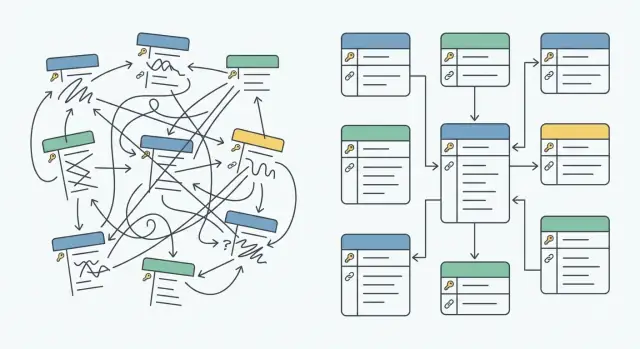
What a messy schema looks like in AI-generated apps
A messy schema usually doesn't look wrong at first. The app runs, pages load, and data shows up. Trouble starts when you try to change something and realize you don't know which table is the source of truth.
AI-generated prototypes often create tables in a hurry: one for each screen, feature, or prompt. Names drift over time (User, Users, user_profiles). ID formats vary (integer here, UUID there). Relationships are implied in code instead of enforced in the database.
Common signs your schema is already costing you:
- Duplicate tables storing the same thing with slightly different columns
- Confusing identifiers (multiple
idfields, or foreign keys stored as plain text) - Inconsistent naming (
createdAtvscreated_at,statusvsstate) - Columns that mix concerns (name, email, and raw JSON crammed together)
- "Soft relationships" (
order.userIdexists, but nothing guarantees it matches a real user)
What breaks is rarely "the database" in isolation. It's the features tied to it: login sessions that stop matching users, payment records that no longer join correctly, reports that double-count, and admin screens that rely on an old column name.
A small example: a prototype might have both customers and users, and orders sometimes point to customers.id and sometimes to users.email. Cleaning this up is possible, but triage is about lowering risk first: map what exists, confirm what the app actually reads and writes, then improve the structure in small steps.
Set up safety rails before you change anything
Before you touch migrations, set guardrails so one wrong step doesn't become an outage. Many AI-generated apps work "just enough" because the data is inconsistent, not because the schema is sound. Your job is to make it safer without breaking what people already use.
Start with a full backup, then prove you can restore it. Don't assume. Restore into a separate database and run the app against it. If you can't restore, you don't have a safety net.
Next, create a staging copy that matches production as closely as you can. Use the same schema, a recent snapshot of data, and the same app build. Staging is where you test migrations, verify key screens, and watch query performance before touching real users.
Write down the few app flows that must keep working during refactors. Keep it short and specific. For example: "sign up -> verify email -> create project", "checkout -> payment success -> receipt", "admin dashboard loads in under 3 seconds".
Finally, decide a rollback plan for every change. If a migration fails halfway, you need to know whether you'll roll forward (finish the fix) or roll back (restore and revert the code). A simple checklist helps:
- Backup created, restore tested, and timestamp recorded
- Staging copy refreshed and app connected to it
- 5-10 critical user flows documented and owners assigned
- Migration is reversible (or a clear roll-forward plan exists)
- Monitoring notes: what metrics or logs will confirm success
Step 1: Map entities and relationships
Before you change any tables, get a clear map of what the app thinks the data means. AI-generated apps often create extra tables that sound similar but represent the same thing, or they mix multiple concepts into one table. A simple map helps you avoid "fixing" the wrong part.
Start by listing the core entities in plain language. Think users, accounts, teams, orders, payments, subscriptions, invoices, messages. If you can't describe a table in one sentence, it's usually doing too much.
Next, find the primary key for each table. Write down what column is used as the true identifier (often id), and note where it's missing or unreliable. Watch for tables that use email, username, or a composite of fields as an identifier. Those tend to create duplicates later.
Sketch the relationships
Sketch how things connect:
- One-to-many: one user has many orders
- Many-to-many: users can belong to many teams (usually needs a join table)
- Optional links: an order may have a coupon, but not always
If you see many-to-many stored as comma-separated IDs or JSON arrays, flag it early. It affects every later step.
Trace reads and writes
Note where the app reads and writes each table: which screens, which API endpoints, and any background jobs or scheduled tasks. A fast way is to search the codebase for table names and key columns.
Example: if the checkout screen writes to both orders and user_orders, you've likely found competing sources of truth. Don't merge anything yet. Capture it on the map.
Step 2: Identify duplicates and conflicting sources of truth
AI-generated apps often create the same concept twice. You might see both customer and user, or team and org, each with its own table and slightly different fields. Everything looks fine until you try to report, enforce permissions, or fix a bug and realize there is no single truth.
Scan your schema map from Step 1 and group tables by meaning, not by name. Pull a few rows from each candidate table. You're looking for places where two tables are storing the same real-world thing.
Common duplicate patterns include identity tables (customer vs user, profile vs user_details), organization tables (team vs org vs workspace), billing tables (invoice vs bill vs payment_request), and address data repeated across multiple places.
Then look for multiple identifiers referring to the same entity. AI tools often add new IDs mid-build, so you end up with id, user_id, uid, and external_id all floating around. Bugs start when one part of the app joins on uid and another joins on id, and data silently splits.
Also watch for the same field stored with different names and formats (createdAt vs created_at, phone stored as both text and number). Even if values match today, they'll drift.
Pick one source of truth per entity and write it down. For example: "users.id is the only internal user key; external_id is optional and unique; the customers table will be merged into users." You're not changing anything yet. You're deciding what wins when tables disagree.
Step 3: Normalize tables gradually
Normalization is just a way to make each table mean one thing. In AI-generated apps, the quickest win is removing the parts that create conflicting data while keeping the app running.
Start by scanning for columns that mix multiple ideas. Common examples are a single address field with street, city, and zip mashed into one string, or a status field that hides extra meaning like "paid+shipped+refunded". These fields are hard to validate and painful to report on.
Next, look for repeated data packed into the wrong place. A classic smell is an orders table with item1_name, item1_qty, item2_name, or a JSON blob of items. It works for a demo and then collapses when you need returns, partial shipments, or accurate totals.
Prioritize normalization where it hurts:
- Data inconsistency (same user name stored in three places, totals that don't match)
- Reporting needs (finance and ops queries are slow or wrong)
- Auth and permissions (roles copied across tables)
- Anything blocking constraints (you can't add foreign keys yet)
- Tables that grow fast (logs, events, orders)
Go gradual to avoid breaking features. Create new tables alongside old ones, backfill data, then switch reads in small steps. For example, add order_items while keeping existing order item fields. Write new items to both places briefly, verify totals match, then move the app to read from order_items only.
Step 4: Add constraints in a safe order
Constraints are where cleanup stops being "tidy" and starts being safe. They turn assumptions into rules the database can enforce. The key is to add them in an order that matches reality today, not the perfect model you want tomorrow.
Start with low-risk rules that are already true for most rows. If a column is always filled in practice, making it NOT NULL often catches real bugs without surprising the app. Small CHECK rules can be useful too, as long as they reflect how the app behaves today (for example, "status must be one of these values").
Before you add foreign keys, clean up existing bad rows. Foreign keys fail if you have orphaned records, like an orders.user_id pointing to a user that doesn't exist. Count how many rows would fail, fix those first, then enforce the relationship.
Unique constraints come next. They stop future duplicates at the source, but they can break sign-up flows or imports if your data still contains duplicates. Dedupe first (Step 2), then add uniqueness only where it reflects a real business rule (for example, one email per user).
If you need a new required column, roll it out in phases:
- Add the column as nullable with a default for new rows
- Backfill existing rows in a controlled way
- Update the app to write the new column
- Only then switch to
NOT NULL
Example: an AI-generated app might have users.email sometimes blank, but the UI treats it as required. Backfill or fix the blanks, then add NOT NULL, and only after that add a unique constraint on email.
Step 5: Update app queries without breaking features
Most outages happen here, not in the migration itself. The app still asks for old columns, or it writes data to the wrong place.
Start with reads. Update SELECT queries and API responses so they can handle both the old and new structure for a short time. That can be as simple as reading from the new tables first, then falling back to the old columns if the new data is missing.
A safe order:
- Add new queries for the new schema, but keep old ones working
- Switch read paths first (ideally behind a small feature flag)
- Migrate writes next so new records land in the new tables
- Keep compatibility briefly (a view, a compatibility column, or temporary dual-write)
- Remove old queries only after monitoring real traffic and fixing edge cases
For writes, be strict about validation. If your new schema splits one column into two tables, make sure every create and update call populates both places correctly. If you do dual-write, keep it short and log every mismatch so you can correct it.
Example: a prototype stores order status in both orders.status and payments.status. Update reads to prefer the new source of truth, then update write code so checkout updates only the new field, while a temporary trigger keeps the old column in sync.
A practical migration flow you can repeat
The safest approach is small moves you can undo. Think "one change, one proof" cycles, not a weekend-long rewrite.
The repeatable loop
Start with a tiny migration that adds something new without removing anything old. Prove the app still works, then move on.
- Add the new table/column/index you want (leave the old structure in place).
- Backfill data in a controlled way (in batches if the table is large).
- Verify counts and relationships (rows copied, foreign keys match, no unexpected NULLs).
- Switch reads first (update the app to read from the new structure), then monitor.
- Switch writes (dual-write briefly if needed), then remove the old path.
After each loop, run the top user actions end-to-end on staging: signup/login, create the core object (order/project/post), and any payment or email step. These flows catch the "it migrated fine but the app broke" problems.
Don't forget performance
Cleanup can quietly slow things down. After each change, check for new slow queries, missing indexes, and queries that stopped using indexes because a column type changed.
Keep a short note for every migration with (a) how to roll it back, and (b) what you measured to confirm it's correct. Teams get stuck when they change too much at once and can't tell which step caused the break.
Common mistakes that cause outages during schema cleanup
Outages often happen when the database gets stricter before the data is ready. If you add foreign keys, NOT NULL rules, or unique indexes too early, the migration can fail on existing rows, or the app can start throwing errors after deploy.
Another trap is changing what an ID means. AI-built prototypes often mix string IDs, integers, and sometimes emails as identifiers. Switching user_id from a string to an integer (or changing a UUID format) breaks joins, API payloads, caches, and any code that treats the ID as a string. If you have to do it, plan a transition with careful backfills and a temporary compatibility period.
Deleting "old" tables too early is also risky. Even if the main UI is moved over, something is usually still reading the old table: an admin page, a webhook handler, or a nightly job.
Easy-to-miss blast zones include background jobs, admin tools, analytics pipelines, imports/exports, and mobile apps or older clients still calling old endpoints.
Security mistakes can cause outages too. Prototypes sometimes store auth tokens, API keys, or password reset links directly in tables in plain text. Later, someone adds encryption or short expiry rules and sign-ins fail. Treat secrets like hazardous material: rotate, expire, and migrate with a clear cutover.
Example: you add a unique constraint on users.email, but the table has [email protected] and [email protected]. Production logins fail because the cleanup step (normalizing and deduping) was skipped.
Quick checklist before and after each change
The biggest risk isn't the SQL. It's changing data rules while the app is still running real flows. Use this checklist every time you edit the schema, even if it feels small.
Before you change anything
- Backup is confirmed, and a restore test has succeeded (even if it's to a local copy).
- Your entity map is updated (tables, key fields, and how records relate) and someone else has reviewed it.
- Duplicates and conflicting sources of truth are removed or clearly deprecated (no new writes).
- You've checked data cleanliness for the next constraint (nulls, orphan rows, invalid values).
- A rollback plan is written for this exact change (what you'll undo first, and how you'll verify it's safe).
Pause for one minute and write down the blast radius: which screens or API endpoints break if this migration fails.
After the change
- Run the key user flows end-to-end: signup, login, and the core transaction your app exists for.
- Confirm the app is reading from the new source of truth (and not silently falling back to old columns).
- Verify constraints are actually enforced (try inserting one bad row in a test environment).
- Check logs for new query errors and slow queries.
- Update the entity map again so the next change starts from reality.
Example scenario: cleaning up users and orders in a prototype
A common prototype problem: you open the database and find users, customers, and accounts tables that all store email, name, and password-ish fields. Orders might point to customers.id in one place, users.id in another, and sometimes just store an email string.
Start by choosing one source of truth for identity. If the app has login, users is usually the best anchor. Keep the other tables for now, but treat them as profiles that will be merged.
To map IDs safely, add a temporary column like customers.user_id and backfill it by matching on a stable value (often normalized email). For records that don't match cleanly, create a small review list and fix those manually before you add constraints.
Next, look at orders. Prototypes often repeat item fields on the orders table (like item_1_name, item_2_price) or store a JSON blob that changes shape. Create an order_items table with order_id, product_name, unit_price, quantity, and backfill it from the existing data. Keep the old columns temporarily so the app still runs while you update queries.
After data is cleaned and mapped, add constraints in a calm order:
- Add
NOT NULLonly on fields you fully backfilled - Add unique constraints (like
users.email) after you remove duplicates - Add foreign keys (
orders.user_id -> users.id,order_items.order_id -> orders.id)
Finally, test what users feel immediately: login and password reset, signup (including "email already used"), creating orders and items, checkout totals, and the order history page.
Next steps: when to bring in expert remediation
If cleanup is still in a sandbox, you can usually move carefully and learn as you go. Once real users and real data are involved, the risk changes fast. A seemingly harmless migration can break sign-in, corrupt orders, or expose private data.
Consider bringing in expert help if authentication or permissions are involved, you handle payments or invoices, you store sensitive data, the app is in production and downtime isn't an option, or the database and app logic feel tangled.
If you do hand it off, you'll get faster results if you can share a schema dump and recent backup, a short list of critical flows (sign-up, checkout, refunds, admin actions), the biggest errors you see (slow queries, broken migrations, inconsistent totals), and any known incidents (duplicates, missing records, security concerns).
If you're dealing with a broken AI-generated prototype and need an end-to-end review (schema, logic, and security together), FixMyMess at fixmymess.ai focuses on remediation of AI-built apps and can start with a free code audit to identify the highest-risk issues before any migrations run.
FAQ
How do I know if my schema is “messy” even if the app still works?
A messy schema is one where you can’t confidently answer “which table is the source of truth?” The app may still run, but changes become risky because data is duplicated, IDs don’t match, and relationships exist only in code instead of being enforced by the database.
What should I do before I run any migrations on a prototype database?
Start with a full backup and prove you can restore it into a separate database. Then create a staging environment that mirrors production and run your critical user flows there before every migration so you catch breakage early.
Which “critical flows” should I test during schema cleanup?
Pick a small set of real, end-to-end flows that represent how users get value, like signup/login, creating the core record, and any payment or email step. If those flows pass on staging after each change, you’re far less likely to ship a schema fix that breaks the app.
How do I map entities and relationships in an AI-generated app quickly?
Make a simple entity map: list the core concepts in plain language, identify each table’s primary key, and sketch how records relate. Then trace reads and writes by searching the codebase for table and column names so you know what the app actually touches.
How can I spot duplicate tables or competing sources of truth?
Look for tables that represent the same real-world thing with slightly different columns or naming, like User vs Users vs user_profiles. Confirm by sampling rows and checking whether the same person/order/team appears in multiple tables under different identifiers.
What’s the safest way to fix inconsistent IDs (UUID vs int, email as ID, etc.)?
Choose one internal key and stick to it, usually a single users.id type across the app. If you need to transition, add a temporary mapping column, backfill it, update code to use the new key, and keep a short compatibility window so old data and new data can coexist safely.
Should I normalize everything at once or do it gradually?
Normalize where it hurts first: places causing inconsistent data, broken reporting, auth/permissions bugs, or fast-growing tables. Do it gradually by adding new tables alongside old ones, backfilling, switching reads, then switching writes, and only removing old structures after real traffic confirms it’s safe.
When should I add foreign keys, NOT NULL, and unique constraints?
Add constraints in the order that matches today’s reality: start with rules that already hold (like NOT NULL where data is truly always present), clean up bad rows before foreign keys, and dedupe before unique constraints. This prevents migrations from failing and avoids new runtime errors right after deploy.
Why do schema cleanups usually break at the query/update step, not the migration step?
Switch reads first so the app can handle both old and new shapes briefly, then migrate writes once reads are stable. If you dual-write, keep it short and log mismatches so you can correct them before removing the old path.
When should I bring in FixMyMess instead of trying to clean the schema myself?
Bring in help when real users and real money are involved, especially around authentication, permissions, payments, or sensitive data. If you inherited an AI-generated codebase that’s tangled, FixMyMess can start with a free code audit and then remediate the schema, logic, and security with human verification.