Fix it works on my machine config issues for dev, staging, prod
Fix it works on my machine config issues with clear dev, staging, prod separation, env var validation, and simple checks that prevent runtime surprises.
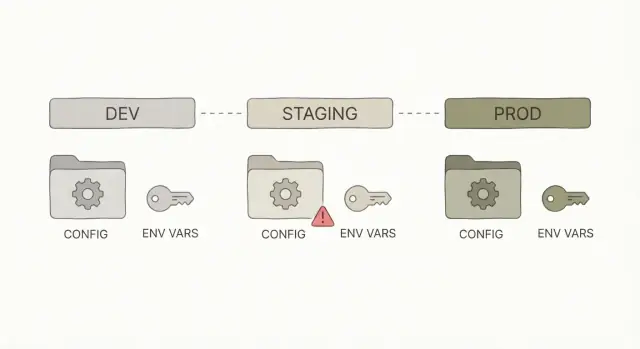
What “it works on my machine” usually means
When someone says “it works on my machine,” they mean the app runs fine on their laptop but breaks after deploy. The code might be the same, but the setup around it is different.
Most of the time, this isn’t a “logic bug.” It’s configuration: the app gets different inputs depending on where it runs. Locally, your computer quietly fills in the gaps (saved logins, local files, seeded databases, cached tokens). In staging or production, those crutches aren’t there.
Common causes:
- Missing or wrong environment variables (API keys, database URL, auth callback URL)
- Different external services (local SQLite vs hosted Postgres, sandbox Stripe vs live Stripe)
- Different URLs and redirects (localhost vs a real domain)
- Different build and runtime settings (Node version, port, feature flags)
- Secrets copied into code or
.envfiles and never set in production
Config problems often show up as confusing symptoms: login works locally but fails after deploy, payments time out, images don’t upload, or background jobs never run. The code path is the same, but the app is pointed at the wrong place or missing a required value.
The goal is repeatable runs in every environment. Dev, staging, and prod can use different values, but they should follow the same rules. If a variable is required in prod, treat it as required everywhere. If staging uses a different database, it should still use the same schema and the same kind of connection.
Example: an AI-generated app deploys and immediately throws “DATABASE_URL is undefined.” Locally, the developer had it in a private .env file. In production, it was never set. The fix isn’t hunting through code. It’s defining required config, validating it at startup, and setting it in each environment.
Dev vs staging vs prod: what changes and what must not
Dev, staging, and prod are the same app in three different places.
- Dev is where you build and try things quickly on your laptop.
- Staging is a rehearsal that should behave like production, but without real customers.
- Prod is the live system people depend on.
Some things should differ between environments because they point to different services or data. Other things must stay identical so you’re actually testing what you’ll ship.
What should change
Keep the app code the same, but swap the values around it:
- Service URLs (API base URL, OAuth callback URL, webhook URL)
- Keys and secrets (different credentials per environment)
- Data sources (separate databases and buckets, or at least separate schemas)
- Feature flags (safe defaults in prod, more toggles in dev)
- Logging level (more detail in dev, less noise in prod)
The environment should decide these values, not the developer’s local machine.
What must not change
The build and runtime should match across staging and prod: same dependencies, same build step, same startup command, and the same runtime version. If staging runs node 20 but prod runs node 16, you’re testing a different app.
Avoid “just this one quick change” in production, like editing a config file on the server or adding a missing env var by hand without recording it. Those one-off fixes create failures you can’t reproduce later. A common example: someone hot-fixes an auth redirect URL in prod, staging stays outdated, and the next deploy breaks login.
Environment variables 101 (without the jargon)
An environment variable (env var) is a setting your app reads when it starts. It lives outside your code, usually provided by your terminal, hosting service, or deployment tool.
Think of env vars as inputs to your app. Treat them like requirements, not suggestions. If a value is missing, the app should fail fast with a clear message, not limp along and break later.
A simple way to decide what goes where:
- Env vars: values that change by environment or are sensitive. Examples:
DATABASE_URL,JWT_SECRET,STRIPE_API_KEY,S3_BUCKET,APP_ENV. - Code: defaults and logic that should be the same everywhere. Example: “sessions expire after 7 days.”
- Config files (checked into git): non-secret settings you want to review and version. Example: feature flags that are safe to expose, UI labels, allowed CORS origins (only if they aren’t sensitive).
Naming is where teams get messy. Pick a convention and stick to it: all caps, words separated by underscores, and one prefix if you have multiple services. Avoid near-duplicates like DB_URL, DATABASE, and DATABASE_URL across different parts of the app.
A common trap is “optional” env vars that silently disable features. For example, an AI-generated app might wrap email sending in if (process.env.SMTP_PASSWORD) and never warn you when it’s missing. The result: signups work locally, but password resets never arrive after deploy.
Better rule: if a feature is enabled in that environment, its required env vars must be present, or the app should stop and tell you what’s missing.
Step-by-step: set up a simple, consistent config structure
Most “it works on my machine” bugs happen because config is scattered. One person sets values in a local file, another sets them in a hosting dashboard, and the app quietly picks whichever it sees first. Decide on a structure and stick to it.
1) Choose a single source of truth
For most web apps, the cleanest rule is: environment variables are the source of truth. A local .env file can be a convenience for development, but your code should read config the same way everywhere.
If you must support both a config file and env vars, set a clear priority (for example: env vars override file values) and write it down so there are no surprises.
2) Add one explicit environment flag
Make the app announce what it thinks it’s running as. Use one variable like APP_ENV with three allowed values: development, staging, production. Avoid guessing based on domains or “if debug is true.”
When the environment is explicit, you can make safe default choices, like verbose logs in dev and quieter logs in prod.
A practical setup for most teams:
- Keep a committed template file like
.env.examplethat lists every required variable (without real secrets). - Use a local-only
.envfile for convenience and keep it out of version control. - Store staging and production values in your hosting provider’s environment settings.
- Load config in one place (a single config module) and import it everywhere.
3) Make defaults safe
Defaults are fine for development (like a local database URL). In production, avoid defaults for anything sensitive. A missing DATABASE_URL in production should fail fast, not silently fall back to something unintended.
4) Document what teammates need to run the app
Put the required variables in one place (usually .env.example plus a short README note). This matters even more for AI-generated apps, where config tends to grow randomly and end up split between code, files, and dashboards.
Validate env vars at startup to prevent surprises
Many “it works on my machine” problems happen because the app starts with missing or wrong settings, then fails later when a user hits a specific page. A simple fix is to validate environment variables once, right when the app boots, and refuse to run if something is off.
Fail fast with clear checks
Treat config like input data. If required values are missing, stop the app and print an error that tells you exactly what to set (without leaking secrets).
What’s worth validating early:
- Presence: required values like
DATABASE_URL,AUTH_SECRET,PORT - Type:
PORTis a number,DEBUGis a boolean, timeouts are integers - Format: URLs look like URLs, emails look like emails
- Cross-field rules: if
FEATURE_X=true, also requireFEATURE_X_KEY - Allowed values:
APP_ENVis one ofdevelopment,staging,production
After validation, log a short startup summary like environment name, app version, and which optional features are enabled. Don’t print secrets, full connection strings, or tokens. If you need confirmation, log only that a value is set, or a safe fingerprint (like the last 4 characters).
Add a config self-test command
A lightweight config self-test makes deployments safer because you can run it before starting the server.
For example:
config:testloads env vars, validates them, and exits with code 0/1- It prints actionable errors (missing keys, wrong types, invalid URLs)
- It can confirm connectivity where safe (for example, can it reach the database host) without dumping credentials
Keep secrets out of code (and out of logs)
A “secret” is anything that gives access: API keys, OAuth client secrets, session signing keys, database passwords, private encryption keys, webhook signing secrets, and even some internal service tokens. If someone gets it, they can pretend to be you or your app.
AI-generated apps often leak secrets in two places: the code and the logs. A key gets hardcoded “just to test,” a connection string ends up in a commit, or someone prints process.env to debug a crash and forgets to remove it before shipping.
Rules that prevent most incidents:
- Never commit secrets to the repo, even “temporary” ones.
- Never send secrets to the browser or mobile client. If the user can see it, it’s not a secret.
- Never log secrets or full headers. Redact tokens and passwords.
- Prefer short-lived tokens where possible.
If you suspect a key was exposed, treat it as compromised. Rotate it, then confirm the old value is truly invalid (many platforms keep old keys active until you disable them). Also check deployment history, logs, and any shared screenshots or error reports.
Use separate credentials per environment. Dev, staging, and prod should not share the same database user, API key, or signing secret. That way, a staging leak doesn’t automatically unlock production.
Make staging match production (enough to be useful)
Staging is where you catch problems that only show up after deploy, but it only works if it behaves like production in the ways that matter.
Start with repeatable builds. If staging runs Node 20 but production is on Node 18, or one environment installs different dependency versions, you’re not testing the same app. Lock your runtime version and dependencies (pin versions, commit your lockfile, and use the same build command everywhere). Avoid environment-specific install steps that change behavior or skip checks.
Keep staging close to prod in the critical paths: same kind of database, same cache or queue if you use one, and the same startup sequence (migrations, seed steps, background jobs). It doesn’t need full scale or real data, but it should use the same services and the same order of operations.
Health checks are your early warning system. A good staging deploy should fail fast if it can’t connect to the database, if migrations are pending, or if required environment variables are missing.
A simple standard:
- Same runtime and dependency lockfile in dev, staging, and prod
- Same build artifact promoted from staging to prod (not rebuilt differently)
- Same startup steps (migrate, then start the web process, then workers)
- A basic health check that verifies DB connection and a couple key endpoints
- A recorded config fingerprint per deploy (which env var names were set, feature flags on/off), without values
Common mistakes that cause runtime failures
Most “it worked yesterday” bugs aren’t random. They usually come from config drift: someone changed a setting, added a hotfix, or tweaked a secret in one place, then forgot to write it down. A week later, a deploy rolls back the code but not the settings, and the app breaks in a way that feels mysterious.
Another classic failure is relying on local files that won’t exist in production. Your laptop might have an uploads/ folder with permissive permissions, a local SQLite database, or a .env file that never makes it to the server. In production, the filesystem can be read-only, containers can restart at any time, and “that file” simply isn’t there.
Mistakes that often turn into outages:
- Treating warnings as fine: missing env vars, fallback defaults, or “optional” settings that later become required
- Mixing client and server environment variables in web apps, exposing secrets or breaking builds when the browser can’t read server-only values
- Forgetting to register OAuth or payment callback URLs for one environment
- Assuming local paths exist everywhere (uploads, temp directories, local DB files, certificates)
- Making emergency config changes in a hosting dashboard and not syncing the change back to shared documentation
Small example: a founder has an AI-generated prototype that runs fine in a hosted dev environment, but production login fails. The root cause is simple: the app falls back to a dev callback URL because the production variable is missing. No clear error, just a redirect loop.
Quick checklist before you ship
A short pre-ship routine catches the most common config issues before users do. Run it against the exact environment you’re releasing to (staging for rehearsal, production for the real thing).
- Confirm every required environment variable is set (and not empty). Double-check values that differ by environment: base URLs, API keys, email settings.
- Verify the app points to the right database and storage (database host/name, storage bucket, queue, cache). One wrong value can send production traffic to staging.
- Check auth settings end to end: redirect URLs, cookie domain, session settings, allowed CORS origins.
- Run startup config validation before release. The app should refuse to start if something critical is missing or obviously wrong.
- Do one realistic end-to-end flow in staging: sign up, log in, reset password, pay, upload, export, invite a teammate.
If staging tests pass but production login fails, the cause is often basic: redirect URL points to the wrong domain, cookie domain is wrong, or a required auth secret isn’t set.
Example: a real-world config cleanup on an AI-generated app
A founder had an AI-generated app that looked fine locally but failed right after deployment. The problem wasn’t complicated. Production had different variable names, one secret was missing, and a URL still pointed to localhost.
What broke after deploy
Users could open the site, but login failed. Symptoms varied: sometimes a blank screen, sometimes a generic 500.
Root causes:
- OAuth callback URL still set to
http://localhost:3000/... - A required auth secret (used to sign sessions or tokens) not set in production
- A staging database URL accidentally used in production
How we fixed it (without guesswork)
First we audited environment variables: every config value the app reads, where it comes from, and which environment needs it. Then we standardized names and split values cleanly across dev, staging, and prod.
We also added guardrails so failures show up immediately:
- Validate required variables at startup and list what’s missing
- Validate formats (for example, URLs must be HTTPS in prod, secrets must meet a minimum length)
- Block unsafe defaults in production (no localhost callbacks, no placeholder keys)
- Log safe hints only (never print secrets)
After that, deploys became predictable. Staging behaved like production where it mattered, and problems showed up at startup instead of during a user login.
Next steps: harden your config without getting stuck
Don’t try to perfect everything in one go. Pick one small change that reduces surprises immediately, verify it locally and after deploy, then do a short follow-up pass before the next release.
Good “today” wins:
- Add a
.env.examplethat lists every required variable (with safe placeholder values) - Add startup validation so the app fails fast when a variable is missing or malformed
- Remove hardcoded keys, URLs, and debug flags from code and move them into environment config
- Stop printing secrets in logs (even “temporary” debug logs)
- Rename confusing variables so they match what they do
Then do a time-boxed hardening pass:
- Compare dev, staging, and prod variable names and make sure only values differ
- Re-check auth settings per environment (redirect URLs, cookie settings, OAuth callbacks)
- Confirm secrets are stored in your deployment platform’s secret store, not the repo
- Run one clean deploy from scratch to catch missing variables and assumptions
If you inherited a messy AI-generated repo, start with a config and secrets audit before you touch features. That’s usually where hidden defaults, leaks, and deploy-only failures begin.
If you’re stuck, FixMyMess (fixmymess.ai) specializes in diagnosing and repairing broken AI-generated apps, including config drift, auth failures, exposed secrets, and deployment readiness. Their free code audit can help you see what’s missing and what to fix first.
FAQ
What does “it works on my machine” actually mean?
It usually means the code is fine, but the environment is different after deploy. Something your laptop provided automatically (env vars, local files, cached tokens, seeded data, a different database) isn’t present in staging or production, so the app breaks even though the repo didn’t change.
What should I check first when an app breaks only after deploy?
Start by checking configuration, not business logic. Compare environment variables, runtime versions (like Node), and service endpoints between local and the deployed environment, then reproduce the issue with the same inputs the server sees.
What’s the most common config mistake that causes deploy failures?
Missing or wrong environment variables are the most common cause. A typical sign is an error like “DATABASE_URL is undefined,” or features silently failing because a key wasn’t set in production.
What should be different between dev, staging, and production?
Keep one app with three sets of values. Dev is for speed, staging is a rehearsal that should behave like prod, and prod is live; you should change service URLs, secrets, and data sources per environment, but keep the build, runtime version, and startup steps consistent.
What belongs in env vars versus code versus config files?
Treat environment variables as inputs that can change per environment or must stay secret. Put business rules and defaults that must never change in code, and keep non-secret, reviewable settings in versioned config files only when you’re sure they’re safe to expose.
How do I avoid confusing “which environment am I in?” behavior?
Add a single explicit flag like APP_ENV and only allow values you recognize, such as development, staging, and production. Don’t guess based on the domain name or a debug toggle, because that creates hidden behavior differences that are hard to reproduce.
How do I make env var problems fail fast instead of failing later?
Validate at startup and refuse to run when required values are missing or malformed. You’ll catch problems before real users hit a broken page, and the error message can tell you exactly what to set without leaking secrets.
Is it worth adding a config:test command to my app?
Yes, a small config self-test is one of the safest pre-deploy steps. It loads configuration, validates types and formats, and exits cleanly with actionable errors, so you can stop a bad release before the web server starts.
How do I prevent secrets from leaking in AI-generated apps?
Keep secrets out of the repo, out of client-side code, and out of logs. If you suspect a secret was exposed, rotate it immediately and make sure each environment has separate credentials so a staging leak can’t unlock production.
What’s the fastest way to stabilize a messy AI-generated app that won’t run in production?
Fix the configuration structure first: centralize config loading, standardize variable names, and add startup validation. If you inherited an AI-generated repo that’s failing after deploy, FixMyMess can run a free code audit and help you repair config drift, auth issues, and deployment readiness fast.