Frontend-backend contract mismatches that break form saves
Frontend-backend contract mismatches make forms look successful while nothing saves. Align DTOs, validation errors, status codes, and pagination formats.
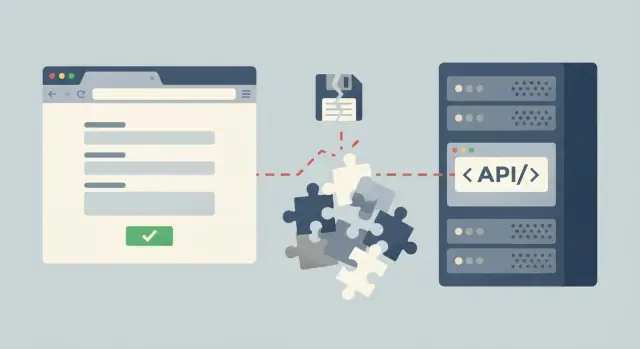
What it means when a form submits but nothing saves
A frontend-backend contract is the shared agreement between your form and your API: what fields are sent, what they are called, what types they have, and what the API sends back on success or failure.
When a form "submits" but nothing saves, it usually means the frontend did its job (it sent a request), but the backend did not persist the data. The tricky part is that the user often sees no clear error because the response looks OK, the UI ignores the response, or the API returns an unexpected shape.
A common example: the form posts { email, password }, but the API expects { userEmail, passwordHash }. The request reaches the server, validation fails, and the API returns a generic 200 with { ok: false } (or an empty body). The frontend treats any 200 as success, shows a toast, and the user moves on even though the database never changed.
This happens a lot in fast-built or AI-generated prototypes. Tools can generate a working UI and an API quickly, but they often guess field names, forget server-side validation rules, or invent response formats. When you later swap a mock endpoint for a real one, the "contract" shifts slightly, and saves start failing silently.
Fixing this is not one change in one file. You typically need to align a few pieces across the stack:
- Request DTOs (field names, types, required vs optional)
- Validation errors (a consistent shape the UI can show next to fields)
- Status codes (so success and failure are unambiguous)
- Success responses (return what the UI needs to confirm the save)
- List responses (pagination format that does not change per endpoint)
If you inherited an AI-generated app and the saves are flaky, this is exactly the kind of issue teams like FixMyMess see: the code "runs," but the contract is inconsistent. The rest of this guide focuses on making that contract explicit, predictable, and hard to accidentally break.
Common symptoms and what they usually point to
A form can look like it worked while nothing actually changed. The most common clue is a success toast (or green checkmark), but after a refresh the old data is still there. That usually means the UI decided it was a success based on the wrong signal, not on what the server truly did.
On the backend side, watch for responses that feel “successful” but are not. A classic contract problem is a 200 OK that contains an error inside the JSON body (for example, { "ok": false, "message": "invalid" }). Another is 204 No Content even though the frontend expects the saved record back and needs an id or updated fields.
On the developer side, the hints are often small and easy to ignore: a console log shows undefined for a field you are sure you filled in, or the Network tab shows a response shape you did not code for (like data vs result, or an array where you expected an object). These are Frontend-backend contract mismatches in plain sight.
Common symptoms and their likely causes:
- Success message shows, but refresh shows no change: request never hit the save endpoint, or it hit it with missing/renamed fields.
- Save works for some users only: backend validation differs from frontend rules, or required fields depend on user role.
- Backend returns 200, but UI behaves weirdly: error is encoded inside JSON, not via status code.
- UI shows “Saved” but list still shows old item: cached data not invalidated, or response does not include the updated record.
- Pagination looks broken (missing items, repeats): frontend expects
page/total, backend returnsnextCursor/items(or the other way around).
Quick rule: trust the Network tab over the UI. If the request payload and the response do not match what your code assumes, the form can “submit” forever without saving.
This is a common pattern we see at FixMyMess when an AI-generated prototype wires up the button and toast, but never confirms the server actually persisted anything.
The contract you must agree on: shapes, names, and types
When a save “works” in the UI but nothing changes in the database, it is often not a bug in one place. It is a disagreement between the client and the API about what a valid request and response look like. Many Frontend-backend contract mismatches are boring details, but they break the app quietly.
Start by writing down the minimum contract for a single save. If any part is vague, different parts of the stack will fill in the blanks differently.
- Endpoint + method (for example,
POST /usersvsPUT /users/:id) - Required headers (especially
Content-Typeand auth) - Request body shape (field names, nesting, optional vs required)
- Response shape (what the client should read to update the UI)
- Error shape (how validation problems are returned)
Naming is the first place contracts drift. If the frontend sends firstName but the backend expects first_name, you may get a “success” response while the backend ignores the unknown field or stores a default.
Types are the second. A common case: the UI sends age: "32" as a string, but the backend expects a number. Some frameworks coerce it, some reject it, and some convert failures into null. If null is allowed, you end up saving an empty value without noticing.
Extra and missing fields can also disappear silently. For example, the form includes marketingOptIn, but the DTO on the server does not include it. Depending on your stack, that field may be dropped during deserialization with no error. The reverse is also painful: the backend requires companyId, but the frontend never sends it, so the server creates a record that is not associated with anything.
A practical way to catch this early is to take one real request from your browser dev tools, compare it to the server DTO and validation rules line by line, and agree on exact names and types before you tweak logic. This is the kind of mismatch FixMyMess typically finds quickly during a code audit of AI-generated prototypes.
Step-by-step: align DTOs from form fields to database
When a form “submits” but nothing saves, the usual cause is simple: the frontend is sending one shape, and the backend is expecting another. Fixing it starts by deciding who defines the truth, then verifying each hop from form fields to storage.
1) Choose a single source of truth
Pick one place that defines names and types. For most teams, the backend request/response DTOs are the safest source, because they sit next to validation and persistence. If you use a shared schema, treat it like a contract and version it.
2) Write the DTOs down with real examples
Do not rely on “it’s obvious.” Write one example for create and one for update. Updates often fail because they require an id, allow partial fields, or use different names.
// Create
{ "email": "[email protected]", "displayName": "Sam", "marketingOptIn": true }

// Update
{ "id": "usr_123", "displayName": "Sam Lee", "marketingOptIn": false }
Then write the response DTO the UI actually needs. If the UI expects user.id but the API returns userId, saves can “work” yet the UI cannot render the updated state.
3) Trace the path from form to database
Walk through the full chain once, end to end:
- Form field names and types (strings, numbers, booleans)
- Payload sent over the network (including headers like content type)
- Backend DTO parsing and validation (required fields, defaults)
- Mapping to database columns (naming and type conversions)
- Response body the UI reads to update the screen
4) Verify using the exact payload the UI sends
Copy the real request from your browser’s network tab and replay it. This catches issues like "true" (string) vs true (boolean), missing fields, or unexpected nesting.
5) Change one side, then retest a known-good example
Fix either the frontend mapping or the backend DTO, not both at once. Keep one “golden” payload and expected response to confirm you did not just move the mismatch somewhere else.
If you inherited AI-generated code, these mismatches are common because generated UIs and APIs often evolve separately. Platforms like FixMyMess typically start by auditing the contract and mapping points before touching business logic, because that is where silent save failures hide.
Make validation errors consistent and easy to display
When the frontend and backend disagree on how errors look, users get the worst experience: the form “submits,” but nothing tells them what to fix. A simple, predictable error shape is one of the easiest wins against Frontend-backend contract mismatches.
A practical pattern is to always return the same structure for validation failures:
{
  "error": {
    "type": "validation_error",
    "fields": [
      { "field": "email", "code": "invalid_format", "message": "Enter a valid email." },
      { "field": "password", "code": "too_short", "message": "Password must be at least 12 characters." }
    ],
    "non_field": [
      { "code": "state_conflict", "message": "This invite has already been used." }
    ]
  }
}
Keep three pieces for each problem: the field name (matching your DTO), a stable code (for the UI to react to), and a human message (for display). If you only return messages, the UI ends up guessing and breaking when text changes.
Non-field errors matter just as much. Permissions, state conflicts, and rate limits are not tied to a single input, so they should go into a separate place like non_field (or global). The UI can show these near the submit button or as a small banner.
On the frontend, mapping should be boring and consistent:
- Clear previous errors before submit.
- For each
fields[]item, attachmessageto the matching input name. - If the field is unknown, treat it as a global error (it often signals a DTO drift).
- Show
non_field[]messages in one visible spot.
Finally, do not hide validation inside “successful” responses. If the save failed, return an error response with an error body. Mixing warnings into a 200 response is how you get silent failures, especially in AI-generated apps we see at FixMyMess.
Status codes and success responses that do not lie
A lot of Frontend-backend contract mismatches start with one simple lie: the server returns a success status, but the UI cannot tell if the save actually happened. If the frontend treats any 200 response as “saved”, you get the classic “toast says success, but refresh shows nothing.”
Use status codes as a clear signal, and keep the response shape honest.
A simple, predictable pattern
Pick rules you can follow every time:
- 201 Created when a new record is created, and include the new resource in the body.
- 200 OK for reads and updates, with a JSON body that represents the saved state.
- 204 No Content only when you truly return no body (and the client does not need new data).
- 422 Unprocessable Entity for validation problems (field errors the user can fix).
- 409 Conflict for duplicates or version conflicts (the request is valid, but cannot be applied as-is).
Returning 200 OK with an { error: ... } object is a trap. Many frontends only check response.ok or the HTTP code. The UI will show success while the backend quietly refused the save.
Idempotency, duplicates, and “try again” behavior
If users can double-click save, refresh mid-save, or retry after a timeout, you need a clear rule for duplicates.
Use 409 when the same unique value already exists (for example, email must be unique) or when optimistic locking fails (stale updatedAt or version). Use 422 when the payload itself is wrong (missing required fields, invalid format).
What a successful save should return
Even on updates, return the canonical data the server stored, not an echo of what the client sent. A good save response usually includes:
idupdatedAt(orversion)- the normalized fields (trimmed strings, computed defaults)
- any server-generated values (slugs, status)
Example: if the frontend sends " Acme ", the response should return "Acme". That way the UI immediately matches reality, and you catch contract issues early. Teams often bring broken AI-generated APIs to FixMyMess where a “successful” response was actually hiding a rejected save behind a 200.
Pagination formats that stay stable across the stack
Pagination is a contract, not an implementation detail. If the frontend and backend disagree on the shape, you get empty tables, repeated rows, or “Load more” that never ends. These Frontend-backend contract mismatches are common in AI-generated APIs where the UI and server were scaffolded separately.
Pick one pagination style and name it clearly
The fastest way to avoid confusion is to choose one style and write down the exact request parameters.
- page + pageSize: simple for page numbers, but can be slow if the database must count and skip a lot.
- offset + limit: easy to implement, but inserts and deletes can cause duplicates or missing rows.
- cursor: best for “infinite scroll”, stable under changes, but needs a cursor token and a strict sort order.
Once you choose, keep it consistent across endpoints. A UI built for page=3&pageSize=20 will not behave correctly if one endpoint silently expects offset=40&limit=20.
Freeze the response shape the UI reads
Decide on the exact fields the frontend can rely on. A safe default is: items plus a way to know if there is more data. Totals are optional and can be expensive.
A very common mismatch is the backend returning { data: [...] } while the UI expects [...] (or expects items). The request succeeds, the UI renders nothing, and nobody sees an error.
To keep pages from reshuffling, lock down these rules in the contract:
- Always require a deterministic sort (for example
sort=createdAt:desc). - Apply filters before paging, and return the applied filters if possible.
- For cursor paging, base the cursor on the same sort fields you return.
- Be consistent about empty states: return
items: []withhasMore: false.
When FixMyMess audits broken prototypes, unstable paging is often the hidden cause of “nothing saves” reports because the saved record exists, but it never shows up in the list view the user checks right after saving.
Common traps that cause silent save failures
A form can look healthy and still fail to persist because the UI and API disagree in small, easy-to-miss ways. These Frontend-backend contract mismatches often do not throw an obvious error, so people assume the database is flaky when it is really the request shape.
One common trap is silent JSON coercion. The frontend sends a string where the API expects a number, or sends an empty string for a nullable field. Some servers quietly drop fields they cannot parse, and then the save fails later because the missing field is required.
Another classic: fields that look optional in the UI but are required to save. Multi-tenant apps often need tenantId, orgId, or userId. If those are normally filled from auth context, a small auth bug can make them empty without changing the form.
Dates cause subtle failures too. A date picker might send "01/02/2026" while the API expects ISO like "2026-02-01". Timezones can also shift values. You save "Jan 14" but the server stores "Jan 13" in UTC, and it looks like the save did not work.
Auth context mismatches are sneaky. The UI shows you as logged in because it has a token, but the API treats the request as anonymous because the header is missing, the cookie is blocked, or the token is expired.
Optimistic UI updates can hide all of this. The screen updates as if the save succeeded, but the backend rejected the request.
Watch for these signals:
- The network tab shows 200, but the response body says "error" or returns an unchanged record.
- The API returns 204 and the UI cannot confirm what actually saved.
- Required IDs are missing in the payload, but no field error is shown.
- A date looks right in the UI but is different in the database.
- The UI updates before the API call completes.
When we audit AI-generated apps at FixMyMess, we often find two different DTO shapes used in different screens, so one page saves and another silently fails with the same form fields.
Quick checklist before you ship
A form that "submits" is not the same as data that is saved. Before release, do a fast contract check that covers the whole path: UI fields, API DTOs, validation, and what the server sends back.
Start by collecting real examples, not just types. Put a sample request and a sample response next to the code and confirm they match what the server actually receives and returns. Pay attention to naming (camelCase vs snake_case), optional vs required fields, and type quirks like numbers that arrive as strings.
Here’s a short checklist that catches most silent save failures:
- Confirm the create and update DTOs match the UI fields exactly (names, types, and which fields are allowed to be null or missing).
- Make every failed save return a non-2xx status code, plus one consistent error body shape (including a general message and per-field errors).
- Ensure the UI can map server field errors to the exact input names the user sees (no "emailAddress" on the server if the form uses "email").
- Verify all list endpoints use the same pagination response format (items key, total count, page/limit, and where metadata lives).
- Test one real create and one real update end to end with a real database record, then refresh the page and confirm the saved values persist.
A quick practical test: intentionally submit one invalid field (like a too-short password). If the UI shows a success toast, or the network shows 200 while nothing changed, your contract is lying somewhere.
If you inherited an AI-generated app, this is where problems cluster: DTOs drift, error formats vary by endpoint, and pagination is reinvented per screen. Teams like FixMyMess often start with a short audit focused on these contracts so the saves become predictable before you add more features.
A realistic example: the save looks fine, but the data is wrong
A common Frontend-backend contract mismatches story: a signup form shows a success toast, but the user cannot log in later. Everyone assumes “auth is broken”, but the real bug is the request and response shape.
The frontend sends this payload:
{
  "email": "[email protected]",
  "password": "P@ssw0rd!",
  "passwordConfirm": "P@ssw0rd!"
}
The API expects password_confirmation (snake_case) and ignores passwordConfirm. If the API also returns 200 OK with a generic { "success": true }, the UI will celebrate even though the server never validated the confirmation and may even store a bad value or reject internally.
The fix is boring, but it works: agree on one DTO and one error format. Either rename the field in the UI, or accept both keys on the server and map them to the same DTO.
On success, return something that proves the save happened:
{
  "id": "usr_123",
  "email": "[email protected]"
}
Use 201 Created for a new user. On validation failure, use 422 Unprocessable Entity and return field-level errors the UI can show next to inputs:
{
  "errors": {
    "password_confirmation": ["Does not match password"]
  }
}
A second mini-case shows up on list pages. The frontend builds pagination controls based on total, but the API only returns a cursor and items. The UI renders “Page 1 of 0” or disables Next even when more data exists.
Pick one pagination style and stick to it. If you want totals, return items and total. If you want cursor-based paging, return items, nextCursor, and hasNext, and make the UI stop asking for total.
Next steps: lock the contract and prevent repeat breakages
Frontend-backend contract mismatches usually keep happening for one reason: the contract lives in people’s heads, not in something you can check. The fix is boring but effective: write it down, test it, and treat changes as real changes.
Start with a one-page contract note for the endpoints that matter most (often: create, update, list). Keep it plain language, and include concrete examples.
- Request DTO: field names, required vs optional, types, and how empty values are sent
- Response DTO: what “success” returns (including the saved record vs just an id)
- Error format: a single shape for validation and server errors, plus a few example payloads
- Status codes: what you use for create/update/not found/validation failures
- Pagination: parameters and the response shape (items, total, page, pageSize)
Then add a small set of contract checks for key endpoints so you catch breaks the same day they’re introduced. This can be simple snapshot-style tests in the backend, or a small script in CI that posts known payloads and asserts on the response shape and status code.
Pick a short list of “must never change silently” rules and enforce them.
- Validation errors always map to fields (and include a readable message)
- Success never returns 200 with an error message hidden in the body
- Pagination always returns the same keys, even when items is empty
- DTOs never rename fields without a version bump or a coordinated release
Before polishing the UI, standardize the API error format. Once the frontend can reliably display field errors, most “it saved but didn’t save” reports get clearer fast.
If your codebase was generated by AI tools and the patterns are inconsistent, a focused audit and repair pass can be the fastest path to stability. FixMyMess does free code audits and then repairs contracts end-to-end (DTOs, validation, status codes, pagination) so the app behaves the same in production as it does in demos.