Frontend service layer: untangle API calls from UI components
Learn how a frontend service layer moves fetch logic out of components, standardizes errors, and makes changes safer and quicker.
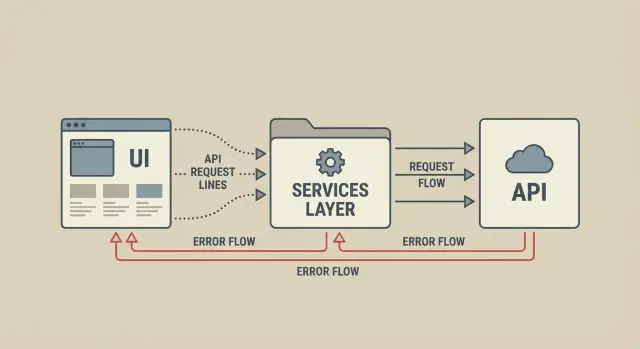
Why API calls inside components turn into bugs
A common React (or similar) pattern is a UI component that does everything: it renders the screen, calls fetch, builds headers, parses JSON, handles status codes, and decides what error text to show. It works for the first endpoint, then turns into a mess as the app grows.
When each screen implements its own request logic, you duplicate small decisions that should be consistent. One component retries on 401, another logs the user out. One sends Content-Type: application/json, another forgets it. One treats an empty response as success, another crashes on await res.json().
This is why a frontend service layer matters. It gives you one place to define how your app talks to the API, instead of re-deciding it in every component.
Another problem is hidden coupling. The UI starts to depend on endpoint details that should be private: exact URLs, query params, header shapes, and response formats. Later, if the backend changes from user_id to id, you are not changing one call site. You are hunting through screens, modals, and hooks hoping you did not miss one.
The symptoms usually look like this:
- Headers that are painful to update (auth token, app version, tenant id)
- Random error messages that differ by screen
- Auth bugs that only happen in certain flows
- Loading states that get stuck after an exception
- “Works on one page” API behavior
A small example: a profile screen and a billing screen both fetch /me. One adds the auth header from local storage, the other uses a stale in-memory value. Users see “Please log in” on billing, but profile still loads.
If you’ve inherited an AI-generated prototype, this is especially common: scattered fetch calls that look fine in demo mode, then fail in production once auth, error formats, and edge cases show up.
What a service layer is (in plain terms)
A service layer is a small set of files that owns talking to your backend. Instead of each component building its own URL, headers, and fetch call, your app makes API requests through shared functions like getUser(), updateProfile(), or createInvoice().
It is not a framework, and it does not need new dependencies. Think of it as plain JavaScript or TypeScript modules that sit between your UI and the backend. You can start with one file (for example, apiClient.ts) and add more as your app grows (for example, authService.ts, billingService.ts).
The goal is simple: one consistent way to call APIs and one consistent way to handle outcomes. That includes the boring parts that cause most bugs: timeouts, missing auth headers, inconsistent response shapes, and error messages that change from page to page.
Components also get simpler. They stop caring about HTTP details. They ask for data or actions, then render based on the result.
Instead of this kind of component code:
const res = await fetch(`/api/users/${id}`, {
  method: "GET",
  headers: { Authorization: `Bearer ${token}` }
});
const data = await res.json();
if (!res.ok) throw new Error(data.message || "Failed");
You end up with UI code that reads like the user flow:
const user = await userService.getUser(id);
That difference matters most when you need to change something globally (adding a header, handling a new error format, switching endpoints). With a service layer, you change it once, not in 15 components.
What belongs in the UI vs the service layer
A simple rule: the UI decides what to show, and the service layer decides how to talk to the server. When those get mixed, components get harder to read and easier to break.
In the UI, keep work that is tied to the screen: local state (loading, data, error), triggering actions on click or page load, and showing feedback like toasts, inline errors, and empty states. The component should not care whether the request uses fetch, which headers it needs, or how to interpret a strange backend error.
In the service layer, put the parts that should be consistent everywhere:
- Building requests (URL, method, headers, auth token, body)
- Parsing responses (JSON vs empty body, status codes)
- Converting failures into a small set of error types your UI understands
- Returning a predictable result shape so every screen handles it the same way
Decide early how you represent results. A common option is: the service returns either { data } or { error }, and the UI owns loading state. This keeps services focused and UI logic predictable.
Naming also matters. Pick one style and stick to it, for example userService.getProfile() (what it does) or ordersApi.create() (what resource it hits). Mixing styles makes code harder to find later.
A concrete example: if a sign-in form needs to display “Wrong password” vs “Network error”, the service should translate raw responses into INVALID_CREDENTIALS or NETWORK. The UI then just chooses the right message.
Step by step: refactor one API call without breaking the UI
Start small. Pick a single endpoint that shows up in more than one place, like “get current user” or “load projects”. These are ideal because you can prove the change works by checking two screens.
Assume you have fetch('/api/me') duplicated in a header and a settings page. Your goal is to keep the UI behavior the same while moving the network details into your service layer.
1) Move the fetch into a service function
Create a file like services/userService.ts (the name does not matter, consistency does).
// services/userService.ts
export async function getMe() {
  const res = await fetch('/api/me', { credentials: 'include' });
  const data = await res.json().catch(() => null);

  if (!res.ok) {
    return { ok: false, error: data?.error || 'Request failed', status: res.status };
  }

  return { ok: true, data };
}
Notice the return shape is always predictable: { ok: true, data } or { ok: false, error }. That one decision removes a lot of “what do I check here?” bugs.
2) Replace the old blocks and keep the UI output the same
Update each component to call getMe() and keep the same loading, success, and error UI as before.
A safe refactor path:
- Swap the inline
fetchforawait getMe() - Map the old state updates to the new result (
if (result.ok) setUser(result.data) else setError(result.error)) - Keep the same spinners, toasts, and empty states
- Test both places that use the endpoint
- Only then delete the old
fetchcode
Before you move on to the next endpoint, confirm nothing changed for the user. If you are inheriting a prototype, this is often where hidden inconsistencies show up (like mixed JSON shapes or brittle auth assumptions).
Standardize how requests are built
When every component builds its own request, tiny differences add up: one call forgets the auth header, another sends the wrong content type, another uses a slightly different base URL. A service layer fixes that by giving you one “door” to the API.
Start with a single request wrapper (an API client) that owns the boring details. Components should only pass what’s unique: endpoint, method, and any data.
A good request builder usually handles, in one place:
- Base URL and common headers (like
Accept: application/json) - Auth tokens (read from storage, attach to the header, optionally refresh)
- Timeouts and request IDs (so calls do not hang forever and you can trace issues)
- Query params (encoded consistently)
- JSON bodies (stringified consistently, with the right content type)
Auth is often the biggest win. Instead of sprinkling Authorization logic across the UI, have the client attach the token automatically. If your token can expire, keep refresh behavior inside the client too. That way, a profile screen and a billing screen behave the same, and an auth change becomes a single edit.
Be strict about how you pass params and bodies. For example, decide that GET requests take params and POST/PUT requests take body, and the client enforces it. This prevents the common “why is the server getting an empty body?” bug.
Concrete example: a “Search users” input might call searchUsers({ q, page }). The UI just provides q and page. The client turns that into GET /users/search?q=...&page=..., adds headers, attaches auth, applies a timeout, and adds a request ID. If you later move the API to a new domain, only the base URL changes.
Standardize responses and error handling
When every component decides what “success” looks like, the UI ends up full of tiny rules: sometimes it reads data, sometimes it reads user, sometimes it checks ok. A service layer works best when it always returns the same shape to the UI, so components can stay simple.
Normalize successful responses
Pick one contract for what the UI receives. Service functions should either return the parsed payload directly, or return a consistent envelope like { data, meta }. Most teams keep UI code cleaner by returning the payload directly.
Be strict about it. If one endpoint returns { user: {...} } and another returns { data: {...} }, normalize them inside the service so the component always receives the same type of value.
Create one error format the UI can display
Don’t throw random strings in one place and Response objects in another. Define a single error object the UI can render without guessing.
export type ApiError = {
  kind: "auth" | "forbidden" | "not_found" | "rate_limited" | "server" | "network" | "unknown";
  message: string;
  status?: number;
  requestId?: string;
};
Then map common status codes in one place so the whole app behaves consistently:
- 401: ask the user to sign in again (kind:
auth) - 403: show “You don’t have access” (kind:
forbidden) - 404: show “Not found” and stop retries (kind:
not_found) - 429: show “Too many requests” and suggest waiting (kind:
rate_limited) - 500+: show a calm fallback and allow retry (kind:
server)
For debugging, log helpful context like status, endpoint name, and a request id header if you have it. Don’t log tokens or payloads that might contain secrets. Users should get a friendly message, and developers should get the details.
Retries, caching, and cancellation without clutter
Once API calls live in one place, you can add “quality of life” features without touching every screen. The UI stays focused on loading states and rendering, while the service handles the messy parts.
Simple caching to prevent double fetches
Not every request needs caching, but a little can stop common annoyances like refetching the same user profile on every tab switch. A practical approach is a tiny in-memory cache with a short time limit (for example, 10 to 30 seconds) for reads that do not change often.
A concrete example: your dashboard and settings page both ask for /me. If they mount close together, you can return the cached result instead of firing two requests and racing the responses.
Retries, but only when it is safe
Retries should be the exception, not the default. Retrying a “read” request (GET) after a network hiccup is usually fine. Retrying a “write” (POST, PUT, DELETE) can create duplicates or unintended changes.
Keep retry rules in the service layer so components do not invent their own behavior:
- Retry only on safe methods (usually GET) and only on network errors or 5xx responses.
- Use a small limit (1 to 2 retries) and a short delay.
- Never retry authentication failures (401) automatically.
Cancellation for fast navigation and search
If a user types in a search box or navigates quickly, old requests should stop. Otherwise you get stale results flashing on screen.
Using AbortController in the service layer keeps cancellation consistent:
export function searchUsers(query, { signal } = {}) {
  return api.get('/users/search', { params: { q: query }, signal });
}
Components then just pass a signal and ignore the plumbing. The result is fewer race conditions, fewer warnings about state updates after unmount, and cleaner UI code.
Common mistakes to avoid
A service layer is supposed to make your UI simpler. Most problems happen when it grows without a clear boundary and people stop trusting it.
A common trap is turning the service layer into a dumping ground. If your “service” starts deciding which button should be disabled or how a screen should look, it is no longer a service. Keep it focused on talking to the server and shaping data into something the app can use.
Another mistake is returning raw fetch Response objects to the UI. That forces every component to remember when to call json(), how to check ok, and what to do with status codes. The UI should get plain data (or a clear error), not a low-level networking object.
Watch for naming and shape drift. If one function returns { user }, another returns { data: user }, and a third returns user directly, bugs become invisible until runtime. Pick a pattern and stick to it across files.
Errors are where many apps get messy. If the service catches errors and returns null or an empty array “to be safe,” the UI cannot react correctly. Your UI needs to know the difference between “no results” and “request failed.”
Finally, avoid coupling services to a single screen. If you name functions after pages (like getSettingsPageData) or sneak UI assumptions into parameters, reuse gets harder and refactors get slower.
Quick checklist before you merge
Do a fast pass for consistency. A service layer only pays off when everyone follows the same rules, even on small changes.
- UI components call a service function, not
fetchor a raw client directly. - Each service function has one obvious contract: clear input and one output shape.
- Errors are translated in one place into a small set of app-level error types or messages.
- Shared request details live in one spot: base URL, auth headers, common query params, timeouts.
- Nothing sensitive is hardcoded in the frontend (tokens, API keys, temporary credentials).
A simple spot check: open one updated component and ask, “Could I swap the API endpoint without touching this UI file?” If the answer is no, the boundary is probably leaking.
Example: cleaning up a prototype with scattered fetch calls
A common pattern in AI-generated prototypes (from tools like Lovable, Bolt, v0, Cursor, or Replit) is the same fetch block copied into lots of components. One screen has a slightly different header. Another parses JSON differently. A third shows a toast for errors, but the rest fail silently. Everything works in a demo, then breaks as soon as you add real auth, real errors, and real users.
In one prototype, fetch was duplicated across 12 components. The bugs were small but constant:
- Auth header drift: some calls used
Authorization, others used a custom header, a few forgot it. - Inconsistent parsing: one call expected
{ data: ... }, another used raw JSON, another never checkedres.ok. - Random user messages: some screens showed “Something went wrong”, others dumped server text, others did nothing.
The first refactor was intentionally small. Instead of rewriting the app, we created one apiClient plus two focused services: authService (login, refresh, current user) and projectService (list, create, update).
Before, a component looked like this (simplified):
useEffect(() => {
  fetch('/api/projects', {
    headers: { Authorization: `Bearer ${token}` }
  })
    .then(r => r.json())
    .then(setProjects)
    .catch(() => toast('Error'));
}, [token]);
After, the UI only asked for data and handled loading state:
useEffect(() => {
  projectService.list().then(setProjects).catch(showError);
}, []);
The win shows up fast. The UI gets shorter, and the rules live in one place: how headers are built, how JSON is parsed, and how errors are shaped. When the backend changes (say it starts returning items instead of data), you fix it once in the service layer and every screen updates together.
Next steps: keep it consistent and get support when needed
A service layer only pays off if everyone uses it. The fastest way to keep the benefits is to make it the default path for any new API work. If someone needs data, they should reach for the service function, not write a new fetch call inside a component.
Write small tests for service functions. You do not need a big suite. You want proof that the happy path works and that errors are shaped the way the UI expects.
Documentation can be light, but it must be easy to follow. A short list of approved service function names prevents duplicates like getUser, fetchUser, and loadUser doing the same thing with slightly different behavior.
If you’re dealing with an AI-generated codebase that has scattered fetch calls, inconsistent auth, or security issues (like exposed secrets), FixMyMess (fixmymess.ai) can help. They focus on diagnosing and repairing broken AI-generated apps, including refactoring request layers, hardening security, and preparing projects for production.
FAQ
Why do API calls inside UI components cause so many bugs?
Because each component ends up making slightly different decisions about headers, parsing, retries, and error messages. Those tiny differences create bugs that only show up in certain screens or flows, especially around auth and edge cases.
What is a frontend service layer, in plain terms?
A service layer is a small set of shared functions that handle talking to your backend, like getMe() or createInvoice(). Components call those functions and focus on state and rendering instead of HTTP details.
What belongs in the UI vs the service layer?
UI should own screen behavior like loading state, button clicks, and what message to show. The service layer should own request building, response parsing, and translating failures into a predictable error shape the UI can handle.
What’s the safest way to refactor one API call into a service without breaking the UI?
Start with one endpoint that’s used in more than one place, like /me or a projects list. Move the fetch into one service function that always returns a predictable result, then swap each component to use it while keeping the same UI output.
What return shape should service functions use?
Use one consistent return shape everywhere, such as { ok: true, data } and { ok: false, error, status }. The big win is that components no longer guess what to check, so error and success flows stay consistent across screens.
How do I standardize headers, base URL, and auth handling?
Create a single request wrapper (an API client) that owns base URL, common headers, auth token attachment, JSON encoding, and timeouts. Then every service function calls that wrapper so you change shared behavior once instead of in many components.
How do I handle inconsistent backend response shapes?
Normalize responses in the service layer so the UI always receives the same kind of payload, even if the backend returns different shapes per endpoint. This prevents components from hardcoding backend details like data vs user vs items.
What’s a good way to standardize error handling?
Define one app-level error object and map HTTP and network failures into it in one place. Then the UI can show the right message without guessing, and you avoid throwing random strings or leaking low-level Response objects into components.
Should I add retries, caching, and request cancellation in the service layer?
Retries are usually safe only for read requests like GET and only for network errors or 5xx responses, with a small limit. Cancellation is worth it for search and fast navigation; keeping AbortController handling in the service layer prevents stale results and state updates after unmount.
How does FixMyMess help if my AI-generated prototype has scattered fetch calls and auth bugs?
This pattern is extremely common: copied fetch blocks scattered across components with drift in headers, parsing, and auth assumptions that only worked in demo mode. If you’ve inherited a broken AI-generated app, FixMyMess can audit the codebase for free and quickly refactor the request layer, fix auth bugs, and harden security so it’s ready for production.