Graceful shutdown for Node servers: stop random 502s
Learn graceful shutdown for Node servers to drain keep-alive connections, finish in-flight requests, close DB pools, and prevent random 502s during deploys.
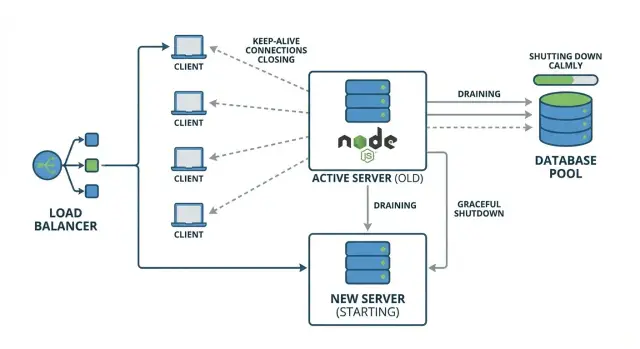
Why deploys can cause random 502s
A “random 502” during a deploy usually means your reverse proxy or load balancer sent a request to an app instance that was already shutting down. For a brief moment, the proxy may still consider that instance available, or it may reuse an existing connection that no longer has a healthy server on the other side.
It feels random because it depends on timing. Most users hit instances that are still running and get a normal response. A smaller group hits the unlucky window: their request arrives right as the process exits, right as the server stops listening, or right after a connection gets cut.
Keep-alive can make this worse. Clients and proxies reuse existing TCP connections for multiple requests, so during a deploy you can have long-lived connections still sending requests to an instance you’re trying to replace. If the app closes the server immediately, those reused connections fail in confusing ways, and the proxy often reports it as a 502.
The core idea is graceful shutdown: stop taking new work, finish the work already in progress, then exit.
A simple example: you deploy a new version, your orchestrator sends a stop signal, and Node exits right away. One user is mid-checkout (an in-flight request). Another user’s browser reuses a keep-alive connection to fetch the next page. Both requests get dropped. Everyone else, routed to other instances, never notices.
A shutdown that drains connections and waits briefly for in-flight requests prevents those “random” failures and makes deploys predictable.
What you are actually shutting down
A Node server isn’t just “a process that stops.” It’s a process mid-conversation with clients, holding open resources like sockets, timers, and database connections. Graceful shutdown is mostly about ending those conversations in the right order.
A typical request lifecycle looks like this: a client connects, sends a request, your app runs code (often calling a database or another API), then the server sends a response and the request is done. If you kill the process in the middle, the client gets a broken response, and your load balancer may report it as a 502.
“In-flight requests” are requests that have started but haven’t finished. They’re the ones most likely to get cut off during deploys. Even short requests can become in-flight if the database is slow, a downstream API stalls, or the event loop is busy.
Keep-alive adds another layer. One TCP connection can carry many requests over time. During shutdown you want to stop taking new requests, but you may still have open keep-alive sockets that are idle or waiting for the next request.
Some work stays “in-flight” longer and needs extra care: uploads (big files, slow clients), exports/report generation, streaming responses and Server-Sent Events (SSE), and WebSockets (not “requests” in the usual sense, but still active connections).
So you’re shutting down three things: new incoming traffic, current in-flight requests, and any long-lived connections that keep the process busy even when it looks idle.
Signals and timing: how shutdown gets triggered
Most deploy problems start the same way: your Node process gets told to stop, but nobody is sure when, or how long it has to finish.
On Linux, two signals matter most:
- SIGTERM: “Please exit now, but clean up first.” This is what platforms send during a normal stop or deploy.
- SIGINT: “Stop because a human asked.” This is what you get from Ctrl+C in a terminal.
Process managers and containers usually follow a simple sequence: a deploy begins, the old instance receives SIGTERM, and a countdown starts (often called a grace period). If the app exits on time, great. If not, the platform sends a hard kill (SIGKILL) and the process disappears instantly.
If you do nothing, Node will keep running until it’s forced off. That means keep-alive sockets can get cut mid-request, in-flight work may never finish, and database connections can be left hanging. The result shows up as “random” 502s, even if your app logs look fine.
Make shutdown behavior consistent, not best-effort. Decide up front which signal you handle (usually SIGTERM), how long you’ll wait before forcing exit, and what stops first (new traffic) versus what you try to finish (in-flight requests).
When shutdown is predictable, deploys stop being luck-based.
Step-by-step: stop accepting new traffic safely
A deploy shouldn’t feel like pulling the power cord. The goal is simple: stop new traffic first, then finish what’s already in progress.
Start by adding a single "draining" flag in your app. When it flips to true, the server is still alive, but it’s preparing to exit.
A safe order for most HTTP APIs:
- Flip
draining = trueas soon as you receive the shutdown signal. - Make your readiness check fail, so the load balancer stops routing new requests to this instance.
- For any new request that still arrives, return a clear
503 Service Unavailablewith a short message. - Tell the HTTP server to stop accepting new connections.
- Keep the process running while existing requests finish (with a timeout, covered below).
A tiny example (Express-style) looks like this:
let draining = false;

app.get('/ready', (req, res) => {
  if (draining) return res.sendStatus(503);
  res.sendStatus(200);
});

app.use((req, res, next) => {
  if (draining) return res.status(503).send('Server is restarting, try again');
  next();
});

process.on('SIGTERM', () => {
  draining = true;
  server.close(); // stop accepting new connections
});
Keep health checks honest. During shutdown, you want “ready” to turn red quickly, but you still want a basic “alive” check to stay green until you actually exit. That helps avoid the platform killing the process early and creating the very 502s you’re trying to prevent.
Drain keep-alive connections without dropping users
Keep-alive means the browser (or a load balancer) can reuse the same TCP connection for multiple HTTP requests. That’s good for speed, but it surprises people during deploys: you stop accepting new connections, yet old keep-alive sockets stay open and may send another request to a process that’s draining.
Node’s server.close() stops new connections, but it doesn’t automatically close existing keep-alive sockets. To drain safely, track sockets as they connect, then gently close the idle ones while letting active requests finish.
A simple pattern:
- Keep a
Setof sockets from the server’sconnectionevent. - Mark sockets as “busy” while a request is in progress.
- On shutdown, call
server.close(), thensocket.end()for idle sockets. - After a deadline,
socket.destroy()anything still open.
Here’s a compact example:
const sockets = new Set();
const busy = new Set();

server.on('connection', (socket) => {
  sockets.add(socket);
  socket.on('close', () => { sockets.delete(socket); busy.delete(socket); });
});

server.on('request', (req, res) => {
  busy.add(req.socket);
  res.on('finish', () => busy.delete(req.socket));
});

async function shutdown() {
  server.close();
  for (const s of sockets) if (!busy.has(s)) s.end();
  setTimeout(() => { for (const s of sockets) s.destroy(); }, 10_000);
}
That force-close deadline matters. Without it, one stuck client can keep the old instance alive and turn a rollout into a mix of timeouts and intermittent proxy errors.
Finish in-flight requests with a clear timeout
When a deploy starts, you want existing requests to finish normally, but you also need a hard stop so the old process doesn’t hang forever. The simplest approach is to track active requests and use a draining flag.
Here’s a small pattern that works with most Node HTTP frameworks:
let draining = false;
let active = 0;

app.use((req, res, next) => {
  if (draining) return res.status(503).set('Connection', 'close').send('Server restarting');

  active += 1;
  res.on('finish', () => { active -= 1; });
  res.on('close', () => { active -= 1; });
  next();
});

function beginShutdown() {
  draining = true;
}
While draining, avoid creating new work that outlives the request. A common mistake is letting a request enqueue background tasks (emails, reports, cleanup) after you’ve decided to shut down. If you must enqueue, guard it with the same draining flag and skip it during shutdown.
Set a shutdown timeout that matches your traffic. Many teams start with 10 to 30 seconds, then adjust based on real slow endpoints.
The flow is straightforward: start draining and stop accepting new requests, wait until active === 0, and if the timer hits, force-close remaining connections and exit.
If a request arrives after draining begins, return 503 Service Unavailable and add Connection: close. That tells clients and load balancers not to keep the socket around, which reduces the weird half-closed keep-alive failures that often show up as 502s.
Close DB pools and other resources cleanly
Closing your HTTP server isn’t the same as letting the Node process exit. A database pool keeps open TCP sockets (and sometimes timers), so the event loop still has work to do. That’s why a deploy can look “done” while the old process lingers, then gets killed and produces errors.
“Close the pool” usually means: stop handing out new connections, close idle ones, and wait until active queries finish. Common examples:
- PostgreSQL (
pg):await pool.end() - MySQL (
mysql2):await pool.end() - Mongoose:
await mongoose.connection.close()(and stop new ops)
Order matters. Stop accepting new traffic first (so you don’t start fresh DB work), then let in-flight requests finish, then close the DB pool. After that, shut down the rest.
Pending queries and transactions need a clear rule. During shutdown, block new requests from starting writes, let current requests finish up to a timeout, then fail fast. If you have long transactions, aim to end them quickly and roll back if you hit the deadline.
async function shutdown() {
  server.close(); // stop new HTTP connections
  await Promise.race([
    waitForInFlightToFinish(),
    sleep(10_000),
  ]);
  await dbPool.end();
  await redis?.quit();
  await queue?.close();
}
Other resources that keep a process alive include Redis clients, job queues, Kafka/Rabbit connections, cron timers, and open file handles. Closing them explicitly turns shutdown into something you can rely on.
Background jobs: don’t forget the hidden work
HTTP traffic is only half the story. Many Node servers run background work in the same process: queue consumers, cron tasks, scheduled refreshes, and worker loops. During a deploy, these can keep the process alive longer than you expect, or keep touching the database after shutdown starts.
The first rule: once shutdown begins, stop starting new background work. Pause queue consumption, stop polling, and prevent cron from kicking off new runs. If you’re using a library, look for a real pause/stop method (not just disconnect), because disconnecting can trigger retries and extra noise.
After you stop new jobs, let current jobs finish, but only up to a clear limit. Otherwise one stuck job can delay shutdown until your platform kills the process, which is when the errors spike.
Cancel safely vs. waiting
Choose based on what the job does:
- Wait for work with a known upper bound (send one email, resize one image).
- Cancel long jobs with unclear end (big imports, third-party calls that hang).
- Cancel anything holding a DB transaction open.
- Wait jobs that can checkpoint progress and resume later.
- Cancel jobs that might run twice and cause damage (double-charging, double-refunds).
If you cancel, do it on purpose: set an “isShuttingDown” flag, stop pulling new messages, and let jobs check the flag at safe points so they can exit cleanly.
What to log so you can tell what prevented exit
Log enough to answer “what was still running?” Capture the shutdown start time and signal, active job counts (by queue name), the oldest running job age and IDs, which subsystem is still open (queue client, cron, timers), and whether you hit the shutdown deadline and forced anything to stop.
Special cases: WebSockets, streaming, and uploads
Shutdown is easier when requests are short. The trouble starts when connections stay open for minutes.
WebSockets: close without surprising users
WebSockets are long-lived by design, so don’t just kill the process. During shutdown, stop accepting new socket connections, then notify active clients and give them a short window to reconnect.
A practical pattern: send a “server restarting” event, stop new messages, and close with a normal close code (not an error). If you have a load balancer, make sure it stops routing new connections to the instance before you begin closing sockets.
Streaming, SSE, and long polls
SSE and other streaming endpoints can look “idle” to proxies even when they’re working. During shutdown, end streams cleanly so the client can reconnect, and set a max drain time so you don’t wait forever.
With long polling, clients retry quickly. Returning a clear “try again” response is better than letting the connection die and show up as a 502.
A practical approach: stop accepting new connections first, mark the instance as draining in your health check, send a final message and close streams/sockets gracefully, give uploads a short grace period then abort, and use one hard timeout for everything so deploys finish.
File uploads mid-flight
If a client is mid-upload, killing the connection can corrupt the file and waste minutes. Prefer resumable uploads when possible. If not, write to a temp file and only “commit” when the upload completes.
Also check reverse proxy timeouts (Nginx, ALB, etc.). An idle timeout shorter than your stream or upload can look like deploy-related 502s even when your app code is fine.
Common mistakes that still lead to 502s
Most “random” 502s during deploys aren’t random. They happen when shutdown happens in the wrong order, or when the load balancer keeps routing requests to a process that’s already on its way out.
One timing mistake is waiting too long to stop new traffic. If you only start draining after you begin closing things, you create a window where fresh requests arrive but critical resources (like DB connections) are already unavailable. The result looks like flaky networking.
Another classic issue is closing the database pool first. Requests that already passed routing still need queries, sessions, or transactions. If the pool is gone, those requests fail mid-flight.
Deploy environments usually send SIGTERM, not SIGINT. If you only tested Ctrl+C locally, your shutdown handler might never run in production. This shows up a lot in AI-generated Node code: it runs fine until the first real deploy, then the platform kills it hard because it doesn’t respond to the expected signal.
The issues that most often break shutdown are simple: not entering drain mode early, having no shutdown deadline (or one so short it cuts off active users), keeping readiness green while draining so traffic keeps coming, closing keep-alive sockets too aggressively instead of draining them, and forgetting that background work can keep the process alive after the HTTP server is closed.
If you fix only one thing, fix health checks. Once draining starts, the instance should stop looking ready quickly so traffic moves elsewhere before you tear anything down.
Quick checklist before you deploy
Do one dry run in staging right before a release. When the process is told to stop, it should stop taking new work, finish what it already started, and leave no loose ends.
A quick checklist:
- Send a real shutdown signal (SIGTERM) and confirm the app reacts right away: a clear log line, readiness flips, and the server stops accepting new connections.
- While draining, confirm new requests get a controlled response (for example, 503 with a short message) instead of hanging until the load balancer times out.
- Create a slow request (sleep, heavy query, or big render) and confirm it can finish. Also confirm you have a hard timeout so the process exits on time even if something gets stuck.
- Check cleanup: database pool closes, message queue clients disconnect, and timers stop. After exit, the process shouldn’t stay alive because of open handles.
- Review shutdown logs end-to-end: start time, when draining begins, active request count, and a final “shutdown complete” line.
A simple way to catch problems is to run two curls at once: one long request, then another right after you send SIGTERM. If the long one finishes and the new one gets a quick, predictable response, you’re close.
If your server was generated by an AI tool (Lovable, Bolt, v0, Cursor, Replit), these hooks are often missing or half-wired. Fixing them early prevents the “random 502” feeling during deploys.
Example: rolling deploy without dropping requests
Picture a small production setup: two Node API instances (A and B) behind a load balancer. Clients use keep-alive, so one browser tab might reuse the same TCP connection to instance A for minutes.
During a rolling deploy, the load balancer starts sending new requests to B while A is being replaced. The catch is keep-alive: even if the load balancer stops picking A for new connections, some clients still have an open connection to A and will keep sending requests on it.
That’s where intermittent 502s come from. If A gets SIGTERM and exits fast, those reused connections suddenly point to a process that’s gone. The next request on that socket fails and the proxy reports a 502.
A graceful shutdown avoids this by doing three things in order:
- stop accepting new connections on A
- drain existing keep-alive connections
- wait for in-flight requests up to a clear timeout, then close DB pools and exit
To test locally or in staging: add one slow endpoint (for example, a route that waits 10 seconds), send repeated requests with keep-alive enabled, then restart only one instance. If draining is working, the slow request finishes and you don’t see intermittent 502s.
Next steps: make deploys boring again
Graceful shutdown only helps if you can see it working under real traffic. Add shutdown logs that show the order of events: signal received, readiness flipped, stopped accepting new requests, active request count, keep-alive drain, DB pool closed, process exit.
Before the next release, run a “slow request” test in staging: make one endpoint intentionally slow (10-20 seconds), then deploy while that request is in progress. You want two outcomes: the slow request finishes successfully, and new requests go to the new instance without errors.
If the codebase is messy or AI-generated and deploys are still unpredictable, a focused audit can be faster than trying random tweaks. FixMyMess (fixmymess.ai) helps teams diagnose shutdown paths, connection draining, and cleanup issues in inherited AI-generated Node apps so rollouts stop producing surprise 502s.