IDOR test for copy-link viewing vulnerabilities in your app
Run a quick IDOR test using two accounts to spot copy-link viewing issues, confirm what data leaks, and capture clear evidence before you ship.
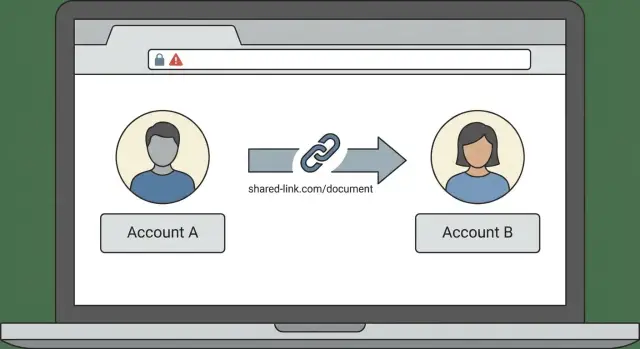
What “copy-link viewing” looks like in real apps
“Copy-link viewing” is when someone can open a page in your app just by pasting a link, even though they aren’t supposed to see that record. It shows up around invoices, projects, support tickets, shared docs, and sometimes admin screens that include a “Copy link” button.
The risky part isn’t the sharing feature. The risk is that the app loads data based only on what’s in the URL (like an ID) without checking whether the current user is allowed to see it.
A common example: a customer copies a link to their invoice and sends it to their accountant. The accountant clicks it while logged into their own account (or not logged in at all) and still sees the invoice. Worse, if the URL looks like /invoice/1042, changing it to /invoice/1043 shows a different customer’s invoice.
Many teams assume they’re safe because the link “looks random” (a long string). But randomness is not permission. If the server doesn’t verify access every time, a random-looking link can still leak data through sharing, forwarding, browser history, screenshots, or someone simply reusing an old message.
People usually report this as “weird” behavior, like:
- “I clicked a link and saw someone else’s name or email.”
- “I can open an old link in a private window and it still works.”
- “My teammate can view my record without being added to it.”
- “Support asked for a link, and now anyone with it can see the ticket.”
This guide walks you through a simple two-account IDOR test to spot insecure direct object access without reading code. You’ll learn what to try, what counts as a leak, and how to capture proof a developer can fix quickly.
IDOR explained without security jargon
IDOR is short for insecure direct object access. In plain terms, it means you can change an ID in a link (or request) and see someone else’s stuff. The app is returning a real object (a project, invoice, message, or file) based mainly on an identifier, without properly checking whether you’re allowed to view it.
A typical pattern: you open a page and the URL includes an item ID. If you swap that ID for another one and the app shows a different person’s item, that’s an authorization bug.
The key distinction is simple:
- Authentication answers: “Are you logged in?”
- Authorization answers: “Are you allowed to access this specific item?”
Lots of apps get the first one right and still fail the second. Being logged in only proves you’re a user. It doesn’t prove you should see every record.
A useful mental model:
- Object: the thing you’re trying to access (document, order, ticket)
- Owner: the user or team the object belongs to
- Permission check: the app must confirm, every time, that the current user has access to that object
If that permission check is missing or too loose, “copy link” behavior turns into accidental data exposure.
Where IDOR bugs hide most often
IDOR issues don’t show up on marketing pages. They show up in the “real work” parts of the app, where records load by ID and actions like download or export exist.
Pages that load one record by ID
These are common because the URL often maps to exactly one record:
- Invoices, receipts, proposals, reports, signed PDFs
- Projects, tasks, tickets, notes, comments
- Profiles, billing pages, settings, team or workspace admin screens
- Attachments, exports, image/file downloads
- “Share” pages that look public but are intended to be private
A quick smell check: if the page changes completely when you change only one number or one token in the address, it might be trusting the ID too much.
Background APIs that still leak
Many apps load data from an API in the background. Sometimes the screen is protected, but the API endpoint isn’t.
Example: the ticket page is blocked, yet an endpoint like “getTicket?id=123” still returns ticket details to any logged-in user.
If you inherited an AI-generated app (Lovable, Bolt, v0, Cursor, Replit), be extra careful here. Access control is often inconsistent across routes, especially for downloads, exports, and “side” endpoints.
Set up the two-account test safely
You’re mimicking what a real user could do with a shared link. Keep it safe: normal user accounts, test-only data, separate browser sessions.
- Create two regular users: Account A and Account B. Don’t give either admin rights or “view everything” roles.
- If your app has workspaces, orgs, or teams, put A and B in different ones.
- Under Account A, create 1-2 obvious test items you’ll recognize later (for example, a doc titled “IDOR Test - A” or a dummy invoice for $1). Use fake data.
- Write down what should happen. For example: “Only the owner can view” vs “Anyone with the link can view, but not edit.”
- Separate sessions so logins don’t bleed together:
- Account A in a normal browser window
- Account B in an incognito/private window (or a different browser profile)
Step by step: the copy-link viewing test
The test is straightforward: Account A can view an item, then Account B tries to open the exact copied link.
- Log in as Account A and open a target item (invoice, project, ticket, document, message thread).
- Copy the full URL from the address bar. Note anything that looks like an identifier (number, UUID-looking string, slug).
- In the separate session, log in as Account B.
- Paste the exact link and load it.
- If anything loads, try a small variation by changing only the identifier and reloading.
After the view page, repeat the same pattern on “side doors” that often leak more than the main screen. Don’t do anything destructive.
- If there’s an edit route, see whether Account B can load the edit form.
- If there’s a download/export action (PDF, CSV, attachment), see whether it returns a file.
- If the page loads at all, pay attention to what extra data appears (names, emails, amounts, internal notes).
If Account B can see anything real, even a preview or metadata, treat it as an authorization bug.
How to read the results (and what counts as a leak)
Don’t only look for a dramatic “I can see everything” failure. Many real issues leak just enough to cause harm.
What outcomes mean
Compare what Account B can do with Account A’s link:
- Full access: B sees the same content A sees. Clear leak.
- Partial data: B can’t use the page normally, but still sees names, amounts, messages, attachments. Still a leak.
- Metadata only: B learns the record exists (title, owner, timestamps). Still a leak.
- Proper denial: B is blocked consistently and no private data appears.
A “404 Not Found” isn’t always safe. If some IDs return 404 while others return a different error, different page, or noticeably different timing, you may be leaking which records exist.
Watch for silent leaks
Some apps hide the UI but still load the data. The page might look blank, but the response (or a downloaded file) contains private info.
Also watch for permission mix-ups: viewing is blocked, but Account B can still edit, delete, download, or export.
Test on both desktop and mobile, too. Mobile views sometimes hit different endpoints.
Capture evidence a developer can act on
A good report saves hours.
Collect:
- The exact URL used (full path and any visible ID)
- Date/time, environment (production vs staging), and browser/device
- Proof from both accounts (screenshots or a short recording)
When you capture screenshots, include something that proves which account is logged in (profile icon, email, account name). Otherwise you’ll get “can’t reproduce.”
Write the rule that should have been enforced, in plain language:
- “Account B should only see its own invoices.”
- “Only invited project members can view this document.”
- “Only the sender and receiver can read this thread.”
Then list exactly what was exposed (names, emails, addresses, amounts, notes, attachments). Keep test data fake and harmless.
Quick checklist: a 5-minute IDOR scan
Use two regular accounts (no admin). Pick a few item types that should be private between users.
- Confirm the two accounts have the same role and permissions.
- Test at least three item types (for example: a document, an uploaded file, and a billing page).
- For each item type, test more than “view” (edit/load form, download/export).
- Make one “guessable” change (for example,
/items/104to/items/105, or swap a readable slug). - Check denial behavior: unauthorized access and invalid IDs should both fail safely and consistently.
Also try a logged-out check in a fresh private window. Pages meant to be private shouldn’t show content just because someone has a URL.
Common testing mistakes that miss the bug
Teams often run this once, see nothing obvious, and move on. A few patterns routinely hide the issue.
- Testing two accounts in the same workspace or org (cross-org is where the bug often appears).
- Confusing true “share links” (intentionally accessible) with private links (should still require the right account).
- Assuming long IDs are safe. If the server doesn’t check permission, any valid ID is enough.
- Only checking what the UI shows, not downloads/exports or background data.
- Stopping after one page. Similar screens are often implemented with different rules.
A practical approach: test the detail page, the download/export endpoint, and any related “activity/comments” view for the same object.
A simple example you can compare to your app
Imagine a client portal where each customer can view invoices. In Account A, you open an invoice and click “Copy link.”
Switch to Account B (a different customer) and paste that same invoice URL.
If Account B can see totals, line items, customer name, or download the PDF, that’s a copy-link viewing vulnerability. The app is trusting the link (or the ID in it) more than it trusts the logged-in user’s permissions.
What should happen instead: the app blocks access unless Account B is allowed to view that invoice. That could be an access denied screen, a redirect, or a login prompt. If your product supports sharing, the link should only work when it was explicitly shared, and sharing should be revocable.
When reporting it internally, keep it specific:
- Impact: “Any logged-in user can view other customers’ invoices by pasting a copied link.”
- Affected areas: “Invoice detail page and PDF download.”
- Repro: “Login as A, copy link, login as B, paste link, observe data/PDF loads.”
- Example data seen: “Invoice total $X, billing name, PDF content.”
How to fix it and what to do next
The fix that actually works
If your two-account check shows copy-link viewing, the fix is almost never in the UI. The fix is on the server: every time the app reads or changes a record, it must confirm the signed-in user is allowed to access that specific record.
Don’t rely on hidden buttons, client-side checks, or “unguessable” IDs. If a user can paste a link, change one ID, and see someone else’s data, the permission check is missing or incomplete.
What to enforce on every vulnerable endpoint:
- Require authentication when the page isn’t meant to be public
- Check authorization for that exact object (owner, workspace member, role)
- Deny by default
- Apply the same rule to reads, writes, exports, and downloads
- Log denied attempts so you can spot abuse
What to do next
After changes ship, rerun the same two-account test against the same pages and downloads you used before. Fixing one route often leaves a “side door” open.
If the app was generated quickly with tools like Lovable, Bolt, v0, Cursor, or Replit, plan extra time. These projects frequently have multiple routes touching the same data.
If you want help confirming scope and patching access control cleanly, FixMyMess (fixmymess.ai) specializes in diagnosing and fixing broken AI-generated codebases, including authorization bugs, security hardening, and deployment prep.
FAQ
What exactly is “copy-link viewing,” and why is it a problem?
“Copy-link viewing” means a person can open a private record just by pasting a URL, even if they were never granted access to that specific record. The problem isn’t sharing itself; it’s missing permission checks when the server loads data based on an ID in the link.
What is an IDOR bug in plain English?
IDOR is when changing an identifier in a URL or request lets you access someone else’s data. If switching from one record ID to another shows a different user’s invoice, ticket, or document, that’s an authorization failure.
What’s the simplest two-account test I can run without reading code?
Use two normal accounts with the same role and keep them in different workspaces or orgs if your app supports that. Log in as Account A, open a private item, copy the URL, then log in as Account B in a separate session and paste the link to see if anything loads.
What counts as a leak if the page doesn’t fully load?
If Account B sees any real data from Account A’s record, count it as a leak. Even “small” exposure like names, emails, totals, titles, timestamps, or attachment metadata can be damaging and usually signals the same bug exists elsewhere.
Are long random IDs or UUIDs enough to keep links safe?
No. Random-looking IDs can make guessing harder, but they don’t enforce permission. If the server doesn’t verify that the current user is allowed to access that specific object every time, any valid link that gets shared, forwarded, or reused can still expose data.
Where do IDOR issues hide besides the main page view?
Try the same test on exports, downloads, attachments, and “print/PDF” actions. Many apps block the page but accidentally leave a file endpoint open, so Account B might not see the UI yet can still download the invoice PDF or attachment content.
Should I also test the link while logged out?
Open the same link while logged out in a fresh private window. If the record is meant to be private, you should see a login prompt or access denied without any private details appearing, including previews or file downloads.
What evidence should I collect so a developer can fix it fast?
Capture the exact URL used, which accounts were logged in, and what was exposed. Include screenshots or a short recording that clearly shows the logged-in identity for each account, plus the expected rule like “only workspace members can view this.”
What’s the correct way to fix copy-link viewing and IDOR?
Fix it on the server by enforcing object-level authorization on every read and write, not just on the UI. The default should be deny, and the same rule must apply to detail pages, APIs, exports, and downloads so there are no “side doors.”
What if my app was built with an AI tool and I don’t know where the bug is?
If you inherited an AI-generated codebase and you’re not sure where access checks are missing, get a focused audit that maps every endpoint touching the data. FixMyMess specializes in diagnosing and repairing AI-generated apps and can patch authorization holes and harden security quickly, usually within a few days depending on scope.