Turn meeting notes into actionable checklists in 30 minutes
Turn meeting notes into actionable checklists with a simple AI workflow: clean inputs, extract decisions, assign owners, and set realistic deadlines.
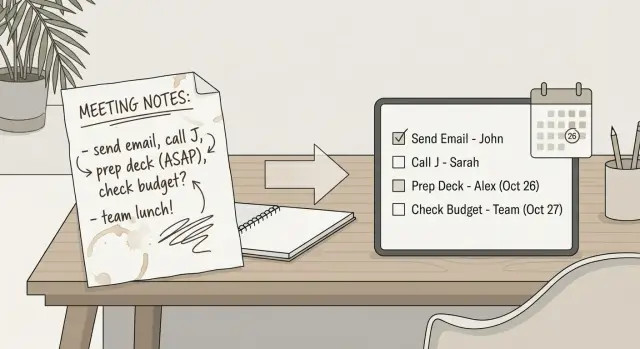
Why meeting notes stay messy and nothing gets done
Most meeting notes are written to help you remember, not to help a group act. They are half reminders, half quotes, half decisions. After the call, they live in different places (a doc, a chat message, a notebook), and nobody is sure which version is the real one.
The bigger problem is that messy notes feel “done.” You attended, you captured something, you can move on. But follow-up work needs structure, and notes rarely have it.
The real problem: ambiguity
Notes fail when they don’t answer three simple questions: what exactly needs to happen, who owns it, and when it’s due. If any one of those is missing, the item turns into “someone should…” and disappears until the next meeting.
Common costs show up fast:
- Owners are missing, so tasks bounce around or get assumed.
- Deadlines are fuzzy (“soon,” “next week”), so nothing is scheduled.
- Decisions are buried, so the same debate happens again.
- Next steps are mixed with discussion, so priorities blur.
- Follow-ups rely on memory, so whoever remembers becomes the default owner.
An “actionable” item is not a topic. It’s a clear task line with a next step, an owner, and a due date (even if it’s a short one like “by Friday”). For example: “Send the revised onboarding email to Legal for approval - Maya - Thu 2pm.”
AI can help you turn meeting notes into actionable checklists by pulling out likely tasks, grouping related points, and rewriting vague lines into cleaner verbs. Tools like FixMyMess are especially useful when your notes are long, inconsistent, or copied from multiple sources.
AI does not help when the meeting never made a decision, when context is missing (“they said yes” - who is they?), or when the task depends on judgment you haven’t provided. In those cases, the best outcome is a short list of questions to resolve before you assign work.
What a usable checklist looks like
A usable checklist is a set of task lines you can act on without rereading the whole meeting. Each line should answer: what needs to happen, who will do it, and by when.
If you want to turn meeting notes into actionable checklists, aim for one clear outcome per line. Avoid mixing discussion points and decisions into the same line as the work.
The minimum fields that make tasks usable
A task is “usable” when it has enough detail for someone to start and someone else to track. The fastest way to get there is to capture a few required fields every time:
- Task: a verb-first action (Send, Decide, Draft, Review)
- Owner: one person responsible (not a team name)
- Due date: a real date, or a clear timeframe (by Friday)
- Status: not started, in progress, blocked, done
- Context: where it happens or what it depends on (doc name, project, meeting)
Once these are present, the checklist can live in a task tool, a shared doc, or a simple table. Tools like FixMyMess can help standardize the format, but the structure matters more than the tool.
Nice-to-haves that prevent follow-up chaos
After the basics, add only what helps the team avoid extra messages later. Two fields that often pay off are priority (what must happen first) and dependencies (what needs to happen before this can start). Reminders can help too, but keep them simple.
This is different from a meeting summary. A summary explains what was discussed. A checklist creates commitments. For example, “Marketing raised concerns about timing” is a summary, but “Nina to confirm launch date with Marketing by Thu, status: not started, context: Q1 launch plan” is a task line you can track.
Prep your notes so AI can do clean extraction
AI is great at pulling out tasks, but it can only work with what you feed it. A few minutes of prep turns scattered scraps into something it can read like a meeting recap, not like a brainstorm dump.
Start by gathering everything that contains real commitments. That usually means your main notes plus a few loose ends: the agenda, chat messages where decisions were made, and any quick follow-up emails. If you keep decisions in a separate place, paste them in too. One combined document is easier for AI than five small ones.
Separate facts from noise
Before you try to turn meeting notes into actionable checklists, quickly mark what is a decision, what is a task, and what is just discussion. You do not need to rewrite anything. Simple labels like "Decision:", "Action:", and "Idea:" are enough.
If a line is only an opinion or a rough suggestion ("maybe we should..."), tag it as an idea so it does not become a task by accident.
Clean the obvious, not the whole document
Do a fast pass to remove only what will confuse extraction:
- Delete exact duplicates (often from copied chat snippets).
- Fix a few key typos that change meaning (dates, names, numbers).
- Split long paragraphs where multiple actions are mixed together.
- Add missing basics at the top: meeting date and who attended (only if it matters for ownership).
- Keep quotes or open questions, but label them as "Question:" so they do not become tasks.
A quick example: if your notes say, "Sam mentioned pricing is off, maybe update it, also promo page needs refresh," change it to two lines with labels: "Action: Review pricing page copy" and "Idea: Refresh promo page." That tiny edit helps tools like FixMyMess extract cleaner tasks with fewer false positives.
A repeatable step-by-step workflow (10 to 20 minutes)
The goal is simple: turn raw notes into a short list of decisions, open questions, and tasks you can assign. You do not need perfect notes. You need consistent prompts and a quick human review.
Step 1: Pull out decisions and open questions
Start by asking the AI to return only two lists: (1) decisions made and (2) open questions. This gives you the “what did we agree on?” and “what is still unclear?” before you touch tasks.
A practical prompt is: “From these notes, list decisions (final, agreed) and open questions (needs answer). Keep it short. Do not add new ideas.”
Step 2: Extract tasks only (no commentary)
Next, ask for tasks only. Be strict about the format so you can copy it into a meeting follow-up checklist without rewriting.
Ask for each task to include: action, outcome, and any key detail (tool, doc, customer, metric). For example: “Schedule a 30-minute call with vendor X to confirm pricing tiers,” not “Talk to vendor.”
Step 3: Add placeholders for owners and due dates
Now ask the AI to propose an owner and a due date for each task, but label them as placeholders. The point is to avoid blank fields, not to guess the truth.
If your team has common roles (PM, designer, sales, ops), tell the AI those options so it does not invent random names.
Step 4: Review only the uncertain items
Do a fast pass and edit only what is risky:
- Tasks that are vague (“look into”, “follow up”)
- Tasks missing a clear outcome
- Owners that feel wrong
- Due dates that were made up from thin air
- Anything that depends on an unanswered question
Everything else should be “good enough” to share. If you try to perfect every line, the workflow falls apart.
Step 5: Output in the format you actually use
Finish by asking the AI to output your final list in the format you will share. For example, a checkbox list for chat, a simple table for email, or numbered tasks for your tracker. If you use FixMyMess (fixmymess.ai) for cleaning up messy text, this is the moment where a clean, consistent format pays off: the fewer variations, the less editing you do next week.
If you want to turn meeting notes into actionable checklists quickly, save these prompts as templates. The repeatable part is not the AI, it is you asking for the same outputs every time.
How to assign owners and deadlines without guessing
A checklist only works if each item has one clear owner and one clear date. Without that, tasks drift, and the next meeting turns into a recap of what should have happened.
Pick one owner, not a group
Choose the person who will make sure the task gets finished, even if they do not do every part themselves. Avoid owners like "team", "we", or "everyone" because no one feels responsible.
If two people are involved, do not split ownership. Pick one owner and name the others as contributors. For example: "Owner: Maya. Contributors: Jordan (data), Lee (design)."
Use real deadlines (and a next check-in when you cannot)
"ASAP" is not a date. A better approach is to tie the deadline to a real moment: before a launch, before the next meeting, or by a specific day.
To keep deadlines realistic, use a simple rule: if the work is small, set it within 2-5 business days; if it is bigger, set a first milestone date instead of pretending it will be done soon.
When the notes do not include an owner or a date yet, do not guess. Write the task as a decision that needs to be made, and add a check-in date so it cannot disappear.
Example formats that work well:
- "Decide owner for vendor outreach (next check-in: Tue 10am)"
- "Confirm deadline for Q1 report draft (next check-in: next staff meeting)"
- "Owner: Sam - Draft agenda for client call (due: Fri 3pm)"
Tools like FixMyMess can help by extracting candidate tasks from messy notes, but ownership and timing still need a quick human pass. That final pass is where you remove "we" and replace it with one name and one date.
Turn extracted items into clear task lines
Once you’ve pulled action items out of your notes, the biggest win comes from rewriting each one into a single clear task line. Aim for the same sentence shape every time: verb + object + context. It prevents vague “follow up” tasks that no one owns.
A simple template that works for most teams is: Do X (what) for Y (who/where) by Z (when). If you want to turn meeting notes into actionable checklists fast, consistency matters more than perfect wording.
Here are a few examples of clean task lines:
- Draft the Q1 onboarding email for new trial users by Thursday
- Confirm venue quote with Finance and share final cost by 3 pm Friday
- Update the bug report form with required screenshots before the next support sync
Add light labels so people can scan the list. Keep them short and obvious, like [Product], [Ops], [Customer], [Finance]. Put the label at the start of the line so it’s visible in any tool.
Some tasks need one extra sentence: acceptance criteria. Use it when “done” can be argued.
Add acceptance criteria when it’s easy to misread
Write it as a quick check: what will be true when the task is finished? Example: “Done = link works, email renders on mobile, and Legal approved the footer.”
Keep task size small enough to finish between meetings. If it feels like a project, split it into the next physical steps: “draft outline”, “get approval”, “publish”. Tools like FixMyMess can help you extract items quickly, but the clarity comes from this last rewrite.
Separate decisions and open questions
Don’t mix them into tasks. Create two small sections: Decisions (what we agreed) and Open questions (what needs an answer). That way your checklist stays focused, and nothing important gets buried.
A realistic example: from messy notes to a clean checklist
Here’s a real-feeling weekly project sync. Three topics came up: onboarding emails, a bug in reporting, and next month’s launch date.
Raw notes often look like this:
Weekly sync
- Onboarding emails: subject line? open rates low. need new draft.
- Reporting bug: totals off for some accounts since last release.
- Launch: “first week of Feb?” depends on legal + pricing page.
- Someone to ask support about top complaints.
- Maybe add a quick tutorial video.
Now you want to turn meeting notes into actionable checklists. The key is to separate decisions (what we agreed), tasks (what someone must do), and open questions (what needs an answer).
After a quick AI pass and a 2 minute human cleanup, it becomes:
Decisions
Onboarding emails will be rewritten this week and tested with two subject lines.
Tasks (with owners and deadlines)
- Draft 2 new onboarding email subject lines and a refreshed first email (Owner: Maya, Due: Thu 3pm)
- Pull last 30 days of onboarding email open rates and send a 5 line summary (Owner: Jordan, Due: Wed noon)
- Reproduce the reporting totals bug and capture steps + screenshots (Owner: Priya, Due: Today 5pm)
- Post the bug summary in the team channel and confirm impact (Owner: Priya, Due: Tomorrow 10am)
One unclear note was: “Launch: first week of Feb? depends on legal + pricing page.” That is not a task yet. Clarify it with a follow-up question:
“What do we need from legal to confirm the launch date, and who is asking?”
That question becomes a task:
- Email legal to confirm approval timeline for launch copy and get a date we can plan around (Owner: Jordan, Due: Tomorrow noon)
If you use a tool like FixMyMess, this is the exact shape you want it to produce: clear task lines, one owner, one deadline, and no guessing.
Common mistakes and how to avoid them
The fastest way to lose trust in your follow-ups is letting AI add “helpful” tasks that nobody actually agreed to. If a line in the checklist is not clearly supported by the notes, label it as a question, not an action. A simple rule: actions must map to a sentence someone said, not a guess about what they meant.
Another common issue is vague tasks. “Look into onboarding” is not a task. It has no clear finish line, so it never feels urgent. When you turn meeting notes into actionable checklists, every item should start with a verb and end with an outcome someone can check off.
Fix the five mistakes that derail follow-ups
Here are the problems that show up most often, and the quick fix for each:
- AI invented tasks: keep a “Needs confirmation” tag for anything not explicitly agreed.
- Vague wording: rewrite as “Do X so Y happens” (action + result).
- Multiple owners: pick one owner per task and list helpers separately.
- Too much commentary: move background into a short “Context” note at the top, not inside each task.
- Unconfirmed deadlines: ask before you assign, or use “Target date: TBD” instead of guessing.
A realistic example: your notes say, “Marketing mentioned a webinar idea, maybe February.” If the AI outputs “Launch webinar on Feb 10,” that is a made-up commitment. Change it to: “Confirm webinar date and owner (proposal: February).”
If you use a tool like FixMyMess, treat its output as a draft, not the final truth. Take two minutes to scan for invented commitments, missing owners, and guessed dates. That small pass prevents awkward follow-ups and keeps accountability clear.
A quick checklist before you share the tasks
Before you send the follow-up, take two minutes to sanity-check the list. This is where most "turn meeting notes into actionable checklists" attempts succeed or fail: not in extraction, but in clarity.
60-second quality check
Start with ownership. Each task should have exactly one owner, even if other people help. If you see "Team" or "Everyone" as the owner, pick one person who is responsible for the outcome. Support roles can be mentioned in the task text, but responsibility should be single.
Next, look at dates. Every item needs either a due date or a next check-in date. If you truly cannot set a date, make the task about getting the date, for example: "Sam to propose two deadline options by Thursday." That keeps it moving without guessing.
Separate decisions from tasks. Decisions are facts you want people to remember. Tasks are actions you want people to do. If you mix them, people miss both. Put decisions in their own small section or label them clearly.
Turn unclear items into questions or concrete next steps. If a line feels vague ("review pricing"), rewrite it as the next observable action ("Aisha to confirm current pricing tiers and flag any gaps"). If you still cannot define the action, convert it into a question to resolve ("What pricing tier applies to nonprofit customers?") and assign it.
Finally, make sure the checklist is short enough to scan in 60 seconds. If it feels long, merge duplicates, remove background notes, and keep only what changes behavior after the meeting.
If you use FixMyMess, this is a good moment to paste the draft checklist back in and ask it to flag missing owners, missing dates, and any lines that read like a decision instead of a task.
How to make the process stick week after week
Consistency is what turns “we should do this” into “this is how we work.” The easiest way to stay consistent is to keep the input and the output predictable, so you are not reinventing the format every meeting.
Reuse one simple template
Use the same headings every time. When your notes always follow the same shape, AI can pull out tasks faster and with fewer weird guesses.
A simple structure that works:
- Decisions
- Action items
- Open questions
- Risks or blockers
- Parking lot (nice-to-have ideas)
Right after the meeting, paste your raw notes under these headings (even if it is messy). Then run your usual “turn meeting notes into actionable checklists” step to extract tasks, owners, and dates.
Pick one conversion time and protect it
Do it while the context is still fresh. For most teams, that means immediately after the meeting or in the first 30 minutes after. If that is impossible, set a same-day rule (end of day at the latest). Waiting a day is where tasks start to drift, and nobody remembers what “follow up with Sam” meant.
Late additions will happen. Chat threads, emails, and quick hallway comments often include real work. Instead of editing the whole checklist, keep a small “Late adds” section and process it once a day. Add new items, but do not rewrite old ones unless the decision changed.
A lightweight habit that makes this stick: do a 2-minute owner confirmation. Send the list, and ask each owner to reply with one of three answers: “Yes,” “Needs change,” or “Not mine.” This catches mis-assignments fast.
Finally, store the checklist in one place every time. Pick a single home (one shared doc, one project space, or one tool like FixMyMess) and use the same naming pattern: date + meeting name. If people know where it will be, they will actually look at it later.
Next steps: set up your repeatable system
Pick one meeting type and commit to it for a month. A weekly team sync is ideal because the same people show up, the topics repeat, and you can quickly see if follow-ups are working.
Write down your “default output” once and stop reinventing it. If your checklist always looks the same, AI output becomes easier to trust, easier to scan, and faster to review.
Create a reusable prompt and format
Keep your prompt short and specific. Tell the AI what to extract and how to format it, then reuse it every time with only the notes pasted in.
A simple checklist format that sticks is:
- Task (starts with a verb)
- Owner
- Due date (or “by next meeting”)
- Notes (only if needed)
Decide who owns the final pass
AI can draft the list, but someone should be responsible for the last 3 minutes of human judgment. Choose one person (often the meeting host or note-taker) to do the final review and send the follow-up.
That final pass should focus on three things: remove duplicates, clarify vague tasks (“look into” becomes “get a quote from X”), and confirm any deadline that feels like a guess.
If your notes live in different places (docs, chat, screenshots) and you keep losing time cleaning them up before you can even extract tasks, FixMyMess can help by turning messy inputs into a structured action list you can review and send.
Once this is set, make it a habit: right after the meeting, run the prompt, do the quick review, and send the checklist while everyone still remembers what they agreed to.