Membership site access rules: plan recovery before content
Membership site access rules decide who gets in, how upgrades work, and how members recover accounts so you can add content with confidence.
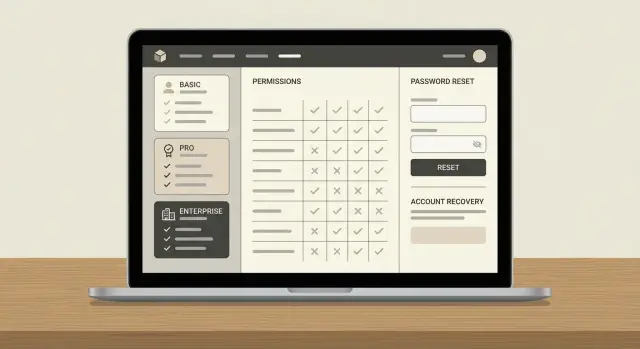
Start by defining what “access” means for your product
Before you write more lessons or add more files, decide what people are actually paying for. A membership is a promise, not a folder. Are they buying weekly coaching, a course library, templates, a private community, or “done-for-you” feedback? If you can’t say it in one sentence, your access rules will stay fuzzy.
Name the kinds of members you expect. Beginners want clear steps and quick wins. Pros want depth and speed. Teams want shared access and simple admin controls. Those differences change what “fair” access looks like, and they decide how many support emails you’ll get.
Split your site into two buckets: what stays public and what is protected. A reliable default is to keep a preview public (so people can see the style and results) and protect the parts that deliver the outcome: downloads, full lessons, replays, community posts, and member-only tools.
To keep your build focused, define what “success” looks like in the first 30 days. Keep it measurable:
- A member can join, log in, and reach the first paid item in under 2 minutes.
- The first-time experience leads to one clear action (watch, download, post, or book).
- Fewer than 5% of members need help getting access.
- You can explain what happens after canceling in one short paragraph.
Example: if you sell “monthly template drops,” you might show one sample template publicly, protect the full pack, and define day-30 success as “70% downloaded at least one pack.”
Design membership levels and permissions on one page
If your tiers are fuzzy, everything else gets messy: checkout, emails, support, and even what “cancel” means. Before you add more content, write your membership site access rules on a single page that a teammate (or your AI builder) can follow without guessing.
Keep tiers to a small set. Most membership sites only need 1 to 3 levels. The goal isn’t clever pricing names. The goal is clear boundaries: what people can see, do, and download.
Decide what access includes. You’re trying to answer a few practical questions:
- What content is visible (courses, lessons, archives)?
- What actions are allowed (commenting, posting, messaging)?
- What extras are included (downloads, templates, recordings)?
- What limits apply (projects, seats, monthly usage)?
- What happens on downgrade (lose access now vs at period end)?
A simple example: a creator has Free, Basic, Pro. Free can read public posts and get a weekly email. Basic unlocks all articles and monthly Q&A replays. Pro adds the community, downloads, and a higher usage cap. If someone cancels Pro, they keep Pro access until the billing date, then drop to Free. No surprises.
A simple permissions table
Write it like a contract with yourself. Here’s a template you can paste into your doc:
| Feature | Free | Basic | Pro |
|---|---|---|---|
| Premium articles | No | Yes | Yes |
| Course lessons | 1 sample | All | All |
| Downloads | No | Limited | Full |
| Community access | Read-only | Post | Post + DM |
| Usage cap | 0 | 10/mo | 100/mo |
This table does more than clarify pricing. It gives you something testable. If your build is powered by AI tools, that matters because access logic often ends up as scattered “if tier then…” checks that are hard to reason about.
Set timing rules: signup, trials, renewals, cancellations
Timing rules sound boring until they break. Most support headaches come from unclear “when does access start?” and “when does it end?” decisions. Write these rules down early so your paywall behaves the same way every time.
Start with access start time. For self-serve products, access usually begins right after payment succeeds. If you sell something that needs onboarding or legal checks, you may choose manual approval. The key is matching the promise on your checkout page. If you say “instant access” but review accounts later, people get frustrated and chargebacks increase.
Trials need three clear answers: what’s included, when the trial ends, and what happens next. Some teams offer full access but limit downloads. Others unlock a small starter area. Whatever you choose, make the end moment predictable with a specific date and time, not “about a week.” Then decide whether the trial auto-renews into a paid plan or ends and locks content until payment.
Cancellations are where trust is won or lost. Many membership businesses keep access until the current billing period ends, because it feels fair and reduces tickets. Instant loss can work for high-risk content (like expensive downloads), but it needs to be stated plainly before purchase.
Failed payments are inevitable, so decide your grace period and what gets locked. Keep it simple:
- Grace period length (for example, 3 to 7 days).
- What stays available during grace (billing page, profile, limited content).
- Reminder schedule (day 0, day 2, day 5).
- What happens after grace (lock content, pause account, or cancel).
- How reinstatement works when payment succeeds.
Example: a creator offers a 7-day trial with limited lessons. On day 8, the plan charges and full access unlocks. If the payment fails, the user keeps access for 3 days, then the library locks but their profile and billing page remain available so they can fix the card without emailing support.
Pick login methods and identity rules early
If you decide this late, you can end up with members who can pay but can’t sign in, or who accidentally create two accounts. That turns basic access rules into a support problem.
Choose one “identity” and stick to it
For most membership sites, the cleanest identifier is the email address. It’s familiar, it works across devices, and it makes account recovery easier. Adding a username sounds friendly, but it creates extra edge cases: forgotten usernames, typos, and people trying to change it later.
A practical starting point:
- Use email as the only login ID.
- Treat emails as case-insensitive (Sam@ and sam@ should be the same person).
- Allow only one account per email.
- Decide whether you allow login before email verification.
- Write down what “one person” means (one email, not one device).
Password login, social login, or both?
Password login is universal, but it brings password reset requests. Social login (Google/Apple) reduces password friction, but it can confuse people who don’t remember which button they used.
If you offer both, set a rule: the account is tied to the email, and any login method must match that email. Otherwise, a member can end up with two separate accounts that look identical.
Email verification is another early choice. If you require it, decide when it triggers: at signup, at first purchase, or before viewing paid content. A safe default is to require verification before accessing anything paid, while still letting the user reach a clear “verify your email” screen.
Finally, plan what happens when a member changes their email. People change jobs and lose access to work inboxes. If you don’t support email changes, they get locked out. If you do support it, require confirmation from the old email (when possible) plus the new email, and be explicit about which address receives billing and recovery messages.
Build a recovery flow people can actually use
Recovery is part of your membership site access rules, because it decides who gets back in when something goes wrong. If you get it wrong, your support inbox fills up fast.
Start by choosing one primary recovery method that matches your audience. For many membership sites, an email magic link is the easiest path. If your users often lose inbox access (work emails, school emails), add a second option like a one-time passcode to phone or backup codes people can save.
A simple build order:
- Pick the reset method(s) and keep them consistent.
- Set expiry and limits (short link/code life like 10 to 30 minutes, plus a small retry cap).
- Add a “can’t access that email” path that routes to support with clear instructions.
- Handle suspicious resets (extra checks after too many attempts, a short delay, or a notification).
- Write the exact on-screen and email text so users never feel blamed or confused.
Don’t skip the “no email access” path. Make it safe and boring. Ask for the minimum proof you can trust without collecting sensitive data. For example: invoice ID, approximate charge date, or the last 4 digits of a saved payment method.
For suspicious activity, add friction only when needed. If someone requests three resets in five minutes from a new location, pause resets for 15 minutes and send a heads-up message to the existing contact method.
Plan the email and support workflow before you scale content
A membership site feels simple until a paying member can’t get in. Before you add more lessons, set up the emails and support steps that make your access rules work in real life.
Start with the emails that must arrive every time:
- Email verification
- Password reset (and a “reset requested” alert)
- Payment receipt and renewal confirmation
- Subscription change notices (upgrade, downgrade, cancel)
- Security alerts (new device login, email change)
Keep each email short: one action, one clear button, and a plain-text fallback. Decide your “from” name and reply-to address so members don’t ignore important messages or reply into a dead inbox.
Next, create a simple support process for edge cases. You don’t need a big system, but you do need consistency: how you triage (billing vs login vs content access), what proof is enough to help safely, when to escalate to a developer, and what response time you can actually keep.
Prepare templates for the tickets you’ll see every week: “I can’t log in,” “Reset email not arriving,” and “I paid but I’m still locked out.” Include three questions you always ask (email used, screenshot of the error, device/browser).
Security basics that prevent painful membership problems
Security doesn’t have to be fancy to be effective. A few basics prevent most “why can’t I log in?” and “why did my account change?” tickets. They also keep your access rules trustworthy so paying members get what they expect.
Protect the accounts that can change everything
Start with admin and staff accounts. If an admin is taken over, every tier, price, and user record is at risk.
Use long, unique passwords (a password manager helps). Turn on MFA if your platform supports it, at least for admins. Keep the admin list small. Require re-authentication before sensitive actions like changing email, billing, or roles.
Reduce abuse without blocking real users
Attackers hammer login and password reset flows because they’re easy to automate. Add friction that triggers only when behavior looks suspicious: rate limits, slowing down retries, and short-lived single-use magic links or one-time codes.
Keep secrets off the frontend. API keys, database credentials, and admin tokens should never ship in browser code or end up committed to a repo. AI-generated code often fails here because it’s optimized to “make it work,” not to make it safe.
Finally, log the events that help you answer “what happened?” fast: successful logins, failed logins (with reason), reset requested, reset completed, email changed, and tier changed.
A realistic example: upgrade, cancel, and recover access
Maya runs a small paid community. A member, Jordan, joins on the Basic plan, upgrades to Pro for a workshop, then cancels. A week later, Jordan forgets the password and can’t log in.
Here’s what Jordan should see if your rules are clear:
- Upgrade (Basic to Pro): “Pro is active now,” the next bill date, and what changed (new areas unlocked).
- Cancel: “Pro stays active until May 31. After that, your account switches to Basic,” plus a way to download invoices.
- After the cancel date: On login, “You’re on Basic,” with a simple option to re-upgrade. No broken pages.
- Forgot password: A recovery screen that never confirms whether an email exists: “If the email is correct, we’ll send a reset link.”
Now the edge case: Jordan types the wrong email ([email protected]) and checks spam. Nothing arrives.
Your rules and support steps should resolve this without guesswork:
- On the recovery screen, offer “Try a different email” and “Contact support.”
- In support, ask for two proofs that don’t expose data (invoice number, approximate charge date, last 4 digits of the card).
- Tell support to look up accounts by billing record, not only email, then update the login email after verification.
- Make reset emails predictable: consistent sender, clear expiry time, and a resend path that doesn’t create multiple active links.
Common mistakes that create support chaos
Most membership support headaches come from a few early decisions that were never tested. The painful part is that these issues rarely show up when you’re the only user. They show up after real people start paying.
A common trap is building a big library first and assuming access will be easy to bolt on later. If your access rules aren’t proven with a handful of real test accounts, you end up with edge cases you didn’t plan for: trial users who can still watch after canceling, annual users treated like monthly users, or people stuck in a loop after a failed payment.
The patterns behind most chaos are simple:
- Tier names that sound nice but don’t explain what’s included.
- Access checks that only happen on login, not on each request.
- No recovery plan for people who lose email access.
- Billing/webhook glitches that leave someone marked “active” forever.
- Copying AI-generated auth code into production without a security review.
A realistic example: you connect payments, ship, and store a flag like hasPaidOnce = true. Your app treats that as permanent access, so upgrades, cancellations, and renewals stop mattering. Now support gets repeated tickets about access and billing that never match what members expect.
Quick checklist before you add more content
Before you record the next lesson, run a “can a real person get in and stay in?” check. Use one or two test accounts per tier. Click through like a customer, not like the builder.
Confirm permissions (what works and what’s correctly blocked), timing (trial end, renewal, failed payment, cancellation), and recovery (reset flow, expired links, email change). Also verify admin boundaries: who can change access rules, and whether key actions are logged.
A simple scenario catches a lot: create a Trial account, upgrade it, cancel it, then try to log back in after the cancellation date. If anything feels confusing, members will email you about it.
Next steps: stabilize the foundation, then expand
Don’t add more lessons, posts, or downloads until the basic access experience is boring and predictable. Content growth is exciting, but unclear rules and flaky recovery turn every new member into a support ticket.
Run a small beta with five to ten real people. Ask them to sign up, log out, log back in on a second device, upgrade once, and do a password reset. Record where they pause and what they expected to happen.
For one week, freeze your access rules. Don’t introduce new tiers, coupons, special cases, or exceptions. Use that time to stabilize login, billing status checks, and what happens when a payment fails.
If your membership was built with AI tools and access logic has started to tangle (auth issues, inconsistent permissions, exposed secrets), FixMyMess (fixmymess.ai) helps turn broken AI-generated prototypes into production-ready software, starting with a free code audit to identify what’s actually failing before you scale.
FAQ
What should “access” mean in a membership site?
Define it in one sentence: what outcome does a paying member get, and what parts deliver that outcome. A reliable default is to keep a small preview public and protect the pieces that create results, like full lessons, downloads, replays, and member-only tools.
How many membership tiers should I launch with?
Start with 1 to 3 tiers and write the rules like a contract: what each tier can view, do, and download. If you can’t explain the difference without hand-waving, your checkout, emails, and support will be messy.
What’s the easiest way to document permissions so nothing gets missed?
Use a simple permissions table that lists features down the left and tiers across the top, then mark what’s included. This makes your build testable and prevents scattered “if plan then…” checks that drift over time.
When should access start after someone pays?
Default to instant access after successful payment, because it matches what most buyers expect. If you need manual approval, say so clearly at checkout and send a confirmation that explains the next step and timeline.
Should members lose access immediately when they cancel?
The clearest rule is: access continues until the end of the current billing period, then downgrades or locks. If you choose instant loss on cancel, state it before purchase and repeat it in the cancel confirmation so it doesn’t feel like a surprise.
What’s a good account recovery setup that won’t flood support?
Pick one recovery path that your audience will actually use, usually email magic links or password reset. Make the flow predictable with short expiry times, rate limits, and a safe “can’t access that email” route that tells support what proof to request.
How do I avoid duplicate accounts when I offer social login?
Make email the single identity and treat it as case-insensitive, with one account per email. If you offer both password and Google/Apple login, tie them to the same email so users don’t accidentally create two separate accounts.
What should happen when a payment fails?
Decide a grace period and what stays available during it, then communicate it in-app and by email. A practical default is to keep the billing page and profile accessible while locking premium content after the grace window ends.
Which emails are non-negotiable for membership access?
Send the few emails that must work every time: verification, reset, receipts, renewal, and plan-change notices. Keep each message to one action and make sure replies go to a monitored inbox so members aren’t stuck.
My AI-built membership site works in testing but breaks with real users—what should I do?
If your membership site was built with AI tools and you’re seeing broken auth, inconsistent permissions, webhook billing mismatches, or exposed secrets, fix the foundation before adding content. FixMyMess can diagnose and repair AI-generated membership code and get it production-ready fast, starting with a free code audit so you know what’s actually failing.