Migrate from JSON blob to normalized tables with backfills
Learn how to migrate from JSON blob to normalized tables with a phased plan: new schema, backfills, dual writes, safe cutover, and rollback options.
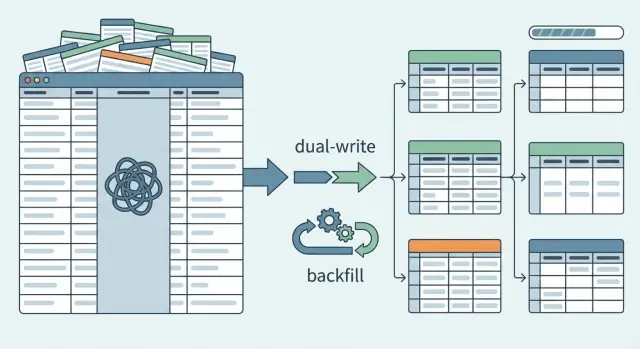
Why JSON-blob columns stop working as you grow
A JSON-blob column is a single database field that holds a whole object as text, like { "status": "paid", "coupon": "NEW10", "notes": "..." }. Teams start with it because it feels fast. You can add fields without changing the schema, and a lot of AI code generators default to it when they’re trying to move quickly.
The trouble shows up once the app has real users, real data volume, and real questions the database needs to answer. What used to be one easy write turns into slow reads, messy reporting, and lots of special cases in code.
You’ll usually feel the JSON blob breaking down in a few predictable ways:
- Queries slow down because filtering and sorting inside JSON is harder to optimize.
- Fields drift into inconsistent shapes (sometimes
phone, sometimesphoneNumber, sometimes missing). - Reporting turns into guesswork because you can’t rely on types, required fields, or relationships.
- Data fixes become risky because you’re editing large blobs instead of updating one clear column.
- Bugs hide for months because bad data still “fits” inside JSON.
JSON blobs also hide data quality problems until it’s expensive to fix them. A value that should be a number can quietly become a string. A field that should be required can disappear. Later, when you need accurate totals, deduping, or compliance logs, you discover you never enforced the rules.
“Normalized tables” means splitting that blob into separate tables and columns that each represent one thing, with clear types and relationships. Instead of one order.data blob, you might have orders, order_items, payments, and addresses, with columns you can index and validate.
There are cases where you should wait. Don’t migrate yet if the product is changing daily, the data volume is tiny, or you don’t have a clear definition of what the fields mean. First decide what must stay stable.
If you inherited an AI-built app where “everything is in JSON,” this pattern is common: it works in demos, then falls apart in production. The good news is you can migrate safely in phases with backfills, without a big-bang rewrite.
Map your current data before changing anything
Before you move from a JSON blob to normalized tables, get clear on how the blob is actually used today. Most failed migrations start with guesses about what’s inside the JSON and which parts matter.
Write down the top read and write flows that touch the blob, based on real behavior: the pages people load, the forms they submit, the API calls you serve, the jobs you run, and the exports your team relies on. In many apps, the first few are predictable: a user-facing page load, a save action, at least one background job, an admin/reporting view that reads lots of rows, and one or two integrations or webhooks that only touch part of the blob.
Then open a handful of real production rows and list the fields that drive decisions. Skip noise like temporary UI state, old flags that never get read, or random keys that appeared once and never came back.
As you list fields, label each one as required, optional, or deprecated.
- Required: the app breaks or business rules fail without it.
- Optional: useful, but not always present.
- Deprecated: safe to remove later, after you’ve confirmed nothing reads it.
Watch for the same data stored twice in different shapes. A common sign is when a field exists both as a top-level column and inside the JSON, or when two JSON keys represent the same concept (like userId vs customer_id). These duplications confuse backfills and make bugs hard to trace.
Define success in measurable terms before you touch the schema. Faster queries on specific screens. Reporting that doesn’t require custom JSON parsing. Fewer data bugs. Simpler validation. Less support load from “missing data” issues. If you can’t measure the improvement, it’s hard to know when the migration is actually done.
Design the normalized schema in small, safe slices
Don’t try to replace the whole JSON column in one go. Pick a first slice that clearly matters: one screen users complain about, one report that’s slow, or one API endpoint that keeps timing out. A small win forces clarity and keeps the work bounded.
Start by naming real entities. If the blob mixes “user profile,” “subscription plan,” “payments,” and “audit events,” those aren’t fields in one table. They’re separate tables with relationships. A simple test: can you describe each table in one sentence without mentioning “JSON”?
Choose identifiers that won’t change. If you already have a primary key for the parent row (like account_id), keep it and use it as a foreign key in new tables. For child records, add stable IDs (payment_id, event_id) instead of relying on array positions inside JSON. This matters during backfills and replays, because you need a reliable way to match rows.
Enforce constraints you can stand behind today, not the perfect set you wish you had. For the first slice, focus on:
NOT NULLon must-have columns (likeuser_id,created_at).- Basic foreign keys where you trust the parent table.
- Uniqueness where duplicates would break the feature (like one active plan per account).
If you need traceability during the transition, keep it explicit and temporary. A raw_json column on the new table can help you debug mappings, but it should be a conscious choice, not a new dumping ground.
Plan indexes from your real queries, not theory. If the app always fetches “latest events for account” or “current plan for user,” index those exact filters and sort patterns. One small slice with the right indexes beats a giant schema no one can query quickly.
Set up a phased migration with minimal risk
The safest path is to add, not replace. Create the new tables first and keep the existing JSON column in place. Production stays stable while you prove the new path works.
At the start, keep the old behavior as the default. Reads continue to come from the JSON column even after the new tables exist. Behind the scenes, you can turn on the new read path for a small set of traffic or a few internal accounts.
A feature flag helps here. It lets you flip reads between the old source (JSON) and the new source (tables) without betting everything on one deploy. It also gives you an instant rollback if something looks off.
Next, begin dual writes. When a record is created or updated, write it to both the JSON column and the new normalized tables. This lets new data accumulate in the new structure while the app still relies on the old one.
Dual writes can drift if you don’t add simple guardrails. A practical pattern is to store an updated_at timestamp and a small schema_version in both places. When versions differ, you know the row is stale and needs attention before you trust it.
A minimal phased setup that holds up in production usually looks like this:
- Add new tables and indexes, but don’t remove the JSON column.
- Add a read feature flag, defaulting to the JSON source.
- Implement dual writes for creates and updates.
- Store
updated_atand a simpleschema_versionfor comparisons. - Log mismatches and keep a quick rollback switch.
Backfills: move existing JSON data into new tables
A backfill is where you turn messy JSON into clean rows. Treat it like a real data pipeline, not a one-off script. You want to be able to stop it, restart it, and run it again without duplicating data or corrupting the destination tables.
Make the job idempotent and restartable. A common pattern is: parse JSON, map to new columns, then upsert into the destination tables using a stable natural key (like user_id + field name) or a generated deterministic ID. Store a checkpoint so you always know what was processed.
To keep risk low, backfill in small batches and track progress. ID ranges work well when IDs are dense. Time windows work well when your data is naturally event-driven. A queue of primary keys is safer when IDs are sparse. Many teams also do “changed since last run” passes at the end to catch anything that moved during the backfill.
Validation matters more than speed. JSON often hides bad types and missing fields, so be explicit about parsing rules: default values, type conversions, and what “empty” means. If you see "age": "", do you store NULL, store 0, or reject it? Decide the rule and keep it consistent.
Assume some JSON is broken and design for it. Don’t crash the whole job. Quarantine and log the failures so you can fix them deliberately:
- Record the source row ID and the JSON path that failed.
- Save the raw JSON fragment that caused the error.
- Tag the reason (invalid JSON, missing required field, type mismatch).
- Keep processing the next record.
This is where migrations often fail in AI-built apps: half-parsed edge cases, silent truncation, and “best effort” conversions that look fine until reporting or billing depends on them. A strict log of what couldn’t be migrated, and why, turns surprises into a short, actionable punch list.
Verify correctness with comparisons and guardrails
The scariest part isn’t moving data. It’s trusting the result. You need simple checks that tell you, in plain terms, whether the new tables match what the app used to read from JSON.
Start with comparisons that compute the same value two ways: (1) parse the JSON column like the old code did, and (2) read from the new tables. Do this first for user-visible behavior: permissions, prices, plan limits, status flags. Then expand to deeper fields.
Roll it out with sampling before you try to validate everything. Sample a small set (for example, recent records per tenant or per day), review mismatches, fix your mapping, then widen coverage until you’re comfortable running checks across the full dataset.
When you track mismatches, keep categories that are easy to act on:
- Missing: value exists in JSON but no row exists in the new tables.
- Different: both exist but don’t match after normalization (types, rounding, casing).
- Invalid: JSON can’t be parsed or fails validation.
- Unexpected: new tables contain values that never existed in JSON.
Decide the source of truth during the transition and write it down. Common choices are “JSON is the truth (new tables are derived)” or “new tables are the truth (JSON is a compatibility mirror).” Pick one per phase. Otherwise engineers will “fix” mismatches by updating both sides in different ways.
Guardrails make mistakes cheaper: feature flags for reads, hard limits on how many rows a backfill job can change per run, and alerts when mismatch rates rise. Keep each phase reversible with a clear rollback path: a switch back to JSON reads, a way to pause writes, and a cleanup plan for partially migrated data.
Gradually switch reads without breaking users
Once new tables are populated and kept up to date, change how you read data in small steps. Treat each read path like a separate release, not one big flip.
Put the new read behind a feature flag. Roll it out to a tiny slice of traffic first (or just internal accounts), then expand. This keeps failures contained and makes rollback simple.
A practical sequence that works for most apps:
- Switch one screen or API endpoint at a time.
- Keep the JSON read as a fallback for that endpoint.
- Compare results in the background and log mismatches.
- Increase exposure gradually (1%, 10%, 50%, 100%).
- Remove the fallback only after results match for a while.
After each switch, watch what users feel first: error rates, timeouts, and slow queries. Normalized reads can accidentally turn into many small queries, and a missing index can make a previously fast page crawl. Add alerts before the rollout, not after.
Keep dual writes until you trust the new reads under real load. If you stop writing to the blob too early, a rollback turns into a data loss incident. Dual write is insurance. Remove it only when you’re confident you won’t need to go back.
As you migrate, make blob-only dependencies explicit. If a feature still depends on a JSON-only key, decide whether it becomes a real column/table or gets dropped. Leaving it vague is how teams end up reading from both models forever.
Common mistakes that cause data loss or downtime
Most outages in a JSON-to-tables migration happen because the work is treated like one switch. In reality, you’re running two data models at once for a while, and the overlap is where things break.
A common failure is turning on dual writes without deciding what happens when the two writes disagree. Even if both updates happen in the same request, you still need a conflict policy (which side wins) and a way to detect and replay missing writes.
Backfills also cause trouble when they can’t resume. Long jobs will get interrupted: deploys, timeouts, locked rows, or a bad record. If the job restarts from the beginning, you risk duplicates, partial updates, or heavy load that looks like a denial of service to your own database.
Silent data drift is another big one. Teams “clean up” field meanings during migration (like changing status values or date formats) and forget to document the mapping. Everything seems fine until reports, emails, or billing logic behave differently.
The mistakes that show up most often:
- No clear conflict policy for dual writes, and no audit trail to spot mismatches.
- Backfills that aren’t idempotent (safe to run twice) and aren’t checkpointed.
- Changing field meaning mid-migration without a versioned mapping and tests.
- Forgetting downstream readers: analytics queries, exports, webhooks, and background jobs.
- Dropping the JSON column early, before reads are fully moved and verified.
A real example: an app stores “user profile,” “subscription,” and “permissions” in one JSON column. A backfill copies data into new tables, but a nightly job still reads JSON and overwrites the normalized tables, wiping recent changes. The fix usually isn’t more clever code. It’s clear rules: resumable backfills, strict mappings, and keeping the old column until you can prove the new model matches reality.
Quick checklist before you cut over
Cutover day should feel boring. If it still feels like a leap of faith, you probably need one more dry run.
- Tables and releases are safe to ship: new tables exist in production, migrations are safe to re-run, and you’ve verified the indexes and constraints that matter.
- Backfill is visible and repeatable: you can see progress, error totals, and checkpoints, and you can re-run without duplicating rows.
- Dual write is on, and conflict rules are written down: you know which source wins (for example, newest timestamp wins) and you log conflicts.
- Read switches are guarded: reads can be flipped per endpoint or tenant using feature flags, and you can revert quickly.
- Mismatch rate is acceptable and rollback is tested: you compare key totals, spot-check records, and you’ve practiced rollback on production-like data.
Example scenario: cleaning up an AI-built app that stored everything in JSON
A founder ships an AI-generated CRM prototype built in a weekend. It works for demos, but every customer profile is stored as one JSON blob in a single table column. A profile might include name, email, status, last_contacted, notes, and custom fields.
Three months later, the pain shows up. Reporting is slow because the database has to scan and parse JSON for every chart. Worse, the status field is a mess: "Active", "active", "ACTIV", "In progress", "In-Progress", and "inprogress" all mean roughly the same thing. Filters miss records, dashboards disagree, and sales notes end up attached to the wrong stage.
A safe first slice is to normalize just what drives the dashboard: customers and statuses.
That slice can look like:
- A
customerstable with stable columns (id,name,email,created_at). - A
statuseslookup table (id,canonical_name) with an allowed set. - A way to connect them (either
customers.status_idor a separatecustomer_statustable, depending on history needs).
Then backfill from the existing JSON:
- Parse each profile blob and insert or update the customer row.
- Map messy status strings to canonical statuses, with a clear “unknown” bucket.
- Log anything that fails parsing so you fix data instead of guessing.
Cutover stays staged. First, switch only the dashboard reads to the new tables. Keep JSON reads for the rest of the app while you compare counts and totals. Once the dashboard is correct and fast, move the remaining screens one by one.
Next steps: finish the migration and keep it clean
Once your reads are fully on the new tables and you’ve had a stable period with no surprises, decide what happens to the old JSON column. Most teams either freeze it (no more writes, keep it for a short safety window) or remove it after backups and sign-off.
If you postponed safety features to move fast, add them now. Normalized tables pay off long-term when they prevent bad data, not just when they store data.
Lock in the new contract
Write down the rules your app now depends on: which fields are required, what “valid” means, and where each piece of data lives. This becomes the data contract for future features and helps new teammates avoid reintroducing a blob “just for now.”
A one-page doc is enough: table names, key columns, ownership (who writes what), and a short example of a valid record.
Prevent sliding back into blobs
After the migration, the biggest risk is drift: new features quietly start stuffing extra fields back into a catch-all JSON column.
Freeze or remove the JSON column after a defined stability window. Add the constraints and indexes you delayed (foreign keys, unique constraints, NOT NULL, and the indexes your top queries need). If you keep a JSON field for true “misc” metadata, add a lightweight check so new keys don’t appear without a plan.
If you inherited an AI-generated codebase that leans heavily on JSON blobs and you need it to hold up in production, FixMyMess (fixmymess.ai) focuses on diagnosing and repairing these kinds of AI-built architectures, including phased migrations, logic fixes, and security hardening, with human verification before changes ship.