Minimal test suite for AI-generated code that stays stable
Build a minimal test suite for AI-generated code using smoke, API contract, and regression tests that stop fixed features from breaking again.
Why unstable AI code keeps breaking after you fix it
Unstable AI code is the kind that seems fine until you touch it. You fix one bug and two unrelated screens break. A deploy that worked yesterday fails today. Small changes cause big surprises because the code has hidden side effects and unclear rules.
In real projects, it often looks like this:
- A login change breaks billing because both rely on a half-finished helper.
- One API response changes shape and the UI quietly falls back to blank states.
- Auth works locally but fails in production due to missing environment variables or leaked secrets.
- A quick refactor triggers random failures because state is stored in the wrong place.
This is common with AI-generated prototypes because the code is produced in chunks, not designed as a system. Naming drifts, temporary hacks become dependencies, and there’s rarely a safety net. Teams end up doing emergency fixes over and over. That’s expensive and stressful.
The cheapest way to stop the bleeding is a small, high-value test suite. Tests aren’t magic. They just catch breakage early, before users see it. They also give you the confidence to refactor and remove weird parts without guessing.
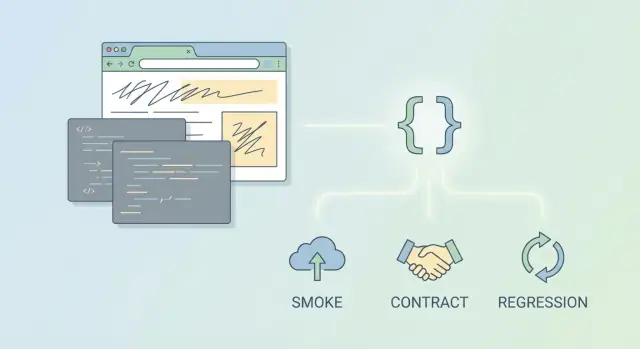
Three test types give the most protection for the least effort:
- Smoke tests: does the app basically run?
- API contract tests: do responses stay compatible with the UI and integrations?
- Regression tests: does a fixed bug stay fixed?
The goal isn’t 100% coverage. Success is simpler: you can deploy without fear, you can change code without breaking last week’s fixes, and failures point to the exact feature that broke.
Pick what to protect first (the 20% that causes 80% of pain)
If your app was generated by AI tools, it can feel like everything is fragile. A minimal suite works best when it protects the few paths people hit every day, plus the places where one small change can break five other things.
Start by listing the user journeys that cause the most support pain when they fail. Keep it practical: what would make the product feel down to a real user? Usually it’s login and signup (including password reset), checkout or subscription changes, your core create-edit-delete flow, webhooks, and file upload/download.
Then look at the integrations most likely to break in weird ways: payments, email delivery, identity providers, and file storage. You don’t need full end-to-end coverage. You do want quick checks that prove you can still connect and get a sane response.
Now pick only 3 to 5 endpoints or flows that must never fail. For a simple SaaS, that might be: login, create project, invite teammate, cancel subscription.
Before you write a single test, define what “working” means for each one. Keep the definition short and measurable:
- Expected status code and a couple of key fields
- Response shape (keys and types)
- One key side effect (record created, email queued, webhook sent)
- One key security rule (can’t access other users’ data)
Finally, choose one test environment and stick to it. Local is fine if setup is consistent. Staging is fine if data is controlled. Mixing both is how “minimal” turns into confusing noise.
Smoke tests: fast checks that catch obvious breakage
Smoke tests answer one question after any change: does the app still start, and do the most important paths respond?
A good smoke test doesn’t try to prove everything is correct. It proves the basics aren’t totally broken. That’s why smoke tests are a great first layer for shaky, AI-written projects.
What to include
Pick a few targets that represent “the app is alive” and “users can do the main thing.” For example:
- A health check returns 200 (or the home page loads)
- The login page renders (or the auth endpoint responds)
- One core API call returns the expected status (like fetching the current user or a main list)
- The database connection can be opened (only if this is a frequent failure)
Keep each test short. Aim for one clear assertion per test, such as “returns 200” or “response includes userId.” When a smoke test fails, you want the reason to be obvious.
How to keep them fast and reliable
Set a hard budget: under 1 to 2 minutes total. Smoke tests should run constantly, not “when someone remembers.” A simple routine works well:
- Run smoke tests locally before pushing
- Run them automatically on every pull request
- Block merges if they fail
Example: you fixed an auth flow that randomly returned 500s. Add a smoke test that signs in with a test account and then calls GET /me. If it breaks again, you find out immediately.
API contract tests: keep responses stable for the UI and integrations
API contract tests check that an endpoint keeps its promise: which fields show up, what types they are, and what error format the client can rely on. They don’t try to prove every business rule. They prevent one of the most common failures in fast-changing code: a backend change that silently breaks the UI or a partner integration.
For a minimal suite, pick only the endpoints that would hurt the most if they changed. Usually that’s a few calls the UI makes on every page load, plus anything an external system depends on.
A simple way to choose is to look at your network tab and error logs, then lock down 2 to 3 contract-critical endpoints, such as:
- Login or session check ("am I signed in?")
- Current user profile ("who am I?")
- The core create action ("create order", "save draft", "post message")
- A critical list endpoint ("my projects", "my invoices")
Cover both success and failure. Many unstable apps fail on the boring paths: missing auth headers, invalid input, expired sessions.
What to assert (and what to ignore)
Lock down the stable parts only. Assert things a person can read and agree with. Skip volatile fields that change every run.
- Required fields exist (id, email, status) and types make sense
- Error responses always have the same shape (code, message) and the right HTTP status
- Arrays are arrays, not sometimes null
- Ignore timestamps, random IDs, and ordering unless ordering is part of the promise
Write expectations in plain language so a non-technical founder can sanity check them. Example: “If auth is missing, /me returns 401 with { code, message }. If auth is valid, it returns 200 with { id, email }.” That one rule alone prevents a lot of rework.
Regression tests: turn fixes into permanent protections
Regression tests are the “this bug must never come back” tests. In AI-generated codebases, fixes can disappear the next time someone tweaks a prompt, regenerates a file, or refactors a messy function. A small regression suite makes your fixes stick.
The best moment to add a regression test is right after you fix the bug, while the failure is still fresh. Weeks later, you’ll forget the exact inputs and the real user impact.
Keep each regression test focused on the smallest reproduction. Capture only what you need: the specific inputs, the few steps that trigger the bug, and the expected result. If the old bug required ten screens of setup, that’s a sign you need a better test seam, not a bigger test.
A simple pattern:
- Recreate the old failing request or user action in a test.
- Assert the exact wrong behavior that used to happen (status code, error message, wrong data).
- Apply the fix.
- Update the assertion to the correct behavior and keep it precise.
- Name the test so future you understands the cost of breaking it.
Test names are underrated documentation. A good name includes what broke and why it matters, for example: rejects_login_when_token_is_missing_prevents_account_takeover.
Concrete example: you fixed a password reset bug that leaked whether a user existed. The regression test should send a reset request for a non-existent email and assert the response stays generic and consistent.
Step by step: build a minimal suite in one focused session
Make tests easy to find and boring to run. Create a small structure and a naming rule you’ll still follow next month:
tests/smoke/for “does it even run?” checkstests/contracts/for API response shape checkstests/regression/for bugs you already fixed
Name files by feature (for example: auth, users, billing) so people can find the right tests fast.
Next, add a handful of tests that give you quick confidence. Keep setup simple so they run the same way on every machine. A good starting point is:
- 3 smoke tests (boot, one main flow, one critical API)
- 2 contract tests (your two most-used endpoints)
- 2 regression tests (your last two real incidents)
When you write smoke tests, think like a tired user: “I open the app, I do the main thing, it works.” When you write contract tests, think like a front end: “I need id, name, and role, not a surprise rename.” When you write regression tests, copy the exact steps that broke in production, then assert the fixed behavior.
Run everything locally first, then run the same command in your deployment pipeline. If tests are too slow, cut scope, not precision.
One rule keeps the suite alive: if you touch a feature, you add or update a test for it.
Make tests reliable: stable data, stable setup, stable cleanup
A minimal suite only helps if it gives the same answer every run. Most “random failures” aren’t random. They come from shared data, inconsistent setup, or tests that depend on outside services.
Keep test data separate from real data. Use a test database, a temporary schema, or a disposable dataset that can be wiped safely. If tests can touch production data, they’ll eventually corrupt it or become too scary to run.
Make setup predictable. Create a few known users and roles and reuse them: an admin, a normal user, and a locked-out user. Keep their credentials fixed in test config so you don’t chase changes later.
External services are a common source of flakiness. If tests hit real email, payments, or webhooks, you’ll see timeouts, rate limits, and surprise failures. Fake these calls where you can, or stub them so you only test “we sent the right request” and “we handled the response.”
Fixtures help avoid copy-paste data that drifts. Keep a small set of builders for common objects like a user, project, or order. Use clear defaults and override only what a test needs.
Reset state between tests so one failure doesn’t poison the next. A simple loop is: create data, run the action, assert what matters, then clean up (rollback or truncate tables) and reset caches/flags.
Common mistakes that waste time and create flaky tests
The fastest way to end up with no tests is trying to test everything at once. If you aim for full coverage on day one, you’ll get stuck wiring setup, fighting failures, and never shipping a usable suite.
Another trap is testing the wrong thing. Pixel-perfect UI checks and exact text matching feel reassuring, but they break for harmless changes like a new button label. Minimal tests should focus on outcomes: “user can sign in”, “invoice total is correct”, “API returns the fields the UI needs”.
Tests also get flaky when they depend on the internet. Real payment, email, or analytics APIs fail, get rate-limited, or change responses. Stub third parties and reserve one occasional end-to-end check for a staging run, not every commit.
Watch for brittle assertions. IDs, timestamps, and auto-generated messages change constantly in messy prototypes. Prefer stable checks like status codes, key fields, and simple patterns (for example, “createdAt exists and is an ISO date”) instead of matching the exact timestamp string.
If you’re dealing with flake, these fixes usually help quickly:
- Test outcomes, not UI pixels or exact wording
- Stub third-party APIs and control responses
- Avoid asserting on random IDs and exact timestamps
- Add at least one sad-path test per critical endpoint
- Keep the suite fast (minutes, not tens of minutes)
Don’t ignore error paths. AI-generated apps often fail on expired sessions, missing environment variables, and malformed payloads. If you only test happy paths, you’ll keep re-breaking “fixed” features.
Quick checklist: is your minimal suite doing its job?
A minimal suite is only minimal if it protects what you ship and stays fast enough to run all the time.
The suite protects the basics
If any of these fail, the app isn’t safe to deploy:
- The app starts cleanly (no missing environment variables, no crash on boot).
- Database setup works (migrations run on a fresh database).
- One key page or screen renders (often the dashboard).
- Your top 3 APIs return the fields the UI expects (names and types you actually use).
- Those same APIs return consistent error shapes (so the UI can show a useful message).
The suite stays easy to run and easy to trust
Speed and repeatability matter more than volume:
- The last two critical bugs you fixed each have a regression test.
- Tests finish in a few minutes on a normal laptop.
- One person can run everything with a single command, without tribal knowledge.
When a test fails, you should learn something immediately. A good failure points to one likely cause (“login token missing”, “API field renamed”), not a vague timeout.
Example: protecting a fixed auth flow from breaking again
A common story: a founder ships an AI-built prototype with login and subscriptions. It works in demos, but real users hit weird failures. Logins loop back to the sign-in screen, sessions expire instantly, and checkout fails because the app thinks the user is logged out.
Someone repairs the authentication logic, cleans up cookies or tokens, and the app finally holds a session. Two weeks later, a small change lands (often in a different part of the codebase) and login breaks again. Nobody touched “auth”, but a new middleware, a refactor, or an environment tweak changes behavior.
A minimal suite prevents this bounce-back by putting three small guards around the flow:
- A smoke test that hits the login route and checks for a clear success signal (200 OK plus a session cookie or token present).
- A contract test that checks the session endpoint response shape (for example: user id, email, subscription status), so the UI doesn’t break when fields move or rename.
- A regression test that reproduces the exact bug you saw, like “after login, fetching
/mereturns 401” or “refreshing the page loses the session.”
Keep the checks simple. You’re not trying to test every edge case. You’re protecting what pays the bills: people can sign in and stay signed in.
The payoff shows up the next time someone changes code. Instead of users reporting “I can’t log in,” the build fails fast with a message like “session response missing subscriptionStatus.” That’s a five-minute fix, not a multi-day scramble.
It also reduces back-and-forth with contractors and agencies. You no longer argue about whether auth is working on one machine. The test is the referee.
Next steps: keep the suite minimal and keep shipping safely
A minimal suite only works if it stays tied to real pain. The goal isn’t “more coverage.” The goal is fewer surprises after every change.
Choose your next five tests based on what actually cost you time: support tickets, outages, and the parts of the app you’re scared to touch. Pull the last three production failures (or near misses) and turn each into a regression test that fails the same way it failed in real life.
To keep momentum without letting tests take over your week:
- After each bug fix, add 1 small regression test that proves the fix still holds.
- After each incident, add 1 smoke test that would have caught it quickly.
- Every couple of weeks, add 1 contract test for your most-used endpoint or integration.
- Keep a short “top breakpoints” list and retire tests that no longer match today’s risks.
- Stop when new tests stop catching real issues. That’s your current minimal set.
If the codebase is messy, expanding tests too fast can backfire. When setup is unpredictable, you get flaky tests that people ignore. In that case, do a short stabilization pass first: make one clean path for booting the app, create a reliable test database setup, and remove obvious foot-guns like exposed secrets or fragile global state.
If you inherited an AI-generated prototype that keeps regressing, FixMyMess (fixmymess.ai) specializes in diagnosing and repairing AI-built codebases, then adding just enough smoke, contract, and regression tests so fixes don’t unravel after the next change.
Treat your suite like a seatbelt: small, always on, and focused on the crashes you’ve already had.
FAQ
What should I test first if my AI-generated app breaks constantly?
Start with what would make the product feel “down” to a real user: sign in, load the main screen, and complete the core action (create/edit/checkout). Pick 3–5 flows or endpoints you can’t afford to break, and ignore everything else for now.
How many tests do I need before the suite is actually useful?
A good minimal set is 3 smoke tests, 2 contract tests, and 2 regression tests. That’s usually enough to catch obvious breakage, stop accidental API shape changes, and prevent your last incidents from returning.
What counts as a smoke test, and what doesn’t?
Keep smoke tests to “does it run and respond?” checks: the app starts, auth responds, and one core API works. If a smoke test takes long setup or tries to validate lots of business rules, it’s no longer a smoke test.
What exactly is an API contract test checking?
A contract test locks down the response fields and error format your UI or integrations rely on, like required keys and basic types. It does not need to validate every rule; it just prevents silent breakage when someone renames or removes fields.
How do I write a regression test that actually prevents the bug from coming back?
Turn each real incident into a small reproduction: the exact request or action that used to fail, plus one precise expectation for the correct behavior. Write it right after the fix, while you still remember the inputs and the user impact.
Why are my tests flaky even when the code looks fine?
Use one test environment and make it predictable with stable seed data and controlled configuration. Most “random” failures come from shared state, leftover data, or tests that depend on external services that time out.
How do I prevent environment-variable issues from breaking production again?
Test your boot path to fail fast when required config is missing, and make the app surface a clear error. If auth works locally but fails in production, the usual causes are missing environment variables, wrong cookie settings, or secrets that are inconsistent across environments.
Should my minimal suite hit real Stripe/email/webhook services?
Default to stubbing or faking third-party calls so tests only verify what you control: you send the right request and handle a known response. Save any “real integration” checks for occasional staging runs, because those services can rate-limit or change behavior unexpectedly.
How do I stop tests from breaking on harmless changes like IDs or timestamps?
Avoid asserting exact timestamps, random IDs, or full payloads that naturally drift. Assert only stable things a human can agree on, like status codes, required fields, and consistent error shapes.
When should I stop adding tests and instead stabilize or rebuild the codebase?
If you can’t get a stable boot path, auth is broken, secrets are exposed, or the architecture is too tangled to set up predictable tests, fix the foundation first. FixMyMess can diagnose the codebase, repair the fragile parts, and add a small set of smoke, contract, and regression tests so your fixes stay fixed.