Multi-tenant SaaS for founders: tenant isolation and sanity checks
Multi-tenant SaaS can be safe if tenant isolation is real. Learn what it means, why it matters, and quick checks you can do today.
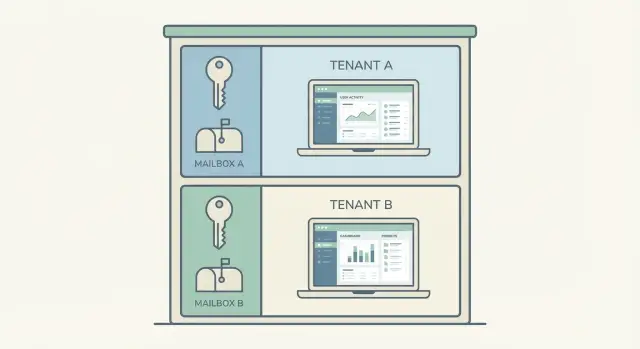
The problem in plain English
If you’re building a multi-tenant SaaS, you’ll hear terms like “tenant,” “isolation,” and “data segregation.” The idea is simple: many customers use the same app, and each one must experience it as if they’re the only customer.
The tricky part is that a product can look fine on the surface (logins work, pages load, payments go through) while a hidden setup mistake quietly lets one customer see or affect another customer’s stuff.
Your product has to keep one promise: no cross-customer bleed. No viewing other people’s data, no editing it, no deleting it, and no “oops, the system emailed the wrong person.” Even small leaks break trust fast.
This is how it tends to go wrong in real life:
- A user changes a number in the address bar and suddenly sees another company’s invoice.
- A support admin exports “all users” and accidentally sends a file containing multiple customers.
- A background job (like nightly reports) runs with the wrong customer ID and mixes results.
- A shared file bucket stores uploads under the same folder, so documents overlap.
- A caching shortcut shows one customer a page generated for someone else.
If you’re not technical, treat this as a risk and a set of checks, not deep engineering. You don’t need to understand databases to ask the right questions and spot red flags.
What multi-tenant means (and what it does not)
A multi-tenant SaaS is one product serving many customers at once. Each customer is a “tenant.” You log in, see your workspace, and everything looks like it was built just for you, even though the system is shared behind the scenes.
Single-tenant is the opposite: each customer gets their own separate copy of the app (or environment) with its own database and often its own servers. That can feel safer, but it’s usually more expensive to run and harder to update.
Multi-tenant does not mean “everyone’s data is mixed together.” Done right, tenants share the app code and infrastructure, but their data stays separated.
In practice, many teams share the application code, servers/background workers, and deployment tooling, but keep customer data and access rules separated. Some also separate encryption keys or tenant-specific settings.
A quick analogy: imagine an apartment building. Everyone shares the same building, hallways, and plumbing. But each apartment has its own locked door, its own keys, and private space. Single-tenant is like separate houses: more separation, more cost, more upkeep.
When people worry about multi-tenant, they’re usually worried about one thing: the locks. Tenant isolation is about making sure the doors can’t be bypassed, even by accident.
Tenant isolation: the 4 areas that matter
Tenant isolation is the set of rules that stops Customer A from seeing, changing, or slowing down Customer B.
1) Data isolation
This is the big one: what each customer can read and change. Every query should be scoped to the current tenant (often an organization or workspace). If your app has “admin” views, they still need tenant scoping unless it’s a true internal staff tool.
2) Action isolation
Even if the data is separated, actions can leak power. Users should only be able to invite people, export data, delete records, or manage billing inside their own tenant, and only if their role allows it.
3) Settings isolation
Settings hide some of the most embarrassing leaks: branding, email templates, roles, feature flags, and billing details. If these bleed across tenants, customers notice quickly because the UI looks wrong or invoices go to the wrong place.
4) Performance isolation
One “noisy” tenant shouldn’t freeze everyone else. This usually means rate limits, job queues, and basic resource caps so one large import or runaway script doesn’t take down the whole app.
A simple way to sanity-check the four areas:
- Can they see the right data only?
- Can they do the right actions only?
- Do they get the right settings only?
- Can one tenant overload the rest?
Early on, “good enough” isn’t perfect isolation. It’s predictable isolation. If you log into two test accounts and the second account ever shows the first account’s users, projects, or invoices, stop and fix that before shipping more features.
Why isolation matters to your business
Tenant isolation sounds technical, but the impact is simple: customers trust you with their data. In a multi-tenant SaaS, one mistake that shows another company’s info can stop deals, trigger churn, and follow you for years.
Buyers assume privacy is the baseline. If a prospect hears “another tenant saw the wrong records,” they don’t hear “edge case.” They hear “this could happen to us,” and the sales cycle ends or procurement slows down.
There’s also legal and compliance exposure, even for small teams. Many contracts say you must keep customer data separate and notify customers if there’s a breach. If you handle personal data (names, emails, billing info), you can be on the hook for breach reporting, audits, and penalties, plus the time and cost of lawyers.
Support gets ugly, too. When isolation is weak, you can’t confidently answer basic questions like “Who saw what?” and “How long did it last?” That leads to long threads, refunds, and escalations.
Isolation issues often show up as “random” glitches that are easy to dismiss but dangerous to ignore:
- A user sees another company’s record in a list or search result.
- An email goes to the wrong customer with someone else’s details.
- A CSV export includes rows from multiple tenants.
- A dashboard total looks too high because it counted cross-tenant data.
- An admin action affects the wrong account.
The cost tradeoff is worth saying clearly: shared infrastructure is usually fine. Shared data is not. You can save money by sharing compute, but you can’t be loose with who can read or write which rows.
Where tenant isolation usually breaks
Most tenant leaks aren’t “hackers.” They’re everyday mistakes: one missing check, one shared cache key, one admin shortcut. Everything can look fine in testing until real data and real users arrive.
1) Login, sessions, and “who am I right now?”
Isolation breaks when the app stores tenant info in the wrong place (or not at all). A user can be correctly logged in, but the session might not pin them to a single tenant. This shows up when you switch between accounts in the same browser and the app “remembers” the wrong workspace.
2) Data access: the missing tenant filter
The most common bug is simple: a database query fetches records by ID, status, or email, but forgets to also restrict by tenant. It might be one endpoint added quickly, one export, or one “list all” screen.
This tends to hide in detail pages that load by record ID, exports/report builders, search/autocomplete, support tools, and webhook handlers that look up users by email.
3) Storage, search, caches, and background jobs
Files are repeat offenders. A shared bucket with public links can expose invoices, avatars, or attachments across tenants, especially when filenames are predictable.
Search and caching can mix tenants if they share an index or cache key. Analytics can also combine tenant events, which is still a data leak even if nobody sees another tenant’s screen.
Background jobs (emails, PDFs, weekly reports) break isolation when they run without the right tenant context. A classic example: a nightly “send invoices” job pulls the correct invoice, but uses the previous tenant’s branding or recipients.
Step-by-step: easy sanity checks you can run yourself
You don’t need to read code to catch many isolation problems. You need clean test accounts and a habit of trying to “peek” across the fence.
Create two tenants you can tell apart instantly. Use loud, different data like “Tenant A: Blue Bakery” and “Tenant B: Red Gym.” Add a few customers, invoices, and notes in each. Then create two users per tenant: an admin and a regular user.
Now walk through the places where data tends to leak:
- Lists and dashboards (recent items, “top customers,” activity feeds)
- Search and filters (search for a name that exists only in the other tenant)
- Exports (CSV/PDF exports often skip the tenant filter)
- Detail pages (open an item, then change the ID in the URL if your app has one)
- Billing pages (subscriptions, invoices, receipts)
Then test the flows that touch email and identity: invite a user, reset a password, and check the emails that get sent. A common bug is an email that links to the right app but lands you in the wrong tenant after login.
Upload a file in Tenant A and confirm it can’t be opened from Tenant B, even if you copy the file URL. Do the same with images, attachments, and any “download” button.
Finally, test support and admin actions. If your team can impersonate users, issue refunds, or delete data, make sure those tools always require selecting the correct tenant first and clearly show which tenant you’re acting in.
Make your checks repeatable (so you actually do them)
Most cross-tenant leaks aren’t “one big bug.” They’re small mix-ups that come back when you change auth, add a new report, or tweak caching.
The fix is boring but effective: run the same quick checks every time using the same test tenants, and write down what you saw. A simple note is enough: date, build version, what you tested, and what happened. When something breaks, that note turns a vague fear into a clear bug report.
A routine you can reuse
Run this whenever you ship a major release, change login, add roles/permissions, or touch anything related to workspaces.
- Switch to the other tenant (using your tenant selector or whatever your product uses), then repeat the last action you took (search, view a record, edit a setting).
- Log out and log back in, and confirm you land in the right tenant with the right role.
- Export something (PDF, CSV, invoice, report) and skim the header and IDs. Wrong company names and foreign IDs are early warnings.
- Repeat one test in an incognito window and one on a second device to catch cached-state issues.
- Re-run the set after any auth or permissions change, even if the feature you shipped was “unrelated.”
Quick checklist: a 5-minute isolation review
Open two browser windows: one logged in as Tenant A, one as Tenant B (use two test accounts). Then run this fast check:
- Browse the main screens (lists, search, recent activity). You should never see another tenant’s names, records, or counts.
- Generate an export or report (CSV, PDF, dashboard totals). Confirm it only includes the active tenant, and totals match what you see on screen.
- Trigger a few notifications (invite email, password reset, invoice, comment alert). Check sender name, logo, and recipients are correct for that tenant.
- Try to access files “by guessing” (change a file ID in the URL, reuse a link from Tenant A while logged in to Tenant B). You should be blocked every time.
- Open any admin or support tools. Keep access limited to the smallest set of people, and make sure actions are logged (who looked up what, and when).
Finish with one destructive test in a staging environment: deactivate a tenant and confirm access is truly gone. Old sessions should stop working, APIs should reject requests, and data should not remain reachable through exports, files, or admin lookup.
If any of these checks fail, treat it like a production bug, not a “later” task.
Common mistakes that cause cross-tenant leaks
Most cross-tenant leaks don’t happen because someone “hacked” you. They happen because a small shortcut turned into a pattern, and nobody noticed until a customer sees the wrong data.
Mistake 1: “Security by UI”
Hiding tenant data in the interface (filters, dropdowns, disabled buttons) but not enforcing the rule on the server is a classic trap. If the backend accepts an ID and returns a record without checking “does this record belong to this tenant?”, someone can change the ID and pull another customer’s data.
Mistake 2: Roles that are not tenant-scoped
A single is_admin flag is simple, but it’s often too blunt. The moment you have agencies, resellers, or shared workspaces, you need roles tied to a tenant (and sometimes to a project inside that tenant). Otherwise, an “admin” from Tenant A can accidentally get admin access to Tenant B.
Mistake 3: Guessable or revealing IDs
Global IDs that are short, sequential, or reused across tables make it easier to stumble into other tenants’ records. Even if your UI never shows them, they leak through URLs, logs, exports, and support screenshots.
A few other patterns that show up repeatedly:
- One API key or secret reused across customers, or copied between dev, staging, and production
- Background jobs running with an overpowered service account that can read all tenants
- Assuming “it worked in staging” when production has more data, more edge cases, and more concurrency
A realistic failure looks like this: a support tool lets staff impersonate a user, but the impersonation endpoint only checks that the staff member is internal, not which tenant they selected. One wrong click, and the next page loads another customer’s invoices.
A realistic example: how a leak happens and gets fixed
Picture a simple multi-tenant SaaS: two customers, Blue Bakery and Green Gym. Both use the same app, but they should only ever see their own invoices.
One morning, Blue Bakery opens the Invoice screen and notices an invoice with a strange logo. They contact support with a screenshot. The support agent tries the same steps and sees it too. A bigger clue shows up when Blue Bakery exports invoices to CSV and finds a few rows that don’t belong to them.
The root cause is usually boring: a missing filter. The database query pulls invoices by status (like “paid”) but forgets to also limit results to the signed-in customer’s tenant. The UI looks fine most days, until two tenants happen to have invoices that match the same status or date range.
A solid fix is more than “add a filter.” It usually includes:
- Scoping every invoice query by tenant ID, not just the one screen where you noticed the problem
- Enforcing tenant checks in your authorization rules so the backend blocks wrong access even if the UI is buggy
- Updating exports and background jobs (reports, emails) that read invoices in bulk
- Adding a regression test that tries to fetch another tenant’s invoice and expects a hard failure
- Logging and alerting when a request attempts to access data from a different tenant
Customer communication matters. Tell Blue Bakery you found and fixed an isolation bug, explain what data might have been visible (be specific), and share what you changed to prevent repeats. Internally, schedule a quick audit of similar pages (invoices, customers, payments) and add the new test to your release checklist.
Next steps: what to ask for and when to get help
You don’t need to read every line of code. You do need a clear answer to one question: “Where, exactly, do we prevent one customer from seeing another customer’s data?” Ask for proof, not reassurance.
Questions to send your devs:
- Where does the tenant check happen on every request (middleware, controller, query layer)?
- What is the source of truth for tenant_id (subdomain, auth token, header), and can it be faked?
- How do you test isolation: unit tests, end-to-end tests, or both?
- What stops background jobs, imports, and exports from mixing tenants?
- If a bug slips in, how would we detect it (logs, alerts, audit trails)?
Then ask for evidence you can skim quickly: a one-page tenant data model (what’s tenant-scoped vs global) and a short test plan with 6-10 “try to break it” cases, including at least one export and one admin/support action.
If you inherited an AI-generated prototype that’s now failing under real customers, it often helps to get an outside set of eyes on tenant scoping, exports, background jobs, and secrets. FixMyMess (fixmymess.ai) focuses on diagnosing and repairing AI-generated codebases into production-ready apps, and a quick audit can map tenant boundaries and pinpoint the most likely leak paths before you ship more features.
FAQ
What’s a “tenant” in a multi-tenant SaaS?
A tenant is one customer’s workspace in your app, usually a company or organization. Multi-tenant means many customers share the same app and infrastructure, but each tenant should only see and affect their own data and settings.
What does “tenant isolation” actually mean?
Isolation is the set of rules that prevents any cross-customer bleed. The practical goal is simple: Tenant A can’t view, edit, delete, export, or email anything that belongs to Tenant B, even if someone clicks the wrong thing or guesses an ID.
Is multi-tenant inherently unsafe?
Yes, if you design it correctly. Multi-tenant is about sharing the app while keeping strict separation at the data, permissions, settings, and job/external systems layers. The biggest risk is not the concept, it’s the small missing checks that let data slip across tenants.
What are the most common signs of a cross-tenant leak?
The classic sign is when changing something small reveals someone else’s stuff, like editing an ID in the address bar and seeing another company’s invoice. Other common tells are exports that contain rows from multiple customers, emails with the wrong branding or recipient, and dashboards where totals feel “too high” because they include other tenants.
Why is “security by UI” such a dangerous mistake?
UI-only rules hide data from normal clicks but don’t stop direct requests. If the backend doesn’t enforce “this record belongs to this tenant” on every read and write, anyone (or any bug) that hits the endpoint with another record ID can pull or change someone else’s data.
Why do exports and background jobs cause so many isolation bugs?
Because they often run in bulk and outside the normal request flow. A nightly report, invoice sender, or import can easily run with the wrong tenant context and mix results, even if the web pages look fine. Treat jobs and exports as first-class isolation risks, not add-ons.
What’s the simplest isolation test a non-technical founder can run?
Create two very different test tenants and keep them both logged in (two browser windows helps). Then try to “peek over the fence” using search, lists, exports, detail pages, and file links; if you ever see the other tenant’s names, IDs, or branding, stop and treat it like a production bug.
Do I need “unguessable IDs” to be safe?
Not always. Sequential or guessable IDs make it easier to stumble into another tenant’s record, but the real protection must be server-side authorization and tenant scoping. Good IDs reduce accidental exposure; good checks prevent exposure.
Is it okay to share one database across tenants?
Shared infrastructure is usually fine if isolation is enforced everywhere. The moment you share data access without strict tenant checks, you’re trusting every endpoint, export, cache, and job to be perfect forever, which is unrealistic. Separate environments can reduce blast radius, but they don’t replace correct scoping.
What should I ask my developers to prove isolation is real?
Ask where tenant checks happen on every request, what the source of tenant identity is, and how they test isolation for pages, exports, files, and background jobs. If you inherited an AI-generated codebase or you’re seeing weird cross-tenant glitches, FixMyMess can audit the app and pinpoint the likely leak paths quickly so you can fix them before more customers are onboarded.