Onboarding state machine: stop half-finished signups
Learn how an onboarding state machine prevents half-finished accounts, handles refreshes and email delays, and keeps users moving forward.
Why users get stuck mid-onboarding
“Half-finished onboarding accounts” happen when your signup flow creates a user record, but the person never reaches a usable done state. They might see a spinner forever, land on a “verify your email” screen that never updates, or get bounced back to step one every time they log in.
Most flows break because they assume onboarding is a one-time, linear checklist. Real users refresh when something looks slow, hit the back button, open the same link on their phone after starting on a laptop, or come back tomorrow after a session expires.
Common triggers look boring, but they’re costly:
- A network glitch causes a step to fail after the account is created.
- Email verification arrives late, or the user clicks an old verification link.
- A timeout logs the user out mid-step and the app loses the trail.
- Multiple tabs submit the same step twice and put data in a strange state.
- A refresh repeats a non-retryable action (like charging a card or creating a team).
The impact shows up quickly in support: “I can’t log in,” “it says verified but still blocked,” or “it keeps asking me to set a password again.” But the bigger loss is silent: many people won’t contact support. They just leave.
The core promise of an onboarding state machine is simple: no matter what happens, the user can always resume safely. If a step fails, the app knows exactly where they are, what they can do next, and what’s not allowed yet.
State machines in plain language
A state is just a clear label for where a user is in signup. Not a feeling, and not a page name. Think: account created, email not verified, profile incomplete, payment pending, onboarded.
A linear checklist assumes people move forward once, in order. In real life, someone refreshes during payment, opens the verification email an hour later, taps Back, or tries again from a second tab. With a checklist, your system often can’t tell whether to continue, restart, or block them.
An onboarding state machine is a small set of rules that answers two questions every time:
- What state is this user in?
- From this state, which moves are allowed (forward, retry, or back)?
Instead of guessing based on the “current screen,” you store the state on the user record and update it only when a step truly succeeds. If a step fails, the state does not change. If the user retries, you run the same step again safely. If they come back later, you look at the stored state and send them to the next valid step.
Keep it simple. Start with the few states that actually change what the user should see next. Avoid creating a tiny state for every button click.
Example: a user creates an account, then waits on email verification. They refresh the page, then try to sign in from another device. If their state is email_unverified, your routing can always send them to “resend verification” and never to “complete profile” until verification is done. One rule like that prevents a lot of stuck signups.
Choose the states that matter
A state machine works best when you record moments that change what the user can do next. If you record every click, you create noise and edge cases. If you record too little, you can’t resume reliably.
A practical rule: create a state when you’ve (1) written something important to the database, (2) triggered something outside your app (like sending an email), or (3) the next screen should be different if the user refreshes.
Most signup flows can be covered with a small set of states like:
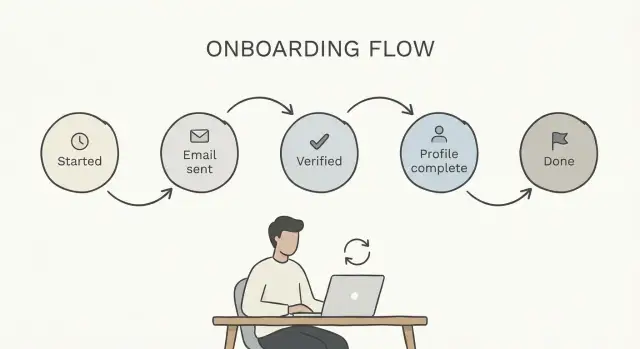
started(account created)email_sent(verification email requested)verified(email verified)profile_done(required profile fields finished)completed(onboarding finished)
Not every state should block the user. Decide which ones are required to move forward and which ones are optional. Email verification might be blocking for security, while adding a profile photo might be optional.
Then decide what the app should show for each state. This is where many stuck accounts get rescued.
If a user lands with state = email_sent, don’t show a generic error or restart signup. Show a clear “Check your inbox” screen with a resend button, a change-email option, and a short note about delays.
If state = verified but the profile is incomplete, send them straight to the profile form and load whatever you already saved.
Define the allowed transitions
A state machine only helps if you’re strict about what can happen next. Write a simple map: for each state, list the few states a user is allowed to move into. Keep it predictable.
Think in terms of moves, not screens. A screen can change without changing the state. A state should change only when you have proof a step succeeded.
Rules that work well for most flows:
- Give each state 1 to 3 allowed next states.
- Add safe re-entry moves that don’t change state, like “open app again” or “refresh page.”
- Define terminal states early, such as
completed(done) anddisabled(blocked for fraud, chargebacks, policy issues). - Treat “waiting” as a real state, like
email_verification_pending, not a temporary screen. - Decide what happens on an invalid move (skip ahead, old tab submits, double-click). Usually: ignore the request, show a clear message, and route them to the correct step.
Example: a user signs up, lands in email_verification_pending, then closes the browser. Two days later they click the verification link. Your rules should allow email_verification_pending -> email_verified, then move them to the next step. It should not allow email_verification_pending -> completed just because some “finish” endpoint was called.
Step-by-step: implement a resumable onboarding flow
A resumable flow makes one promise: no matter where a user drops off (refresh, failed payment, slow email), the app can always decide what to show next.
Start by storing a single source of truth for progress. Add an onboarding_state field on the user record, or create a separate onboarding record if you need history, retries, or multiple attempts.
Next, centralize routing logic. Write one function that takes the user (and any onboarding record) and returns the next screen, like "verify_email" or "create_workspace". That function is the heart of your onboarding state machine.
Then treat each step as “complete only on success.” If a user submits a profile form, validate and save it first, and only then move the state forward. If anything fails, keep the state where it was so the user can retry.
A compact implementation checklist:
- Persist state in the database (not just in the browser)
- Use one “decide next step” function everywhere
- Advance state only after the step actually succeeds
- On every app load, route based on current state
- Keep a small audit log of state changes
That audit log matters more than people expect. When support gets “I verified my email but I’m still blocked,” the log should show whether verification was received and what state the account is in.
Example: Sam signs up on mobile, requests email verification, then opens the app later on desktop. If your app always calls the same decision function on load, Sam lands on “Verified? Yes. Next: create workspace,” instead of a dead page or a loop.
Handle refreshes, back button, and multiple tabs
Treat onboarding like it can be interrupted at any moment. People refresh when something looks stuck, hit the back button when they get nervous, and open two tabs when a code doesn’t show up. If your flow only works in a perfect, single-tab journey, you’ll create stuck accounts.
A safe rule: any page can reload at any time. On every load, ask the server where the user is in the onboarding state machine, then render the step that matches that state. Don’t assume the last URL is the truth. URLs are navigation; state is the source of truth.
Avoid keeping critical progress only in the browser (local storage, in-memory flags, a React state variable). Those are easy to lose on refresh, private mode, or a device switch. Store progress on the backend with timestamps, and treat client storage as a convenience.
Multiple tabs create “double submit” problems. If two tabs try to complete the same step, the second one shouldn’t break the account. Respond with “already completed” and route forward.
A few UI choices also reduce panic:
- Put a clear “Continue onboarding” entry point in your app after login.
- Show what step they’re on and what comes next.
- If a step is pending, explain why and what resolves it.
- Offer “Restart onboarding” only if you can do it safely without data loss.
Email verification delays without dead ends
Email verification is slow by nature. Messages get delayed, land in spam, or arrive after someone has already closed the tab. If your flow assumes verification is instant, you’ll end up with signups that never recover.
In a state machine, treat verification as asynchronous work. A clean pattern is separating “we sent an email” from “the address is verified.” Keep a state like email_sent (or awaiting_email_verification) and a separate email_verified = true/false flag. That way, the user can refresh, return tomorrow, or switch devices without falling into a dead end.
On the waiting screen, give safe actions that don’t reset progress or create duplicates:
- Resend the verification email (rate-limited, same user, same state)
- Re-check verification status
- Change email address (with a confirmation and a new email send)
- Use a different sign-in method (only if you support it, and only after confirming identity)
Also handle the “wrong email” case with plain guidance. A single line like “Used the wrong address? Update it here and we’ll send a new link.” prevents a lot of tickets.
Scenario: Sam signs up on mobile, then goes to a laptop to finish setup. The verification email arrives late, and Sam clicks it on the phone. If your app stores a pending state and checks email_verified on the next page load, Sam can continue on the laptop right away. No new account and no loop back to step one.
Make steps retryable and idempotent
People double-click. Phones drop connections. Browsers retry requests. If your onboarding assumes every step runs exactly once, you’ll end up with accounts in an in-between state.
Retryable means a step can be attempted again after a failure. Idempotent means running it twice has the same result as running it once. You want both.
A simple example is “Create workspace.” If a user taps twice or the request times out and the app retries, you shouldn’t end up with two workspaces, two billing profiles, or a user who can’t proceed because the second request fails.
One practical pattern is an idempotency key. When the client starts an action (like creating a workspace), generate a unique key for that action and send it with the request. On the server, store the key with the resulting record. If the same key shows up again, return the already-created result instead of creating a duplicate.
Rules that prevent most stuck accounts:
- Treat every “create” action as “create or return existing,” keyed by an idempotency token.
- Put uniqueness constraints in the database (for example, one workspace per user during onboarding).
- Move to the next state only after the database is consistent.
- If something fails mid-step, record a clear failure reason and keep the user in the previous safe state.
- Make the UI safe too (disable buttons during requests), but don’t rely on that alone.
A common bug is updating onboarding state first, then trying to create the data. If the second part fails, the user looks “past” the step but has missing records.
Common mistakes that create stuck accounts
Most stuck onboarding bugs aren’t fancy. They happen when your app records progress too early, or trusts the browser more than the server.
A common trap is marking a step complete before it really is. For example, setting payment_complete when the checkout page loads, not when the payment provider confirms success. If the tab refreshes or the callback fails, the user is now in a state they can’t actually satisfy.
Another frequent cause is relying on client-side state (localStorage, in-memory flags, a React step index) to decide what comes next. Users open a new tab, clear storage, or switch devices, and your flow loses the plot. In a state machine, the server should be the source of truth, and the UI should reflect it.
Mistakes that reliably create half-finished onboarding accounts:
- Progress encoded in URLs (like
/onboarding/step-3) instead of a server-side status the backend enforces. - Creating a new user record on every failed verification attempt, leading to duplicates and “wrong account” confusion.
- Weak handling of email verification delays: the app assumes the email will be clicked right away, then blocks all other actions.
- No safe retry path: re-submitting creates a second workspace, second subscription, or a broken profile.
- No escape hatch: when something goes wrong, the user has no clear way to request help or reset.
Example: Sam signs up, requests a verification email, then refreshes while waiting. The frontend advances a step counter and assumes Sam is verified, but the backend still requires verification. Sam gets redirected in circles.
Quick checks before you ship
Before you release, test the flow the way real people behave: they refresh, switch devices, click Back, and wait hours for email. If your onboarding state machine handles those without confusion, you’ll avoid most stuck accounts.
For each state, confirm:
- One state maps to one clear screen (or message) and one clear next action.
- Refreshing keeps the same progress and shows the same “what’s next.”
- Retrying the same step twice doesn’t create duplicates (accounts, orgs, payments, invites).
- Verification can be resent, re-checked, and completed later without restarting signup.
- Support can see the current state and recent transitions (timestamps and errors).
Then do three “break it on purpose” tests in a real browser:
-
Open the same step in two tabs, complete it in Tab A, then reload Tab B. Tab B should catch up safely.
-
Turn off your internet mid-step, submit, then try again when you reconnect. You should either get the same success result, or a clear error with a safe retry.
-
Delay verification: request the email, wait 10 minutes, click it, and return to the app. You should land in the right place, not a blank page or a “start over” loop.
Example: a realistic stuck onboarding rescue
Maya signs up for a SaaS trial during a busy afternoon. She creates an account, sees “Check your email to verify,” then closes the tab.
The next day the verification email finally lands. She clicks it, but her original session has expired. In a fragile flow, that’s a dead end: the app doesn’t know if she’s new, verified, or half-created.
With an onboarding state machine, the app looks up Maya’s current state and resumes from there. The verification click marks her account as verified even if she’s logged out, then sends her to the next required step.
A few minutes later, Maya opens the app in two tabs. In one tab she fills in her profile; in the other she’s still looking at “Complete your profile.” When she hits Save in the first tab, the account state advances once. The second tab refreshes and sees the new state instead of overwriting anything.
Maya’s experience stays consistent:
- Signs up: sees “Verify email” with a safe “Resend” option.
- Clicks a late email: verification succeeds and she’s prompted to log in.
- Logs in: lands on “Complete profile,” not the homepage.
- Uses two tabs: the lagging tab catches up with “Already completed” and moves on.
Support sees a clean story too: current state, timestamp of the last completed step, and the last error (if any). That’s the difference between fixing an issue in minutes and guessing for hours.
Next steps: map your flow and get unstuck fast
If people can sign up but can’t reliably finish, treat onboarding like a product feature, not a set of screens. A simple onboarding state machine gives you one source of truth for where a user is and what they’re allowed to do next.
Start on paper. Write down every step your app expects (create account, verify email, accept terms, create workspace, add payment, invite team). Then group them into 5 to 8 clear states that describe progress, not pages. States should stay stable even if the UI changes.
A quick plan that usually pays off:
- Define your states and your one done state (for example: SignedUp, EmailPending, Verified, ProfileComplete, Active).
- Log every state change (who, from, to, when, and why).
- Track drop-offs by state, not by page.
- Add one central “route by state” rule so refreshes and deep links land correctly.
- Pick one brittle step (often email verification delays or payment) and make it resumable first.
A small habit that prevents a lot of pain: when something fails, don’t leave the user in “unknown.” Put them back into a known state with a clear next action, even if that action is “retry” or “check your email later.”
If you inherited an AI-generated app where signup works in demos but breaks under real retries, delayed emails, and tab switching, FixMyMess (fixmymess.ai) focuses on diagnosing and repairing those flows: state persistence, transition checks, and the backend logic that keeps users from getting stranded mid-onboarding.
FAQ
What is an onboarding state machine, and why would I use one?
A state machine makes onboarding resumable. Instead of guessing progress from the current page, you store a clear onboarding_state on the user and only move it forward when a step actually succeeds, so refreshes, retries, and device switches don’t trap people in loops.
How many onboarding states should I start with?
Start with the few states that change what the user is allowed to do next. Most products can cover signup with about 5–8 states, like “account created,” “email unverified,” “profile incomplete,” and “completed.” If you create a state for every click, you’ll add edge cases without improving recovery.
Where should I store onboarding progress—frontend or backend?
Persist it on the backend, usually as an onboarding_state field on the user record. Use browser storage only for convenience, because it disappears on refresh, private mode, device switches, or multi-tab use.
Can users safely resume onboarding after closing the tab or switching devices?
Yes, if you centralize routing. On every app load after login, call one “decide next step” function that reads the stored state and sends the user to the right screen, even if they reopen the app tomorrow or on another device.
How do I prevent email verification delays from causing dead ends?
Treat verification as asynchronous. Keep a waiting state like email_sent and a separate email_verified flag, then render a “check your inbox” screen that can be refreshed safely and supports resending or changing the email without restarting the account.
How do I avoid double-submits creating duplicates when users open multiple tabs?
Make critical actions idempotent. Use an idempotency key for “create” operations (like creating a workspace or starting billing) and enforce database uniqueness so a second submit returns the existing result instead of creating duplicates or errors.
What should happen if someone tries to skip steps or submits an old form?
Do not advance state until you have proof the step succeeded, and reject or ignore invalid moves. If a user tries to skip ahead, show a clear message and route them back to the correct next step based on stored state.
Do I really need an onboarding audit log?
Keep a small audit trail of state changes with timestamps and failure reasons. It turns “I’m verified but still blocked” from a guessing game into a quick check of what event happened and what state the account is actually in.
What are the fastest tests to run before shipping this?
Test the flow like real users behave. Refresh mid-step, open two tabs and complete in one, switch devices, and delay email verification. Your goal is that every reload routes to a valid next action and retries never corrupt data.
How do I fix a signup flow that was built by an AI tool and gets users stuck?
Look for frontend-driven step counters, progress encoded in URLs, and state updates that happen before the database write or external confirmation succeeds. If the code was generated quickly, it often “looks right” in a demo but breaks under retries, timeouts, and async callbacks; fixing it usually means moving state and decision logic to the server and making steps idempotent.