Optimistic locking to prevent lost updates in web apps
Learn how optimistic locking prevents lost updates when two tabs or users edit the same record, using version columns or ETags and clear conflict handling.
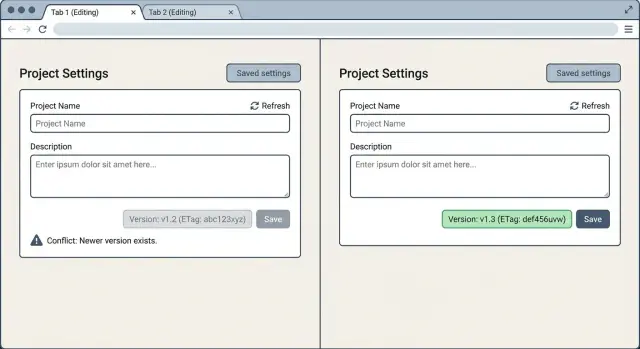
The lost update problem in plain language
A “lost update” happens when two people (or two browser tabs) edit the same thing, and the second save quietly overwrites the first. Nobody sees an error. Both users think their change stuck. But only the last save ends up in the database.
A simple example: you open your profile in one tab and change your display name from “Sam” to “Samantha”, but you don’t click Save yet. In another tab, you change your email address and click Save. Then you go back to the first tab and click Save. If the app uses “last write wins”, that older form submission can overwrite the newer email change, even though you never touched the email field in the first tab.
This often goes unnoticed because everything looks normal. The server returns “200 OK”, the UI shows a success toast, and the page refreshes. The bug only shows up later when someone realizes a setting reverted, an address changed back, or an admin update disappeared. By then it feels random, and customers may blame “unstable” software.
You’ll see it most in everyday CRUD screens where people keep a page open for a while: profiles and account settings, admin panels (users, products, permissions), team configuration pages (roles, billing info), content editors (titles, metadata, descriptions), and any edit form that loads data once and saves later.
“Last write wins” is risky because it treats every save as equally fresh, even when it’s based on stale data. It also creates a trust problem: users did the right thing, but the system silently threw away their work.
Optimistic locking is a common way to prevent this. When you save, the server checks whether the record changed since you loaded it. If it changed, the app stops the overwrite and asks you to resolve the conflict instead of pretending everything is fine.
Common situations that cause silent overwrites
Silent overwrites happen when your app lets someone edit data based on an older snapshot and then saves it without checking what changed in the meantime. The result is “last save wins”, even when that last save is the wrong one.
The most common cause is two tabs (or windows) open on the same page. You update a record in Tab A, forget Tab B is still open, then Tab B saves later and unknowingly puts old values back. This shows up a lot in admin panels, dashboards, and “Edit profile” pages people leave open for hours.
It also happens when two different people touch the same record. Think of a customer note, an order status, or an address. Person 1 changes the phone number, Person 2 changes the delivery instructions, and whoever clicks Save last can wipe out the other change if the app sends the full record instead of only the fields that changed.
Slow or unreliable networks make this worse. A save from a train ride or a spotty mobile connection can arrive late. If your server accepts it as current, it can overwrite newer edits that were saved while the first request was still in flight. Offline mode has the same risk: you can edit locally, come back online, and push changes that are now outdated.
Retries can re-send an old update too: a user double-clicks Save, a background job retries after a timeout using stale data, a queue replays a message after a crash, or a client library automatically retries a request that already applied.
These are exactly the cases where optimistic locking pays for itself. Add a simple version check (or an ETag check), and the server can detect “you edited an older copy” and refuse the save instead of silently overwriting.
What optimistic locking is and how it works
Optimistic locking prevents the lost update problem. Instead of blocking people from editing, it lets everyone edit freely and checks for conflicts only when someone tries to save.
It’s easiest to understand by comparing it to pessimistic locking. Pessimistic locking is like putting a physical “do not touch” sign on a record while you edit it. It prevents conflicts, but it also creates waiting, timeouts, and “someone left the page open” headaches. Optimistic locking assumes conflicts are rare, so it avoids blocking and only stops the save when a conflict really happens.
A “version” is a small piece of data that changes every time a row or document changes. In a database row, it’s often an integer column like version that starts at 1 and increments on every update. In APIs, it can also be an ETag, which is a fingerprint of the current state.
The basic flow is:
- When you load a record, you also read its current version.
- When you save, you send back the version you originally saw.
- The update succeeds only if the stored version still matches.
- If it matches, the record updates and the version bumps.
- If it doesn’t match, the save is rejected as a conflict.
That mismatch is the whole point. The system is telling you, “Someone (or another tab) changed this after you loaded it.” The app can then show a clear message and offer a safe next step, like reloading, reviewing differences, or copying your changes before retrying. The overwrite never happens silently.
This fits most CRUD apps because most users aren’t editing the exact same record at the exact same time. You keep the UI responsive (no locks held while someone thinks) and you still protect data.
A quick mental example: you open a profile form in two tabs. Tab A saves first, bumping the version from 3 to 4. Tab B tries to save with version 3. The database (or API) refuses, and Tab B has to refresh or merge. That small version check turns hidden data loss into a visible, fixable conflict.
Step by step: add a version column approach
A version column is the simplest way to stop silent overwrites in a CRUD app. Store a number on each row, send it to the client when they read the record, and require the client to send it back when they save. If the number changed since they loaded the page, reject the update.
1) Add a version field to the table
Add an integer column, often called version, starting at 1. (Using updated_at can work as a backup, but timestamps can get messy with time zones and very fast edits.)
ALTER TABLE documents ADD COLUMN version INTEGER NOT NULL DEFAULT 1;
2) Carry the version through your API
Make the version travel with the record end to end. On read, include version in the API response so the UI can store it. On edit, keep that version in the form state (even if it’s hidden). On update, require the client to send the last-seen version back (request body is simplest).
Now the server can tell whether the client is saving an old copy.
3) Update only if the version still matches
This is the core of optimistic locking: update the row only when id and version match, then bump the version.
A common pattern is one atomic query:
UPDATE documents
SET title = ?, body = ?, version = version + 1
WHERE id = ? AND version = ?;
If the query updates 0 rows, the version didn’t match. Return a conflict (often HTTP 409) and include the latest record (and its new version) so the UI can show what changed.
4) Increment on success, reject on mismatch
When the save succeeds, the response should include the new version so the client is ready for the next edit. When it fails, don’t retry automatically. That can turn a clean “you edited an old copy” signal into more confusion, and it can still lead to overwrites.
Step by step: use ETags with If-Match headers
An ETag is a short fingerprint that represents the current state of a resource. If the resource changes, the fingerprint changes too. That makes it a good fit for optimistic locking when you don’t want to add a version column, or when you want the server to decide what “same state” means.
1) Return an ETag on read (GET)
When a client loads a record to edit, your API should return the record plus an ETag that matches that exact state. You can compute the ETag from a row version, an updated_at timestamp, or a hash of the JSON you return.
A simple flow:
- Client sends
GET /items/123 - Server responds with the JSON body and an
ETag: "abc123"header - Client stores that ETag next to the form data it’s editing
2) Require If-Match on write (PUT/PATCH)
When the user saves, the client includes the ETag it originally saw. That tells the server: “Only apply my update if the resource is still in the state I edited.”
- Client sends
PATCH /items/123with headerIf-Match: "abc123" - Server compares
If-Matchto the current ETag for item 123 - If they match, apply the change and return the updated resource with a new ETag
If they don’t match, you have a conflict. Don’t accept the write silently.
3) Return the right response on conflict
Most APIs return either 412 Precondition Failed when If-Match doesn’t match (the most precise), or 409 Conflict if you prefer a more general response.
Include enough detail for the client to recover: a short error code/message, and often the latest version of the resource (plus its new ETag) so the UI can show what changed.
When ETags are a better fit than a version column
ETags are handy when you can’t easily change the database schema, when multiple backends can update the same resource, or when you already use caching semantics. They also work well when the “resource state” isn’t a single row, like a document assembled from several tables.
Example: two tabs edit the same profile. Tab A loads the page and gets ETag "v1". Tab B saves a change first, making the profile ETag "v2". When Tab A tries to save with If-Match: "v1", the server returns 412. The UI can then ask the user to reload, or show a small merge screen instead of overwriting Tab B.
How to handle conflicts without frustrating users
A conflict isn’t an error in the user’s eyes. It’s a surprise. Your job is to explain what happened and help them keep their work.
Use a plain message that names the problem and the impact: “This record was changed somewhere else while you were editing it. Your changes weren’t saved yet.” Avoid vague text like “409 Conflict” or “Update failed”. People need to know it wasn’t their fault.
Give simple choices (and make the safe one easiest)
Most apps need the same three options. Keep them simple, and make the safest path the default.
- Reload latest: fetch the newest version and show it.
- Keep my edits: keep the user’s unsaved input in the form so they can re-apply it.
- Overwrite anyway: allow it only when the user clearly confirms they want to replace someone else’s change.
Make “Reload latest” the primary action. “Overwrite anyway” should be secondary and explicit, with a confirmation that says what will be overwritten.
Preserve the user’s unsaved input
The fastest way to lose trust is to wipe a form after a conflict. Keep what they typed, even if you reload the record.
A practical pattern: store the user’s pending edits separately (local state or a draft), reload the latest server data, then re-populate the form using the draft values where they still make sense. If you can, highlight fields that differ from the server version so the user can quickly spot what changed.
When reload is enough vs when you need a merge UI
A simple reload is enough when the form is short, changes are usually small, and the cost of retyping is low.
You likely need a merge UI when users edit long text (descriptions, notes, policies), when many fields can change at once (pricing tables, multi-step setups), or when conflicts happen often (busy teams, shared admin screens).
A realistic flow: two people edit the same customer record. One updates the phone number and saves. The other changes the address and hits save later. With good conflict handling, the second person sees: “Phone number changed by someone else. Your address edit is still here.” They can reload and re-save without retyping.
Common mistakes and traps to avoid
Optimistic locking is simple in theory, but a few mistakes can quietly undo the whole point. Most show up only after real users start working in multiple tabs, or when a new code path gets added during a rushed release.
Pitfalls that cause silent overwrites
- Using
updated_atas the “version” when timestamps aren’t precise enough. If two updates land in the same second (or your database rounds), both can look valid and one update can overwrite the other. - Adding a version/ETag check in one endpoint but missing it in another. For example, the main edit screen uses the check, but a quick toggle, autosave, admin panel, or background job updates the same record without it.
- Changing the version on reads, or on writes that don’t change user-managed fields. If you bump the version when someone simply views a page, you create conflicts that feel random and unfair.
- Catching the conflict and retrying automatically without user input. Blind retries can turn a clear “you edited an old copy” signal into a confusing loop.
- Doing bulk updates that bypass the concurrency check. A single SQL statement or batch tool that updates many rows can ignore the version condition and wipe out recent edits.
Small habits that prevent big bugs
Be consistent: if a record is editable, every write path should either (1) require the version/ETag, or (2) be clearly designed as a forced override and logged as such.
Keep versioning stable. The version should only advance when you accept an update that was based on the latest known version. If your app has side-effect writes (recalculating counters, syncing metadata, setting last_seen), consider moving those to a separate table so they don’t create unnecessary edit conflicts.
A quick reality check: open the same edit form in two tabs, save in tab A, then save in tab B. If tab B succeeds without a clear conflict, you still have a lost update path somewhere.
Quick checks before you ship
Treat optimistic locking like a feature you can break on purpose. If two saves race, you should get a clear conflict instead of a silent overwrite.
Start with the easiest real-world test: open the same record in two browser tabs. Change different fields in each tab, then save tab A and tab B. Tab B shouldn’t “win” quietly. It should get a conflict response (often HTTP 409) and a message that tells the app what happened.
Slow networks are where these bugs hide. Use your browser’s network throttling (or add an artificial delay on the server) so one save takes a few seconds. While it’s in flight, save from another tab. When the delayed request finally returns, it must fail safely.
A quick pre-ship checklist:
- Two tabs: edit the same record, save in both tabs, confirm the second save gets a conflict.
- Slow save: delay one request, save another, confirm the delayed one is rejected.
- Mobile resume: edit, background the app, come back later, then save, confirm version/ETag is still checked.
- Offline recovery: lose connection mid-edit, reconnect, then save, confirm you handle conflicts instead of overwriting.
- Draft safety: after a conflict, confirm the UI keeps the user’s unsaved text.
Also verify the details users feel. When a conflict happens, the response should be specific enough for your client to react: a clear status, a human-readable message, and ideally the latest server version so the UI can show “your changes” vs “current version.”
A realistic example: two people editing the same data
Two teammates, Maya and Jordan, are updating the same pricing rule in an admin panel. The rule says: “10% off when cart total is over $100.” Maya wants to change it to $120. Jordan wants to change the discount to 15%.
They both open the edit page at 10:00. Each tab loads the current rule. At that moment, the record has version = 7 (or an equivalent value).
What happens without locking
Maya saves first at 10:02. The server writes “threshold = 120” to the database.
Jordan saves at 10:03. His browser still has the old form values, so his update writes “discount = 15%” and also sends the old threshold value from when he loaded the page. The result is a silent overwrite: Maya’s threshold change is gone, and nobody gets a warning. The UI often shows “Saved” both times, so the team trusts the wrong data.
What happens with a version column
With optimistic locking, both updates include the version they started from.
- Maya’s request says: “update this rule where id=123 and version=7”
- The server updates the row and bumps it to version 8
- Jordan’s request also says: “where version=7”
- The database finds no match (because the record is now version 8)
- The server returns a conflict response instead of overwriting
What the user sees: Jordan gets a clear message like “This pricing rule was changed by someone else. Review the latest version before saving.” The page reloads the newest data (threshold 120, version 8). Jordan’s unsaved edits can be kept locally so he can re-apply “15%” and save again.
What data is preserved: the latest saved record stays intact, and Jordan’s intended change isn’t lost. It’s delayed until he confirms it against the newest version.
Next steps: roll it out safely (and get help if needed)
Start by choosing the approach that fits how your app already works. A version column is often simplest when you control the database and ORM and most updates go through your server. ETags with If-Match are a good fit when you have a clean REST API, multiple clients, or strong caching needs.
Roll it out in small slices. Pick one high-value edit flow (profiles, orders, settings) and add optimistic locking end to end: read, edit, update, and a clear conflict message. Once that path feels solid, repeat for the next resource.
A safe rollout checklist:
- Add the version (or ETag) to every read response and every update request.
- Return a clear conflict response when versions don’t match (no silent overwrites).
- Show a simple UI choice: reload, keep your changes, or retry after reviewing.
- Log conflicts with resource type and frequency so you can spot hot spots.
- Add one or two tests that simulate two tabs updating the same record.
Don’t stop at the API. If the UI just says “Save failed”, people will retry and can still overwrite someone else’s changes. Give them context: what changed, and what they can do next. For simple forms, a strong default is to reload the latest data and keep the user’s draft so they can re-apply changes.
If you inherited an AI-generated CRUD app, it’s worth checking that every update path follows the same concurrency rule. Teams like FixMyMess (fixmymess.ai) focus on turning fragile AI-generated prototypes into production-ready software, and a quick audit often finds missing version or ETag checks before they cause real data loss.