Path traversal in download endpoints: how to spot and fix
Path traversal in download endpoints can expose private files. Learn safe filename handling with allowlists, canonical paths, and storage-level access controls.
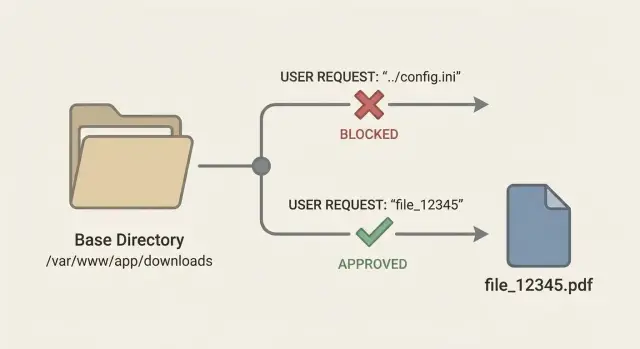
Why download endpoints are easy to get wrong
A download endpoint should do one simple job: when a signed-in user clicks "Download," the server finds the right file and sends it back (with the right filename and content type).
In practice, the "find the file" step is where things break. The most common mistake is treating user input like it’s a safe filename. A developer takes something like ?file=invoice.pdf and joins it onto a folder path, assuming the user will only ever request their own files. Attackers don’t think in filenames. They think in paths.
That’s the core risk with path traversal in download endpoints: an attacker tries to control where the server reads from, not just which document they get. If your code builds a path from untrusted input, a request can walk out of the intended folder and into sensitive areas.
When that happens, the impact can be much bigger than "someone downloads the wrong invoice." An attacker may be able to read app config files that reveal database credentials or API keys, source code (useful for finding more bugs), private user uploads and exports, or other server files that help them map your environment.
Download endpoints are also easy to get wrong because they feel harmless. They often ship late, get less review, and "work fine" in basic testing. The bug only shows up when someone sends weird inputs, encoded paths, or unexpected separators.
How path traversal shows up in real requests
A download endpoint usually takes something from the request and turns it into a file path. The bug appears when the server trusts that input. If the code does something like baseDir + "/" + filename, an attacker can change what “filename” means.
From the outside, a normal request asks for report.pdf. An attacker tries payloads that walk up directories or jump to a different drive.
Common payload shapes include:
../secrets.envor../../../../etc/passwd..\..\Windows\System32\drivers\etc\hosts/etc/passwd(absolute path on Linux)C:\Windows\win.ini(absolute path on Windows)- Mixed separators like
..\../..\config.yml
Encoding makes this harder to spot in logs. Many apps decode URL parameters before they validate them, which means a blocked string can reappear after decoding. Attackers often try %2e%2e%2f (which becomes ../), or double-encoding like %252e%252e%252f (decoded twice by some stacks). They also mix case and separators, for example %2E%2E%5C to get ..\.
A realistic scenario: your endpoint is GET /download?file=invoice-123.pdf. If the handler uses that value directly, the attacker tries file=..%2f..%2f.env or file=..\..\appsettings.json. If the file exists and your process can read it, the server may return it as a "download" with no obvious error.
Platform differences matter just enough to be dangerous. Linux typically uses / and is case-sensitive. Windows accepts \ and often tolerates /, supports drive letters, and has device names like CON and NUL. If your validation only thinks in one OS style, it may miss the other style when you deploy, or when an attacker tests bypasses.
Fast ways to spot unsafe filename handling
Most path traversal in download endpoints starts with one mistake: letting the request decide the path you read from disk. You can often spot it quickly by tracing where the download route gets its input, and where that input is used.
Risky signs usually look like this:
- A query param like
file,path,name, ordownloadis read and passed intoopen(),readFile(),sendFile(), or a path join. - The server trusts a header (like
X-File,Content-Disposition, or evenReferer) to pick a file to serve. - "Sanitizing" is done with string tricks like
replace("../", "")or trimming dots, instead of enforcing a safe base folder. - The endpoint builds a path from user input and a base folder, but never checks where it ends up after normalization.
- Downloads come straight from the app server filesystem even though the files could be stored elsewhere (object storage, database blobs, or an uploads service).
You can confirm suspicion with a few safe tests in a dev environment. If a download endpoint accepts a filename, try values that should never work: ../.env, ../../etc/passwd, ..\..\windows\win.ini, or URL-encoded variants like %2e%2e%2f. Even if the response is an error, watch for clues in logs (full resolved paths, stack traces, or error messages that mention real directories).
One common "looks safe but isn’t" pattern: the code checks that the input ends with .pdf, then opens it. Attackers can use encoding tricks, double extensions, or other edge cases to slip past naive checks. Even if some older null-byte examples no longer apply to your stack, the lesson is the same: suffix checks are not a boundary.
Safer pattern: use file IDs and server-side lookup
The simplest way to avoid path traversal in download endpoints is to stop taking filenames from the URL. Filenames are messy. They can include slashes, backslashes, dot-dot sequences, and encodings that change meaning once your server joins strings into a path.
A safer pattern is to expose a stable file ID, like GET /download/7f3a2c, and keep the real storage location on the server side. The ID is just a pointer. Your app decides what file it maps to.
When a request comes in, look up the file in a database table (or any trusted store) using that ID. Store metadata you need to make a safe decision: who owns it, what the storage key is, what content type it should return, and whether it is still valid.
A simple flow:
- Accept only an opaque ID (UUID, random token, database ID).
- Fetch file metadata by ID (owner, org, storage key, content type).
- Check the current user is allowed to access that record.
- Download by the trusted storage key, not by user input.
- Set response headers from stored metadata, not from the request.
Example: a customer clicks "Download invoice" and your UI calls /download/inv_12345. Your server checks that inv_12345 belongs to that customer’s account, then reads storage_key=accounts/889/invoices/2025-01.pdf. The user never gets to send ../../etc/passwd because there is no filename parameter to attack.
This also makes audits easier. You can review one authorization check around the lookup instead of trying to prove every possible filename is safe.
Allowlists that actually help (and what to avoid)
An allowlist only helps if it limits downloads to things you already know are safe. For downloads, that usually means either (1) a list of known file keys you generated and stored, or (2) a short list of file types you truly support.
The safest allowlist is by exact stored key, not by a user-provided filename. The user sends an ID like fileId=8f3c..., your server looks up the stored record (owner, bucket path, exact object key), and serves that. The user never gets to influence the path.
If you must accept filenames, treat extension allowlists as a backup, not your main control. Validate a short set (for example: pdf, csv) and reject everything else. Don’t try to "clean" inputs into something acceptable. Rejecting is safer.
Before you validate anything, normalize it so attackers can’t sneak past checks. Keep it boring and consistent: trim whitespace, normalize case if that fits your system, and reject path separators (/ and \) plus sequences like ... Also watch for tricky names like invoice.pdf.exe or report.pdf .
What to avoid: blacklists (they miss variants), endsWith checks on raw input, and allowlists that still allow directory parts.
Canonical paths: enforce a base directory boundary
The safest rule for downloads is simple: the user should never be able to choose a filesystem path. If you must accept something like a filename, convert it into a canonical path and then prove it still lives inside one approved folder (for example, downloads_root). This closes the classic ../ trick.
Canonicalizing means resolving the real path the OS will use. It should collapse . and .., normalize separators, and (if your platform supports it) resolve symlinks. Symlinks matter because a harmless-looking path inside your downloads folder can point outside it.
A practical pattern looks like this:
base = realpath(downloads_root)
requested = realpath(join(downloads_root, user_input))
if requested is null -> error
if not requested starts_with base + separator -> error
serve requested
Before you canonicalize, reject obviously dangerous inputs. It reduces edge cases and makes logging easier. Common rejects include absolute paths (/etc/passwd, C:\Windows\...) and inputs that contain path separators when you expected a plain filename.
Rules that hold up well:
- Accept only relative inputs (no leading
/, no drive letters). - Build the path with safe join functions, never string concat.
- Canonicalize to a real path, then verify it stays under
downloads_root. - If the canonical path fails, treat it as blocked, not as "try another".
Finally, return the same generic error for "not found" and "blocked" cases. If you return different messages, attackers can probe which files exist on your server, even if they can’t download them.
Storage-level access controls that reduce blast radius
Even with good input checks, treat your download endpoint as high risk. If traversal slips through, storage choices decide whether the attacker gets one file or your whole server.
Avoid serving user files from the same disk as your app container. When uploads and app code share a filesystem, a single bug can expose config files, keys, and source code. Keep files outside the web root and disable direct static serving for that directory, so only your application can read and return files.
For many teams, object storage is the simplest way to reduce risk. Instead of reading local paths, store files as objects and enforce access using per-object permissions or short-lived signed access. Your app checks who the user is, which file ID they requested, and whether they own it. Only then does it generate a time-limited download token or proxy the file.
Controls that pay off quickly:
- Keep buckets private by default.
- Prefer short-lived signed access over permanent public URLs.
- If you must use local disk, store files outside web root.
- Run the app with minimal filesystem permissions (read only where needed).
- Separate environments and buckets (dev vs prod).
Logging matters as much as blocking. For every download request, log the user ID, file ID, and the decision (allowed or blocked), plus a reason code like "not owner" or "expired token". That audit trail helps you spot probing and proves what happened.
Common mistakes and bypasses attackers use
Most path traversal fixes fail because the code assumes the attacker will send a simple ../ string. Real attacks are layered and designed to slip past whatever check you added.
A classic mistake is trusting client-side rules or hidden form fields. If your UI only lets users pick from a dropdown, but the server still accepts a path parameter, an attacker can change that value in the request. The server has to act as if the UI doesn’t exist.
Encoding tricks are another frequent bypass. Teams decode once, validate, and later some framework or proxy decodes again. That can turn a safe-looking string into ../ after validation. The fix is consistency: normalize and validate in one place, and make sure the value used to open the file is exactly the value you validated.
Extension checks are easy to fool. Blocking everything except .pdf sounds safe, but attackers can still traverse into sensitive folders and fetch files that happen to end with .pdf, or abuse extra segments if your path handling is sloppy. If the goal is to serve only invoices, the path shouldn’t be user-controlled.
Bypasses that show up often:
- Hidden or client-generated file paths treated as trusted input
- Decoding at different layers (app, framework, proxy)
- "Allow .pdf only" checks that ignore directories and segments
- Symlinks inside an allowed folder that point outside it
- Zip Slip: extracting an archive that contains
../paths and writing outside the target folder
Symlinks deserve special attention. Even if you join a base directory with a filename, a symlink placed inside that base directory can jump the boundary. The reliable fix is canonical path checks (after resolving symlinks) plus strict filesystem permissions.
Quick checklist before you ship a download feature
Download endpoints feel simple, but they’re a common way traversal slips into production. A few small choices (like accepting a filename from the URL) can turn a normal invoice download into "read any file on the server."
The safest default approach
Start by deciding what the user is allowed to request. Users should ask for a file by an ID you control, not a path they can shape.
- Input: accept only a file ID (or invoice number), never a raw path or filename.
- Lookup: map that ID to a stored record that contains the real storage key or absolute server path.
- Validation: if you must handle names, use a tight allowlist (expected extensions, expected characters), then canonicalize and confirm the result stays inside your base directory.
- Authorization: check ownership and role before you read the file, not after.
- Response: set safe headers and avoid reflecting user input into
Content-Dispositionwithout cleaning it.
Reduce blast radius with storage and tests
Private-by-default storage saves you when code makes a mistake. Keep downloadable files out of web root, and avoid public buckets where guessing a name is enough.
A quick practical test: try requesting ../ sequences, URL-encoded variants, and extra slashes against your download route. Blocked attempts should be logged with enough detail to debug (user ID, requested ID, reason blocked), but not with secrets.
Example scenario: invoice downloads that expose server files
A founder ships a quick invoice feature: customers click a button and the app hits an endpoint like /download?filename=invoice-1042.pdf. The server takes filename, builds a file path, reads the file, and returns it.
It works in testing because everyone requests normal files. The problem is the server is trusting user input to pick a file. An attacker can change the parameter to something like ../../.env or ../../../etc/passwd. If the code joins strings (or decodes URL-encoded values and then joins), the app may read files outside the invoices folder.
A fix plan that keeps the feature but removes the risk:
- Switch from filenames to file IDs (example:
/download?id=inv_1042) and look up the real path on the server. - Enforce auth and ownership checks so only the right customer can download their invoice.
- Store invoices in private storage (not a public folder) and serve them through controlled downloads.
- Add simple allowlists: only allow known invoice formats (like PDF) and reject anything else.
- Log denied requests so you can see probing attempts early.
To confirm it’s fixed, don’t rely on "it seems fine." Prove it:
- Attempt
../payloads and verify you always return a generic error. - Check logs to confirm traversal patterns are blocked and recorded.
- Add an automated test that tries
../../.envand expects a denial.
Next steps: audit your endpoints and fix issues quickly
Start by assuming you have more than one "download" path. In many apps, files get served from several places: an invoices route, an exports route, an attachment preview, and sometimes a debug helper that accidentally ships.
A practical audit:
- List every endpoint that returns a file (download, export, report, image, attachment, backup).
- Trace where each one gets its filename or path (query, route param, JSON body, headers, database).
- Write down every storage location in use (local disk directories, temp folders, network mounts, object storage buckets).
- Search for path building and file reads (
join,resolve,open,readFile,sendFile, zip creation). - Check access checks: who can request which file, and how that mapping is enforced.
Once you know the surface area, do a focused remediation pass. Prefer file IDs with a server-side lookup (ID -> stored path) rather than letting user input influence a filesystem path. Add canonical path validation to enforce a single base directory boundary for any remaining disk access, and use a tight filename allowlist only for truly static files.
Finish with tests that prove the fix stays fixed:
- Requests containing
../and URL-encoded variants are rejected. - Absolute paths (Unix and Windows) are rejected.
- Symlink edge cases can’t escape the base directory.
- Only files owned by the current user or org can be downloaded.
If you inherited an AI-generated codebase, it’s worth getting a second set of eyes on file-serving routes. FixMyMess (fixmymess.ai) focuses on diagnosing and repairing AI-generated apps, and a quick audit can surface issues like unsafe download handlers, broken auth checks, exposed secrets, and risky storage patterns before they reach production.
FAQ
What is path traversal in a download endpoint?
A download endpoint becomes risky when it turns user-controlled input into a file path on disk. If your code does something like “base folder + user input,” an attacker can try ../ or encoded variants to escape the intended directory and read other files your app process can access.
What can attackers actually get if path traversal works?
If an attacker can read files outside your downloads folder, they may grab config files that contain secrets, application source code, private uploads, exports, or other server files. The real damage is often follow-on access, like using leaked credentials to reach your database or third-party services.
How do I quickly spot unsafe filename handling in my code?
Look for any route that reads file, path, name, or similar from a query, route param, JSON body, or header and then passes it into file APIs like open, readFile, or sendFile. Also treat string-based “sanitizing” like replace("../", "") as a red flag, because it usually misses encodings and edge cases.
Why doesn’t blocking "../" in a string check fix it?
Because attackers rarely send plain ../ in the clear. They use URL encoding, double encoding, mixed separators, and platform-specific paths so the dangerous string may only appear after decoding or normalization inside your stack.
What’s the safest design for a download endpoint?
Default to an opaque file ID in the URL and do a server-side lookup for the real storage key or path. The user should request “file 123,” and your app should decide where that file lives and whether the current user is allowed to access it.
Are extension allowlists like “only .pdf” enough?
Not reliably. A check like “must end with .pdf” doesn’t prevent directory traversal, and it doesn’t stop someone from downloading a sensitive PDF that happens to exist elsewhere on the server. Use extension checks only as a small extra guard after you’ve removed user control over paths.
What does “canonical path” checking mean in practice?
Resolve the requested path to a canonical (real) path and then verify it still sits inside a single approved base directory. If the canonicalized result escapes that boundary, block it and return a generic error so attackers can’t probe which files exist.
Why do Windows vs Linux differences matter for validation?
They’re different path formats that can bypass one-style validation. Windows accepts backslashes, may tolerate forward slashes, supports drive letters, and has special device names, while Linux uses forward slashes and is typically case-sensitive. If you validate for only one environment, you can miss real bypasses when you deploy or when attackers try alternate styles.
How can storage choices reduce the damage if a bug slips through?
Don’t store user-downloadable files on the same filesystem area as app code and secrets if you can avoid it. Prefer private object storage with short-lived access tokens or server-side proxying, and run your app with minimal read permissions so a single bug can’t expose the whole machine.
What should I log and monitor for download endpoints?
Log the user identity, the file ID (or requested value), and whether it was allowed or blocked with a simple reason code, but don’t log resolved full paths or secret-bearing file contents. If you inherited AI-generated code and suspect file-serving routes are risky, FixMyMess can run a fast audit and fix unsafe download handlers, auth checks, and secret exposure issues without you needing to untangle the code yourself.